
Daz 3D is part of 
Connect
DAZ Productions, Inc.
7533 S Center View Ct #4664
West Jordan, UT 84084
Licensing Agreement | Terms of Service | Privacy Policy | EULA
© 2026 Daz Productions Inc. All Rights Reserved.
Comments
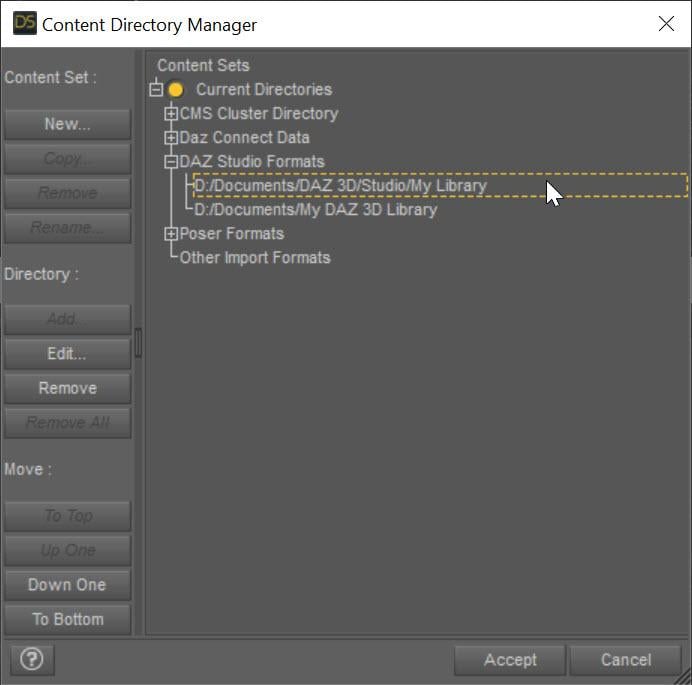
This helps. First off, even though it is not affecting these scripts, your Content Directory Manager Daz Studio Formats looks wrong. Is there a "My Library" directory under "F:/Daz Content/Documents/Daz 3D"? If so, you should add "F:/Daz Content/Documents/Daz 3D/My Library" instead of having "F:/Daz Content/Documents/Daz 3D". If not (i.e., there are "Data", "People" folders directory under "F:/Daz Content/Documents/Daz 3D"), then that is fine. BUT, whether "F:/Daz Content/Documents/Daz 3D" or "F:/Daz Content/Documents/Daz 3D/My Library", it should be the FIRST directory in Daz Studio Formats. It should be ABOVE "F:/Daz Content/Documents/My Daz 3D Library"
Now for all the Move script issues. Looking at the log, those scripts find the drop files for the billboards, but report "Cannot find baseline of ...". First off, chedk the drop.txt. It should look something like this:
If you select the billboard, what is the filename of the Base Color in surfaces? It should be something like "Award Photographer Standing 01 0 0.png"
Hey Riversoft,If I understand you correctly are you saying that in the image below, the folder circled should be the one that contains all the other folders? if so I can swap this around, but I am concerned of what if any other errors may happen to other stuff, and sinces all other assets etc work fine, do I really need to change the folder structure?
As for checking the drop txt, Where do I find it, I can't see anything on the popup menu, and the log is just jiberish to me.
The filename you asked about in the surfaces tab, there is no BASE COLOR as it is in RSL format, however the DIFFUSE COLOR does have a file name which matches the one you suggested.
I am really sorry that this is becoming a huge issue to fix, and I thank you for your continued help.
Geordie
No, do not move the folders around. In the Content Directory Manager, change the order.
You could have just searched for drop.txt. Here is one:
My bad. Yes, I meant DIFFUSE COLOR. Ok, that is good that the filename is the same as I specified.
Hey Riversoft, sorry you are going to have to be more specific, as your tech knowledge is greater than mine,, I do not understand what you mean by don't move the folder , change the order? is'nt that the same thing, and what errors will that cause for otehr products?
And I really don't understand this whole drop text thing, when you say I could have searched for it, where do I search ?
Geordie
I mean that you are not using Windows Explorer to do anything, you are using Daz Studio's Content Directory Manager. You are changing the order in the list in the Content Directory Manager. This means selecting the first one ("F:/Daz Content/Documents/My Daz 3D Library") in the Content Directory Manager and clicking the Down One button
I gave you the entire path and filename that is being reported by the script:
Hey Riversoft, I have done the reorder on the content directory manager, and I searched the drop text, I have attached what came up, I hope it makes sense to you, as it dies not to me :(
Yes, it makes sense. It confirms that the drop file is not corrupted. I have sent you a message.
Here you go Riversoft Art. I sent you a message with the rest of the information.
Here you go Riversoft, this is thwe latest log you needed.
Geordie
Here you go Riversoft, hope this helps,
Here you go Riversoft, Hope this helps,
Hey Riversoft, So I moved the folders and files as you suggested, and viola IT WORKS !!!, tested it overnight to see if there was any issues or anything, and nope all good :) Thanks for all the support and help, I am sorry for the headaches.
Geordie
Fantastic! I am so glad that worked.
Hi RiverSoft Art, I have a problem with two of the scripts in Public Build 4.23.1.44. It's kind of a vanishing issue.
I'm attaching what I think might be the relevant log section and my system info. Daz vanishes immediately after the last line in the log snippet. If you need more info please let me know.
Solved this one. The manual says I need the Billboard Nodes plugin. I thought that was replaced by Billboard Builder, which I have. But I was wrong. So this script is no longer usable in recent releases or betas of DS, as far as I can tell.
If you create a New Billboard Node under the Create menu, does it work? What does that log look like? The script is doing the equivalent of deleting my billboard, create a new billboard node and assigning surfaces.
For the second one, I assume you are using it on one of my billboards and not the converted move man standing as that disappears. How did you install the utilities? What is your Daz Studio Formats under the Content Directory Manager look like?
I am using 4.23.0.1, and it works. I am surprised they got rid of something in a point release but maybe that is Mac?
Thank you for taking a look at this.
I don't have the option to create a billboard node in either 4.22 or 4.23. Screenshots attached.
I also attached a screenshot of my Content Directories in 4.23. They're the same in 4.22.
I installed the utilities via DIM.
Update: After much switching between 4.22 and 4.23, changing layouts and adding different crowd packs, I can mostly avoid the DS vaporization problem if I:
But that method is not 100% reliable. It's more like 75%. All of the other scripts run without error, so I remain confused about what the orient script does that makes DS unhappy.
As for the convert billboard script, I wonder if the Billboard Nodes plugin was/is Windows-only?
Sidebar: It may be worth mentioning that I can reliably make 4.22 vanish regardless of what is going on in a scene or what (if any) plugins or scripts are in use. All I have to do is open a long menu like Create and then slowly move my mouse down the items list. The menu will disappear at some point, and when it does, if I move the mouse back up to the menu name to try to get it to appear again, DS vanishes without a trace. I can't get 4.23 to do that because the DS menu bar is contained in the app's UI, while the 4.22 menu bar is integrated into the system menu bar like a proper Mac app.
For now, I save often and restart my system after each DS disappearance. That seems to help. I hope this information helps lead to a solution.
Cheers.
The orient script does math and then changes the node's transform. That should not be able to cause DS to crash no matter what.
Can you uninstall the RSSY 3Delight to Iray Converter (and delete its files on disk)? The log shows that the orient script is pulling in a file from it and it was Daz Connect installed
/Users/Shared/My DAZ 3D Library/data/cloud/1_53295/data/riversoft art/common/rsconstants.dsa
It shouldn't matter but I am grasping at straws. When you run the script again, check the log to make sure the script is not pulling in a different cloud directory file.
Note. This is not about the Orient script: About the Content Directory, IF you are using stuff like my clothing, hair or character converters, it is a recipe for disaster to have the My DAZ 3D Library be the first folder in the Daz Studio Formats. The first folder should be a My Library where all the converted files, including data files, go. Probably your My Daz Converted Sets and Materials is that? IF SO, that should be the first folder.
I did as you asked. Attached is screenshot of the new folder order in DS.
The log now shows that the script is pulling a file from another data/1_5xxx folder, which I assume is where the Daz Connect files are stored? If so, that's odd because I installed the scripts via DIM.
While my technique above has stopped most of the crashes when the orient script is run, new problems have surfaced. Neither the drop to ground or drop to surface scripts work. They don't run because they think there's not a billboard in the scene. New log file with script info is attached, as is one of the error message I get from the script.
Further, when I added a plane as the "surface" to drop to, something changed in the convert to billboard script results. The now crowd billboard vanished in the viewport and the outline as before, but the billboard's name was given to the plane. I examined the plane hoping maybe the billboard texture image had been applied to it as well, but that didn't happen. Again, I think the log file reflects what was noted during that operation.
New behavior after I uninstalled the 3Delight to Iray package and deleted the files: The Content Directory Manager crashes DS with the same vanishing act after a few moments of the CDM window appearing. I had to make the folder order change quickly. I don't know why the outline script, the CDM and, in 4.22, the menus cause DS to just shut down. I suspect it has to do with video hardware calls from DS and the Rosetta layer between DS and macOS.
You can always find out what product it is by taking the number after the underline, and pasting it into the search on the Daz website. In this case, 51939 is the Now-Crowd Billboards - Droids product. I really wish I knew why DS fails a lot if I am pulling the exact same file from different locations. Keep trying to uninstall the cloud products (and install with DIM) that are showing up in the log.
I have completely uninstalled (as in, removed files and folders after the DS uninstall command runs) all of my Daz Connect-installed items and carefully re-installed the ones I want using only DIM. The only "cloud" folder I have left is "meta", and it contains all the thumbnails for Smart Content for my purchased products, both installed and available. Here's hoping that will cure some/many/all of my functional hurdles and give me a solid baseline going forward.
Given that information, and that I have some Poser and 3rd-party content I want to add into the database using Content Wizard and 3Delight to Iray Converter, do you have any "best practices" that you would recommend, please? I would even be grateful for RTFM page references.
Removing the files doesn't remove them from the database, which is what matters. You need to uninstall them by right-cl9ick on the product container (the "folder" under Products in the Content Library or the product icon in Smart Content>Products)
I hope so too. Most of my problems have always been Daz Connect.
Not that I can think of off the top of my head. Good luck!
Update:
TL;DR: After much uninstalling and re-installing and brute force placing of metadata, both in DIM and DS, I think I have everything working smoothly now.
I think the key steps were these:
During the course of my efforts, I connected and disconnected to Daz from inside of DS many times. But I always made sure any changes I made to the database were done offline. I don't know how important that is, but I do know that once I start working on a project in DS, it must be offline to avoid accidentally duplicating installations and messing up metadata.
Whew! Sounds like a lot of work. But congratulations on fixing your DS.
Wow! I don't think I could do this. How did you ever manage? I hope there will be easier ways. Developed to fix DS if problems like this develop in the future.
Thank you. It's nice to have your billboards working as they should. I wouldn't have been able to do it without you pointing out that the script was pulling files from where it shouldn't, leading me to fix the database underlying issues.
Heads up, though. DS is still fragile on Apple silicon, even with a shiny new Content DB. I don't see that changing until Daz 5 or Daz 2026 or whatever they end up calling it.
It was time. The Content DB had been neglected for years through several updates of Daz Studio and moving products in and out. RSA's Now-Crowd Billboard issues on my system were the final straw, once he told me about assets not being where they should be.
I agree with you; I hope someone finds an easier way to fix corrupted product metadata and the database itself. I just don't see how, though, when so much depends on PAs getting everything right. And Daz hasn't made that easy for PAs.