Multlayered Shader Geoshell / Skin Layers Paints/Tatoo/Blood other
 ARealiti
Posts: 158
ARealiti
Posts: 158
THE SHADER IS GRANTED TO ANYONE WHO WANTS IT UNDER MIT License AND IS SUBSTANTIALLY THE PROPERTY OF DAZ NOT ME I JUST ALTERED IT.
Shader to do Multlayered Shader Geoshell / Skin Layers Paints/Tatooes/Blood other, 3 layers here shown as two layers of body paint over 3rd layer skin, can change to do as many layers as required, each layer has Map/Strength for Diffuse, Normal, Height, Opacity, Roughness with overall Subsurface which could also be layered others like Metalic could be added this way to each layer.
This is really useful for Geoshells which are used to add tatoo, blood, dirt, paint and also for other Geoshells I would say.
Geoshell overlays as shader layering with this shader and very good performance as the Geoshells are just done as shader layering not as geometry, i.e. only the Genesis 8.1 geometry pictured here in Unity with the 2 Geoshell layers converted to shader layer combination in Unity with no Geoshell geometry. This also means the Geoshell layers can animate in Unity with the Genesis character, Geoshells at the moment only export as static Mesh geometry from Daz.

Daz 3D is part of 
Connect
DAZ Productions, Inc.
7533 S Center View Ct #4664
West Jordan, UT 84084
Licensing Agreement | Terms of Service | Privacy Policy | EULA
© 2026 Daz Productions Inc. All Rights Reserved.
Comments
Looks nice! How do we get the shader and does it work in urp ?
Hi, it was done for HDRP, but is shader graph, i.e. no shader code so it would probably be able to set up a similar thing in URP, never done URP shader graph myself.
I can package it up as a unity package, how would you like to get this sent to you? It is the following files in the package. And because shaders have a texture sampling limit it also uses Texture Arrays and Unity doesn't have a Texture Array editor so I also have one c# script to convert the Diffuse, Normal, Height, Roughness and Opacity textures for the layers to Texture Arrays to save sampler resources or it would error with the amount of texture sampling being done.
Well done, @ARealiti
Would like to have something like that for URP, as well.
Since it is a ShaderGraph, should be pretty easy to convert from HDRP to URP.
Ok so any one who wants this can send me a private message and can organise to send to you.
Had a quick play - export cobra - girl with a geomorph - face seems to be all white, although this one is a tricky export.
I did get an error on install as well -something about a wrong guid? I can reinstall again and see what happens.
I haven't bought many dirt and blood texture as I know they don't work. Might grab one and see how ti looks.
Is there a way to paste images in this forum ?
Can you link me some dirt blood etc stuff that you know it works on ?
Hi, I'm just getting back into this shader now I was side tracked on Unity 6 conversion of project I'm doing and other stuff I'm just about to apply it all in Unity 6 with quite a various set of body paints/muds/oils and will post renders here. Once I've done the Unity 6 version I will send to the people I've already sent the link to the Unity 5 version, hopefully improvements on the texture array / sampling and won't need to create texture arrays. I may get around to URP but can't guarantee
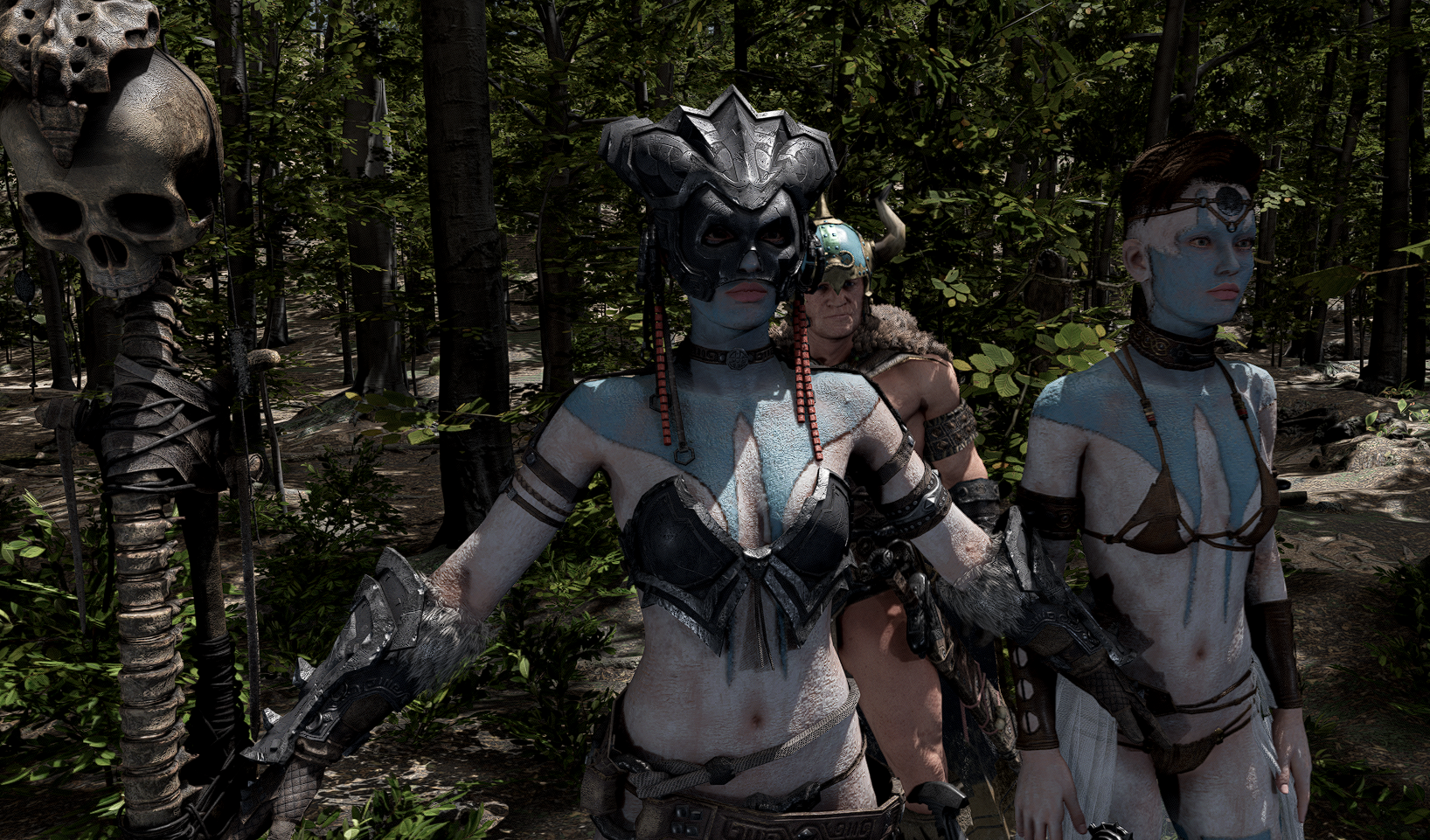
Ok Good News Everybody, I've done the Unity 6 Version on the new uDTU HDRP shader and not only is Unity 6 lighting just super better, but also it's ShaderGraph lets me sample more textures and so can now view changes as they are made in the Scene View! Have made new overlay versions of the uDTU HDRP.SSSOverlay and the UDTU.Sub.MakeupOverlay. In shot below there are 3 layers, skin, makeup layer, makeup layer overlay. I've added Normal and Height fields to the Makeup that was already on the UDTU HDRP and added a second layer of makeup. The top layer is a blue hand on face with Height, Normal, Roughness, Opacity and Diffuse applied, bottom makeup layer is light white layer of paint, bottom layer under makeup layers is the normal skin for the model. I'll send this version to the people who requested the shader, haven't tested in anything other than Unity 6 and HDRP. First shot is with STF Tribal Body Paints from Roguey and Strangefate, second is with AKI Tribal Paints from Aeon Soul.
Looks great, @ARealiti
Nice work.
Thanks!
THE SHADER IS GRANTED TO ANYONE WHO WANTS IT UNDER MIT License AND IS SUBSTANTIALLY THE PROPERTY OF DAZ NOT ME I JUST ALTERED IT.
To anyone else who wants the shaders please message me as you have to agree some disclaimer legal stuff.
FYI - You can get a similarish effect by using projection decals in hdrp and urp, but doesn't look as good as these.