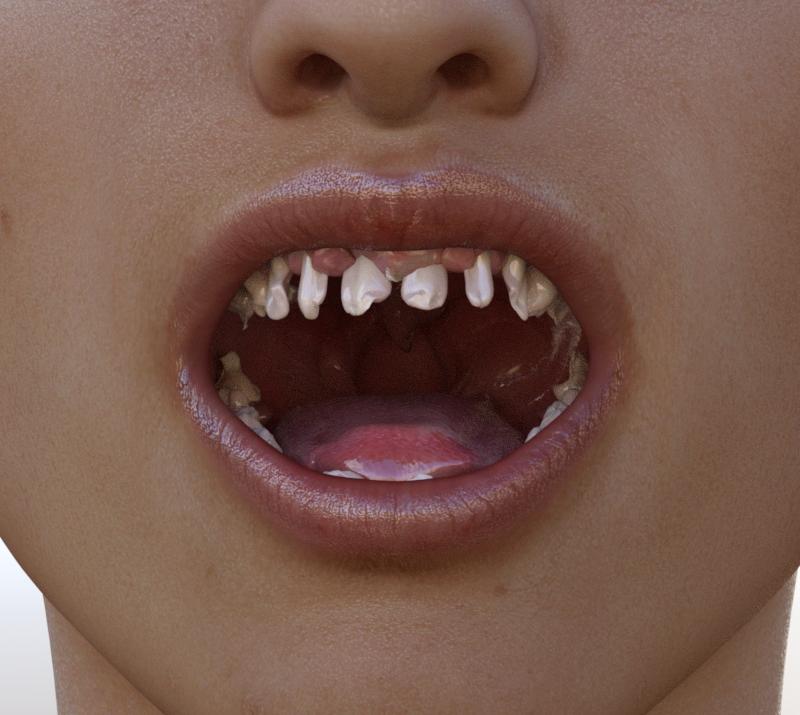
200 Plus Head Face Morphs for G3F are messing up the teeth etc.[Partially Fixed]
 barbult
Posts: 26,358
barbult
Posts: 26,358
Yup, more morphs messing up the teeth of G3F. After I found the problem in Real Hands, I thought I'd better check some other morphs I got recently. Sure enough, some of the morphs in the 200 Plus Head and Face Morphs are also causing similar problems. This is a great product that I really like, so I hope Daz will fix it quickly. I have already submitted the help request. The offending morphs that I found are:
- Lips Thin Alt
- Nose Bulbus (misspelled name, too)
- Nose Style Nordic
Post edited by barbult on

Daz 3D is part of 
Connect
DAZ Productions, Inc.
7533 S Center View Ct #4664
West Jordan, UT 84084
Licensing Agreement | Terms of Service | Privacy Policy | EULA
© 2026 Daz Productions Inc. All Rights Reserved.
Comments
It's the doubling/trebling of the Mouth Realism HD morph that's the problem...as a 'temp' fix, zero it out. That should reduce the amount of messing up that occurs. If it is only doubling it, then that should be enough.
mjc1016, I applied all 3 morphs that are causing the problems and then tried to compensate by dialing back the Mouth Realism HD as you suggested. That helped a lot with removing most distortion, but left the teeth narrow and rounded. The 200 Plus morphs includes a Teeth Scale morph, which I then applied to close the gaps between teeth. It doesn't get the teeth back to the default state, but it is MUCH better.
For comparison, here is the default state that the teeth load with, before applying any 200 Plus morphs.
Have you submitted a ticket? Posting in the forums can't get the problem fixed.
Yes, I have. In my initial post I said "I have already submitted the help request." I haven't heard back yet, but it is the weekend now, so I don't expect any response for a couple days at least.
Edited to add: I know posting in the forum will not get Daz attention to fix anything, but it will alert other owners that a problem has been identified and reported. Suppose you had applied a bunch of morphs and then later opened G3F's mouth and saw the mess of teeth that I saw. You might not know where to begin looking for the problem. A helpful forum post to alert you to issues like these might help you figure out what went wrong.
Sorry, missed that you said that. :)
Cris, is anyone of the administrators taking note of the DISMAL failures of the quality assurance people in releasing not one, but two products that cause bad morphs? I mean, this is really not acceptable. Filing a support ticket probably won't get the attention of supervisors or the people who really need to know someone is seriously- SERIOUSLY screwing up what they are supposed to be doing. I don't totally blame the vendor (but they are supposed to have these products working before they submit them) but the quality control people are totally NOT doing what they are supposed to do (testing the product before it is released.) Barbult found another product (was it the expressions?) that also caused problems. This needs to be reported to someone who is their supervisor, in addition to the support person.
Novica, while I appreciate your concern, having been a PA here with Daz since 2001, let me assure you that QA here is top-notch and quite dedicated. While they catch many things (and believe me, as PAs we try to catch things before we submit and still sometimes get a list of fixes), there is always a possibility of missing something. Considering the volume of product that comes through Daz, the number of mistakes is rather small. When things are found, they are fixed. And I'm sure this will be no different.
That, and Genesis 3 being only about 3.5-4 months old. These things do sometimes happen.
If I hadn't run afoul of it, I would have never in my life considered looking inside someone's mouth during a check of their hands. I'm surprised it doesn't happen more often.
Novica, the other product Barbult was thinking of was the HD Hand morph/pose bundle that came out a few days ago.
Personally, I found it more "entertaining" that the files for The Captain's Ready Room had to be tracked down in my Poser stuff. I expected that with the Vanguard, but not a "modern" piece. Once I'm done with the Demon Render (3 G3Fs in the Ready Room), I'll start building the .dsf/duf files for it so I can find it later. If Kibaretto wants them afterwards, I'll be happy to pass them along.
Then what you need to do as a workaround is to set the limits for Mouth Realism HD to -200 or less or so, and then dial until it looks right (this one will at -100), The morph got embedded into each of the morphs in question, and so it's being applied several times.
This is all because the vendors forgot one simple rule of morph making, always zero the figure before sending it to modeling or sculpting program (unless the morph needs to be built on top of other morphs or a shape than remember to switch on Reverse Deformations in Morph Loader Pro).
The embedded version may only be SD, depending on how how the mesh was exported and whether the affected morph is itself SD or HD. If so then applying the HD morph at a negative value will not precisely cancel it out.
Just dialing the Mouth Realism HD in the negative direction does not fix all these problems for me. Richard has described that it may be more complicated than that. I think we'll have to wait for Daz to fix it.
They're goin g to kick it back to the vendors in question, and theyr'e going to have to remake those morphs from scratch.
Thankfully they probably wont have to remake it from scratch. Most 3d modeling programs there are ways to limit morphs to specific vertices (blender has shapekeys you can limit by vertex groups and I think its a pretty similar setup for the other programs too). But its still a lot of morphs to go through and test.
If they can work out which ones are doing it from the customer reports, then it's a lot easier. I use maya LT, and if it has that fucntionality I haven't seen it.
chicklets :)
I have this set and hadn't had a chance to try it out before reading this thread. Obviously there has been a QA failure, but that's not at all unusual these days. My real question is how the hell did this happen in the first place? I'm trying to visualise the workflow that designing a morph for the nose (eg Nose Style Nordic) results in morph variations for the teeth. Wouldn't you only be working with the vertices for the nose on a zeroed base figure? Can somebody help me out here?
Basically the Mouth Realism HD morph was dialed in on the export, but it shouldn't have. That exported object was then used as morph base with the included Mouth Realism HD. It then gets taken as part of the other morphs that you design, which then amplifies the result with the already exisiting Mouth Realism HD morph. When you create your own morphs you need to make sure that you only dial in what you absolutely need as a base for your morph and you actually need to tell DAZ Studio on the import whether you had a morph base or not, which DAZ Studio would account for then, but this wasn't planned. In this case no morph should have been dialed in as a base.
We have two morphs turned on in G3 by default, the Navel and Mouth Realism HD. Generally, when we export, we turn these off, but we have to remember to do so. I made that mistake several times and so I saved a version of the base without those dialed in to use.
Off topic,but for the ready room, you can apply the materials and save the Ready Room as a scene subset. And the lights have DUFs of their own, so you can just copy those into a directory in the Studio formats section where you put the scene subset, if that's how you you work. The cameras are pure Poser cameras -- no DUFs, and each camera preset wipes the others from the scene -- so you might as well just make your own from the "Create" menu and put those wherever you need.
On topic, the vendors in question normally do top notch work, so I'm guessing it's just the newness of the figure, plus who thinks to check mouth morphs when you're doing hands? In any event, hopefully, a fix will be out soon. I've no idea how much work that would be; I don't know if it's something where you can simply do a batch edit of the DUFs and DSFs to remove all references to the mouth realism morph, or you have to actually go through, dial out the morph and regenerate the HD morphs and the poses.
It's been my experience that when one makes this particular mistake one must start again. You could theoretically dial the morphs in one at a time, invert the morphs in question, and maybe it works.
No, you don't have to start completely again.. you just have to import the morphed obj again with the mouth realism on, use reverse deformations, overwrite deltas, done.
I still think it would be a good idea to turn this HD morph Off by default. It's a great morph to be included with the figure but it shouldn't be on as default value, it's far too easy to slip through and cause issues in morph creation. Just my opinion.
That's nice to know... I can save a couple or morphs I really liked.
It's just as easy to save a preset, for export purposes, that as I explained earlier, creates the figure with the two morphs off.
Easier, actually... The individual user can do it in less than a minute.
Yeah it is. Except people have missed it, PAs, a few times now. I just saying it wouldnt be an issue if it was off by default
On the other hand, I can't tell you how many times I had to redo renders because I forgot to turn on that stupid navel....so it's a double-edged sword no matter which way you look at it. ;)
OK. Got it. And once it has been exported as a geometry there is no way to tell that a specific morph had been applied and its shaping is then "baked in" to the figure that you're working on (in ZBrush or whatever).
I look forward to seeing an update in my DIM Download list.
Sorry for the delay in replying. In the old days when you posted on a thread and somebpody replied you got a notification. It seems that DAZ have decided this feature wasn't wanted, so now - no notifications.