Dear PAs: Please don't mess with Render Settings That Don't Concern you.
 Sevrin
Posts: 6,314
Sevrin
Posts: 6,314
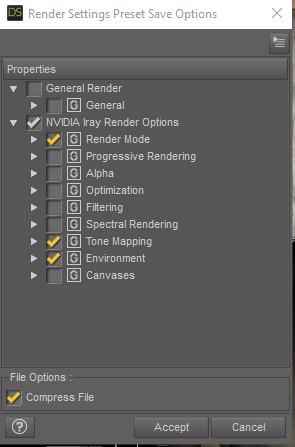
So many PAs are in the habit of changing everything about our render settings when, in the case of an HDRI, the only thing they need to mess with are Environment, and maybe Tone Mapping. Filtering and Spectral Rendering are out of bounds. If anyone knows enough to want Caustic Sampling, they can turn that on themselves, and the same goes for Bloom. Spectral Rendering can cause all kinds of artifacts under some circumstances that take forever to chase down.
But what really boggles the mind are Progressive Rendering settings that get turned down to nothing for heavens know what reasons, like they know how long we want to render for. They delete any canvasses we have set up, maybe because they don't know what they are for? This goes especially for HDRI vendors. I know I can load the HDRI manually, but wouldn't it be easier if you just kept your hands off what you don't need to mess with?
To Illustrate:
Just please stop.
Thank you.

Daz 3D is part of 
Connect
DAZ Productions, Inc.
7533 S Center View Ct #4664
West Jordan, UT 84084
Licensing Agreement | Terms of Service | Privacy Policy | EULA
© 2026 Daz Productions Inc. All Rights Reserved.
Comments
I find the changes in progressive rendering and canvases the most annoying. I don't have a Nvidia card, so my settings requrie more time than a PA with a dual 2080 RTX set-up, and I use canvases extensively. I have both of these built into my default scene file, so it's not something I think to change before rendering.
I doubt anyone is delibrately switching things off/on, but they are likely just saving the render settings and then not selectively choosing what should be saved. Thus everything is changed when it is clicked. Not great, but I guess that was the lazy option.
Hear hear!
I get particularly annoyed when they change the dimensions to something massive, and I don't spot it till it's been through the entire "building" process and finally starts to render. I'm not keen on them changing the aspect ratio either, but at least that's easy to spot if you have the aspect frame displayed in the viewport. I don't mind them doing that when it's one of those "ready to render" / "here's one of the promo scenes" affairs that load with a particular camera - I know to expect other changes then - but please don't mess with my own dimension settings when all I did was load a prop or new lighting!
That's just the point. If they can't do it properly, and they want to sell their HDRIs, then they should just ship the HDR files and not pretend to know anything about render settings.
..hmm wonder if that is why I sometimes find the sun in an HDRI does not have the same luminescence as the basic Iray sun /does.
Image 1 Iray sun/sky setting. Image 2 HDRI sun.
Also notice the difference in the shadow quality.
I suspect that in the HDR the majority of the light is coming from a tiny bright dot, and little effort has been made to simulate the corona & high altitude cloud diffusing the sunlight over a wider arc & so softening the shadows a bit.
HDR's are more flexible, and the corollory is that there is more scope to get things wrong.
One thing that would be nice with sun-sky lighting would be the facility to have a hdr-like jpeg as the background as well as the controllable sun lighting the scene. Would open up many more images to act as backgrounds.
I include any render setting changes as optional presets (in their own folder) - and they'll do what they say and no more (so I'll add one for tone-mapping changes for 'indoors' renders so you can achieve the look in the promos with one-click. Even then, I'll avoid touching other parts (like the 'render quality' / max samples options since that's up to you). It's easy enough to drill down and select/deselect things but you need to know to do it.
Having said that, I don't sell HDRIs. I've bought a couple of sets that have 2 options (one is a 'scene' file and the other a render-settings file. (It still bugs me that they automatically turn on 'render hdri as background' and 'render ground' - I usually just use them for lighting and want a transparent background and my own floor).
One thing you can do is save your own 'default' render settings for things you don't want others to change and apply that each time after loading an HDRI. I know the argument is that you shouldn't have to but given the situation...it saves time in the future.
You can actually do this by loading the .jpg or .png onto a plane...the trick is getting the light to match. The below examples were lit with HRDI but use plane backgrounds -
I do admit I dislike it when the dimensions of my scenes are altered for an HDRI. I tend to not render long horizontal pics which lots of PA's favor, so I always have to change the screen dimensions back to portrait.
The only time I'll do this is in a set of cameras which have 'Use local dimensions' turned on (doesn't change your render settings). This is mostly so the customer gets the same framing that I used. You can always turn local dimensions off in the parameters tab to be restored to your own.
When an HDRI comes with it - if it comes with cameras as well, it's to line it up to avoid the warping you see when you render an HDRI from an odd angle. If it's just setting the dimensions in render settings without a camera ... I'm not sure why they'd do that.
This thread is why I don't buy the HDRi packages from the DAZ store now. I've been bitten a few times by having my scenes spoiled by the settings someone else thinks I should be using. Better by far to just download a HDR image and plug that into the environment slot, leaving my render settings as they were.
You know you can still just plugin the HDRI and not use the preset, right?
- Greg
Yeah, Greg. We know. Thanks, Greg.
The only pack I've purchased recently was one of the Cake and Bob sets so I could decronstruct how DoF is applied. Other than that...it's pretty much HDRI Haven for me...unless I'm looking for something specialized. Orestes has some pretty neat specialized ones.
But yeah, I've had my render settings all sorts of whackdoo'd by stuff...I've even had some that turned up render quality to 100...like whut?
I don't mind so much when they increase those settings, since I can always just stop the render when it's satisfactory. It's when they do stuff like change iterations down to the minimum that I get tripped up. Unlike tone mappings, when you change some settings on the fly from the render window and not have it interrupt your render, I've found the render really does start over again from zero when you change Progressive Render settings.
Orestes and Cake'n'Bob, for all their faults, are my favourite HDRI vendors. Their stuff works well for the kind of images I like to render.
..this is why I rarely bother with HDRs. I purchased the IBL Skies Bundle because I wanted more than just the clear sky like get with the Sun/Sky mode as it is only a skydome with no ground scenery and had the "feel" of using the old LDP2 plugin with the Azure Skies add on since it has different sun elevations. Didnt realise the sun was not as bright until I used it instead of the Iray Sun on the scene I posed above..
I just purchased the Cloudscape Creator Bundle at 60% off using the Hanging at Home code (19.98$) which offers a nice variety of cloud effects. so I can use them with the Iray Sun as well as the HDRs included. Now all I need is an updated version of Spacebones' old Sky Trails for contrails to make even more realistic skies.
...that is what I did for this scene: The city skyline is a photo on a backdrop plane. I created a transparency mask to remove the sky portion so I could use one of the IBL Skies domes to give a better sense of depth. This was actually done with 3DL using Parris' IBL Master. Notice how much brighter the sun is compared to the IBL sun in the sample I posted above as well as that the shadow edges are slightly softer. Sadly the file was lost in a drive crash so I I am unable to check the settings I used.
I don't think I have loaded a single HDRi from my library, I just load them on environment in my render settings
Well Sevrin, it seemed liked some didn't know based on the comment before:
"This thread is why I don't buy the HDRi packages from the DAZ store now. I've been bitten a few times by having my scenes spoiled by the settings someone else thinks I should be using. Better by far to just download a HDR image and plug that into the environment slot, leaving my render settings as they were."
- Greg
When something loads and changes my settings there are three things I do.
Ctrl/z which takes me back to the previous state.
If it is a HDRI then before I Ctrl/z I click on the Environment Map to see what the image is and where it is in the drop down menu.
Then after the Ctrl/z I click on the Environment Map and load the image from the drop down menu.
I have a lot of HDRIs from the store and I don't believe I've ever seen my rendering settings change from just doubleclickinga HDRI. The again I never use the "Render Settings" options when they are included.
I guess I'm surpirsed that folks don't routinely check settings after crafting a scene and before hitting render.
Same here, and I use HDRI's a lot
I've mainly encountered changes to render settings in scene pre-loads, where the thought is perhaps to give people a solid set up from which to start. You can turn that int a general content pre-load by right-clicking on the file and selecting Merge, though I do prefer to have a clean (i.e. just the items) load with a separate file to apply render options if needed (e.g. recreating the promo renders, which is a frequently requested feature).
That works well if you know the HDR will change the settings.
I think the problem is if they modify a setting you don't expect and you only see it later on when you want to render and something isn't right.
I use Iray preview and I can see right away when something has been changed in my settings.
The whole point here is that PAs are making chages that are not beneficial, like wiping out canvasses, and making changes to things like Progressive Rendering and aspect ratio and size of our image that have nothing to do with adding their HDRI to the scene. In most renders, the HDRI is not the primary focus of the image.
As an analogy: bluejaunte sells characters that come with an individually crafted smile, and they look fine, if you want a cute smile on your character. However, when you load the character, it isn't already wearing that smile. That's all I'm asking of PAs who sell HDRIs or light their scenes.