Duster Disaster Redux - RESOLVED ***
 Doc Acme
Posts: 1,153
Doc Acme
Posts: 1,153
I've been putting in some time to learn dForce and finally came across mention for working with characters using multiple clothing layers which is where I've been having problems for some time. I've several similar sets, but recently picked up the G8M dForce Gunslinger outfit. So along with the shirt, you have a vest and dForce Duster, not to mention pants, boots, and a holster.
At 56:50 in the Daz Studio dForce Basics vid, she touches on dealing multi layered clothing. The process seemed simple & logical enough; running a sim with one item then freezing. Yet when I tried I still got explosion issues.
Along with the Gunslinger Outfit I'm using the IGD S&C M8 07b pose https://www.daz3d.com/igd-slouch-and-crouch-poses-for-genesis-8-males which is simply kneeling & pointing to a spot on the ground. It looks pretty close prior to simulation, but the duster draping isn't correct of course. I tweeked the Right hand pose to leave some space where it comes to rest on the thigh, & set a couple keys for the feet to keep them from penetrating the static ground plane. Pretty straight forward. I set up the timeline to 24 fps and keyed the pose at 24 & allow to run to f36. I went to a 24 frame span vs. the usual 15 thinking perhaps the problem is a velocity thing but didn't seem to help.
Since I was having problem with the full outfit, I pared the scene down to just Joseph (a G8M figure) and the Gunslinger Duster as it's really the only item that needs distortion. Of the wardrobe set, its also the only item with a dForce attribute already applied. Even with that, the problem is with just the left sleeve cuff starting the explosion & just can't see what's interferring. It's just the arm in the sleeve & it's not even bending that much; more pointing forward & down.
It appears to be starting very subtly early on. I did screen captures of the progression & wondering what sort of clue this might be? There's a progress bar & the frame at first is ragged then smoothes. It progressively gets worse until compete failure.
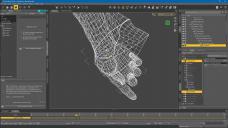
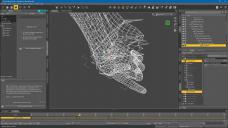
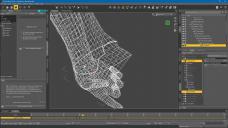
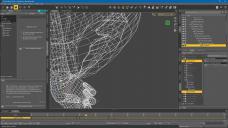
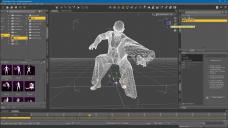
How do I go about diagnosing this?
All geom is set to base rez. Tried various options such as with & w/o smoothing but nada.
Also, what is the Collision Layer setting & what sets or adds that parameter? The Start Here page explanation seemed a bit fuzzy & mentioning that it's not really used in the "better" settings.
TNX

Daz 3D is part of 
Connect
DAZ Productions, Inc.
7533 S Center View Ct #4664
West Jordan, UT 84084
Licensing Agreement | Terms of Service | Privacy Policy | EULA
© 2026 Daz Productions Inc. All Rights Reserved.
Comments
The Collision Layer is another way of handling multiple items - if two items have different values then the higher value is on top of the lower (it's per-item in its effect, even though it's a surface property - I don't know if it will be possible to have different layers within a single item later).
As for the explosion, I would initially try increasing the number of subframes or iterations per sub-frame in Simulation Settings - the system works by having each edge treated as a "spring", and distributing the energy in the springs to drive the deformation; soemtimes there isn't enough tiem for the energy to propagate and an explosion is the result.
Thanks Richard. I'll give that a look.
Managed to get it to completion but took it's time.
Tried some other tests & just don't think this laptop system can handle the task of multiple clothing layers unfortunately. Just not enough horsepower. Looks like this will have to wait until I get back to main system. Drat.
I'm back to my main system, only for a few months unfortunately, but it's amazing what a little horsepower & brains can do for dForce sims.
Anyway, had some progress that I couldn't before, & then not so much.
My initial test was just with Cowboy Jo as before and the Duster into a kneeling pose. My scene is set to 24 fps for 60 frames. Added a static ground plane, & hid everything except Jo & the Duster. The animation is smoothed ramped from 0 to f24.
The Duster alone on Jo worked great. Started from the Mem Pose and finished in a few minutes, not minutes per frame as the laptop struggled to do.
Turning on the Shirt though had serious poke through but hadn't sim'd it. So, turned OFF the Duster vis & Froze it, & set the Shirt to Dymanic, Basic Mesh, etc. and ran the Sim again. Got to frame 24 and looked good. Two frames later it frame fillingly 'sploded. Haven't a clue where it starts from it's that sudden. Few months ago when I tried it seemed to be the sleeve, but that was back on frame 14ish.
Here are some frame grabs at Frm 24 where the animation ends, and wondering if the tuck in the thigh is possibly the issue?
Perhaps I need a particular order of Sim & Freeze or some other prep step I missed?
For what I'm needing for the present, I can export this as a static obj & edit the mesh as needed. But, it would be really nice to get this all working as it should.
Thanks folks.
So, absolutely NO replies, eh? Ya'll are gonna make me do this the hard way then?
WELL I DID !!!
I was sort of right all along that there was a specific recipe that needed to be followed, but there are some issues with the dForce sim as well.
I ended up doing not only Inner to Outer Sim then Freeze of the various layers of the outfit, I also did it as a two-part process. Using the Use Start Bones from Mem Pose AND use the Timeline range would fail. If I Sim'D from the Start Pose first, and THEN changed that over to OFF and used the Timeline range, it worked.
So, since this outfit has 5 clothing items, that meant 10 separate sim runs.
Here be the result:
That turned out pretty nice.
Thanks.
Fixed the pant leg in Lightwave's Modeler. Think I needed to actually Sim the boot rather than just set it as static, then do the pants. Pat Head AND Rub the Tummy. Or is it the other way around? In any case it seems to all be part Art, Science & a twinge of religion I suspect.
I'm going to try to tackle my Mafioso Big George soon but need to find a true dForce coat as the one I liked was converted from G3 to G8 I lthink. Been awhile.
It draped over nicely in the end.
What I usually do when I have multiple layers of clothing and I have some pokethrough is hide the parts of the lower item in the geometry editor.
The only time I would not do that and try to make it work was if I wanted the outer clothing layer to have a clear shape of the item under it. That doesn't happen that often though and in the case of your Gunslinger items, the material doesn't look like one that would fit the form of the underlying shirt.
I wasn't able to do that in this case with the shirt front unfortunately. Should have hidden him from the waist on down I suppose, but I've more control after the fact with Modeler if needed. My earlier attemps had real problems with the pockets and belt & loops on the Pants. They're not actually connected to the main geom. Using the two Sim approach, they stayed where they were supposed to. You can't see them as they're under the duster where they should be, but earlier they'd come through as separate pieces.