Doubts about Daz Studio Motion Capture
 ChrisSerket
Posts: 202
ChrisSerket
Posts: 202
Hi, since I don't speak English, I'm using google translator to write to you.
I have some doubts about the options for capturing real movement in relation to eyes, eyebrows and fingers (obviously thinking of all daz figures, or at least from V4 / M4 to Gemesis 8 Female / Male).
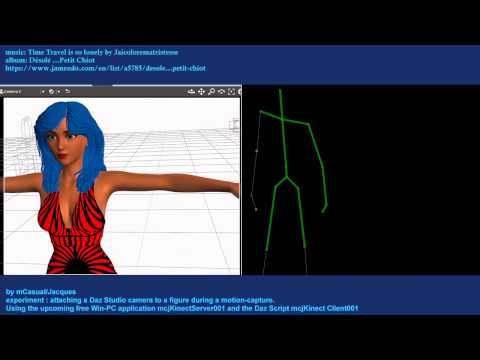
Hoping that this helps some other user, I found the following options that I heard that are for all figures in relation to motion capture of the whole body (less fingers) using an Xbox 360 kinect (and so I saw on the user page there was also a script for the Xbox one kinect), being totally free scripts:
As for the mouth movement when speaking, in Daz's options I only found this product for Carrara (which in some forums has called it "THE PAY HEXAGON" XDXDXDXD):
https://www.daz3d.com/mimic-pro-for-carrara
As it is something really ugly to have to pay a giant sum of money for Carrara and then another to get the serial number for the plugins, there is a free possibility (whose link I can not leave here because Daz prohibits links from third-party pages that do not be youtube or social networks I think):
Script For Importer Lip Sync in DAZ Studio UPDATE (found on the ShareCG page).
Now returning to the initial topic, I cannot find for daz studio (compatible with the aforementioned figures) that it captures movement of fingers, eyes and eyebrows.
Could anyone mention the options that daz has in your store (no matter if they are paid) and options free of daz or third parties (if any)?
Any help is welcome.
Greetings and sorry for the long post xDDDDDD.

Daz 3D is part of 
Connect
DAZ Productions, Inc.
7533 S Center View Ct #4664
West Jordan, UT 84084
Licensing Agreement | Terms of Service | Privacy Policy | EULA
© 2026 Daz Productions Inc. All Rights Reserved.
Comments
as luck would have it
there is a new plugin under developement for Carrara
https://www.daz3d.com/forums/discussion/comment/5358581/#Comment_5358581
uses OpenFace V2
Not in the store any longer is iClone. It's the best way IMHO to get motion capture into Daz Studio by way of BVH files. It costs plenty but there are sales on their site. You could spend a small fortune for all the various plugins, but they all are not needed. There are plenty of YouTube videos that show you how it works and also works with Daz Studio. The most important things needed are iClone itself and 3DXchange which helps you import and export DAZ characters. A couple good users of iClone post here often...
I appreciate the comments.
But so far there is nothing for eye movement in daz studio?
getting facial animations back into DAZ studio is a no go
I don't have it as only on iC6 and no iPhoneX but follow their forums and know the limitations
I use the BVH import all the time for other animations but because as you said it is not available at the DAZ store any longer discussion here is scarce.
Unfortunately, google translator translates me in a way that makes the words you said Wendy not fit each other.
Could you write it another way please?
(This is the bad thing about using google translator TT.TT)
hopefully this translates
you can do facial mocaps in iClone 7 with a plugin and an iPhoneX
you cannot import that back into DAZ studio
Ah okay.
Now it translated well.
Hehehehe thank you very much Wendy and Wolf.