What does the evolution of daz "Realism" look like?

I say realism in quotes because so many things can define it. The pyschics of future animations, textures and better lighting, ect.

So that's my question - as these products and software keep evolving, what will be the next step to really making daz renders look like something out of the real world?

I see a lot of unreal engine renders and it really doesn't seem like daz is THAT far off. https://cdn2.unrealengine.com/Unreal+Engine%2Fblog%2Fcreating-realistic-digital-humans-using-ue4-livestream-recap%2FFB_DigitalHumansLivestreamRecap-1200x630-a84633a5e05ef07804f536d3f634f3d3dc61bcec.jpg That is a still and if you were to tell me it was something this product created, I would believe you. Animations are a different story. 

Comments

  • FSMCDesignsFSMCDesigns Posts: 12,844

    The image is a specialized character rendered in specialized lighting. No reason the same scene can't look the same or better in DS and Iray.

  • AsariAsari Posts: 703
    I'm currently learning shader nodes in other render engines and I have to say Iray, with all its shortcomings and downsides we've discussed a lot about, isn't so bad per se. But that's Iray itself.

    For what it's worth, DAZ is a company that focuses mainly on selling humans. And the standard skin shader system the DAZ figures and most of the PA figures come with is a bit lacking compared to skin materials of other render engines. I haven't studied the Iray materials enough myself but I wouldn't be surprised if the Iray materials for human skin could be improved. For instance, bluejaunte's figures do not use the DAZ skin shader setup and the skin looks more realistic.

    The new dual lobe hair shader, mainly developed for strand based hair, is a very good universal hair material.

  • MelissaGTMelissaGT Posts: 2,611
    edited February 2020
    Asari said:
    I'm currently learning shader nodes in other render engines and I have to say Iray, with all its shortcomings and downsides we've discussed a lot about, isn't so bad per se. But that's Iray itself.


    For what it's worth, DAZ is a company that focuses mainly on selling humans. And the standard skin shader system the DAZ figures and most of the PA figures come with is a bit lacking compared to skin materials of other render engines. I haven't studied the Iray materials enough myself but I wouldn't be surprised if the Iray materials for human skin could be improved. For instance, bluejaunte's figures do not use the DAZ skin shader setup and the skin looks more realistic.


    The new dual lobe hair shader, mainly developed for strand based hair, is a very good universal hair material.

    One of the biggest shortcomings, in my opinion, with Daz and most PA-made characters is the lack of proper subsurface maps. Most often the color map is just used for a SSS map and that's not the way to good skin. Change that one thing, and you can wind up with something like this - 

    Theron Test - Small.jpg
    3500 x 3500 - 4M
    Lennie - Small.jpg
    3500 x 3500 - 7M
    Rosawyn Bramble - Compare.png
    2000 x 2000 - 3M
    Tasha 8 - Compare.png
    2000 x 2000 - 3M
    Post edited by MelissaGT on
  • FSMCDesignsFSMCDesigns Posts: 12,844

    Melissa, nice images. On the 3rd image, what character/skin is that and what did you change please

  • MelissaGTMelissaGT Posts: 2,611
    edited February 2020

    Melissa, nice images. On the 3rd image, what character/skin is that and what did you change please

    She's actually a "frankenskin" that I probably shouldn't have included because more work was involved than just swapping out the SSS map. The color map is that of LY Bramble with Victoria 7 for Victoria 8 specular, normal, and bump maps (Vicky 7 for Vicky 8 is just Vicky 7's maps converted to the base UV). I've decreased bump values and added top coat values (which use the specular map). The SSS map is rebuilt, using the color map blended with Victoria 7's SSS and AJ's blood vessel maps. Everything was converted to chromatic SSS with custom-tweaked values. The character shape itself...err herself...is custom. She's the one pictured in my avatar and here - 

    Post edited by Chohole on
  • WonderlandWonderland Posts: 7,134
    edited February 2020

    There are many details that still aren't possible or easy to implement. Like the folds on the wrist here or the indentation on the cheek. It would be great if there was a way to just click a body party and then have a scalable indent slider and click on a body part and have a morphable wrinkle creator slider. I'm not techie, so not sure if this is possible. But several years ago at the Smith Micro booth at Siggraph I met a new employee who was supposedly creating a new Poser figure. I described the ideal figure I would like and he told me it was impossible. And then G3 came out at Daz and it was exactly what I described (minus a few things that were mostly covered by PA addons.) But rather than a new G9 figure, I'd love it if they could add this to G8. I know there are things like the push modifier which seems complicated and I do have mesh grabber which I haven't tried yet, but I'd love a simple way of doing these things so I can create art rather than deal with time spent learning complicated undocumented aspects of the software. I know Zevo has some skin wrinkle morphs which I will get when on sale but I didn't see wrinkles for wrists or ankles/feet listed and there are so many other tiny wrinkle morphs that happen with bends even on young people and children and some of the wrinkle morphs in the promos look too pronounced for younger people.

     Also, the hand and wrist bends on G8 are still awful, really hard to make something as simple as holding a glass realistic. The skin I think is very close and can look good with the right shaders, but bends are still bad. I do have some PA addons that help but it's still not possible to truly get poses to look realistic in some positions. So many people use Instagram filters or whatever so skin has not been a big problem with the uncanny valley, it's the poses that give it away, especially hand and feet poses. (And hair of course.) 

    F8971285-6BD9-441D-AF09-FECCB110E8F6.jpeg
    1083 x 975 - 680K
    Post edited by Wonderland on
  • FSMCDesignsFSMCDesigns Posts: 12,844

    Thanks for the info Melissa, that helps.appreciate it. Nice gallery at DA also.

  • MelissaGTMelissaGT Posts: 2,611
    edited February 2020
    mr clam said:

    For the most part, it looks like it could be done with deformers, but totally understand the convenience of the product. I've used a quick deformer to throw in something like an inner arm squish when a character has their arms down, etc. Also, for more detailed "squish" you could create a morph in an editing program like ZBrush...I'm also assuming Blender and maybe Hexagon? I'm only familiar with ZBrush (w00t GoZ).

    Post edited by MelissaGT on
  • WonderlandWonderland Posts: 7,134
    mr clam said:

    That doesn’t look very realistic to me and it’s only in certain places. I would like to click on a spot and be able to easily morph it without having to go into modeling software or undocumented aspects of Studio software.
  • MelissaGTMelissaGT Posts: 2,611
    edited February 2020
    mr clam said:


    That doesn’t look very realistic to me and it’s only in certain places. I would like to click on a spot and be able to easily morph it without having to go into modeling software or undocumented aspects of Studio software.

    That's where it becomes impossible, because at the very least, you would need to communicate to the model what needs to be squished and by how much and in what shape was the object doing the squishing? Collision objects can achieve this somewhat in very specific situations...but so far we can only have one collision per object, and objects cannot be set to collide with each other...and an object can't collide with itself. These are all things I hope we can see in the future. 

    Post edited by MelissaGT on
  • nonesuch00nonesuch00 Posts: 18,744

    Seeing the OP's link to that render of the Glenn Campbell look-alike has me thinking maybe that 3D model was part of the motivation for Dain, who has the best DAZ Originals Pro Bundle skin materials yet.

    There are many details that still aren't possible or easy to implement. Like the folds on the wrist here or the indentation on the cheek. It would be great if there was a way to just click a body party and then have a scalable indent slider and click on a body part and have a morphable wrinkle creator slider. I'm not techie, so not sure if this is possible. But several years ago at the Smith Micro booth at Siggraph I met a new employee who was supposedly creating a new Poser figure. I described the ideal figure I would like and he told me it was impossible. And then G3 came out at Daz and it was exactly what I described (minus a few things that were mostly covered by PA addons.) But rather than a new G9 figure, I'd love it if they could add this to G8. I know there are things like the push modifier which seems complicated and I do have mesh grabber which I haven't tried yet, but I'd love a simple way of doing these things so I can create art rather than deal with time spent learning complicated undocumented aspects of the software. I know Zevo has some skin wrinkle morphs which I will get when on sale but I didn't see wrinkles for wrists or ankles/feet listed and there are so many other tiny wrinkle morphs that happen with bends even on young people and children and some of the wrinkle morphs in the promos look too pronounced for younger people.

     Also, the hand and wrist bends on G8 are still awful, really hard to make something as simple as holding a glass realistic. The skin I think is very close and can look good with the right shaders, but bends are still bad. I do have some PA addons that help but it's still not possible to truly get poses to look realistic in some positions. So many people use Instagram filters or whatever so skin has not been a big problem with the uncanny valley, it's the poses that give it away, especially hand and feet poses. (And hair of course.) 

    It's possible but the work has to be modeled and then posing a model has to apply the creases and wrinkles. It's heading that direction with the Facial expressions and D.Master's Auto Face Enhancer products are examples of what you speak of.

  • DripDrip Posts: 1,238

    Ideally, figures consisted of not only their skin layer, but also of actual internal flesh and muscles, each with its own defined "jelly settings", pushing back against the overlaying skin when pressed, twisted, pulled, squeezed, etcetera. I'm sure such things can technically be modelled these days, so the problem is more whether they can be modelled quickly enough to be of any use. Pinching an arm and then having to wait any longer than 5 minutes before seeing how the pinching interacts with the model just won't give a good workflow. Just imagine, you set up the pose, wait five minutes for the result, then decide it's not exactly how you imagined, and want to pinch a bit harder, or move the pinch half a centimeter, wait five minutes again for the result.. Nope, that will NOT be convenient at all while setting up a scene. Scene set-up is a process that has to be in a "flow", rather than constantly getting interrupted by long waiting times.

    At the same time, this is the kind of technology I'm hoping for for Genesis 9. There isn't much else to really improve the next generation of figures, so I don't expect it to come anytime soon.

  • There are many details that still aren't possible or easy to implement. Like the folds on the wrist here or the indentation on the cheek. It would be great if there was a way to just click a body party and then have a scalable indent slider and click on a body part and have a morphable wrinkle creator slider. I'm not techie, so not sure if this is possible. But several years ago at the Smith Micro booth at Siggraph I met a new employee who was supposedly creating a new Poser figure. I described the ideal figure I would like and he told me it was impossible. And then G3 came out at Daz and it was exactly what I described (minus a few things that were mostly covered by PA addons.) But rather than a new G9 figure, I'd love it if they could add this to G8. I know there are things like the push modifier which seems complicated and I do have mesh grabber which I haven't tried yet, but I'd love a simple way of doing these things so I can create art rather than deal with time spent learning complicated undocumented aspects of the software. I know Zevo has some skin wrinkle morphs which I will get when on sale but I didn't see wrinkles for wrists or ankles/feet listed and there are so many other tiny wrinkle morphs that happen with bends even on young people and children and some of the wrinkle morphs in the promos look too pronounced for younger people.

     Also, the hand and wrist bends on G8 are still awful, really hard to make something as simple as holding a glass realistic. The skin I think is very close and can look good with the right shaders, but bends are still bad. I do have some PA addons that help but it's still not possible to truly get poses to look realistic in some positions. So many people use Instagram filters or whatever so skin has not been a big problem with the uncanny valley, it's the poses that give it away, especially hand and feet poses. (And hair of course.) 

    I rendered this foot from mei lin 8 (with hd morph on) 

    the wrinkles pretty good looking to me so i have confidence they can apply this to hands too.

  • lilweeplilweep Posts: 2,746
    mr clam said:


    That doesn’t look very realistic to me and it’s only in certain places. I would like to click on a spot and be able to easily morph it without having to go into modeling software or undocumented aspects of Studio software.

    That's where it becomes impossible, because at the very least, you would need to communicate to the model what needs to be squished and by how much and in what shape was the object doing the squishing? Collision objects can achieve this somewhat in very specific situations...but so far we can only have one collision per object, and objects cannot be set to collide with each other...and an object can't collide with itself. These are all things I hope we can see in the future. 

    There is that Mesh Grabber product in the store.

  • lilweeplilweep Posts: 2,746
    edited February 2020
    Drip said:

    Ideally, figures consisted of not only their skin layer, but also of actual internal flesh and muscles, each with its own defined "jelly settings", pushing back against the overlaying skin when pressed, twisted, pulled, squeezed, etcetera. I'm sure such things can technically be modelled these days, so the problem is more whether they can be modelled quickly enough to be of any use. Pinching an arm and then having to wait any longer than 5 minutes before seeing how the pinching interacts with the model just won't give a good workflow. Just imagine, you set up the pose, wait five minutes for the result, then decide it's not exactly how you imagined, and want to pinch a bit harder, or move the pinch half a centimeter, wait five minutes again for the result.. Nope, that will NOT be convenient at all while setting up a scene. Scene set-up is a process that has to be in a "flow", rather than constantly getting interrupted by long waiting times.

    At the same time, this is the kind of technology I'm hoping for for Genesis 9. There isn't much else to really improve the next generation of figures, so I don't expect it to come anytime soon.

    If we could pose our figure and then turn on soft body physics and wait a mere 5 minutes for that to simulate, then I would be perfectly happy with that.  I already wait that long for the scene to load to GPU  to do test renders

    (when it is a big scene). 

    Post edited by lilweep on
  • MelissaGTMelissaGT Posts: 2,611
    edited February 2020
    lilweep said:
    mr clam said:


    That doesn’t look very realistic to me and it’s only in certain places. I would like to click on a spot and be able to easily morph it without having to go into modeling software or undocumented aspects of Studio software.

    That's where it becomes impossible, because at the very least, you would need to communicate to the model what needs to be squished and by how much and in what shape was the object doing the squishing? Collision objects can achieve this somewhat in very specific situations...but so far we can only have one collision per object, and objects cannot be set to collide with each other...and an object can't collide with itself. These are all things I hope we can see in the future. 

    There is that Mesh Grabber product in the store.

    Yes, but the original comment was around not having to use mods to make the mesh do what it should just...do. I could do the same exact thing with ZBrush, which is why I haven't purchased Mesh Grabber. 

    Post edited by MelissaGT on
  • KetsyColaKetsyCola Posts: 86
    edited February 2020
    karia007 said:

    I say realism in quotes because so many things can define it. The pyschics of future animations, textures and better lighting, ect.

    So that's my question - as these products and software keep evolving, what will be the next step to really making daz renders look like something out of the real world?

    I see a lot of unreal engine renders and it really doesn't seem like daz is THAT far off. https://cdn2.unrealengine.com/Unreal+Engine%2Fblog%2Fcreating-realistic-digital-humans-using-ue4-livestream-recap%2FFB_DigitalHumansLivestreamRecap-1200x630-a84633a5e05ef07804f536d3f634f3d3dc61bcec.jpg That is a still and if you were to tell me it was something this product created, I would believe you. Animations are a different story. 

    Here's another thing to take a gander at, if anyone's interested. It's Reallusion's Character Creator roadmap for 2020. They're attempting to create morphable digital humans to work with UE4, it seems. If Reallusion can do it, Daz should be able to-- I don't see why they couldn't.
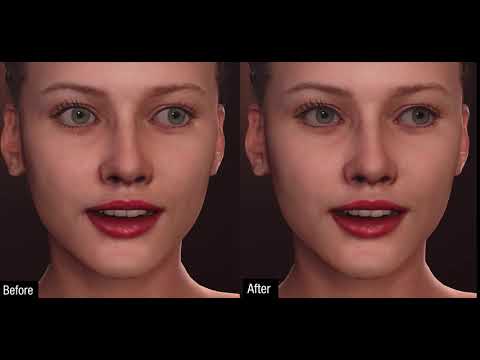
    Edit: Here's one of their unlisted videos about eye enhancement for their 2020 roadmap:

    Post edited by KetsyCola on
  • lilweeplilweep Posts: 2,746
    hadi-karimi-grace-1.jpg
    1920 x 1920 - 570K
  • MelissaGTMelissaGT Posts: 2,611
    edited February 2020
    KetsyCola said:
    karia007 said:

    I say realism in quotes because so many things can define it. The pyschics of future animations, textures and better lighting, ect.

    So that's my question - as these products and software keep evolving, what will be the next step to really making daz renders look like something out of the real world?

    I see a lot of unreal engine renders and it really doesn't seem like daz is THAT far off. https://cdn2.unrealengine.com/Unreal+Engine%2Fblog%2Fcreating-realistic-digital-humans-using-ue4-livestream-recap%2FFB_DigitalHumansLivestreamRecap-1200x630-a84633a5e05ef07804f536d3f634f3d3dc61bcec.jpg That is a still and if you were to tell me it was something this product created, I would believe you. Animations are a different story. 

    Here's another thing to take a gander at, if anyone's interested. It's Reallusion's Character Creator roadmap for 2020. They're attempting to create morphable digital humans to work with UE4, it seems. If Reallusion can do it, Daz should be able to-- I don't see why they couldn't.

    Edit: Here's one of their unlisted videos about eye enhancement for their 2020 roadmap:

    That looks really cool, but heads and facial expressions are way different than soft body physics and actual "things bumpin' together". I've never played a video game where there isn't a whole heap of clipping and missed collisions...even ones with physics engines. 

    Post edited by MelissaGT on
  • mr clam said:


    That doesn’t look very realistic to me and it’s only in certain places. I would like to click on a spot and be able to easily morph it without having to go into modeling software or undocumented aspects of Studio software.

    That's where it becomes impossible, because at the very least, you would need to communicate to the model what needs to be squished and by how much and in what shape was the object doing the squishing? Collision objects can achieve this somewhat in very specific situations...but so far we can only have one collision per object, and objects cannot be set to collide with each other...and an object can't collide with itself. These are all things I hope we can see in the future. 

    (1/2)kx^2 for collisions. Problem is Daz really doesn't have a physics engine for this kind of stuff, and if it ever does have one developed & built into the program, rest assured you'll be paying a lot for just the program itself(no more free Daz Studio) and you'll need a fairly beefy system to handle the more complex calculations depending on the type & number of objects you plan on running a collision simulation with. I think it probably has more application for animation.

  • KetsyCola said:
    karia007 said:

    I say realism in quotes because so many things can define it. The pyschics of future animations, textures and better lighting, ect.

    So that's my question - as these products and software keep evolving, what will be the next step to really making daz renders look like something out of the real world?

    I see a lot of unreal engine renders and it really doesn't seem like daz is THAT far off. https://cdn2.unrealengine.com/Unreal+Engine%2Fblog%2Fcreating-realistic-digital-humans-using-ue4-livestream-recap%2FFB_DigitalHumansLivestreamRecap-1200x630-a84633a5e05ef07804f536d3f634f3d3dc61bcec.jpg That is a still and if you were to tell me it was something this product created, I would believe you. Animations are a different story. 

    Here's another thing to take a gander at, if anyone's interested. It's Reallusion's Character Creator roadmap for 2020. They're attempting to create morphable digital humans to work with UE4, it seems. If Reallusion can do it, Daz should be able to-- I don't see why they couldn't.

    Edit: Here's one of their unlisted videos about eye enhancement for their 2020 roadmap:

    Let's not forget, you have to pay for Reallusion's software, plug-ins, etc., and depending on what you want to be able to do with it, I'm sure you could easily spend in excess of $1,000. If Daz were to develop something like this, I would expect it to be a type of plug-in that one would have to pay a few hundred $$$ for.

  • I think the biggest difference I could tell between a Daz character and custom modeled and rendered characters in other packages starts with the eyes.  The eyes in many Daz characters seem off somehow.  It could come down to the separate material zones and the way the geometry is created.  In many custom characters, the eyes are blended differently than Daz's characters, right down to the geometry.  The geometry is very important for realistic eyes.  The area between the lacrimal and eye whites shouldn't receive AO or shadows in a noticeable way.  This requires special modeling in that area to blend the geometry into each other.  Daz characters contain distinct and separated geometry there that creates areas of occlusion where the two pieces of geometry touch.  That is very telltale that it's CG, specifically a Daz CG character.  Sure, you get this also in characters created in other packages as well.  It depends on how the eyes were modeled and the knowledge of how to correct it is up to the modeler themselves.  Then there's the matter of proper materials and SSS for these parts as well.  Many custom characters in other packages take special care to hand paint very detailed custom maps for each and every part of the character.  Substance Painter is the best resource for this type of work, but this is often a multi-step process, with extra attention paid to the normals and displacement as well.

  • KetsyColaKetsyCola Posts: 86
    edited February 2020
    KetsyCola said:
    karia007 said:

    I say realism in quotes because so many things can define it. The pyschics of future animations, textures and better lighting, ect.

    So that's my question - as these products and software keep evolving, what will be the next step to really making daz renders look like something out of the real world?

    I see a lot of unreal engine renders and it really doesn't seem like daz is THAT far off. https://cdn2.unrealengine.com/Unreal+Engine%2Fblog%2Fcreating-realistic-digital-humans-using-ue4-livestream-recap%2FFB_DigitalHumansLivestreamRecap-1200x630-a84633a5e05ef07804f536d3f634f3d3dc61bcec.jpg That is a still and if you were to tell me it was something this product created, I would believe you. Animations are a different story. 

    Here's another thing to take a gander at, if anyone's interested. It's Reallusion's Character Creator roadmap for 2020. They're attempting to create morphable digital humans to work with UE4, it seems. If Reallusion can do it, Daz should be able to-- I don't see why they couldn't.

    Edit: Here's one of their unlisted videos about eye enhancement for their 2020 roadmap:

    That looks really cool, but heads and facial expressions are way different than soft body physics and actual "things bumpin' together". I've never played a video game where there isn't a whole heap of clipping and missed collisions...even ones with physics engines. 

    Maybe not, but this is a thread about realism, no? Sure Reallusion's focus isn't on physics, but they are focused on more realistic textures, shaders, transitional meshes, dynamic wrinkles, etc. 

    If you want better collision physics, I don't think that's going to be in Daz any time soon. I'd be pleasantly surprised if they did decide to go that route. However, collision physics are better left to beefier programs like Houdini, Unreal, Maya, or even Blender.

    Post edited by KetsyCola on
  • KetsyCola said:
    karia007 said:

    I say realism in quotes because so many things can define it. The pyschics of future animations, textures and better lighting, ect.

    So that's my question - as these products and software keep evolving, what will be the next step to really making daz renders look like something out of the real world?

    I see a lot of unreal engine renders and it really doesn't seem like daz is THAT far off. https://cdn2.unrealengine.com/Unreal+Engine%2Fblog%2Fcreating-realistic-digital-humans-using-ue4-livestream-recap%2FFB_DigitalHumansLivestreamRecap-1200x630-a84633a5e05ef07804f536d3f634f3d3dc61bcec.jpg That is a still and if you were to tell me it was something this product created, I would believe you. Animations are a different story. 

    Here's another thing to take a gander at, if anyone's interested. It's Reallusion's Character Creator roadmap for 2020. They're attempting to create morphable digital humans to work with UE4, it seems. If Reallusion can do it, Daz should be able to-- I don't see why they couldn't.

    Edit: Here's one of their unlisted videos about eye enhancement for their 2020 roadmap:

    Let's not forget, you have to pay for Reallusion's software, plug-ins, etc., and depending on what you want to be able to do with it, I'm sure you could easily spend in excess of $1,000. If Daz were to develop something like this, I would expect it to be a type of plug-in that one would have to pay a few hundred $$$ for.

    It doesn't always have to be that way, though. Would I be surprised if Daz put stuff out like that for some serious amounts of cash? No, not really. But look at Unreal Engine, for example. They've got a much more powerful features, and that comes stock for free.

  • GordigGordig Posts: 10,601
    lilweep said:

    That doesn't look realistic only because the render looks like a painting.

  • nonesuch00nonesuch00 Posts: 18,744
    mr clam said:


    That doesn’t look very realistic to me and it’s only in certain places. I would like to click on a spot and be able to easily morph it without having to go into modeling software or undocumented aspects of Studio software.

    That's where it becomes impossible, because at the very least, you would need to communicate to the model what needs to be squished and by how much and in what shape was the object doing the squishing? Collision objects can achieve this somewhat in very specific situations...but so far we can only have one collision per object, and objects cannot be set to collide with each other...and an object can't collide with itself. These are all things I hope we can see in the future. 

    (1/2)kx^2 for collisions. Problem is Daz really doesn't have a physics engine for this kind of stuff, and if it ever does have one developed & built into the program, rest assured you'll be paying a lot for just the program itself(no more free Daz Studio) and you'll need a fairly beefy system to handle the more complex calculations depending on the type & number of objects you plan on running a collision simulation with. I think it probably has more application for animation.

    Unity & UE4 both have physics engines that are free if you are a hobbyist or indie game maker. 

Sign In or Register to comment.
