Solved, my surface tab went odd
 Jerife
Posts: 272
Jerife
Posts: 272
Since some days ago my surface tab does not show the whole tree of functions 
The filter box is clear
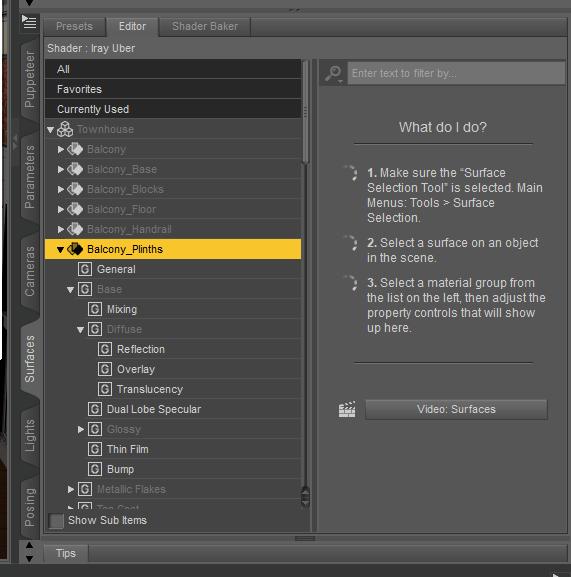
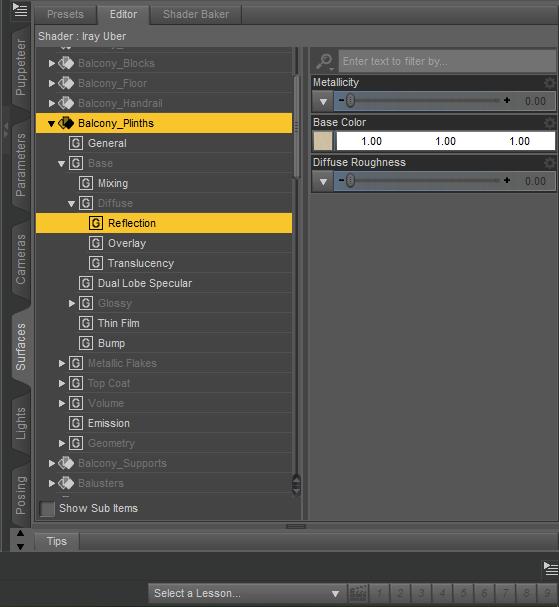
You can see it only from inside the tree
Very odd and makes working a pain
Any idea why is this happenning? I reinstalled the program even
Post edited by Jerife on

Daz 3D is part of 
Connect
DAZ Productions, Inc.
7533 S Center View Ct #4664
West Jordan, UT 84084
Licensing Agreement | Terms of Service | Privacy Policy | EULA
© 2026 Daz Productions Inc. All Rights Reserved.
Comments
I think you need to tick 'Show sub items' at the bottom.
I think the item/s you want to work on in Surfaces Tab must also be selected in the Scene Tab.
Thank you very much felis, that did it. I wonder how I became so dumb
Certainly IceScribe, thanks for your help