MMX and Sloshwerks SBH shaders
 JonnyRay
Posts: 1,744
JonnyRay
Posts: 1,744
[ EDIT: I have corrected some of my misunderstandings of Slosh's shader work below. ]
Based off a discussion in the Iray Shaders for Strand Based Hair from MMX thread, I started doing some testing with MMX Blended Dual Lobe Hair Shader Toolkit for Iray by @Mattymanx and ColorWerks Extreme: Hair Texture Blending for Iray and dForce Hair by @Slosh. I thought it was only fair to both vendors that I post this as a separate thread so they both get "credit" in the thread title. :) You can see the original thread for some other tests that L'Adair did as well.
Test Setup
For my testing, I chose PhilW's Femme Fatale Hair for G8F. I wanted to use a hair that had some curl and shape to it to better show how the highlights play within the hair. I'm not going to post all of the various options I tried, just 3 that kind of provide some side-by-side views. I put the hair on Victoria 8, but I removed a lot of detail from her skin shader because I didn't need a realistic figure, I just needed the hair to render well when placed on a human. I lit the scene with one of Colm Jackson's PRO-Studio HDR Lighting System HDRIs. I use these a lot for "character setup" scenes because they provide very nice even light with just enough contrast to be interesting.
Three Big Caveats
First, let's realize that "under the hood" the MMX shader uses the Dual Lobe Shader that comes with the latest versions of Daz Studio. For that reason, just like with a shader that is based off the Iray Uber Shader, the shader can't really do anything that the base shader isn't designed to do.
Second, Slosh did write a custom shader that allows the hair blending to be used for both transmapped and strand based hair products. So, in a full "apples to apples" comparison, the two products aren't really exactly the same which plays into some of my reviews of them below.
Third, as I stated in the original thread that motivated these tests, I have some experience in trying to make shader code designed for strand based hair work for transmapped hair. Even with the custom RSL code I was writing, trying to get the shader to treat a ribbon of geometry as if it were actually a cluster of hair strands was extremely difficult. So, while the MMX shader might work for transmapped hair and may even provide some good results, judging them based on their usefulness for that would be like using a wrench to drive nails. It might work, but the tools were made for different problems.
Too Long, Didn't Read Summary
I'm breaking the "rules" by giving my summary first. :) Both products bring something different to the table and will prove useful depending on exactly what you're trying to accomplish.
ColorWerks Extreme (CWX) is probably the easier package to use overall. Slosh has done a nice job providing a straightforward interface and a custom shader which makes blending hair colors easier. You select a base color, an optional color to blend with it, and a mask to use between them. There is some flexibilty as well because you can play with the blending modes, etc. Because this isn't based on the Dual Lobe shader, CWX is also going to work better for transmapped hair. When used on SBH, the implementation adds the shader code without destroying any settings for SBH/dForce hair which is why it focuses on color and less on the other aspects of those hair types. The tradeoff, of course, is that when you make something simple to use, you will often lose some of the flexibilty.
In contraxt the MMX BDLHS shader kit is VERY flexible. You're given a lot of control over all aspects of the hair shader including tools to modify things like the hair density and generation parameters. The use of maps is also unique and may take some getting used to in order to understand the power and usefulness of them. Unlike typical hair maps that look like photos of hair, what these maps basically tell the shader is "If a hair starts at this location on the surface, this is how you should modify the (root color, tip color, etc.)." This would make things like patterns on animal fur, etc. much easier to control. The tradeoff for the flexibility is that you may need to spend more time with it to get comfortable and be able to get the full benefits of the package.
ColorWerks Extreme: You'll like this if you mostly want realistic looking hair colors with maybe a few fantastic dyes, but you don't want to spend a lot of time "playing" with the hair color. Also of the two packages, this one is going to be more consistent in how it works for traditional transmapped hair products.
MMX BDLHS: You'll like this if you want more control over all the aspects of the hair color and maybe even want to tweak how the hair is being generated. You can still create wonderful realistic colors, but if you want to really get crazy (rainbow mohawk anyone?), this package will be more to your liking.
Test Renders
I actually did several test renders using various colors of hair, etc. But, to be honest, since I was trying to side by side comparison, what I found was that you couldn't really tell a huge difference from one to the other. I'll show the tests using a light brown / reddish tint to the hair to illustrate what I mean.
Important: Please note that I was only letting these run for about an hour. Because of the complexity of the Femme Fatale hair, they were achieving 35-50% convergence in that time. Look at the color more than the noise/detail levels. There is so much self-shadowing and light transmission with this complex hair product that it would have taken longer than I was willing to wait for my simple tests. I didn't do any postwork on any of the renders other than to add the label to them to show which shader was being used.
The time it was taking to render is due to the density of geometry in the Femme Fatale hair. With so many strands of polygons, casting shadows and transmitting light through them, Iray was working hard to converge the image. Even though the scene fit easily on my GPU. There didn't seem to be any appreciable difference in the time for rendering between the three options, again because the efficiency of the shader code was less significant than th density of the geometry.
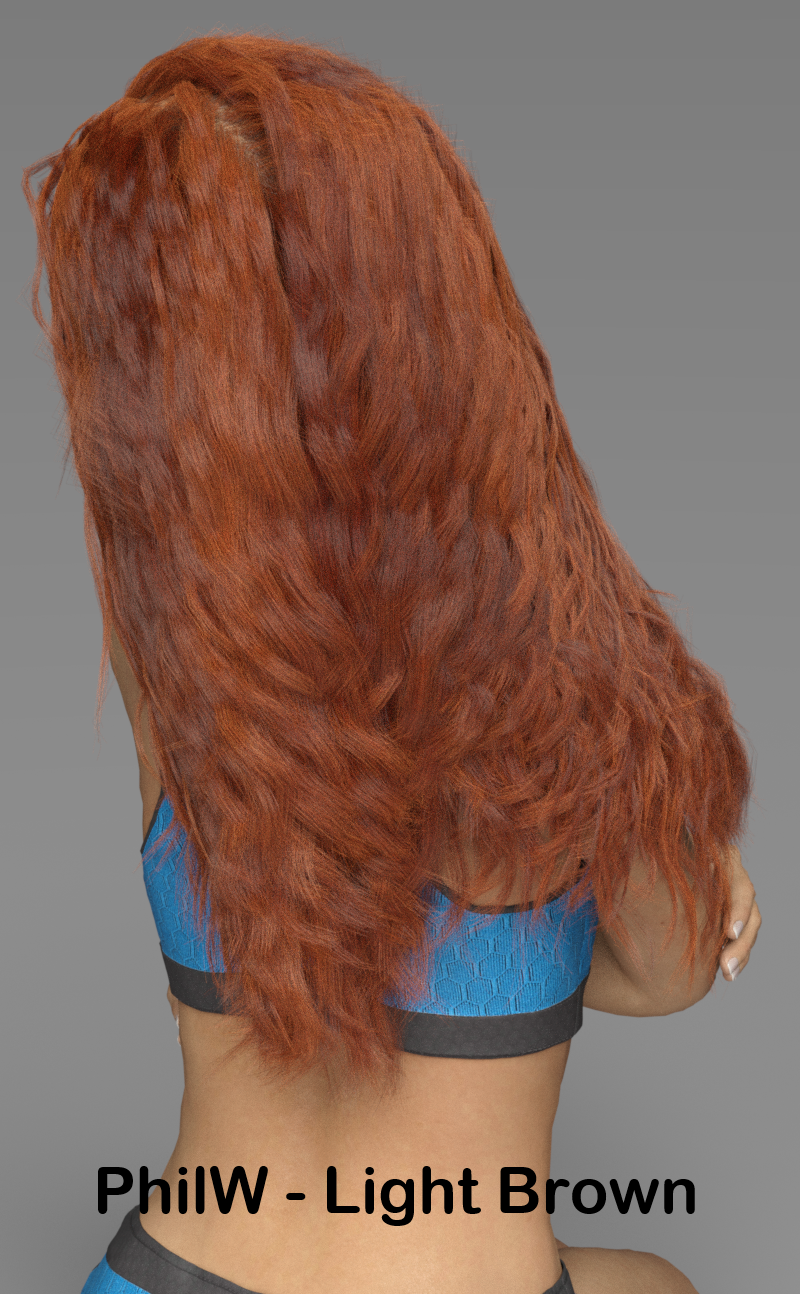
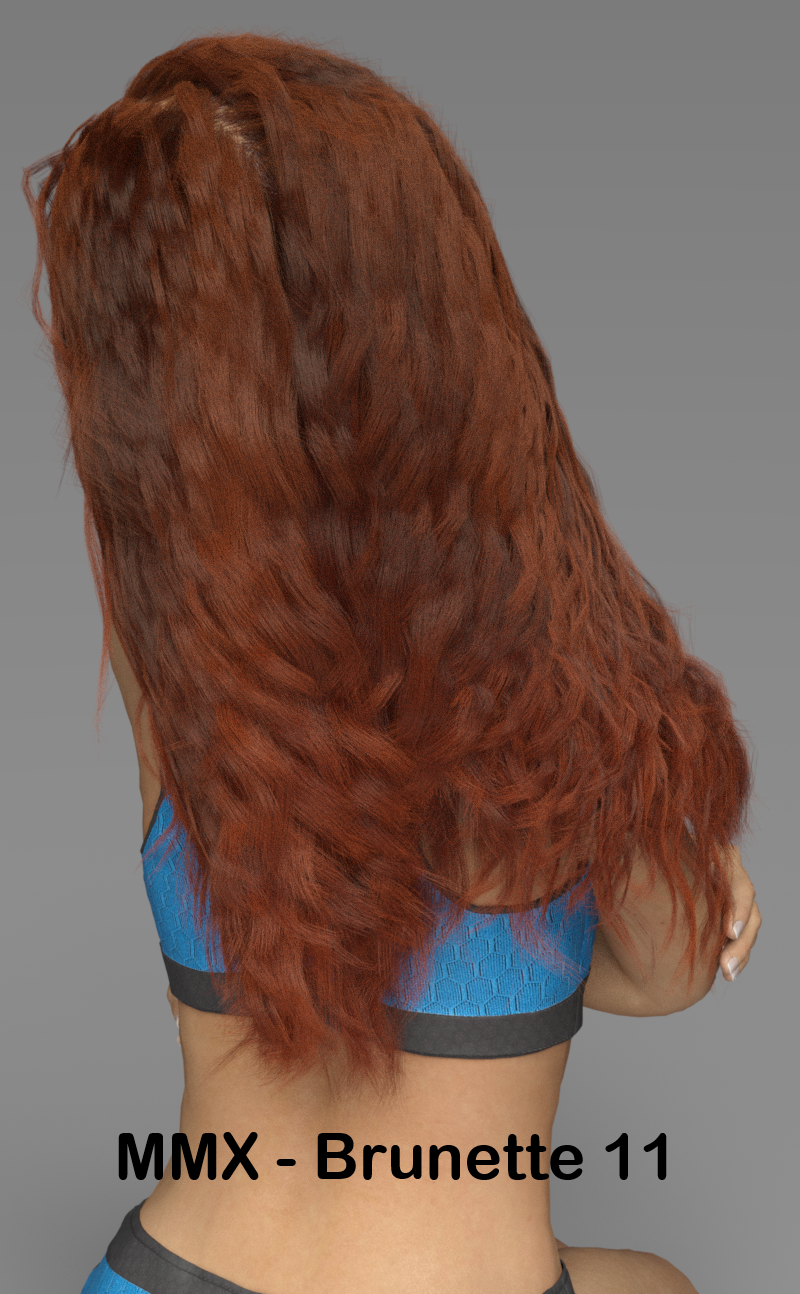
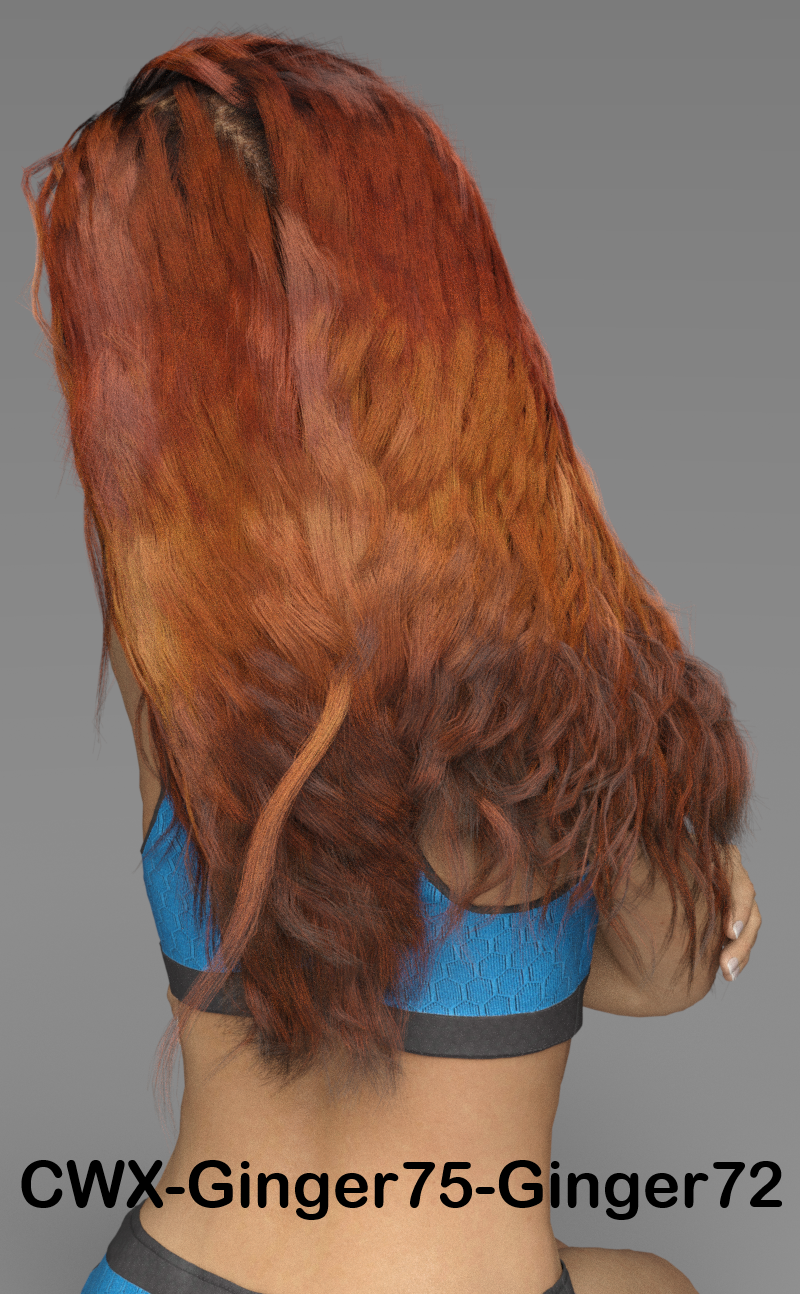
I think you can see that they are all 3 producing roughly equivalent reddish brunette colors. The choices I made for CWX provided some more variation in the color, but I could have achieved the same effect with MMX BDLHS with a bit more manipulation.
Also, I don't know what happened with that errant strand of hair in the CWX render. I noticed it after the render was done and would have re-draped and simulated the hair to fix it, but I got sleepy and decided it still served the purpose.

Daz 3D is part of 
Connect
DAZ Productions, Inc.
7533 S Center View Ct #4664
West Jordan, UT 84084
Licensing Agreement | Terms of Service | Privacy Policy | EULA
© 2026 Daz Productions Inc. All Rights Reserved.
Comments
CWX is not based on the new dual lobe SBH shader. It is a custom shader that uses a couple of the outputs from that shader brick, but with very different inputs. CWX was originally meant for transmapped hair and it, by luck more than anything, happened to work well on Strand Based and dForce Hair. If you apply CWX to a SBH or dForce Hair, all of the options on that hair are still available in the Surface Tab, so it does not limit any of the options for hair density, etc. that you mentioned.
I just wanted to clear that up. I've seen you state it twice that CWX is a modified version of the dual lobe shader, but it is really not in the end. In fact, the specularity settings were the last thing I added when setting up the shader. It was mainly made for the blending options
I'm sorry, Slosh. L'Adair had pointed out privately to me that I may have misunderstood that as well. I'm going to update my OP and do some more testing to be able to describe the additional benefits for your system to clarify things.
wonderful :) I don't mind the comparisons, because mine is indeed meant to be used on strand-based hair as well, but I don't want anyone thinking it won't "work well on transmapped hair" when that was the original intention. Matty's was entirely intended to supplement the included dual lobe shader, whereas mine just borrowed some of the anistropic properties and nothing else
I think the fact they were realeased close together and both mentioned strand based hair made a comparison inevitable. And I still think your product does have something to offer in that regard as well. But yeah, it isn't truly "apples to apples".
I mean I bought both (and have used the heck out of your original ColorWerks product anyway), and have been very happy with what I see in each one.
Yeah, that is understandable. Mine wasn't intended to be released this month, and I was out of town when it did hit the store, so without a computer or even a tablet on hand, I couldn't comment on anything until I got home (I hate trying to do forums on a phone LOL). I think that MMX is going to be fantastic for SBH (though it has some transmapped use) and CWX will be fantastic for transmapped hair (though it has some SBH use), LOL.
Thanks for the comparison Johnny.
Daz3D really created an amazing beast when they made the Blended Dual Lobe Hair shader. I just wish I could have conveyed in the promos just what it is capable of.
I'm pretty much in love with both products.
I'm the type of person who likes to control the details in my images, and the MMX product is perfect for that. But from what little testing I've done, CWX will allow me much better blending on my my trans-mapped hair, and most of what I own is trans-mapped, at this point. My only question was, "where's the plushie?"

Seriously, I can see using CWX on Mokie… I'll have to post an image after I've finished.
I'm not positive those images reflect very well on any of the products used, including the hair itself.
I took advantage of the Take 5 coupon, along with my PlatClub coupon for September, to pick up the MRL dForce Curly Bun. Now I'll have to use it test out these shaders. After Mokie gets his 15 minutes…
That's because the goal with those wasn't to show the very best they could do. The question I was asking was given the same parameters, would you get roughly the same results. And I believe the answer was yes.
I'm in the process of doing some additional renders using the shader kits for the types of hair for which they were designed. These should showcase the strengths of each shader kit in more detail.
I wanted to state that I'm working on expanding this review / comparison to highlight the strengths of each product. It's just going to take some time to get there because I have a day job and a daughter who's playing in 2 sports this fall, which takes up a lot of my "free" time.
I've been trying out ColorWerks Extreme and overall have been impressed. If the author is still monitoring this forum, there is a small issue I would welcome feedback on:
When I apply the shader to a hair that has the UV direction reversed, increasing the mask offset blends the hair from top to bottom rather than the reverse. There is a swap colors button that allows this to be corrected for the in-built blend, but the problem is that any secondary blend applied to the blend mask still appears at the top of the hair. The only way I have found to work around this is to increase the maximum value of the mask offset parameter - but applying any further presets resets the parameter range to the default. I don't know if I'm missing something here, but it would be nice to have a way to rotate the built in mask.
Anyway, here's a sample render using the shader with the dForce Faye hair (not related to query above).
Have yoiu tried setting the V Tiling to -100% in the Surfaces pane?
Thanks for your suggestion Richard.
I should clarify that the image I attached is not related to the issue, which was with trans-mapped hair.
The only settings I see in the Surfaces pane are those exposed by the ColorWerksX shader. Turning on hidden properties reveals a vertical tiles setting, but changing this to -1 does not appear to work. Is this what you meant or is there another setting available somewhere for V Tiling?
I've spent some time working with Sloshwerks ColorWerks Extreme (CWX) shaders this week, so I thought I'd go a bit deeper on this product. I'm going to do the same with Mattymanx's shader kit soon.
Setup
Because the primary design goal for CWX was transparency mapped (transmapped) hair, I used OutOfTouch's Liv Hair on Charlotte 8 and Aiko 8 for this test. The fact that OOT also has a custom color blending hair shader for their products also made this product a good fit because I knew the geometry would be configured with the blending in mind. Keep in mind that to get the best out of any shader package, the underlying model you're working with should also be high quality.
Finally, I once again used one of Colm Jackson's PRO-Studio HDR presets for the lighting. As I mentioned in the OP, I like these for setup and test renders because they render quickly and provide good quality even lighting. I did choose a preset with a little more contrast than I did for the original renders though.
Note that I haven't done any post-processing work on the renders below. They are straight Iray renders.
Impressions
As I said above, CWX is a fairly straightforward product to use. Choose two hair colors, a mask for how to blend them, and away you go. However I have to admit that I had overlooked a couple of things that @Slosh put on their product page. Slosh kindly answered the question when a "RTFM" response would have been understandable too. Basically I wasn't seeing the blending of colors. I didn't realize I'd need to adjust the Mask Offset slider because the default is that only the first (Blend 1) color is being used. Once I got past that user error, the results improved dramatically.
I stand by my assertion though that even new artists will find this shader set to be easy to use. Once I got into the flow of working with it, it was very quick to try different options for the colors and masks.
If I gave the impression, however, that the product is somehow limited because of that simplicity, I need to correct that! There are 171 color "swatches" included in the package. These can be used in either the Blend 1 or Blend 2 color channel; so you have 171 x 170 color blends to choose from. That's 29,070 different color combinations. There are also 28 different masks you could use for each of those; so you're up to 813,960 different color blends.
But Slosh also let's you choose from 28 different mathematical ways that those blends are calculated; so that's a total of 22,790,880 different color blending options.
When you throw in 100 differnt settings each for the Mask Offset, Highlight Strength, and Highlight Roughness, you're up to 22,790,880,000,000 combinations of settings for the shader package. And that's not even including the fact that you could use your own custom colors or blending masks if you chose to. Even if only 0.01% of those combinations were to look good to you, you're still looking at 2,279,088,000 different looks for your hair product from this package!
The Results
All the above is all well and good, but we know that the proof of the value of a shader package is in how it looks when rendered. As I said in my OP, I think this product really works well for realistic hair colors. So, I started with some simple Brunette, Blonde, and Ginger hair colors. I'm making the images a bit smaller to make this easier to read, but you can click on each to see it in the full resolution.
Obviously I'm not showing anywhere near 2 million options. But I think you can get the idea from here how the color depth and blending works well to create some very nice looking hair colors.
Hair Dyes
Although for me the main draw with this set will be the realism of traditional hair colors, that's not to say that more colorful options are left out. For instance, my girlfriend happens to love dying the tips of her dark hair different colors and the CWX shader supports that option very well. The fact that you could use existing color maps in the blend color channels also means that this product would allow you to use a hair color that you already like from the original hair prouct and just add the additional hair dye options to get it to your specific desired look.
And for a little fun, I brought in Aiko to show off how the pastel and neon color options can be used to create some really cool anime, sci-fi or fantasy style looks.
Finally, while I happen to really like the default highlight strength and roughness settings, I wanted to show that the shader will allow for shinier, more artificial looks as well should you need them. Granted, Liv Hair isn't designed for this kind of a look, but I wanted to show the effects on the same hair model I've been using so far. This could also work well with a bit of tweaking for a "wet look" for the hair.
Final Notes
This is easily going to become my "go to" shader system for my transmapped hair products. The abilty to quickly create so many custom hair color variations and the quaility of the rendered results just makes sense. I would be remiss if I left out that this product WILL work for strand based and dForce hair products as well. So if you're only going to buy one new hair shader, this would be a good choice. However, as I'll show in my more in depth review of Mattymanx's product, a package which uses Daz's Blended Dual Lobe Shader (something Daz specifically designed for those types of hairs) may work better if you're willing to buy both.
Still, this is an amazing product and I've had a lot of fun working with it this week. Thank you to @Slosh for all the hard work that obviously went into creating such a high quality hair shading system.
Just to clairify, in case anyone misunderstands the wording used, my product is not a seperate shader from the Blended Dual Lobe hair shader, it is the BDLHS which comes with the dForce Hair essentials for Daz Studio.
Since we have had trans mapped hair (TMH) around for a very long time, and CWX was designed for TMH, you will find it to be the superior product for that type of hair. The blended dual lobe hair shader on TMH will not work the same as it does on strand based hair (SBH) or as CWX does on TMH. dForce SBH is still new and in its infancy and is by far, a far more difficult beast to tame than dForce clothing. So only time will tell what we will see in the future for dForce SBH. The BDLHS was designed specifically for SBH and thats where its strength is and no other shader for Daz Studio can do what it does for SBH. I say this of the hair shader and not my product, as it only uses the shader.
Hi Galien...thanks for posting. I struggled with the mask placement thing for a long time, deciding whether to make it flip with the colors or not. In the end, I felt like users would put the mask where they wanted it and probably would be annoyed if it suddenly flipped to the other side (as in, they have it at the tips of the hair, then flip the colors and all of a sudden they have streaks at the roots, when they didn't want to do that). As with anything, there are trade-offs when designing the shader functionality. So, the Swap buttons does only what it advertises, and that is swap the colors. Any change in placement of the mask needs to be done in it's designated control, the Offset slider. As much as I would love to make the shader do everything the way every user wants it, I just could not do that and had to make decisions. Believe me, I beat my head against a rock for weeks trying to work out exactly what to include, how to get things out of presets and onto controls to avoid having to wade through a slew of folders. In the end, I hope the majority of users like what I came up with.
As a solution to your situation, you could load the colors in reverse manually (ie, use the Blend1 and Blend2 presets opposite of what you chose) or even go to the Image Editor on the hidden mask (show hidden properties) and use the Invert option. I had originally played with this idea, but it doesn't flip the colors properly. Instead of getting an almost exact flip of the colors, you get "kinda close" to the same blend line, which did not seem like the best idea.
Anyway, sorry for the late response. Still recovering from travel-lag and not thinking as a content creator very well at the moment LOL
I did promise to post an image with Mokie, using the new ColorWerks shaders. Here's the thumbnail:
You can see the complete image, and view it full-size, from the Gallery page, here.
(Now to go see how both products work on the dForce Curly Bun hair…)
Thanks for the reply.
I can appreciate and understand that you need to consider a number of differing factors in designing a product like this - and having looked further into possible solutions, I've realised that it's not just a simple matter of rotating the mask.
The best solution I have found for using it with hairs that have the UV Direction reversed is to set up the blend colours as normal and increase the maximum value of the mask offset parameter (I set it to 1.5 for the hair I was testing it with). I set the mask offset parameter to the maximum value and then decrease it to move the blend line up from the tips of the hair. Doing it this way ensures that any mask presets used appear on the correct side of the blend line (i.e from the blend line to the tips of the hair).
I updated my sentence to make this clearer Matty. What I've been trying to communicate through this is that each hair shading product works very well for the type of hair products it was designed for and has some utility for the other type as well. Most tools of any sort are typically designed for a specific purpose, but may be useful in other situations. It adds to the value of the asset as long as the user is aware of the difference between the primary and ancillary use cases.
No problem, thanks Johnny.
Btw, if you are testing with SBH, I have found that setting the surface angle to 180, Iray will report a lower geometry use in vram. This seems to only work if its direct from teh editor and not dForce SBH.
Wanted to show my results here for MMX Dual Lobe Shaders I Have both shader sets and love both of them! To be honest I dont know that I even own any SBH but I plan on playing around and seeing what I can come up with on my own too.
So that being said of course I had to use it for off label use and briefly played around with trans mapped hair with great results! The only issue I had was with the highlights but that could well be user error and will work with it to see if I can get them smoothed out. First two images are with highlights, 2nd is without. Loved the way they all turned out!!! Only postwork was to fix a line on the neck where skin textures were different and lightned them up just abit more from the original.
Very nice @Daventaki. I love those. Still working on my in-depth look at the MMX shader kit, but that's a good example of what can be done with it.
Those look good Daventaki.
Something I mentinoed in the other thread about using the BDLHS with transmapped hair is to turn up your bump strength to 2 or higher and that will help with botht he shine and the over all appearence.
Thank you both! Mattymanx I will definitely give that a go, I must have missed that information when I read through the other thread!!
The reason it helps is because the Blended Dual-Lobe Hair Shader (could they come up with a LONGER name?) assumes that it is being applied to strand based hair. Increasing the bump strength simulates additional geometry on the ribbons that transmapped hair are made of and so it's closer to what the BDLHS is expecting.
Badly need help please!
Purchased this but since it does not have a ReadMe file on how to use the product, I have been struggling. I first selected the hair and then loaded the product (Shaders>Iray>Hair>CXW!! Apply First),... but nothing new gets added to the hair, I don't see a new panel on the Surface tab or any new options. Clicking on the other shaders or materials do not change any color or change anything in fact... (what's the diff between the shader and materials options anyway?). I am literally pulling my hair over this! ps. am using "Saya Short Hair"
This is how I do it:
Select Hair in Scene tab
Go to Surfaces tab and select what parts of the hair you want applied to. You can apply it to the scalp and the shader has a Is this a scalp? button in it.
Go to the Colorwerks Blend 1 folder and apply the Apply first preset then choose a color you want applied to the 1 color slot
Go to the Blend 2 folder and select the 2nd color you would like.
To see the different colors you need to adjust the Mask Offset slider on the surfaces. No mask @ 50% will give you half of each color.
In Utilities folder you can add a mask preset, adjust the Mask Offset slider to get the look you like.
You're a Godsend!!!! It finally worked... I finally see colors! I will spend the evening learning and experimenting with the Mask Offset... so far I have been using Shaders>Iray>Hair... do you know what Materials>Iray>Hair are for? It's marvellous how you worked out using this product... it's just a tad annoying when products do not come with the minimal ReadMe or instructions. THANK YOU!!