Alternative , audio based lipsinc for Daz studio??
 wolf359
Posts: 3,940
wolf359
Posts: 3,940
Hi,
Right now Daz studio has two ,somewhat limited, options for auto generation of lipsinc
Install the 32 bit version of Daz studioand use the basic plugin with no edit adjustment options and save animated .duf for use in your 64 bit version at rendertime.
Purchase mimic live -$50 USD
https://www.daz3d.com/mimic-live
It does not use pre-recorded audio
unless you use my hack that requires piping in hard line
audio files from a second computer's sound card.
https://www.daz3d.com/forums/discussion/115371/for-my-fellow-animators-using-mimic-live#latest
no editing options beyond a global strength adjustment
(The F-clone software has waaay too many bad reports
so I will exclude it as a viable option for Daz studio)
Perhaps some clever DAZ script wizard can port the free open source papagayo software to export Daz genesis visemes as animated .duf files.
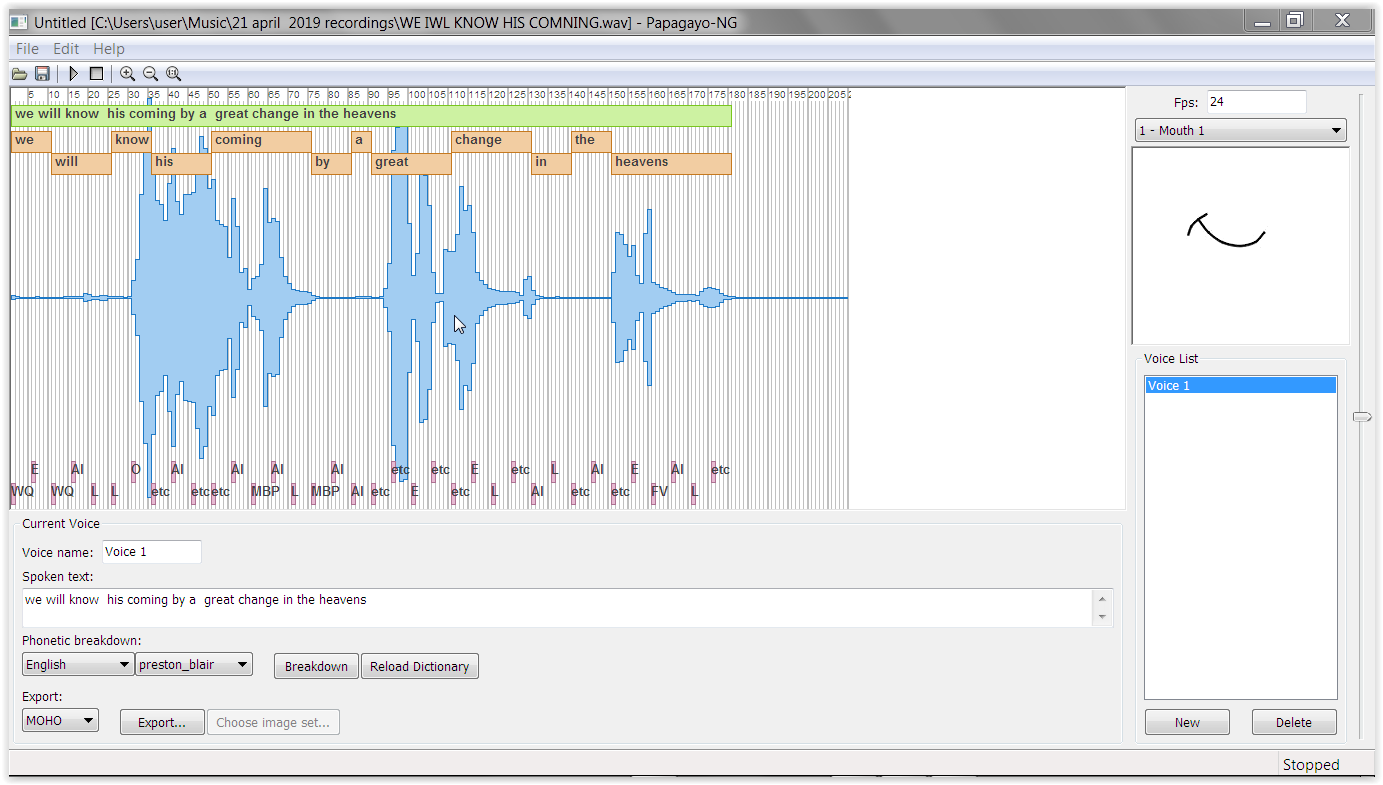
someone recently did so for Iclone with great results that are better t than the basic audio lipsinc in Iclone.
Anyone up to the challenge??

Daz 3D is part of 
Connect
DAZ Productions, Inc.
7533 S Center View Ct #4664
West Jordan, UT 84084
Licensing Agreement | Terms of Service | Privacy Policy | EULA
© 2026 Daz Productions Inc. All Rights Reserved.
Comments
Some people use that Faceshift software with Motionbuilder
Does it export genesis compatible mouth lipsinc back to DS?
I find no info on that option.
I have no idea but seen videos people have done with DAZ figures
there is this also Blender users use
https://github.com/DanielSWolf/rhubarb-lip-sync
All these programs etc just translate sound to viseme or phoneme lists
Thing is you need some sort of a script or spreadsheet that will basically fill in the morphs in a duf using the generated values, I have no doubt Casual could probably do it or a few others familiar with creating scripts etc.
And there is Poser with Talk Designer too
https://www.daz3d.com/forums/discussion/179731/script-for-load-files-moho-for-lip-syncing-in-daz-studio
It can - if it was setup properly with the model correctly - anything in motionbuilder can be "roundtripped" back to DS by exporting a FBX . This includes any morphs or rigged/bone based movement
Couldn't you also use the speech recognition feature of Anilip 2? https://www.daz3d.com/anilip-2
sorry for the double post. Was trying to edit and made a new post in error.
@pdr0 thanks!! I see it has already been done for Papagayo.
BTW I have the venerable Mimic Pro3
(works up to Genesis 2 using exported Poser Cr2)
Mimic Live for 64 bit studio.
IIRC poser "talk designer" only useful with the
Horrible smith micro Native figures.
I prefer any option that allows adjusting the phoneme postions after they are generated by the imported audio.
I can layer on My Facial expression animation using graphMate.
I really love the simple Design of Papagayo as I have used with anime studioOn My Mac Computer
Thanks
well if you can import a Geneis figure or later dual quart converted to Triax and saved as a cr2 it is actually possible to write your own phoneme files for it
I never did it but its doable I think its an XML file
and for the latter
not DAZ studio but I might yet find a way to get it into DAZ studio,
I can get it into Poser as an FBX lying on its back and the lipsync works
getting that as a loadable file in DAZ studio trickier
Mimic pro for Carrara does have the abilty to move and resize the generated NLA clips on the timeline but not so easy going from Carrara to DAZ studio
and it works with Genesis 3 & 8 using Misty's Blended weight node name fixed characters
and
you can use any NLA clips anything keyframeable etc can be saved as an NLA clip
oh its easy
Fenric's BVH exporter works perfectly
I do some renders later
BVH export from Carrara, the eyes try to blink but that's possibly Carrara not understanding ERC
Interesting experiments Wendy.
I have an 1850 frame animation rendering that will take a "few days" on my rendering machine.
That leaves my other two PC 's available for testing the Daz studio lipsinc options.
I have already tested the Papagayo & free Daz script
(linked by pdr-0) with Genesis 2 in DS 64 bit
I have already tested Mimic Pro 3 using a G2 exported Cr2 to generate PZ2 file for Genesis 2
and Daz Mimic live with pre-recorded audio Via My 16mm dual head pin jack option from one PC sound card to another.
I may test the 32 bit basic lipsinc if I can get my old 32bit DS4.7 to not immediately crash after opening.
If not ,I am moving on the G8 in 64 bit to compare mimic live and papagayo as I assume most here have moved beyond G2/3
I will test mimic pro 3 with Daz millenium 3 only to show what a great loss it is to not have that complete solution updated for true genesis functionality.
I dont have anilip.
I have Poser pro 2014 But wont be bothering with the "talk designer" and editing XMLfiles etc.
I will post a detailed video of all of my results and findings/opinions sometime next week.
Try doing it by hand.
Analyse the voicetrack for accents and rhythm. DAM dadam dam dam dam DAM.
Hit the big accents. Biggest mouth shapes there.
Hit the B's, M's and P's. Lips should be closed there.
Best show teeth for sharp S-es.
Simplify the rest. ("phrasing") Don't do lots of mouthshape variations unless you have to. Favor the expression.
Clear L's, T's and N's should show a palatal tongue.
Lead the gestures by four to eight frames.
Lead the eye and brow accents by two to four frames..