3DL lighting trick I found
 RAMWolff
Posts: 10,366
RAMWolff
Posts: 10,366
Hi,
I know most folks use iRAY these days. Not to say there are not folks that still use 3DL...
Ever have a scene that you just can't get enough light into? Have you tried the Intensity Scale just under the Intensity slider?
Now you have to be careful... Set your Intensity to about 1 or 2 (yea, that low) and then set the Intensity Scale to 1.01.
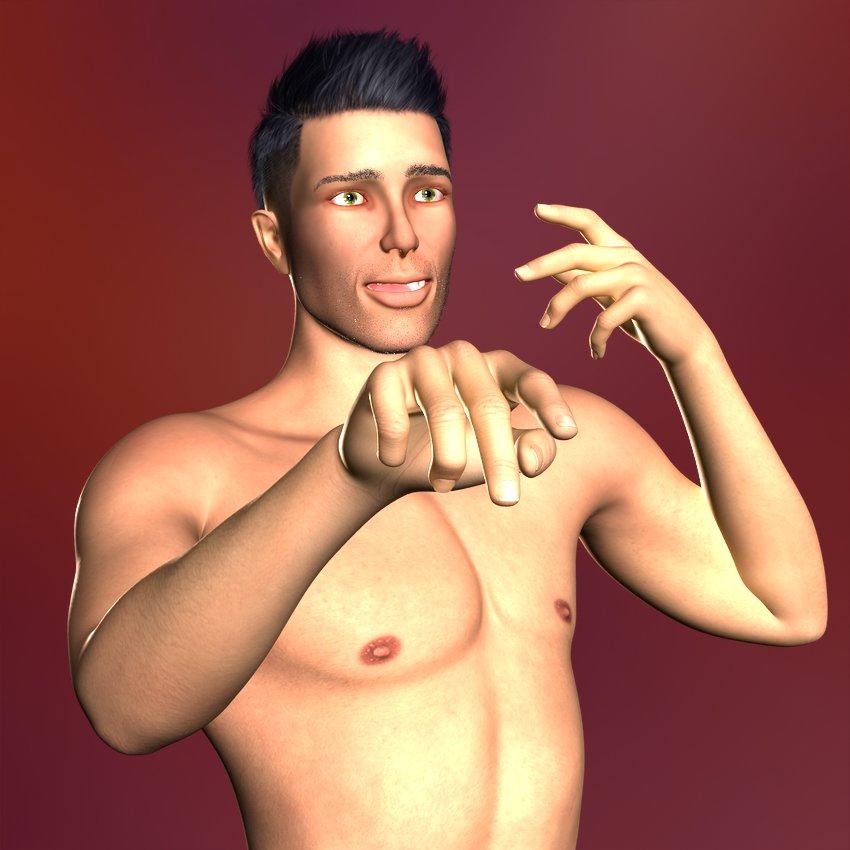
The quicky render below is using one rim light set to Intensity 4.9 & Intensity Scale set to 1.01 and one Fill light aimed a ways back but in front at Intensity 2 & Intensity Scale 1.01
I always struggled getting enough light into a 3DL scene that lit up the skin nicely. Found the solution! At least for my needs...

Daz 3D is part of 
Connect
DAZ Productions, Inc.
7533 S Center View Ct #4664
West Jordan, UT 84084
Licensing Agreement | Terms of Service | Privacy Policy | EULA
© 2026 Daz Productions Inc. All Rights Reserved.
Comments
for this one I dialed the intensity scale of the main light source up to 2 and then i had about 3 or 4 fill lights with intensity scale 1 and intensity itseld dialed down to 30%
So yes that slider is worth trying around with
What the relation among Intensity and Intensity Scale? I thought that Total Intensity = Intensity x Intensity Scale...
Looks really nicely lit Linwelly! Like how the light is playing off of the fronds too!
Kind of, the exact relationship I don't know, but increasing Intensity scale is especially helping once you have your light intensity already at 100%
Additionally it seems to work better with light that is not coloured exact white (for my main light in the image above I used a slight yellow tint)
It's probably a good question to ask in this thread : https://www.daz3d.com/forums/discussion/55128/3delight-laboratory-thread-tips-questions-experiments/p92
Just remember, so folks don't get turned off, keep your Intensity LOW when you have Intensity Scale up to 1.01 or higher or your scene and characters will look very blown out with light. When experimenting with it I had my intensity set up to 100 and the Intensity Scale up to 2 and it looked like Gino looked like he had a light bomb going off inside his mouth and eyes. Very interesting effect but not what I was after! LOL
You might want to use negative light at times too, yet another good thing about biased renderers:) Here is a DS standard spotlight with a light intensity of -100. Color is red, so hue gets inverted, naturally.
Oh, that's pretty darned cool!
It is! A couple of years ago I had a theory about reversing my workflow...literally. That's when I found out. I flooded a scene with 10000% white ambient light, then started removing it little by little in a controlled manner using negative spots and distant lights, you know, the opposite of light sculpting . I did produce a bunch of anti-art renders
 . Now I just make regular non-art;)
never tried that one @Sven very cool!
Anti art is the new art, didn't you know ?
Works well with the 3DL AWE too... Had a point light that I wanted to really light up Gino's face with and since I still struggle with with lighting under the AWE set up. I just put a point light in the scene, scaled it larger and set it to a full Intensity 100% and set the Intensity Scale to 3500 and since it has a really nice fall off for that particular type of light it really did wonders getting the front of the body and face lit nicely!