Pose distorting hair
 Taoz
Posts: 10,289
Taoz
Posts: 10,289
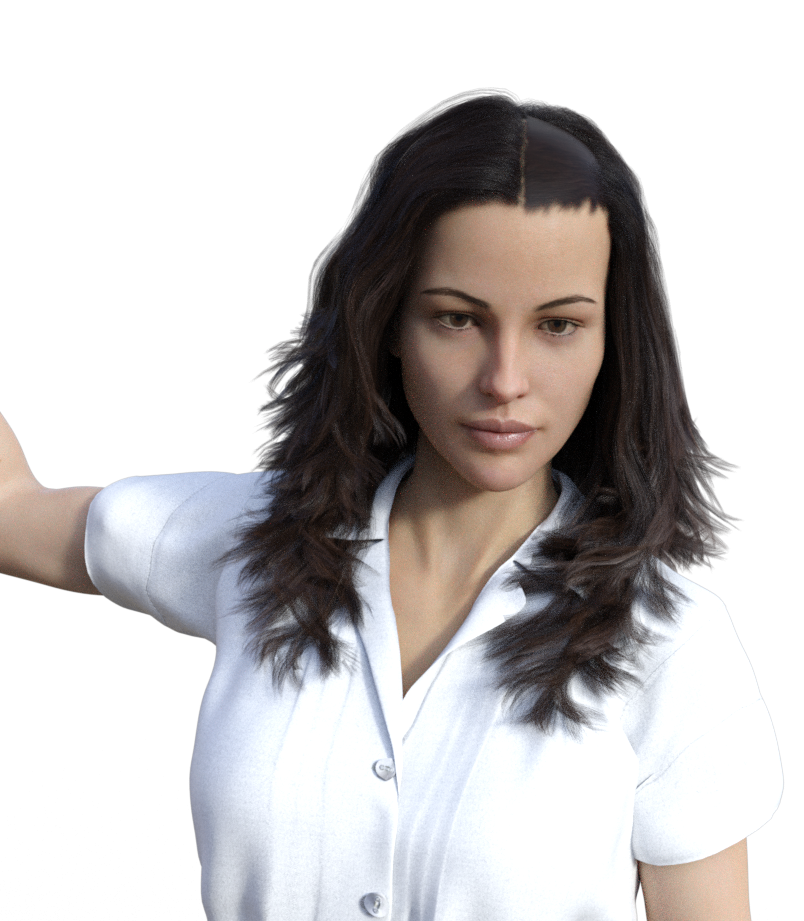
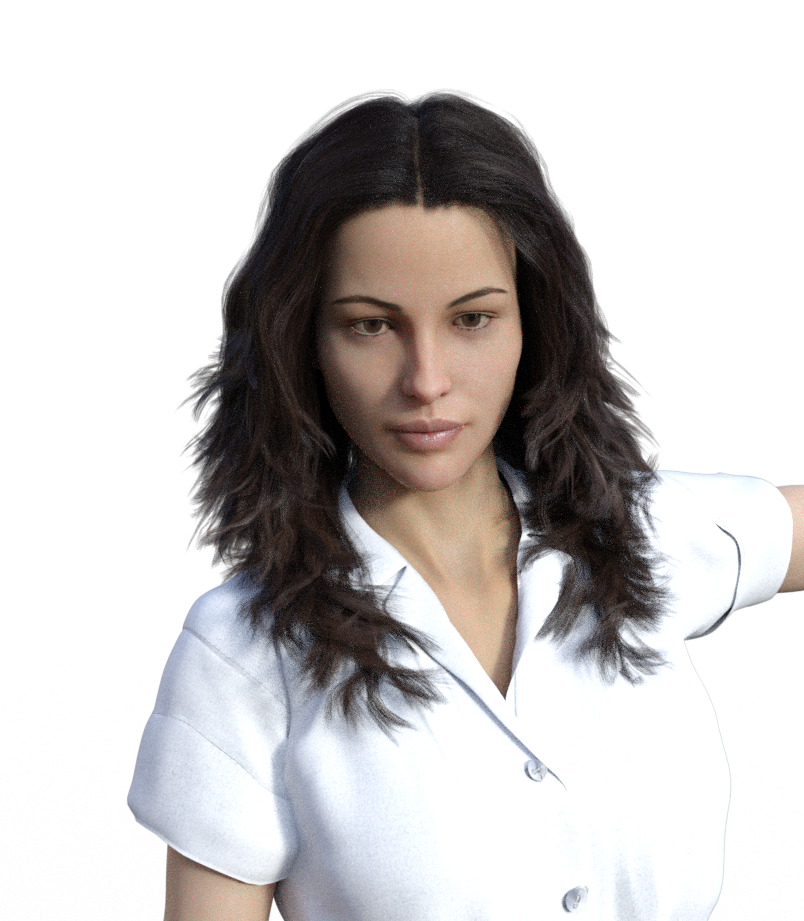
I have the Addison hair loaded on V8, but when I apply a certain pose, the hair gets distorted. The mirrored pose included works fine. Any idea what can be causing this?
Post edited by Taoz on

Daz 3D is part of 
Connect
DAZ Productions, Inc.
7533 S Center View Ct #4664
West Jordan, UT 84084
Licensing Agreement | Terms of Service | Privacy Policy | EULA
© 2026 Daz Productions Inc. All Rights Reserved.
Comments
I guess some JCM (Joint Controled Morph) is acting crazy.
To check for JCMs I would unfit the hair, selecting Property Groups "All" in the Parameters pane and typing JCM in the Filter Box on top to see the list of JCMs that got projected from the genesis figure to the hair. Make shure to chack Show Hidden Properties in the Parameters pane Option Menu (the lined button on top of the pane).
If the hair is "unfitted" you can now manualy turn up the JCMs, I would have a look at Right Collar JCMs first, by the looks of it I suspect one of these. If you found the culprit JCM delete it, don't worry a new propper one will propably get created by the time you fit the hair to the genesis figure again.
Thanks very much, that fixed it.
Actually it was the jJCMCollarFwd_L that did it. Not sure how to delete a JCM though so I tried deleting the bone for the affected hair part, and that worked. Later I found out that just changing the JCM dial from 0.76 to 0.00 while the hair is fitted to V8 works as well.
Well deleting the bone is an option but it will stop the hair from conforming to the figures collar movement. I don't know how important that is in your case with the shoulder long hair, but in general I guess the issue with the hair product should be reported with a support ticket.
Lately I saw generated morphs on conforming figures that once set to "autofollow" and the item is fitted to the figure, the sliders change to be hidden and you can't manipulate them anymore. That is the the case at least with the current DS version 4.10.0.123.
Using the filter box with "JCM" while the hair is fitted to the figure and having a look at the Paramters pane "Currently Used" group, would have been the best option to find the active character shape morphs and JCMs triggered by the current figure pose.
To delete a property like the JCM or whatever right-click the Parameters pane and in the menu activate Edit Mode. Then right-click the actual property slider and choose Delete Property. It will only delete the slider in the current scene the actual DSF file stays in the data folder on disk. If you reload the scene the morph and will come back getting loaded from the content library again if you don't delete or overwrite the actual DSF file.
I thought if you delete the one JCM with the distortion and have a new one generated the issue could be fixed. Another method would be to export the working JCM on the other side as OBJ and load it with Morph Loader Pro and the "Swap on X axis" option. Next I think you could simply go to File>Save As>Support Asset>Save Modified Assets to fix the hair JCM in general not just for the current scene. Be careful with Save Modified Assets it will show you a list of properties and assets detected as "modified" in the scene that will get updated. To be on the save side you could also use File>Save As>Support Asset>Morph Asset but its tedious to do all the correct settings in the save dialog to actualy overwite a morph DSF file instead of saving a new one.
OK. Wasn't sure if the problem was with the pose or the hair.
I'm using 4.10.0.123. With this hair the sliders are greyed out (which means hidden I suppose) when fitted, all can be manipulated but, with one exception (the right counterpart to the one in question here), only those with a value other than 0 (currently used) have any effect.
Will swapping that way work corrrectly? Most hairs are more or less asymmetric and have asymmetric bones as well I suppose.
No, swapping was a bad idea with asymmetric hair geometry. I guess you could also use the Transfer Utility instead of having the JCM autogenerated by fitting the hair after deleting the original JCM. With the Transfer Utility and the JCM(s) set as favourits in the Parameters pane on the genesis figure you can select to only "transfer" Morph Targets in the dialog with the setting "Favourits and Sub-Components" with Source: Genesis Figure, Target: Hair. With the Projection Options like Distance Tolerance on top of the Transfer Utility dialog you can then control how the morphs from the genesis figure marked as Favourits gets projected onto the hair. With this you may get better results than with the autogenerated ones.
OK. I think I'll raise a support ticket first though to see if they can fix it, they're probably better at it than I am.
Thanks!