Question on Daz Shaders: Nature Shaders
 wscottart
Posts: 447
wscottart
Posts: 447
Product: https://www.daz3d.com/nature-shaders
I have to manulally download this product. Once installed do I have to access it in my content library? I often cannot find the iray shaders in the surfaces tab, as the shader preset folder doesn't show up in there.
Post edited by wscottart on

Daz 3D is part of 
Connect
DAZ Productions, Inc.
7533 S Center View Ct #4664
West Jordan, UT 84084
Licensing Agreement | Terms of Service | Privacy Policy | EULA
© 2026 Daz Productions Inc. All Rights Reserved.
Comments
Also had to manually download this shader, and now I begin to wonder if there are other products I have overlooked as I often buy many at once, and sometimes don't get around to using them for months. They show up in my product library, The product page has a link for download manager, but it does not show up in the down load manager.
https://www.daz3d.com/homestyle-2-iray-shaders
Why do you have to manually download? Regardless, if it is properly installed in will show in the Content Library pane - all content that appears in a CMS-drive view (the Presets tabs, Samrt Content, Categories, and Products) willa lso appear under Daz Studio Formats, Poser Formats, or Other Import Formats (as appropriate).
No, they are not showing up in the daz installer. I have to manually download them. Yes, I can locate them in the shader presets after manully installing them. I'm not arguing that the prouct is not great. I'm saying this product and some others are not showing up in the dim installer (or lets say they are not showing up in mine).
add this one as well: Shimmer and Lace Iray Shaders
What are your Download Filters, the button on the elft above the (empty) package list?
I am clicking on the download and install link on the products download page. That launches daz installer with the filter set for the products sku #. As you can see the product is not there. I did manually download and intall it successfully though. along with the other two products I mentioned in this thread.
At any rate just sharing this out, as I said I was able to manually download and install them. Will just be a lot more careful in the future to make sure everything I purchase gets downloaded.
I don't ever use the Download and Install link, so I'm not sure if it can override the Download Filters - it's worth checking them.
well as I begin my research here I am uncovering some more products that don't respond or show up in the Dim. Here is one I bought back in December of 2014 that I had no ideal was not installed.
Ornamental Walls & Ceilings. It doesnt have a product page any longer, but at least its in my products and has a manual download link still available.
found another one: https://www.daz3d.com/vintage-tiles-and-carpet-shaders. Not showing up in dim.
It seems like its only the shader products that are sometimes not appearing in my dim for some reason.
Never mind...found this one.
You should try to install them with Daz Connect.
Always listen to Richard Haseltine. He knows a lot! Follow his advice to check the Download Filters in DIM.
Every product in the Daz Store should have one or more DIM "tags" that indicate what kind of product it is, whether it can be downloaded with Daz Connect, or what software it works with. For example, products to install into modern versions of Daz Studio should have the tag of "Daz Studio 4.5+". To see those products in DIM, you need to put a checkmark on the Download Filter "Daz Studio 4.5+". Then DIM knows that you want to see those files. Tutorials often have only the tag "General", because video and PDF tutorials do not install as content within Daz Studio. If you don't have a checkmark on the "General" tag in DIM Download Filters, you won't see your purchased tutorials in DIM. The purpose of Download Filters is to let you hide whole categories of files you are not interested in. For example, if a product comes with both Daz Studio and Maya files, you may not use Maya and may not want to install those, so don't check the Maya Download Filter.
Some products are incorrectly tagged. Even if you have the "Daz Studio 4.5+" tag checked in DIM Download Filters, if a product is missing that tag, you won't see that product in DIM unless it has an additional tag that you do have checked in your DIM Download Filters.
Nature Shaders is one of those incorrectly tagged products, in my opinion. The only tag it has is "Connect Available". It should also have the "Daz Studio 4.5+" tag.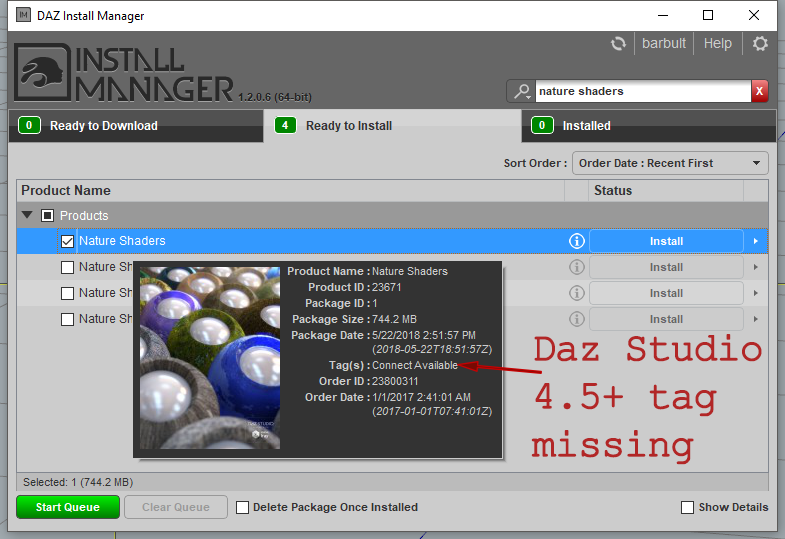
The tag "Connect Available" just means that it also (in addition to DIM) has a Daz Connect installer. I always have "Connect Available" checked in my DIM Download Filters, to catch tagging errors just like this. I suggest you do the same.
Awesome, thank you barbult.That is exactly the information I needed. I can now see all of them in my dim. The visuals made a world of a difference thank you. I believe I have learned an awful lot today thank you all for putting up with me.
Great! Thanks for letting us know that you got it all resolved. I'm glad my advice was helpful.
Dim regular is missing products that I purchase and I constantly check my filters. I never thought to try "Connect Available" since I don't use Connect. In fact, I completely changed my routine and went to downloading everything manually because of the problem. Thanks for the tip.
I've submitted a help request to report the missing tag on the Nature Shaders product.
Request #291824 Nature Shaders is missing the Daz Studio 4.5+ tag in DIM
Great adivice, Now I see what he was trying to say. =)