Dynamics & Animation Questions?
 Faeryl Womyn
Posts: 3,741
Faeryl Womyn
Posts: 3,741
I want to do an animation, I would like to use dynamics in it, however, I seem to recall this might be a problem.
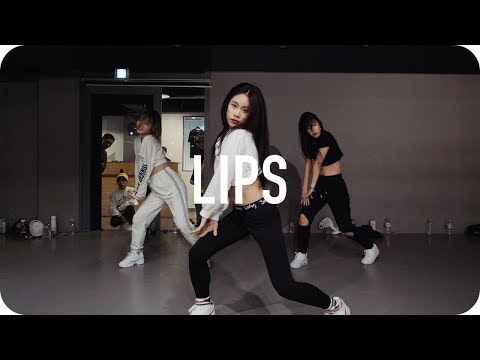
In the video below, the first two sets of dances are wearing clothes that would require dynamics to move in the same fashion, yet the long hair also needs dynamics to move natural, as they do in the video. I will have other questions regarding dynamics and animation in the future, so will use this thread.
The questions...
With the current Daz 4.10 and the use of Animate2 as well as the dynamic plugin (not dforce, computer can't handle it) can two dynamic items be in the same scene and both work properly?
Does Daz currently have the ability to make, particularly long hair, flow like it does in the video?

Daz 3D is part of 
Connect
DAZ Productions, Inc.
7533 S Center View Ct #4664
West Jordan, UT 84084
Licensing Agreement | Terms of Service | Privacy Policy | EULA
© 2026 Daz Productions Inc. All Rights Reserved.
Comments
Yes!
No, you would need to animate it. Even using dForce would probably require manual adjusting.
That's a bummer about the hair, will have to see if Blender can do it, though that program tends to leave me confused most times...lol Thank you for the information.
I use the geometry editor to create a dynamic surface on hairs below the roots add dforce modifier then just slide dynamic strength to zero on the nondynamic surfaces, and no self collision
also you need to bake aniblocks to the timeline, need to own animate2
The OP indicated that her computer cant handle Dforce thus Adding a
Dforce surface below the hair rootswould not be an option for her it seems.
The leaves Optitex.
Even if she somehow has Optitex formatted clothing
??I am not sure even optitex would do well with sudden directionalchanges of the dancers.( I still use optitex as well)
The long flowing hair moving dynamicly, in Daz studio,
is a nonstarter,and moving the entire project to blender would
require extensive knowledge of the program of course.
yes dynamic hair and clothes will work the same time as long as they are Optitex compatible and you have the full license version of the Optitex dynamic clothing plugin
But like i said you weill need to have Optitex. dynamic supported clothing and hair in order for them to work in the dynamic plugin and poser dynamic clothing does not work with the Optitex lugin. I recomemened you get have the full version of the animate2 plugin as well for reasons Wendy stated,
under the dynamic plugin tab set everything dynamic under the collide settings for all items you want to animate dynamically just remember that the dynmaic clothing plugin requires Optitex. supported clothing and hair. if you have the skills to create your own dynamic mesh for the Optitex.plugin the better. there has not been any new dynamic clothing hair released since dforce has been released though. and you don't need a super computer to use deforce you just have to work with the asettings alittle I can use a 2,4Ghz with a gtx720 in a dell laptop and i can render animation with deforce. just keep things tight . I start with default settings and character first . run my animation with deforce with nothing else in the scene Then build your scene around the characters after your run your deforce simulation and save it as a preset bake it to the timeline and save as animated scene your ready to render .no super computer required.
But the Optitex. dynamic clothing plugin requires Optitex supported mesh
The results of the dynamic clothing plugin kind of looks like this rendered out Good Luck
Deforce does give you more options because you can use anything hair obj or clothing, props etc as long as you have the geometry so you can convert the item to deforce weight-mapping making the item deforce compatibility . I'm still learning that part of deforce myself
I found its best when working with deforce to start simple, no major setting changes . I usually found to high or low gravity settings with make the clothing blow apart. same for to much to wind dialed in if you use a wind node.
the big issues i have with deforce is i usually have to much stuff going on in the scene at the asame time and then when i run the deforce simulations I run out of gpu. So if I have a lot of clothing and props in the scene I'm trying to run the deforce simulations in. that will eat up the gpu and give me issues so my work around I found to create my deforce animation first and then build the scene around it once you simulated the clothing and hair,. save it as a animated preset or scene after you have run & completed your deforce simulation and saved it as a preset you won't be using the gpu for deforce once the preset has been created &saved and that will leave the gpu resources free to render. its a little work thats why i said you will need to start simple first.
You don't need animate2 to save your animations. You can save them as pose presets.
But you need animate2 to save aniblocks , and aniblocks can be created and used not just for character mesh but anything your animating. you have to have animate2 to bake the animation to the timeline so if your building and creating scenes and you keep reloading the scene over and over animate2 is required for baking as well
you also have to have animate2 to add and remove subtracks which is really needed when working with animation & aniblocks
Uhmm... no! You can bake to the timeline with the lite version.
True, but you can also save as partial pose presets;)
you can save with limits animated pose presets using the daz native timeline as well, So please don't take my word for it. you can try creating a animated character with dynamic clothing & baking a dynamic clothing item to the unlicensed version of animate-lite and save it to reuse in animation. I believe new lesson will be learned . :)
Sorry Ivy, not sure what you mean. What limits are you referring to? And I'm talking about animated partial pose presets, not aniblocks.
So this means it will not work? I'm sure you're right, I don't use aniblocks and I don't have animate2. Always use the timeline, that way I can seamlessly combine my pose presets. IMO aniblocks are very hard to combine seamlessly. Which is funny, because that's what they are made for;) Bottom line: You know animating in DS, but for people new to it, there are other methods than using aniblocks.
Yes you are correct. there are many methods, there is hand keyframing method. using the native daz timeline one ketframe at a time. and then you can use BHV (Biovision Hierarchy) motions capture files imported into the daz native timeline, along with motions builder MDD files (requires animate2) you can also import cr2 and pz2 poser files that hold motions presets and lastly there are MI and FXB motions files All are much harder to edit in the native daz timeline than in animate2. Animate2 has timeline tools built in such as graph for bending & motions curves. keyframes you can see and edit on the timeline. subtracks to add extra motion or corrections motions files too. It is my understanding is that Aniblocks are deigned for new users to get off the ground quickly to be able to drop and drag pre made motions files to a timeline. they were never meant to give the same quality results as a Autodesk timeline that has a great IK & fk editing and other pinning tools . a new user would not grasp the daz native timeline as quickly as the animate2 timeline IMO but that is is just my opinion. My best use for the native daz timeline is using it with the puppeteer to make hand premade motions file I can save as aniblocks for reuse. and lately setting up deforce that I can bake the results and move over to the animate2 for further scene creations.
you can play around with animate lite. but there really is not much you can accomplish with it until you unlock all the tools with the license version
Due to two of my posts being removed, some questions I asked were missed. I will try one last time. A heads up...my computer will not allow me to use dforce. I did install it and tried to use it, yet each time a window popped up telling me I can't due to my computer not being good enough. That's a summation as I can't remember the exact wording of the message. It had to do with either my graphics card or the cpu, not sure which. Also I do have the full version of the opitex dynamic plugin.
#1 Does anyone know of any current tutorials for animate? most of the one's I have found are old and not that great a quality.
#2 I saw a video not long ago, albeit an old one, that you can save puppeteer presets? I could be wrong on that wording. How does one do that and can they be used in animate and how can they used?
#3 I am confused about the saving pose presets for animation. It's my understanding a pose preset is a single pose, like for a render of an image. If I am wrong about this, please explain and how I could use this for animate lite? It was also mentioned I can bake to animate lite timeline?, as well as partial pose presets?
#4 I have had no success in finding a good tutorial on how to use the timeline and/or explain everything it does. Does anyone know of any tutorials that can help?
I am familiar with the various formats for animations, the most notable being bvh files. I am still figuring out how best to use all those files and get them to work with a chosen model properly. I was thinking of taking those animations and putting them on a model, make all the corrections and resave to my Don't Share runtime...I have multiple runtimes. However I need animate2 for that. With any luck, I can get the full plugin after the holidays, unless I win a few more contests and get it earlier...lol
#5 Final question...
I was wondering how best to use toon shaders. I know about most of the one's out there for Daz, have several of them wishlisted. What I don't know is how to use them with animation. I know how to use shaders for a single rendered image, however, I have no clue how they would work if applied to an animation or if that can even be done. If a toon type shader is used, would it have to be done for each frame or will it work on a whole animation that is being rendered?
I want to take a moment and thank all of you for the help you have given me so far, it's greatly appreciated.
#3 When you save as a pose preset you can choose save as a single frame or save as an animated time range from frame x to frame y:
When you expand the figure by clicking on that little triangle, you can uncheck the bones you don't want to be included in the preset. If you check everything but the root (figure) node (translations), the position of the figure will not be saved with the preset, so it won't move the figure when applied.
Animate lite will allow you to save an aniblock to the timeline by right clicking the gray field and choosin the proper options from the pop up.
You can then go to the timeline and edit that aniblock if needed.
If you're serious about animating in DS, you will probably need animate2 as well as the keymate/graphmate plugins. Will make life so much easier;)
#5 Yeah it works for the scene, doesn't matter if a single frame or animation;)
That's great and I have graphmate and keymate wishlisted. I don't know much about them yet, only read a little bit, since I am working to get animate2 first. My current computer is 10 yrs old, though my daughter and her husband did their best to make it as workable for me as possible within my financial ability. Software is not an issue when I win online contests with images, it's a big help. If I want to get animate2, I will need to win two or three contests to have enough, unfortunately Daz and has great sales going all the time and I am really bad at saving. Who knows, maybe I will win the lottery next weekend...lol
Most of my questions have been answered and everyone has been so helpful. I will be saving this page to my computer for reference.
One question I still need answered is in regards to puppeteer. I still don't know how to save the animations created with it. I did some searching yesturday and only found references that you can save, not how to save. I do know that when you use puppeteer, the animations take place in the timeline, so I wonder if you can save it through there as the present mentioned earlier?
Just thought of another question and something I have been checking to see what works.
Does Daz have a lip sync plugin? I know of the old one and the fact I need to use the win32 version of Daz to access it, unless I am confusing plugins, which is quite possible. Be that as it may, I want to be able to use lip sincing to help speed up some of the animation I will be doing and that would definitely help.
yes need 32 bit version due lo licensing you can save as poses
there is mimic live but it's a pain as won't use files only live sound and workarounds like stereomix audio playback a real PITA to do.
Also there is Anilip I don't have that uses text to speech.
https://www.daz3d.com/anilip
it can apparently be adjusted manually to match a real speech recording in advanced mode giving you the viseme poses generated from the text to speech if you don't like the robotic voice.
I have AnilLip wishlisted, however from the video they showed it was very jittery so could not properly evaluate how good it would be for me. I have both 32 and 64 installed on my computer as a result of reading that I would need it for lipsnyc. Basically I only need to get the animations down properly, audio is no issue as I would only take to Audacity or Sony Vegas to remove the audio and input better one's, they also allow for multipe streams of audio and loads of adjustment possiblities. Once I have everything lined up properly, Sony can render out the animation with audio to create the film.
The viseme can help, though having a lipsync file for the models used would certainly speed things up. I plan on using Genesis2 models. I have mimic config files for them but do not know if that will work with lipsync, haven't tested it yet?
Because I am being stubborn about Daz being able to create a complete film in the program, except for audio, I am looking for all possiblities to make it happen, as well as making the tutorials on how I did it. My son is a gamer and records his playing for youtube, so he knows quite a bit about using Audacity and Sony Vegas, knows about audio streams and can help me with that. It's the Daz part I need help with for getting what I want. My first project is going to be an intro and an outro for my youtube channel, as they are less then a minute. Next step from there is going to be a music video, which will run anywhere from 3 to 5 minutes depending on what I decide on, then I will start on the film I have planned, which will be done like an anime with episodes, due to the limits of my income and computer, then there is my age and health.
So far I have gotten lots of help on this thread, understand a couple things better. The only thing I need help with now is understanding lipsync and puppeteer better to create as well as alter certain animations as well as save the animations.
By the way Wendy I am subscribed to your youtube channel, love the progress you have been making. Oh forgot to mention, I will be using real voices, already have 5 people lined up to help with that.
Hi the included lipsynch in the 32 bit version of Daz studio will
work for the genesis 2 figures
I use them for most of my animation work
here is the G2 male in a test I did last year
with some audio well known in the anime community
LOL I love that show, only seen the movies though, not the series.
So, I have power pose, puppeteer, lipsync, animate lite and the timeline. Can I use all of these at the same time to create a scene and save/render the animation? I mean I know i can render it, however with an older computer I would have to get everything created and tested out, that is why I need to save as I go along, then once I have everything, restart the computer and make sure nothing else is running, so I can bring all those saves in, placed on the timeline and render it out? I am more interested in the animations then audio, other then to match up the two, since I will be doing the audio with another program as I mentioned above.
LOL wondering if I am making this sound more complicated than it is.