How was this done?
 Fae3D
Posts: 2,888
Fae3D
Posts: 2,888
I saw this gorgeous piece of art not long ago in the gallery. It's by TinaVogt:

After seeing this, I bought the set, Princess of Atlantis for MFD https://www.daz3d.com/princess-of-atlantis
Mine... doesn't look like that. It looks flatter and the colors look a lot less brillient. It looks even worse from any other angle.
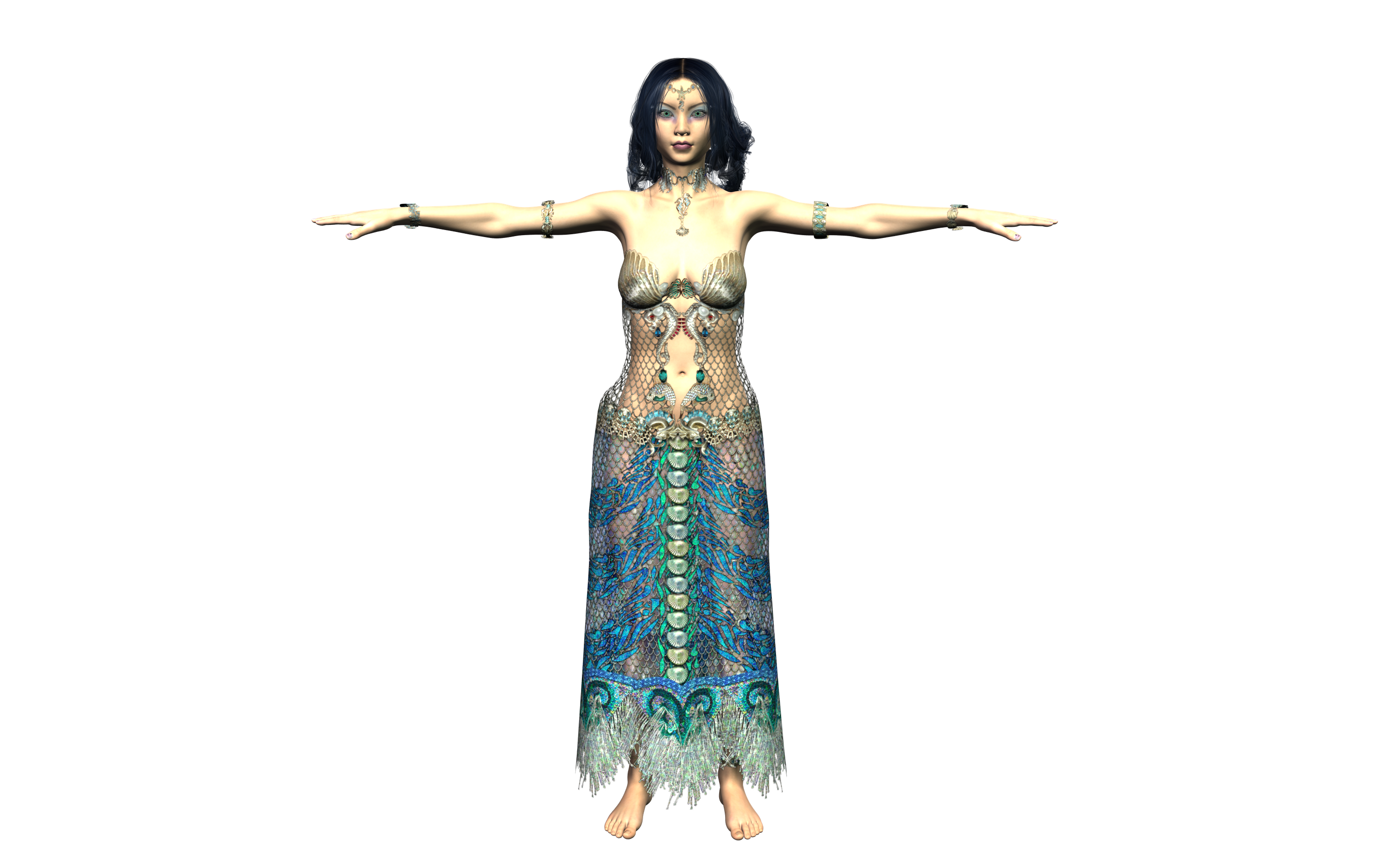
Does anyone know what makes the difference here? Is is something simple I'm missing? Or is this a case of heavy postwork?
Edi: I know the light I used was bad, but trust me, I've tried many, and this is actually one of the more vivid ones.

Daz 3D is part of 
Connect
DAZ Productions, Inc.
7533 S Center View Ct #4664
West Jordan, UT 84084
Licensing Agreement | Terms of Service | Privacy Policy | EULA
© 2026 Daz Productions Inc. All Rights Reserved.
Comments
To first sea what is going on you need to mimic the original lighting conditions. Its a broad “window” in front her a bit to her right. Look at the eyes, it gives you a clue.
There is also an ambient lighting around her so it’s maybe an hdri set. Make a new render using that and a bit closer. TinaVogt probably changed the shader from the looks of it, but it is hard to see in your render.
edit : Checking the original outfit it seems its an older one for 3dl, I think its been converted to iray. There is an option to convert a material to iray, called iray uber base or something like that.
Yep, my first guess is converted to Iray.
https://www.daz3d.com/rssy-3delight-to-iray-converter
Have you rendered it in 3DL or Iray?
The first image looks like Iray, so my guess is the dress has been converted to Iray.
And which is fairly simple. Just add Iray Uber Base shader to the dress. And maybe some surface adjustments too, especially for the gloss.
Ah, perhaps it is Iray. I don't use Iray, and since the outfit was for 3Delight, I just assumed that was the engine used.
There is one other thing, though. Her necklace and bodice seem to cast a shadow, while mine clings flatly to the model. Any idea how that may have been achieved?
One of the reasons so many people like Iray is because the shadows are automatic. If there's light, there's shadow. But with 3DL, you have the option of lights that do not create shadows. It's been a very long time, and I was only just getting the hang of it when Iray came out, but I think you need to select the light(s) and set one or more parameters to get the shadows.
(Or come over to the dark side, and use Iray…! Muahahahahahaha)

You could check out awesurface, if you dont want to go iray just yet, it has some functionality that might get closer to the look you saw. Its for 3delight.
Or use 3DL and a nice HDRI with IBL-Master;)
You will get vivid and soft looks with Iray that are rarely achieved in 3DL; I'd try Iray if you can.
Either way, 90% of getting a good render is LIGHTING. I know people harp on it. Because it's true.
I also strongly suspect some sort of softening postwork.
Gallery images is most likely postworked, so I would never base purchase decision on their look.
For many people out there, purchased items are just the starting point to the final image.
Since this product was created before Studio 4 and you wish to use 3Delight, I would suggest that you play with the bump and displacement parameters. DAZ has had to change how these sliders work from Studio 3 to Studio 4. They have also had to change the Specular Strength parameter. It takes a lot less strength in 4 then in 3. By playing with bump and displacement you will find that there will be more depth. Bump will add the darker lines that you see in the textured portions and Displacement will add thickness to the netting. Playing with Specular strength will control the sparkle so that you can reduce your light strength which will bring the richness of the colors back into your render. I would recommend that you render with gamma. This technique will also give you a slight increase in richness. You will have to set your color textures, for the elements in the scene, to a gamma of 2.2 on the surface tab. In render settings turn gamma correction to on and set the gamma to 2.2. I would also add a skydome. I find this http://www.sharecg.com/v/45996/View/11/Poser/SkyDome dome to work quite nicely. I find these UberEnvironment2 lights to work well as well. http://www.sharecg.com/v/61695/gallery/21/DAZ-Studio/UberEnvironment2-Light-set5-for-SkyDome-Exp5. Also I would review the user guide, for this product, Metalized Glass Shaders for DAZ Studio, http://docs.daz3d.com/doku.php/public/read_me/index/15595/start. It will give you insight on how to get those specular results you see in iray Pay close attention to Age of Armour's recomended render settings. You will see that my recommendation for a sky dome while rendering with 3Delight comes from this user guide. You can get comparable results with 3Delight as you do with iRay but you just have to understand the work necessary for each type of render package. Both renderers are good, one is just a bit easier to use out of the box. And as everyone has said lighting is very important and each type of lighting you use, HDRI, IBL, Uber you need to do some work to understand what happens to the scene. Hope this helps you.
The attached image is an example of what each of the steps I mentioned would do if you so choose to perform the action. The thumb is only a partial. You will need to click on the image to see all five actions applied.
Its an old set so set up for Poser's Firefly not DS's 3dl. DollyGirl's advice is good, there's no one click solution you will need to do somework for it to look good in 3dl.
Hi,
Tina answered your question (In German) on how it was done in the gallery comments. Loosely translated, they used Iray in Daz Studio to render the image, which means they converted the materials to Iray ("Ich habe im DazStudio mit Iray gerendert"). It really is a lovely image and they did an awesome conversion of the existing materials.
Trish
Wow, thank you everyone! So much great advice and good ideas here. I can't really use Iray, as my computer takes forever (as in days) to render it, and often crashes part way through. I don't know enough about it to know why, I just stick to 3Delight because of it. I've never really understood bump or displacement, but this really helps, I'll work on it. And I'll try some more different light systems, too.
Thanks, also, for translating!
You guys are great, this is why I love the Daz community so much. Everyone's always so quick to help each other.
If I get a good render, I'll post it here. But it sounds like I've got a lot of work to do!
I use Iray all the time and before I got my PC this past summer with a graphics card, I was on an iMac that didn't have an Nvidia card and it could also take days for a high res Iray render. The way I got around it sometimes, and this just depends on what you're using the photos for, but when I was doing storyboards and didn't need a 2K photo, I would go in the render tab, click all and at the top there's the dimension boxes (I'm not at my computer with Daz so I can't give specific names). But in the top line of two boxes, set to the first number (W) to like 486 and hit tab, then the second box (L) will automatically fill in with the proper pixel formula for the dimensions of your frame. Now you won't have a high res image, but if you look at it on your phone or on a 1080 monitor, you can see it all a-okay. These renders that if I set the W number to 1920 would take 40-50 hours to render, it could render sometimes in 20-30 minutes. So give that a try and see what you can do at least for a test!
Actually it was updated in 2014 with a native DS version for G1 and G2.
Well, it certainly isn't the best of light sources, but with everyone's help I got a MUCH better looking outfit!
I also used the bump and dispacement changes on the hippocampus, and it made all the difference, trust me. From flat to scaley in an instant!
Thank you so much everyone, I learned a lot!