Urban Sprawl 3 and the invisible truck
 Griffin Avid
Posts: 3,822
Griffin Avid
Posts: 3,822
https://www.daz3d.com/urban-sprawl-3
When switching between Texture shaded and Iray, I've come to accept that quirky things happen and there's an expected diffference in what I get.
Even the Iray preview and the actual render can look very different. But! I think this is the first time I've come across an invisible truck.
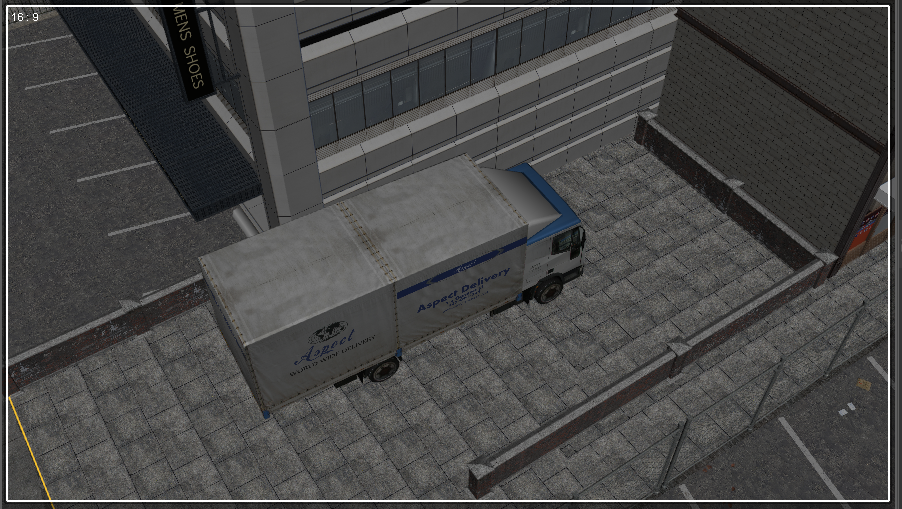
In normal Texture-shaded mode, there is no truck.
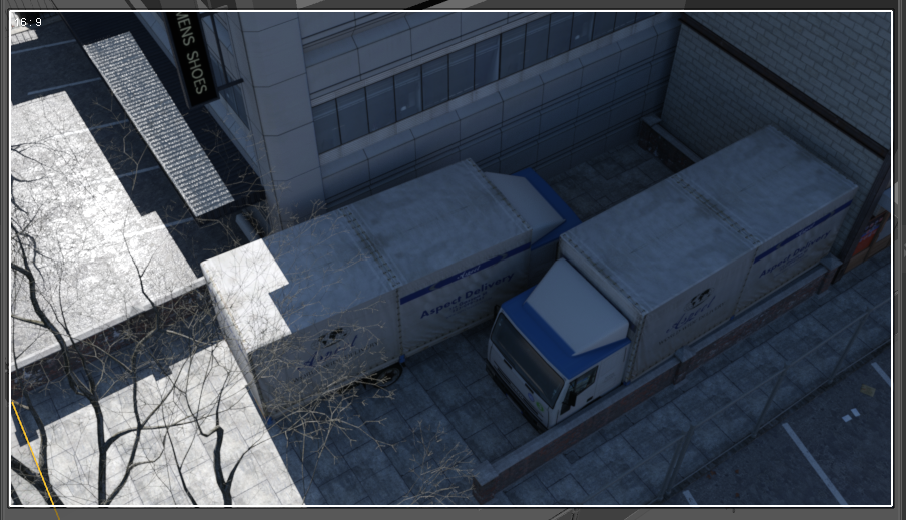
In Iray preview, the truck appears and it cannot be selected - with any tool, not even The Surface Tool seems to see it.
I don't see it listed in any of the Scene Tab props.
I'm not even sure how this is possible...
I suppose it's composed of all Iray shaders and...and, man listen, I have no idea why this happening.
Maybe my Daz install is still spooked from Halloween.
Texture Shaded, normal Daz
Iray Preview mode

Daz 3D is part of 
Connect
DAZ Productions, Inc.
7533 S Center View Ct #4664
West Jordan, UT 84084
Licensing Agreement | Terms of Service | Privacy Policy | EULA
© 2026 Daz Productions Inc. All Rights Reserved.
Comments
Oh snaps, I just noticed, the tree is/was invisible too.
Hi,
I have the product. Can you please share the .duf scene file so I can check :D.
AHA...so I moved the truck and tried to get it away from the "ghost truck" and POW! It was right there, in the new location.
Checking further, I discovered that this second, ghost truck, is a (node) INSTANCE of the same truck, just reversed.
It's listed in the SCENE TAB as being parented to the "real truck".
Stonemason is a clever vendor. Removing that extra instance, cleared the extra truck.
@3DMinh
I was typing while you were replying and didn't see that.
Apparently, I've solved another mystery.
Thanks.
I thought it might be an instance.
One of the properties you can give an instance in the parameters tab controls whether it appears in the preview or not - useful if you're using instances to produce a forest of trees (or a streetful of trucks, I suppose) from a single original.
Thanks for that nugget of info, Chris.
But what about the tree?
The tree- I didn't worry about. I'm sure it's the same thing.
In context, two trucks would have been hard to explain.
setting instanced objects as invisible should make navigation of the scene a little smoother for users
Neat trick. I'm actually amazed at your city sets and how massive they are and filled with so much detail. You even did the texture on the concrete/cement floor to have intricate patterns of urban wear. And there's graf on walls, in places...In another thread I spoke about making my own police car and POW you included them in these sets. And and I love the steps you did for the shared museum and police station building.
I would love to see you tackle a SUPER-futuristic city...Like the kind you could make from your greebles, but with lots of joined buildings.
(walkways, bridges, thru-traffic tunnels, arches, top-heavy buildings, etc...)
If your future sets take us 100 years in the future, what could you do with a 1,000?
Pretty please....