Skin rendering partially see-through - Resolved
 Worlds_Edge
Posts: 2,153
Worlds_Edge
Posts: 2,153
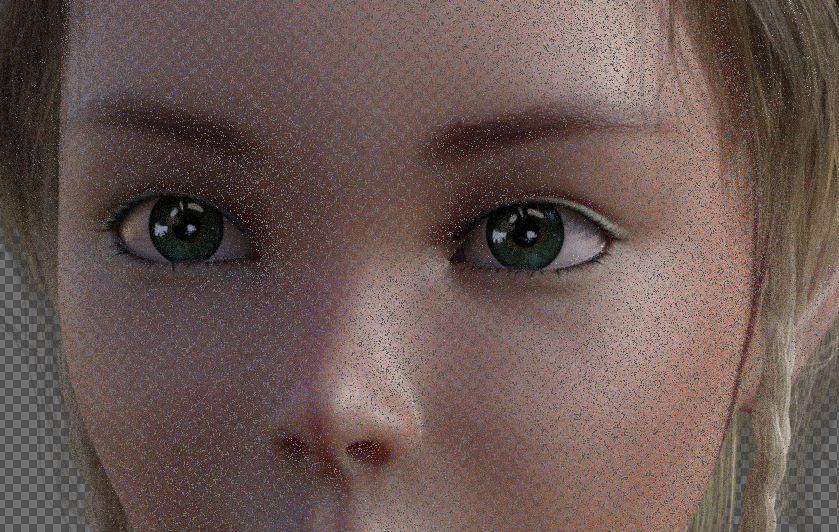
One character's skin is rendering partially see-through. At first I thought I was just getting black speckles, but if I put a different colored background behind the render, in photoshop, the speckles turn the color of the background. If I use her skin on other characters, I get the same issue. If I use another character's skin on her, it's fine.
Is this something I need to submit a ticket about, or is there a skin surface setting I should be tweaking?
Post edited by Worlds_Edge on

Daz 3D is part of 
Connect
DAZ Productions, Inc.
7533 S Center View Ct #4664
West Jordan, UT 84084
Licensing Agreement | Terms of Service | Privacy Policy | EULA
© 2026 Daz Productions Inc. All Rights Reserved.
Comments
This is an Iray issue, fixed in the version in the current Public Beta - you can workaround it in 4.10.0.123 by selecting the skin surfaces and setting the SSS type to Monochrome in the Surfaces pane, or simply by rendering with Draw Dome on in Render Settings.
Thanks Richard. I had an eye issue with another character and was told to do the same. I didn't realize it was the same issue. I'll keep a note of the fix :)