Change render dimension
 xavierator
Posts: 161
xavierator
Posts: 161
in The Commons
Dear,
I'm trying to render my scene with a big resolution.
I just see this options in render settings:
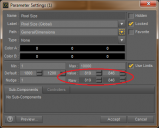
But when I change the values they return to default values and only the raw values are changed:
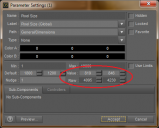
How can I change de values in order to render and create a TIF/PNG image or how can I export a raw file ?
Thanks a lot, Xavi

Daz 3D is part of 
Connect
DAZ Productions, Inc.
7533 S Center View Ct #4664
West Jordan, UT 84084
Licensing Agreement | Terms of Service | Privacy Policy | EULA
© 2026 Daz Productions Inc. All Rights Reserved.
Comments
That's the camera dimensions? Or where are you trying to change the size?
You'd usually go to the Render Settings, and change the size there; it only works if you have a different ratio than "viewport" selected, as that will always give you the pixel size of the viewport.
The Render SEttings are also where you can change the type of image.
Check out http://docs.daz3d.com/doku.php/public/software/dazstudio/4/userguide/chapters/rendering/start
or the "Rendering" tutorials in the video section https://www.daz3d.com/help/help-daz-3d-video-tutorials
I just find one way to increase the render resolution, see the attached image:
I would like to change resolution for my needs, but I can't change the W and H pixels for my self, only choose some of the the presets.
It will take a lot of time, at this moment 15 minutes and 0 % rendered
I have a computer with this features, is enough ?
Intel Core i3-4010U 1.70GHz
16GB RAM
W7 64 bits
Thanks, Xavi
Make sure you turn off Constrain Proportions before entering size values.
Dear,
Resolved, there is a custom preset to enter free values:
Thanks, Xavi