Converting Tannenbaum WW2 Uniforms to Daz

dan2050dan2050 Posts: 36
edited June 2018 in The Commons

I have a set of Tannenbaum WW2 German Uniforms. Has anyone been able to import these into Daz Studio and if so can you show how to do it?

Offsite link removed

Post edited by Richard Haseltine on

Comments

  • Richard HaseltineRichard Haseltine Posts: 108,040

    It looks to be a Michael 4 set, so it should be possible to AutoFit it to Genesis (from where you can AutoFit it to Genesis 2 or Genesis 8) - the AutoFit dialogue will pop-up when you load the item and, if it doesn't fit on load, fit it to the figure. Props will need to be manually positioned and parented to the appropriate body part.

  • dan2050dan2050 Posts: 36

    The boots come together as a pair. Should I position the figure into the boots and then parent them somehow? I'm not sure how to make that work.

  • FSMCDesignsFSMCDesigns Posts: 12,843
    edited June 2018

     I picked up the U.S. Army uniform this past weekend and they work fine in DS. You will need to setup a poser runtime folder since the install path is in poser format and then link to it in your DS directories. I used it on M4 and just applied Anagenesis to the textures. It autofitted fine ti G8, but as usual the boots warped a bit


    soldier.jpg
    825 x 862 - 732K
    Post edited by FSMCDesigns on
  • SimonJMSimonJM Posts: 6,067

    I've used them, IIRC it neeed some wholesale tweaking of the, especially, glossy surafces, such as leather to work well in 3Delight.  Not sure how a direct use in Iary would fare.

  • OdaaOdaa Posts: 1,548
    SimonJM said:

    I've used them, IIRC it neeed some wholesale tweaking of the, especially, glossy surafces, such as leather to work well in 3Delight.  Not sure how a direct use in Iary would fare.

    For Poser based clothing in Iray, the safest bet is to use a cloth shader kit that includes a "keep current maps" option-Parrotdolphin and DesignAnvil both have products that do this. There's a leather preset in DS's base Iray shader preset settings that is okay for leather and and beaten or dull metals, if you correct the color in the diffuse channel afterwards. For polished metals, glass, and costume jewelry with opaque unfaceted "jewels" the base iray options are also useful. I recommend the car coat options for the jewels.

  • CybersoxCybersox Posts: 9,275

    I've used these sucessfully as well using both G8 and G3 figures, though, as noted by others, the boots tend to distort a bit.  I used Vyktoriah's Convert it! for all the cloth and metal bits and... I can't remember which leather shader I used on the leather, but I've been playing with SickleYield and Riversoft's new 3DL to Iray convertor and I suspect the results would be nearly identical. The one thing that is a nuisance on these is all the badges,pins, armbads, etc. that are separate objects, so you have to make adjustments to all of these when you change poses.

  • OdaaOdaa Posts: 1,548
    Cybersox said:

    I've used these sucessfully as well using both G8 and G3 figures, though, as noted by others, the boots tend to distort a bit.  I used Vyktoriah's Convert it! for all the cloth and metal bits and... I can't remember which leather shader I used on the leather, but I've been playing with SickleYield and Riversoft's new 3DL to Iray convertor and I suspect the results would be nearly identical. The one thing that is a nuisance on these is all the badges,pins, armbads, etc. that are separate objects, so you have to make adjustments to all of these when you change poses.

    Can you parent them to different bones so they will follow them?

  • AllenArtAllenArt Posts: 7,175

     I picked up the U.S. Army uniform this past weekend and they work fine in DS. You will need to setup a poser runtime folder since the install path is in poser format and then link to it in your DS directories. I used it on M4 and just applied Anagenesis to the textures. It autofitted fine ti G8, but as usual the boots warped a bit


    Still looks pretty darn good :)

    Laurie

  • FSMCDesignsFSMCDesigns Posts: 12,843
    edited June 2018
    AllenArt said:

     I picked up the U.S. Army uniform this past weekend and they work fine in DS. You will need to setup a poser runtime folder since the install path is in poser format and then link to it in your DS directories. I used it on M4 and just applied Anagenesis to the textures. It autofitted fine ti G8, but as usual the boots warped a bit


    Still looks pretty darn good :)

    Laurie

    Thanks Laurie blush

    The beauty of this set and the other WW2 clothing sets at rendo is they look good, but are not to resource heavy like lots of addons here that are made for the newer figures, namely the WW2 outfit here. I was playing with this scene a littl bit more and after tweaking the materials a bit more and fixing some small details I was able to render a full scene with 2 groups and 20 instances in 6 minutes and I still have plenty of head room to add more to the scene. As for converting to iray, that was easy peasy, the only things that needed converting were the metal parts and M3 skin which was a one click solution with anagenesis.

    I have been wanting to do more WW2 scenes and now I am even more pumped for that knowing I have more of the resources to make it happen


    soldiersww2.jpg
    1511 x 870 - 2M
    Post edited by FSMCDesigns on
  • Serene NightSerene Night Posts: 17,704

    Why was the link removed? It would be helpfult to look at the problem by reading the product info.

  • CybersoxCybersox Posts: 9,275
    Odaa said:
    Cybersox said:

    I've used these sucessfully as well using both G8 and G3 figures, though, as noted by others, the boots tend to distort a bit.  I used Vyktoriah's Convert it! for all the cloth and metal bits and... I can't remember which leather shader I used on the leather, but I've been playing with SickleYield and Riversoft's new 3DL to Iray convertor and I suspect the results would be nearly identical. The one thing that is a nuisance on these is all the badges,pins, armbads, etc. that are separate objects, so you have to make adjustments to all of these when you change poses.

    Can you parent them to different bones so they will follow them?

    Yes, but they have a habit of drifting relative to the clothes themselves. What works fine in one pose may be visibly floating above the surface in another and sticking through the surface to be partially buried in a third.  It only takes a few seconds to tweak it per shot, but I wouldn't even try animating it. 


  • FSMCDesignsFSMCDesigns Posts: 12,843

    Why was the link removed? It would be helpfult to look at the problem by reading the product info.

    It's my understanding that links can only be posted when asked for, like looking for this product, etc.You can just google tannenbaum poser and his store will come up.

    I take it the issue is that the user is new and not used to installing things other than what DAZ provides or isn't directly labeled for a specific figure. Tannenbaum products are in the poser runtime format and only for M4/V4

  • dan2050dan2050 Posts: 36
    I take it the issue is that the user is new and not used to installing things other than what DAZ provides or isn't directly labeled for a specific figure. Tannenbaum products are in the poser runtime format and only for M4/V4

    Yep. So I am still slightly unclear about the process I need to follow to get this to work. I know it does.

    So the files come in a Runtime folder.

    Inside that the .obj files are all in \Geometries\Tannenbaum\German_Infantry

    and then in Runtime/Libraries there is Character, Pose and Props.

    I know I can import .obj files using the import function but obviously things aren't quite right.

    So when you say I should link to the folder in my DS directories do you mean add an alias and where abouts should that alias be?

    If someone has the patience for a bit of a step by step I would be most grateful.

  • OdaaOdaa Posts: 1,548
    Cybersox said:
    Odaa said:
    Cybersox said:

    I've used these sucessfully as well using both G8 and G3 figures, though, as noted by others, the boots tend to distort a bit.  I used Vyktoriah's Convert it! for all the cloth and metal bits and... I can't remember which leather shader I used on the leather, but I've been playing with SickleYield and Riversoft's new 3DL to Iray convertor and I suspect the results would be nearly identical. The one thing that is a nuisance on these is all the badges,pins, armbads, etc. that are separate objects, so you have to make adjustments to all of these when you change poses.

    Can you parent them to different bones so they will follow them?

    Yes, but they have a habit of drifting relative to the clothes themselves. What works fine in one pose may be visibly floating above the surface in another and sticking through the surface to be partially buried in a third.  It only takes a few seconds to tweak it per shot, but I wouldn't even try animating it. 


    hmm smoothing modifier+collide with clothing?

  • FSMCDesignsFSMCDesigns Posts: 12,843
    dan2050 said:
    I take it the issue is that the user is new and not used to installing things other than what DAZ provides or isn't directly labeled for a specific figure. Tannenbaum products are in the poser runtime format and only for M4/V4

    Yep. So I am still slightly unclear about the process I need to follow to get this to work. I know it does.

    So the files come in a Runtime folder.

    Inside that the .obj files are all in \Geometries\Tannenbaum\German_Infantry

    and then in Runtime/Libraries there is Character, Pose and Props.

    I know I can import .obj files using the import function but obviously things aren't quite right.

    So when you say I should link to the folder in my DS directories do you mean add an alias and where abouts should that alias be?

    If someone has the patience for a bit of a step by step I would be most grateful.

    I am an ex poser user, so i have a large poser runtime and I just pointed DS to it. Try this thread, it gives a step by step install process http://www.dreamslayerartworks.com/vB3/showthread.php?10985-Using-Poser-Content-in-Daz-Studio


  • CybersoxCybersox Posts: 9,275
    Odaa said:
    Cybersox said:
    Odaa said:
    Cybersox said:

    I've used these sucessfully as well using both G8 and G3 figures, though, as noted by others, the boots tend to distort a bit.  I used Vyktoriah's Convert it! for all the cloth and metal bits and... I can't remember which leather shader I used on the leather, but I've been playing with SickleYield and Riversoft's new 3DL to Iray convertor and I suspect the results would be nearly identical. The one thing that is a nuisance on these is all the badges,pins, armbads, etc. that are separate objects, so you have to make adjustments to all of these when you change poses.

    Can you parent them to different bones so they will follow them?

    Yes, but they have a habit of drifting relative to the clothes themselves. What works fine in one pose may be visibly floating above the surface in another and sticking through the surface to be partially buried in a third.  It only takes a few seconds to tweak it per shot, but I wouldn't even try animating it. 


    hmm smoothing modifier+collide with clothing?

    No smoothing modifier unless you want metal pens, badges, epaulets, etc. to bend unnaturally like cloth.  Keep in mind that most of these aren't things that are supposed to lay flush to the surface of the uniform or bend with the flow of the fabric... if they were, it would have made more sense to just make them part of the clothing's textures.  My usual trick is to parent a null to the uniform for each item and then parent the items to that, so that there are a lot of fine adjustments that can be made just by adjusting the doubled set of XYZ axises, the same trick I use for body piercings.     

  • OdaaOdaa Posts: 1,548
    Cybersox said:
    Odaa said:
    Cybersox said:
    Odaa said:
    Cybersox said:

    I've used these sucessfully as well using both G8 and G3 figures, though, as noted by others, the boots tend to distort a bit.  I used Vyktoriah's Convert it! for all the cloth and metal bits and... I can't remember which leather shader I used on the leather, but I've been playing with SickleYield and Riversoft's new 3DL to Iray convertor and I suspect the results would be nearly identical. The one thing that is a nuisance on these is all the badges,pins, armbads, etc. that are separate objects, so you have to make adjustments to all of these when you change poses.

    Can you parent them to different bones so they will follow them?

    Yes, but they have a habit of drifting relative to the clothes themselves. What works fine in one pose may be visibly floating above the surface in another and sticking through the surface to be partially buried in a third.  It only takes a few seconds to tweak it per shot, but I wouldn't even try animating it. 


    hmm smoothing modifier+collide with clothing?

    No smoothing modifier unless you want metal pens, badges, epaulets, etc. to bend unnaturally like cloth.  Keep in mind that most of these aren't things that are supposed to lay flush to the surface of the uniform or bend with the flow of the fabric... if they were, it would have made more sense to just make them part of the clothing's textures.  My usual trick is to parent a null to the uniform for each item and then parent the items to that, so that there are a lot of fine adjustments that can be made just by adjusting the doubled set of XYZ axises, the same trick I use for body piercings.     

    Good to know, I'll have to try that trick myself!

  • grinch2901grinch2901 Posts: 1,247
    Cybersox said:
    Odaa said:
    Cybersox said:
    Odaa said:
    Cybersox said:
    No smoothing modifier unless you want metal pens, badges, epaulets, etc. to bend unnaturally like cloth.  Keep in mind that most of these aren't things that are supposed to lay flush to the surface of the uniform or bend with the flow of the fabric... if they were, it would have made more sense to just make them part of the clothing's textures.  My usual trick is to parent a null to the uniform for each item and then parent the items to that, so that there are a lot of fine adjustments that can be made just by adjusting the doubled set of XYZ axises, the same trick I use for body piercings.     

    Why not a rigid follow node? You select the polys you want the rigid item to be "glued" to and create a rigid follow node. Then you parent the item to the rigid follow node. Lets you be very precise in where you put things and they follow the cloth very closely.

  • dan2050dan2050 Posts: 36

    I am an ex poser user, so i have a large poser runtime and I just pointed DS to it. Try this thread, it gives a step by step install process http://www.dreamslayerartworks.com/vB3/showthread.php?10985-Using-Poser-Content-in-Daz-Studio

    I had poser and some artifacts before I discovered Daz. Its great to know I can re-use them. Thanks for that, it was relatively easy.

    I couldn't quite make them fit Gen8, but they are good for Gen3 with some tweaking. Less flexible but will do.

    I see there is a Gen8 U.S. Uniform, so I'm going to grab that and hope that eventually some of the other uniforms come out for Gen8 at the level of detail supplied by Tannenbaum.

  • CybersoxCybersox Posts: 9,275
    Cybersox said:
    Odaa said:
    Cybersox said:
    Odaa said:
    Cybersox said:
    No smoothing modifier unless you want metal pens, badges, epaulets, etc. to bend unnaturally like cloth.  Keep in mind that most of these aren't things that are supposed to lay flush to the surface of the uniform or bend with the flow of the fabric... if they were, it would have made more sense to just make them part of the clothing's textures.  My usual trick is to parent a null to the uniform for each item and then parent the items to that, so that there are a lot of fine adjustments that can be made just by adjusting the doubled set of XYZ axises, the same trick I use for body piercings.     

    Why not a rigid follow node? You select the polys you want the rigid item to be "glued" to and create a rigid follow node. Then you parent the item to the rigid follow node. Lets you be very precise in where you put things and they follow the cloth very closely.

    I haven't really played with rigid follow nodes, but what I've read seems to imply that they tend to affect the shape of the attached object more when the item that they're attached to is something that changes size when flexxed. That seems like something you wouldn't want on somthing that's supposed to be rigid like a metal badge, but that's based on the rather sketchy information I have.  Once again, this is the curse of DAZ's continued lack of interest in providing even basic documentation on almost all higher functions of DS, but I'll give them a try in the future.

  • Richard HaseltineRichard Haseltine Posts: 108,040
    Cybersox said:
    Cybersox said:
    Odaa said:
    Cybersox said:
    Odaa said:
    Cybersox said:
    No smoothing modifier unless you want metal pens, badges, epaulets, etc. to bend unnaturally like cloth.  Keep in mind that most of these aren't things that are supposed to lay flush to the surface of the uniform or bend with the flow of the fabric... if they were, it would have made more sense to just make them part of the clothing's textures.  My usual trick is to parent a null to the uniform for each item and then parent the items to that, so that there are a lot of fine adjustments that can be made just by adjusting the doubled set of XYZ axises, the same trick I use for body piercings.     

    Why not a rigid follow node? You select the polys you want the rigid item to be "glued" to and create a rigid follow node. Then you parent the item to the rigid follow node. Lets you be very precise in where you put things and they follow the cloth very closely.

    I haven't really played with rigid follow nodes, but what I've read seems to imply that they tend to affect the shape of the attached object more when the item that they're attached to is something that changes size when flexxed. That seems like something you wouldn't want on somthing that's supposed to be rigid like a metal badge, but that's based on the rather sketchy information I have.  Once again, this is the curse of DAZ's continued lack of interest in providing even basic documentation on almost all higher functions of DS, but I'll give them a try in the future.

    Props parented to a rigid follow node should move with the polygons that define the node, rotating and scaling as a whole. They aer designed to avoid the shape itself changing.

  • grinch2901grinch2901 Posts: 1,247
    edited June 2018

    I've used rigid follow nodes in several situations and never seen them scale (except if you scale the model as a whole). Buttons are always button sized, for example.  I did do a belt buckle once that rotated in the Z direction whenever I twisted the abdoemen, which I never really understood that well. But the shape and scale was always maintained.

    EDIT: The pic below shows what I mean. The buckle in the center is fine, twist the abdomen left or right (either side pic) and you can see how it's rotating.  All the buttons are also rigid follow nodes and they do fine.

    Belt Twisting.jpg
    1338 x 477 - 182K
    Post edited by grinch2901 on
  • CybersoxCybersox Posts: 9,275
    Cybersox said:
    Cybersox said:
    Odaa said:
    Cybersox said:
    Odaa said:
    Cybersox said:
    No smoothing modifier unless you want metal pens, badges, epaulets, etc. to bend unnaturally like cloth.  Keep in mind that most of these aren't things that are supposed to lay flush to the surface of the uniform or bend with the flow of the fabric... if they were, it would have made more sense to just make them part of the clothing's textures.  My usual trick is to parent a null to the uniform for each item and then parent the items to that, so that there are a lot of fine adjustments that can be made just by adjusting the doubled set of XYZ axises, the same trick I use for body piercings.     

    Why not a rigid follow node? You select the polys you want the rigid item to be "glued" to and create a rigid follow node. Then you parent the item to the rigid follow node. Lets you be very precise in where you put things and they follow the cloth very closely.

    I haven't really played with rigid follow nodes, but what I've read seems to imply that they tend to affect the shape of the attached object more when the item that they're attached to is something that changes size when flexxed. That seems like something you wouldn't want on somthing that's supposed to be rigid like a metal badge, but that's based on the rather sketchy information I have.  Once again, this is the curse of DAZ's continued lack of interest in providing even basic documentation on almost all higher functions of DS, but I'll give them a try in the future.

    Props parented to a rigid follow node should move with the polygons that define the node, rotating and scaling as a whole. They aer designed to avoid the shape itself changing.

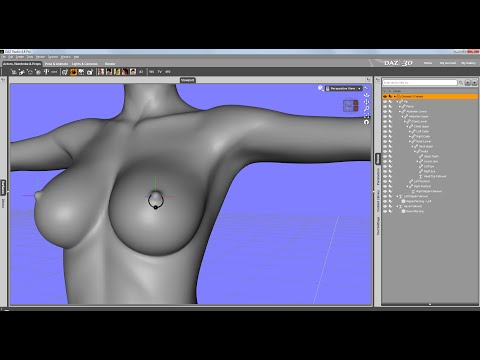
    Okay, most of what I know about RFNs for this kind of application comes from this video  (uses grey form figures but they are "nude" so may not be safe for work).  Since the polygons that the item is parented to are shifting relative to the surounding polygons, there's still a noticeable bit of drift relative to the main figure with the ring in the video rotating as the breast is raised.  Correct me if I'm wrong here, but the problem I see with using the RFN for something that has a very definite "real world" position relative to the fabric of a uniform is that you would have to parent it to the uniform mesh, not that of the base figure, and most outfits' fit morphs tend to do a lot more stretching and distorting of the base mesh than fabric in the real world would do.  That is to say, that the fabirc of the Tannebaum uniforms, when fitted to a Genesis figure, would behave more like spandex than the heavy linen and cotton fabrics that they're supposed to be made of.  That could be minimized by only fitting the add-ons to the uniform once it's been posed but that seems kind of defeats the whole point as it's faster to just go in and adjust them manually.  That said, I'm basically extrapolating in the vacuum left by the lack of vetted documentation, but I'm not one of those people who has hours and hours to sit and simply play with the software in the hopes of possibly finding a faster way to do things when what I'm currently doing seems to be just as fast, if not faster.    
Sign In or Register to comment.
