
Daz 3D is part of 
Connect
DAZ Productions, Inc.
7533 S Center View Ct #4664
West Jordan, UT 84084
Licensing Agreement | Terms of Service | Privacy Policy | EULA
© 2026 Daz Productions Inc. All Rights Reserved.
Comments
Not the only one; I was not wholly struck with the clothing with the Pro bundle, and with the need to take more care over purchases found it quite simple to pass on Owen, despite the character looking quite good.
I think the Elijah 7 sales must of been good enough that Elijah 8 in the form of Owen 8 was too good to pass up.
My suspicion as well. Especially since Elijah 7 Pro Bundle was so low in price (I paid $3.10 for it) that it was almost a giveaway.
I couldn't resist- Super Owen 8! I used Supernatural brows on him instead of his own. I didn't change any of his morphs. I think he could be quite versatile. There's some postwork for color, tone and glow, but nothing that changed his features.
I usually don't enjoy the male characters as much as the female characters, but I'm a big fan of Owen 8! I think he's great - and that face! *swoon* ! I'm looking forward to seeing more renders of him. :)
what suit is that, if I may ask?
That's from xtrart3d's store at Rendo. He had his whole store on clearance recently for $3.50 an outfit. No idea why, but this was one of the few male items over there and I really like it. Many different colors too. It's my first time using it. Haven't tried messing with the symbol or anything yet.
I am still waiting on Aiko 8 and The Girl 8. Hope they will appear.
Looks like it is $9.75 now. Looks like a cool suit though. Would definitely be curious to know if the maps can be edited in Photoshop to change the Gold seams, etc.
Owen and Charlotte. Stoped at 26% because I'm impatient. lol
I was also confused why that entire store was marked as clearance, including the Genesis 8 stuff, and it is still marked as clearance. It was either a clever marketing exercise (in which case it worked as many of the stores items have been high in the "What's Hot" list other there for several days now, even though they returned to normal prices a week ago), or the PA intends to shut down his content there and move elsewhere.
I am not complaining though as I picked up a few items.
I really like the contents of the bundle for the most part. I’m excited to have more male goodies to work with.
This is gorgeous!
Looks like there are three material zones- Base Bodysuit, Base Sides and Base Trims. I think they can be changed. I'll definitely play with it. I love supersuits!
Thank you, my friend! That's very sweet of you to say! :D
Adam Driver (and Tom Hardy) both have sort of downturned eyes. Owen, Adam and Tom all have similar eyebrows and roughly similar face shapes. Owen's nose, while not as distinctive as Adam Driver's, is a bit large. His mouth is all wrong for Adam Driver, though, which is why I saw a resemblance but felt like everything that made Adam Driver look interesting had been removed.
Aw, they updated the ad copy on Owen's main page . Shouldn't have said anything.
With the extra bonus, plus some additional pro bundles I don't have, I may still end up getting the pro bundle here (more appealing to me than Lucas personally). But I have to say I am a bit disappointed about the facial hair on the textures in the pro pack. A lot easier to add hair than remove it, and I wouldn't mind if it wasn't on all of them. The pros probably outweight the cons in the end, but I'm glad people pointed it out in this thread so I know what I'm getting.
I also wouldn't have noticed the Tom Hardy resemblance without this thread, now I can't not see it
Yeah, that one is already really close to the Flash or Reverse Flash, so if the maps allow for some decent modifications to redesign the seams and trims, that would be ideal to me.
He looks quite a bit like Tom Hardy.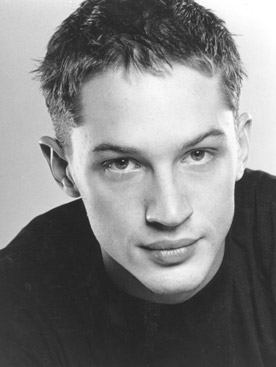
Yes. A bit. But a younger Tom Hardy perhaps.
Yeah I agree in fact I logged in here just to see if anyone else noticed and if not to suggest to any Star Wars - The Last Jedi fans that Owen with not many adjustments would make a fantastic render of any scene from the movie featuring Ben Solo.
I like him, comes off as very sincere and naive. Don't really care for the pretensious hipter vibe, though. I must be old, everytime I see one in the store I work at I get this gut reaction to back hand him and tell him he has to earn the beard, oh well.
But I hope the next character theme is Atomic Blonde (Charlize Theron 8) and James Bond (Daniel Craig 8) or at least give us a bloody Superhero theme character bundles. I'm still waithing for dforce capes and cloaks. Bring me Chris Hemworth 8!
O.M.G... I'd pay full price for that bundle, especially if it included his costumes for Thor, Ghostbusters, and Star Trek. (New one coming out, apparently, where he reprises his role as George Kirk. Hopefully a lot more screen time than in the first.) A girl can dream.
I know, I know, one can hope for all 3 brothers to be part of the bundle. Australia sure know how to grow them!
Birthday Portrait: I chose Owen 8, Elijah 7, Scott 6, Gianni 6, & Leo 7.
I really INTENSELY wish that Daz would develop a metadata category or type tag or SOMETHING that tells you which items are diffuse overlay and which are regular materials. I kept double clicking his tattoo materials and being confused about why they weren't applying. And then suddenly, it occurred to me that they might be doing the same thing with those that they're doing with makeups these days. And they were. Which is fine. IF THERE WAS JUST SOME WAY TO KNOW WHAT WAS GOING ON. Theres' no indicator in the Content Library. There's nothing on the product page. NOTHING. ANYWHERE.
This is complicated by the fact that the 3Delight materials transparently are NOT diffuse overlay, because 3Delight doesn't have that ability.
Seriously, something where you can look at the materials in the Content Library, and/or (preferably "and") look at something on the product information page, and see "Iray tattoos and makeups are diffuse overlay materials." This does not seem unreasonable.
And grow them TALL...!
If anyone bought the street style outfit texture expansions texture expansions1 and texture expasnsion 2 and installed it via dim, can you see if it shows up in the folder with the other textures? I go directly to the genesis 8 male>Clothing folder to find it and use it. Dim shows these packages are there, but I can't see them for some reason when I go into the materials folder or the subfolders it is supposed to have created. I appreciate it.
I kept waiting and checking for a message bar, because I have the Base figures for Elijah and Lucian I got a 30% off discount. It didn't show up until late at night.
Okay, apparently, I haven't been clued in. How the heck do you get the tattoos to show up?