[Solved] Decal appears reversed when applied
 mike_from_nz
Posts: 113
mike_from_nz
Posts: 113
Hey folks,
finally figured out how to get an iray decal working in Daz (was using cycles in Blender previously). I realise this could be solved by reversing image in Photoshop, but was wondering if anyone knew what I am not doing to get the decal showing the correct way? Am sure it will be something rediculously simple!
I have played with X/Y/Z Projection Rotate with no luck. Any help would be really appreciated :)
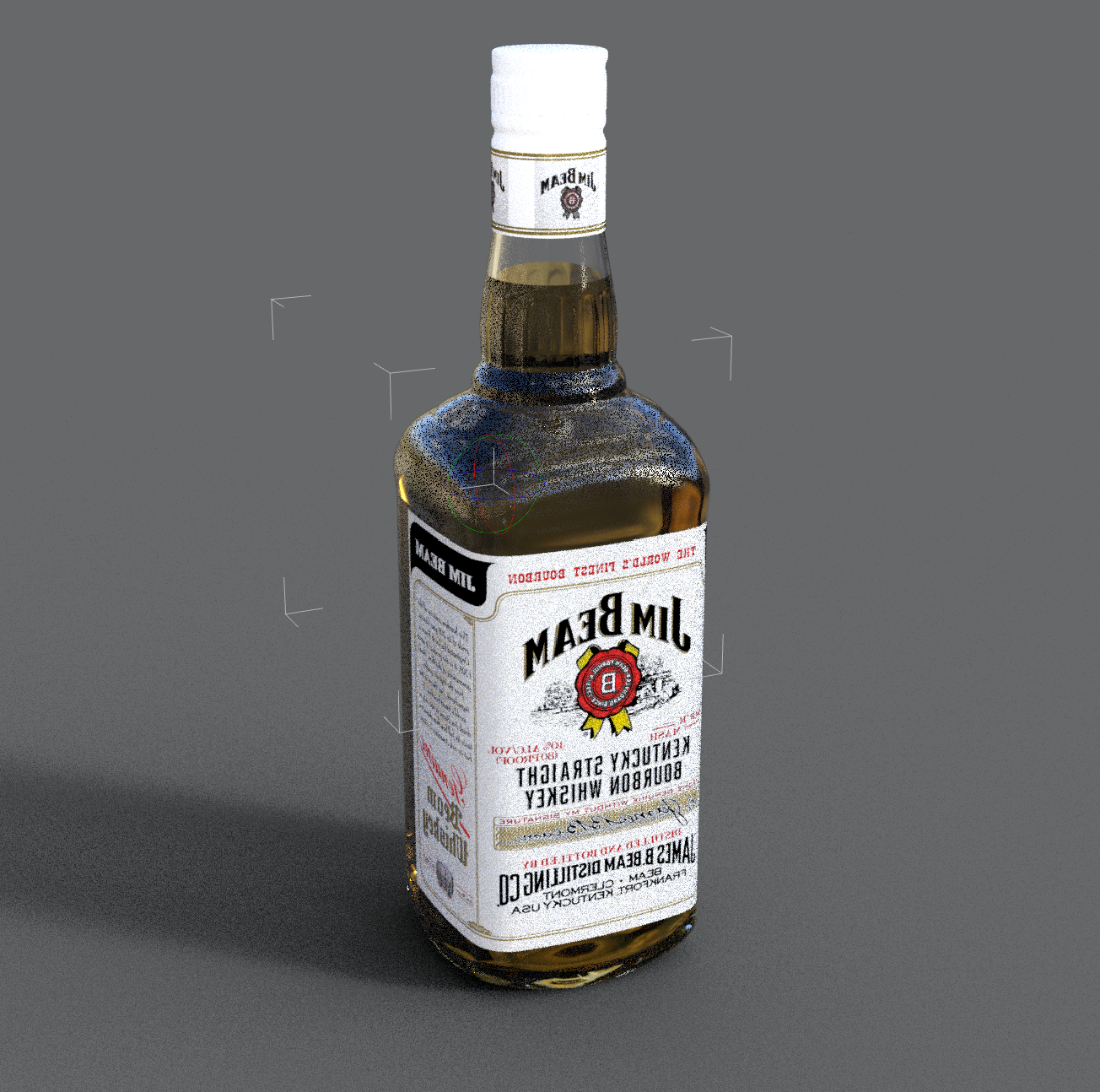
Post edited by mike_from_nz on

Daz 3D is part of 
Connect
DAZ Productions, Inc.
7533 S Center View Ct #4664
West Jordan, UT 84084
Licensing Agreement | Terms of Service | Privacy Policy | EULA
© 2026 Daz Productions Inc. All Rights Reserved.
Comments
Sometimes the UV map is simply backwards.
I'm also wondering if I had the axis' incorrect/reversed on import from Blender.
Solved, had the axis wrong when importing.