Need help with shoulder/neck slope - Resolved
 Worlds_Edge
Posts: 2,153
Worlds_Edge
Posts: 2,153
Hi All,
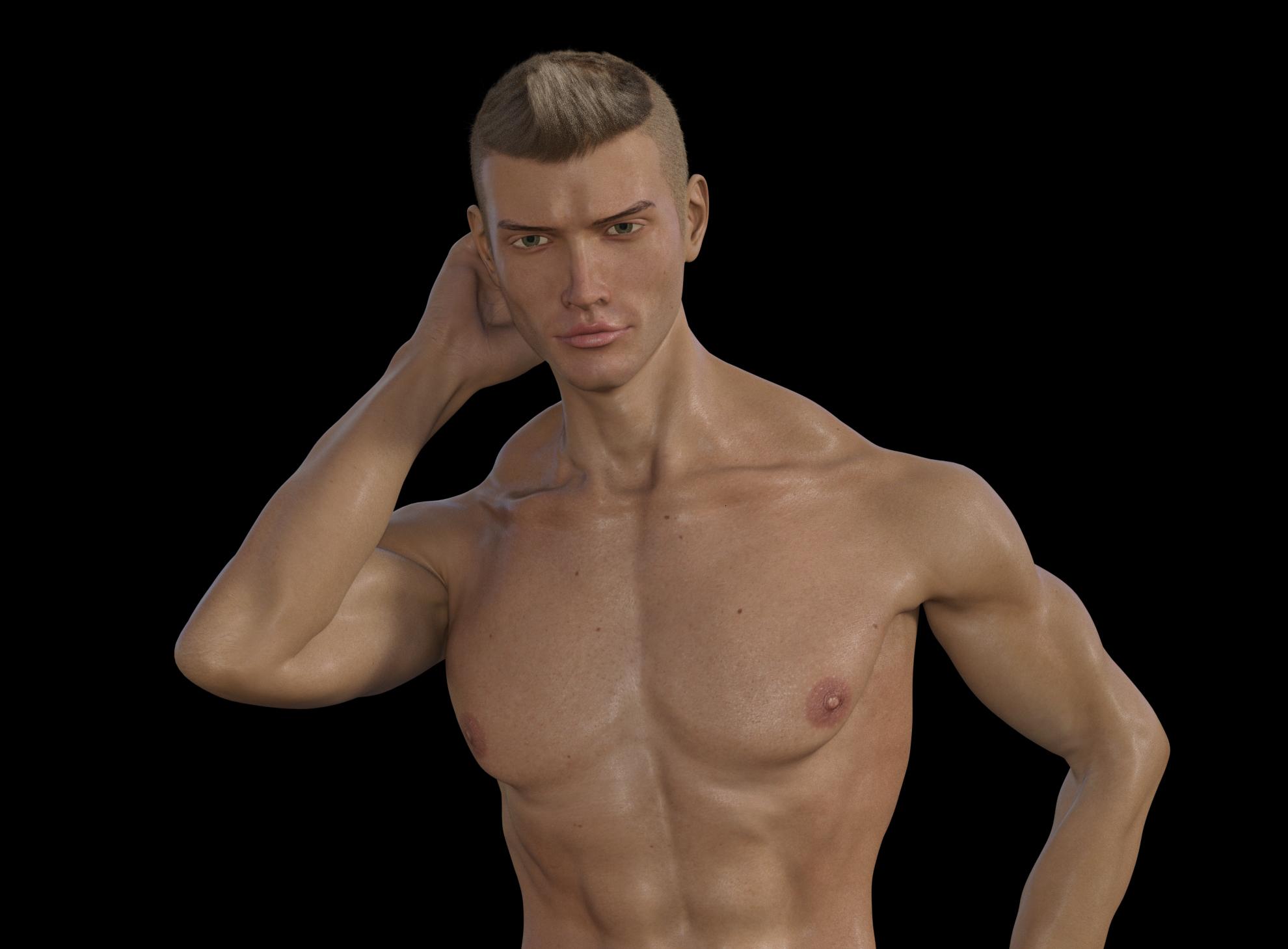
I'm not thrilled with the neck/shoulder slope on my model - Trapezius bulges out way too much (and looks like there is stair/step shape in there!). Does anyone have any tips on which shape sliders/shaping morphs I should be using to fix my issue?
Post edited by Worlds_Edge on

Daz 3D is part of 
Connect
DAZ Productions, Inc.
7533 S Center View Ct #4664
West Jordan, UT 84084
Licensing Agreement | Terms of Service | Privacy Policy | EULA
© 2026 Daz Productions Inc. All Rights Reserved.
Comments
Agree, and I think what's making it worse is the way the armpit-leading to arm area is deeply sunken in and that upper muscle group is deeply indented where it joins the forearm. Aren't there a lot of muscles from both front and back that are affecting your problem area? I think you'll just have to try each one and look at the teeny diagrams. So glad they have those!
I think I can repose the arm to avoid that sunken look but, even in zero pose, the traps are too much for what I want. I haven't yet found a dial that affects that area directly, but I'll keep trying.
Shape Shift / Traps was the first thing that sprang to mind. Combine it with neck length.
I don't believe there is a Shape Shift for genesis 8 yet - sorry, I should have mentioned it is a genesis 8 male figure. I'll definitely buy it when Zevo releases it for G8M though!
There should be a traps morph under head? You can always turn parameters off and go beyond what it says. I'll take a look when I'm back on my PC, but there's definitely a traps morph included.
"Traps Size" would be the main one to start with If you've already dialed down "Traps size" to its limit at -25% you can open up its parameter settings (left click the gear on the top right of the slider) and turn off its limits to dial it down more.
Another thing that might help is dialing up "shoulders size" the shoulders look kind of small fr how muscled the rest of him is, which is making the traps look even bigger in comparison.
also check out the pose, I've had similar looks when I had the collar bones bent down too much, so having the collar bone bend less and the shoulder bone bend more instead might also help. (on the right of the image in particular it looks like that might be the case the collar looks bent down but the arm bent up, try doing that in real life, its pretty much physically impossible)
@jcade and karuki - Thank you! I previously couldn't find the traps size slider. I've scaled it down, and did have to turn off limits (thank you for including instructions to do so). I've increased the shoulder size as well. It looks much, much better now.
Yay! Good to hear :)