SSS Mode-Chromatic vs SSS Mode-Mono
 vwrangler
Posts: 4,989
vwrangler
Posts: 4,989
So ... would it be possible for someone to explain, in hopefully not an extraordinarily technical manner, what exactly it is that the SSS Chromatic setting in the Iray Uber shader does, exactly?
The two attached images were rendered for the same amount of time. I'm attaching them purely to illustrate my question.
What prompted the question was buying Lucas, trying to render him in my default setup, and he was very very orange. So I used the orange fix that got posted into the Stephanie thread. And he was no longer orange!
He was translucent.
This was, to put it mildly, unexpected.
I had a vague memory that Chromatic SSS had something to do with this, so I flipped him from SSS Mode/Chromatic to SSS Mode/Mono. I noticed that the SSS Color option disappeared.
And then I tried to render him again, and there he was! Not translucent! very very pink -- considerably more pink, actually, but then, I suppose, compared to being a ghost, a solid character would look much more pink.
I then flipped him back to Chromatic, pulled his translucency weight way down (to about .3), and there he was again! Not orange, not too pink, and ... less translucent. So not actually all that successful. (And also not pictured here.)
So what does SSS Mode/Chromatic do that we would actually want it to do, and why does it make characters go translucent if you change things? I just want to understand what's happening, if I can.

Daz 3D is part of 
Connect
DAZ Productions, Inc.
7533 S Center View Ct #4664
West Jordan, UT 84084
Licensing Agreement | Terms of Service | Privacy Policy | EULA
© 2026 Daz Productions Inc. All Rights Reserved.
Comments
I think chromatic scatters light of different wavelengths differently and mono scatters them all the same, but I think this only because it makes the most sense to me, it seems completely undocumented so I can't be sure.
That "less orange" shader is great but requires one to render with a background visible. If you render w/o a background it has issues. Try rendering it with a background (make sure Draw Dome is On in the Environment tab).
Yes, but why? That's the part I don't get. There's nothing about SSS intrinsically that should say that if the character has orange undertones, all is fine (if orange), but if the character has pink undertones, hey, completely translucent unless there's a backdrop of some sort!
The only thing I can think on my uninformed own is that it's possibly related to the fact that the characters are essentially hollow, so doing things with their surfaces makes them see-through, for some odd reason. Which then goes back to the question, what does Chromatic do that it's worth not only that level of finnickiness, but also a noticeable render hit, in terms of processing and time?
Very good questions, sadly I'm not informed enough about Iray settings to be able to answer them. I'll be keeping an eye on the thread though - as I'm very curious to know the answers myself. :)
Personally I don't care much for the chromatic shader implementation. I tend to put it back to mono and use a G3 type shader, which picks up a LOT less orange. The new shaders for the G8's just look gawd-awful IMVHO...thank goodness I can use any of my G3 shaders on them. :P
Laurie
It seems to me that Chromatic SSS is currently bugged because, as vwrangler said, it tends to produce transparent pixels. It is supposed to work as 3-layer SSS with deep, mid and shallow scattering ( https://support.solidangle.com/display/A5AFMUG/Subsurface ) but requires endless trial and error to set up without the bug showing up.
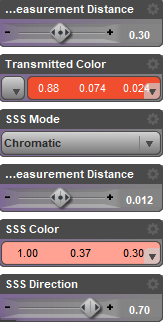
One of my set ups that do work:
Ah. Thank you for explaining that, and for the link; at least now I kind of understand what Chromatic seems to be trying to do.
So would the three levels that it's calculting with be, as far as this implementation goes, Translucency (which gets an actual image map in the Genesis 8 Daz-Original bases, I think), Transmitted Color, and SSS Color, I wonder? Or it the third layer simply absent from the shader as it's been put together?
That's an interesting setup. I'm surprised that it hasn't made your character orange; Is it just set to operate more shallowly than the current base setup?
I wish I knew! Just in case, I kept translucency setup very simple:
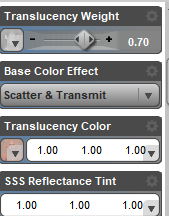
The model is a free head scan from https://sketchfab.com/models/4d07eb2030db4406bc7eee971d1d3a97
No. It scatters red, green, and blue light at different depths. So in Sangriart's example, red scatters the deepest at 1.00 (cm? I'm not sure), green is 0.37, and blue is 0.30. This simulates three layers of skin. I think these then get scaled by SSS distance.
The chromatic SSS translucency issue can often be fixed by turning the dome on for renders. Some lighting setups fix the issue too.
I find (and TBF I might be alone in this) it easier to think of the SSS color slot that comes when you switch to Chromatic SSS as 3 values rather than a "color"
Look at it this way: when the SSS is set to mono there's 1 slider that controls how far the light scatters. With Chromatic you have 3 values that control how much the Red, Green, and Blue scatter respectively. So a red value near 1 means the red part of the light travels further through the material than a lower green and blue value
(and as with transmitted color don't have any of the values set to 1 or 0 or weird things start to happen)
I had to think about that for a while before I understood what you were saying. I mean, I get it, but it's tricky to wrap my head around. In that model, basically, strength = distance (... inverted. I think.) The higher the value for the red color, the less distance it's traveling, and the more strongly it appears in the skin. I think.
For any values, the scattering measurement distance will be constant, because that's the way Studio has things set up. So it has to compensate for the fact that the colors (technically) aren't traveling different distances by adjusting the strengh value of the color.
But ... in Sangriart's example, above, his Red value/distance/whatever is set to exactly 1 for SSS Color. And weird things seem to be failing to happen! (That said ... I wonder what that would look like rendered without a backdrop? Which is the problem, after all; Chromatic should not be making characters translucent, ever.)
Is Spectral rendering affecting this notably?
This isn't really a fix I rarely render with the dome on, I prefer to put the sky or background in postwork
Seems in my tests enabling spectral rendering actually removes the transparent bug when there's no backdrop.
I just tried rendering Lucas with the pink fix and SSS Mode Chromatic with Spectral Rendering / Faithful conversion intent / Spectral observer cie1931. (I have no idea what any of that means; those were the settings present when I flipped Spectral rendering on.)
Made no meaningful difference, as far as I can tell. He was still translucent; it was just different pixels that weren't rendering. (You can actually see the difference. If I did animation, I could combine them and make him all twinkly!)
I don't understand what it is that Spectral rendering is supposed to do, either, I'm afraid. I remember hearing that whatever it does, it works best in bright daylight; since I tend to do a lot of interior scenes, I've mostly ignored it.
I tested this on a render I was doing with a Volume Cube. There are some interesting possibilities one of which would be a disco type scene with colour falloffs across the scene.
Here is a quick example. Changing the RGB amounts changes the colours across the volume.
These are the settings used . The render was stopped.
2017-10-20 16:49:57.938 Total Rendering Time: 1 hours 7 minutes 49.89 seconds
Transmitted Measurement Distance 0.0080
Transmitted Colour Barcelona rooftop HDRI white
SSS Mode Chromatic
Scattering Measurement Distance 15.00
SSS Colour 0.90:0.70:0.30
SSS Direction 0.30
1) Initial set-up without the backdrop, the bug is there.
2) Red value down to 0.88, the bug is still there.
3) Red 0.88, spectral rendering on, the bug is still there, but I do like the skin tone.
I still don't understand how Translucency channel relates to SSS set-up. When trying to apply things learned from various tutorials (i.e ) to Iray Uber, Daz documentation and even Nvidia manuals are almost of no use.