BVH Import 4.9 vs 4.10 Beta - See for yourselves.
 will2power
Posts: 270
will2power
Posts: 270
I know we talk about this a lot, but I learned in the forums today that they've made some improvements to BVH handling. I did a little side by side experiment and posted it for everyone to see. I didn't edit any of the video so it's about 8 minutes long with the import.
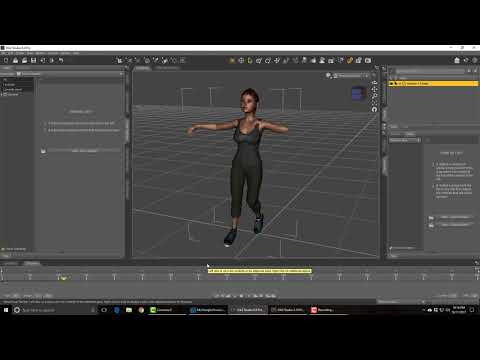
I created a test animation in iClone 7 with a Genesis 3 character, since that was where all the complaints came from. I then imported the BVH animation back into DAZ studio both in it's current version and then in the Public build beta. Have a look and you can see the result for yourselves. The BVH was not edited in any other software like Motionbuilder or Webanimate.

Daz 3D is part of 
Connect
DAZ Productions, Inc.
7533 S Center View Ct #4664
West Jordan, UT 84084
Licensing Agreement | Terms of Service | Privacy Policy | EULA
© 2026 Daz Productions Inc. All Rights Reserved.
Comments
oh this is great
I had not tried the latest beta yet, I certainly will now
just tested and yes genesis 3 not bad, (8 is still a dogs breakfast)
good find
Thanks for this
Well I haven't tested Genesis 8 in iClone yet, but it's really encouraging to know that you can put together an animation and bring it back into DAZ Studio. I like the animation tools in iClone but I wasn't really happy with the results from the figure. You lose all the detail and it doesn't really look as good as it would if you were animating in DAZ Studio. So when I purchased iClone the idea was to do the animation there, and then bring the motion back into DAZ Studio. If I wanted to do things like adding clothing or strand based hair in Cinema 4d, then I could always send it there in alembic. Well that was not going to happen when I tested the bvh import on the Genesis 3. I'm just glad that DAZ went to work correcting the problem. Now I have a real prospect of animating with all that great detail like I really wanted to.
DING!
Things are sure loooking up. converted some old v4 poser 6 bvh animation scripts to work g3 great.saved them as aniblocks, and reloaded them back in studio without a hitch.. it actually worked much better than I had expected. Bravo Daz Guys, thank you for listening to my BS. please don't stop there though. can we please have a much needed & requested IK systems next? and a little more documents on dforce. which is mind blowing BTW . keep up the good work,
Hilarious... 8 is still a dogs breakfast.
Never heard that expression used
Now this is progress!!! I'm glad for the Daz people that they have their dynamics, but this is what I was waiting for. Now I can animate in Daz and send out to Maya for rendering. Thanks for this demo. It seems Daz3D has come thru for us animators. Now all they have to do is fix their fbx export and they will have a decent pipeline for us.
There are at least a couple of FBX updates noted in the beta announcement https://www.daz3d.com/forums/discussion/203076/daz-studio-pro-beta-version-4-10-0-94#top
Hi Forgive my confusion but If you have an Autodesk Maya subscription
why are you animating in Daz studio?
Unlike Maxon C4D's Rubbish native CA tools, Maya has world Class Character motion
creation tools, why not just import G3/G8 FBX to Maya and create your animation there??
I'm not an animator, but it looks like the 4.10 beta is good news all around! Good for animators, lovers of dynamic clothing AND FBX improvements :D
Laurie
Hi Laurie
Its very encuraging to see updates target people like me that only uses daz for animation, I was starting to feel left out of the fun., .. besides having dforce. and the new fxb and motions BHV modifier improvements . I also notices the little pink and purple Actirfacts I use to get with 3dl using deep shadow maps light settings is also fixed... no more annoying artifacts. Whoo Hoo!
LOL, the same reason you are! Because DAZ characters morph easier in Daz Studio. Remember that thread about Daz's auto-JCM's? That's a very valuable feature if I am animating a scene where characters are in extreme positions with unclothed joints. I won't animate everything in Daz because most of the time I don't need to apply corrective blendshapes, but for action scenes, bedroom scenes and other scenes where the body moves in dynamic positions, I now have the option to bring the mocap file into Daz and let it do the work for me. This knocks my socks off.
Yes, I saw that. I hope that means I can export animation out of Daz without it being mangled. Can't wait for the beta to become final public release. There are shots I have been putting off because I was waiting to see what Daz was doing.
My experience with FBX export has been good minus the obvious
loss of subD/HD/JCM
Here is the G3 male struttung in Lightwave 2015 with some Iclone motion
applied to him.
I think I meant the fbx import. I can export fine, just the import fbx mocap is where I ran into trouble. Might not need it now since .bvh is fixed (I hope). It would still be nice to be able to use fbx mocap files since Maya likes those. Sometimes I won't need the subD data so fbx is handier because it transfers the materials in the file (as opposed to alembic). Gosh, I wish Maya accepted MDD caches.
It surprises me that Maya does not import MDD
but Alembic is the latest craze in Cross application transfer
Even iclone 7 has has an optional alembic export .
I prefer .obj from Daz driven to motion by MDD because the textures come over intact
but more importantly I can send over new MDD animation
Data to the same mesh without re-exporting another .obj fileto both C4Dand Lightwave 2015.
Alembic requires a complete re export for any new animation and you lose UV info as well as the ABC cache
files being huge in file sizes compared to MDD Data files.
Alembic should handle the UVs correctly. I haven't had any UV issues with DAZ to Houdini via .abc. With that said though, there's a number of fairly significant bugs in DAZ's Alembic exporter that limit its usefulness.
This is fantastic!
THANK YOU, DAZ. You listened to us. You must really like us after all. :D
well our Paypal or CC transactions on Genesis 3 content at least
G3 Females seem to be ok on BVH export / import
For some reason I cant say the same for G3 male for some reson
No idea why??!!
UPDATE problem sorted, G£M was corrupted - reinstalled and all ok now
That's.... odd.
Can someone else test this?
Here is a test of the Genesis 3 Male. I used the same BVH file and did no other work than importing it and applying it to the G3M. Here is the result:
Thanks! Seems to work just as well! Though it's funny to see him holding his arms like that. ;)
This is good news!
But too bad Mixamo retired it's free product on Aug 22nd. Now I'm not sure where a hobbiest can get inexpensive/free BVH files for Genesis 3...
Yes, it did look quite amusing when I applied the same BVH file to it. But it wouldn't really be a test if I changed any of the criteria. The important thing for me is that you can now get motion to your characters in DAZ studio, which is what I really wanted. The thing is, I never wanted to do the animation in any other package because you loose all the beauty of the work DAZ has put into their figures if you take just the FBX. I would rather do MDD or Alembic from DAZ and do a final render in the application of my choice rather than give up all that detail.
Yes. I am also glad to have that option now. Although on most occasions I don't need to use that option because of the fact that in most scenes (at least in my experience) there is not difference (or very little) between how Daz figures look in Maya and in DS. But for those times when they are bending and stretching and I have to do some corrective sculpting, this option is priceless. I will never sculpt fast enough to keep up with DS. It's like having a free modeler working for you to correct the bad deformations in deep bending positions.
Fascinating stuff. I'm hoping to learn more about animation...namely the use of mocap or existing aniblocks. Is Iclone the only way to create such files? I'm on a Mac and it's PC only.
Ive commented elsewhere on another forum, but have you tried exporting the anims from Iclone back into DS with any success?
I am having little luck when Ive tried.
if I load a converted animated pose using Draagonstorm's script on Genesis 8 from 3 and bake the joint rotations after applying the tpose at start the exported BVH with map saved works on Genesis 8
Sorry to be so dumb but could you please put in short bullet form the workflow of G8 with clip exported through 3dx to same G8 figure in Daz Studio. I think you mean set up the G8 figure in Daz with the applied Tpose ( where is the bake function?) ? Then apply the BVH exported from iclone ( what is the 'map'?). I can get G3 to and from Daz to iclone with BVH that works but have not been able to get a BVH back to G8 without the mangled look.