Motion blur trouble (3delight)
 Sven Dullah
Posts: 7,621
Sven Dullah
Posts: 7,621
I've run into this problem before a couple of times but have not been able to isolate the cause, it seems totally random.
As you can see from the attached render one of the figures is transparent. I tried reloading the scene, restarting, rebooting, also reapplying the skin.
If I disable the motion blur the skin renders just fine. Both characters are Genesis 1 using the DS default shader, the one to the left using the skin "mode"
and the one with the problem used the metallic but I changed it to skin which made no difference. I also reapplied the default shader just to be sure but no cigar:(
There are no error messages whatsoever.
I fixed the render using the spotrender tool and disabling the motion blur so that is not the problem but I had some animation in mind and motion blur
is kind of crucial in this case,and I can't spotrender hundreds of frames.
Anybody? Is there a workaround or trick to get this done? Has anyone else had the same problem?
The lightning was Uberarea lights for ceiling spots, ds shader spotlights above the pooltable and UE2 ambient occlusion with soft shadows+ the RR3 reflective light by Marshian.
Rendered in progressive mode: raytrace depht 2, pixel samples 12x12.
I'm on an Imac using DS 4.9.70 IIRC, can't check now as I have a render in progress.
Any tips would be much appreciated, thanks!
Edited to add: DS 4.9.2.70 64bit
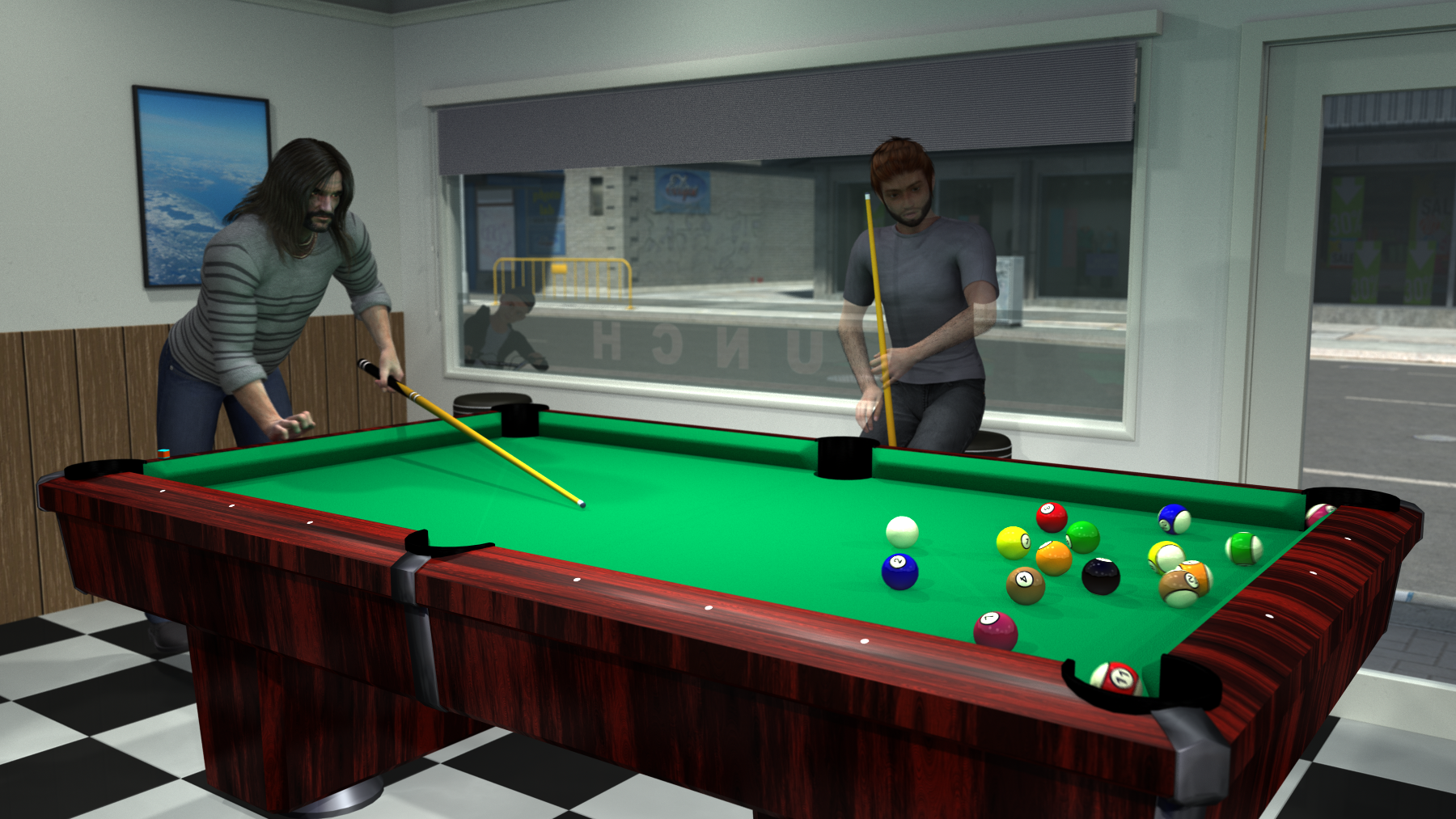
My solution:
Saved out the pose shape and skin, fitted all clothing and body hair to none. deleted the character, loaded Genesis 1 and applied the pose, shape and mat, refitted clothing
and body hair and hit render. It works now. Before all this I copied the skin from the left side character and pasted onto the right side one, still transparent.
Then I moved the left side one in front of the window and thought it might have something to do with the window transparency but he rendered ok and the other guy was still transparent lol,
both with the same skin, go figure

Daz 3D is part of 
Connect
DAZ Productions, Inc.
7533 S Center View Ct #4664
West Jordan, UT 84084
Licensing Agreement | Terms of Service | Privacy Policy | EULA
© 2026 Daz Productions Inc. All Rights Reserved.
Comments
Hello, had to open this again, the trouble continues.
I saved the "fixed" scene under a new name, then later decided to open it to make some changes and that guy is transparent again .
.
I guess I can repeat the operation and render without closing the file but a permanent fix would be great.
Any ideas?
Found this... finally Sven.. sorry... I guess we can't use motion blurr anymore? Unless someone has a fix. I use it quite frequently. I hate postwork and it's much better to do the blurr in Daz. I'll be curious to see if anyone answers or comes up with a solution. :) (clicks the star to watch this thread)
Well to me it seems like a random glitch, I've used it in far more complex scenes with no problems, but when it strikes, the only thing I can think of is the fix I described earlier, pretty weird stuff At some point I thought it might be a shader/temp file thing, but disable motion blur and problem goes away.
This scene actually uses the same character (different hair), no problem whatsoever
yeah.. I find it weird that only one of your characters in the pool scene is transparent... Gonna have to figure it out.. I hate puzzles... and this is puzzling... BIG TIME!