Product icon in Smart Content with broken border and "u" icon?
 jakiblue
Posts: 7,281
jakiblue
Posts: 7,281
in The Commons
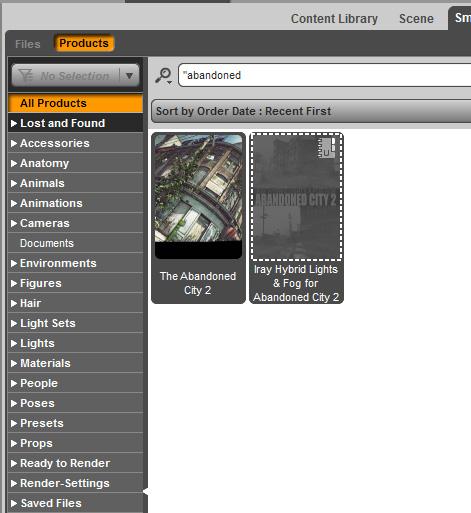
Can anyone tell me what this means? I just uninstalled it via smart content, and it showed like that. I can't right click and install it. I don't know what the "U" icon means or why it has a broken border around it.

Daz 3D is part of 
Connect
DAZ Productions, Inc.
7533 S Center View Ct #4664
West Jordan, UT 84084
Licensing Agreement | Terms of Service | Privacy Policy | EULA
© 2026 Daz Productions Inc. All Rights Reserved.
Comments
U means it's user data, created by you, not vendor data, from the store. Since it's user data it doesn't hook up to a store product that can be downloaded. Presumably either you somehow saved, or triggered a save inadvertently, as a new product - that product now has no files unless you reinstall the original sore product; alternatively it may indicate an error in the metadata, but I'm not then sure how it could have been installed in the first palce.
That's odd. I hadn't created anything new with it. I have been uninstalling and reinstalling it cos of problems, but I didn't really do anything for user data. But I did what @dragotx said above - hit the 'update metadata' and it went to normal so i could reinstall it. thanks dragotx!
Head and body morphs installed by DIM show up as user data by default in the Smart Content tab. The thumbnails are greyed out but you can still use them. I never update metadata inside the Studio application since it screwed up my installation twice already (eg. duplicate entries in Smart Content like Victoria 5, missing thumbnails after update, etc.).
I was spouting nonsense, particularly embarassing as I'm pretty sure I've been corrected on this before.
If you have modified the database for the product, then the userdata will remain with a dotted outline to indicate that it belongs to a currently uninstalled product. You can, if you don't want the user data, delete it by finding it in the Product listing in the Content Library pane and right-clicking. I'm not sure why you can't reinstall through the Samrt Content pane - do you get the option if you find the item in the Products list in the Content Library?
I right clicked and hit 'update metadata' and then it went normal and I was able to install it again.