Upgrading an old computer (Solved)
 Charlie Judge
Posts: 13,399
Charlie Judge
Posts: 13,399
I want to use The EVGA GTX 970 I took out of my main computer and use it to upgrade my old HP Pavilion p6710f ccomputer In order to do it I plan tro upgrade the memory to 12 GB and the power supply to either 750W or 850W I am currently cosidering this: https://www.amazon.com/gp/product/B01FYDUDJ0/ref=ox_sc_sfl_title_2?ie=UTF8&psc=1&smid=ATVPDKIKX0DER . Will this be enough or would it be worthwhile to spend an extra $30 and get the 850W model? In this regard I have 3 Hard drives and 2 DVD drives and plan to upgrade the memory to 12 GB. Some other considerations in selecting the power supply were the physical size to fit the case and one that does NOT have active PFC voltage control so it will play nice with my stepped wave UPS.
Also are there any recommendations as to which brand of memory to get? I will need two 4GB sticks of PC3-10600 MB/sec 240 pin DDR3 memory.
The main use of the old HP PC will be to use it as a backup and to do some work while the main computer is rendering.
Thanks for any help and opinions

Daz 3D is part of 
Connect
DAZ Productions, Inc.
7533 S Center View Ct #4664
West Jordan, UT 84084
Licensing Agreement | Terms of Service | Privacy Policy | EULA
© 2026 Daz Productions Inc. All Rights Reserved.
Comments
750 will be more than enough. It gives you room to do massive GPU upgrades if needed. You would be surprised at how little power a GPU takes. Look up the card on NVIDIA's sight and it will tell you what it needs.
As far as power supply, you can never have enough of it
But if you want to see how much power your card and system actually requires, just google "EVGA GTX 970 power consumption" and you'll find tons of stuff. Anandtech measured it in gaming and said the total system requirement is around 300 watts, which seems very reasonable.
EVGA's website says you need a 500 watt power supply. A 750 watt is what I have with my GTX 1070 and it's fine. But if you're like me you'll always wish you had bought a bigger one .... just because
Thanks, Frank. I won't be able to do any more GPU upgrades (like a second card) anyway because I only have one pcie slot available. I just want to be sure I have a big enough power supply that I won't be stressing it too much.
I agree. 750 is enough :)
I have an 850W PS, but I have two 8 core Xeons, a 980 Ti, 64 gigs of ram and a SSD and three regular hard drives in it. It runs everything fine. You won't have nearly that much in your computer.
Laurie
750 should be enough. They have online calculators, you just plug in all your components and it will tell you what you need. Recommend going 100 W over load, the PSU runs more efficiently the lower the load (in other words, at 50% rated load is more efficient and runs cooler vs. running at 100% rated load).
http://www.coolermaster.com/power-supply-calculator/
A single GPU and a single CPU... 750W will be plenty of juice.
**Processor Upgrade Information from the HP website.**
Max TDP: 95W
AMD Phenom II X4 9xx/9xxe/8xx Quad-Core (Deneb core)
The Phenom II X6 1045T can be bought on ebay for around $60. That's not bad for a 6 core CPU that will work with your HP Motherboard.
Recomendations for memory? If you are going to use the memory that's already in there, then your best bet is to get the same brand, speed and latency so you will not run into any issues running dual chanel mode.
I plan to keep the two 2Gb sticks that came with the computer and add two 4Gb sticks in the other two slots; I don't know what brend the original memory is but from the HP website it is PC3-10600 MB/sec Type: DDR3-1333 memory.
The Crucial website memory finder lists this as an upgrade for my HP Pavilion p6710f Desktop: https://www.amazon.com/gp/product/B005NU49DG/ref=ox_sc_sfl_title_3?ie=UTF8&psc=1&smid=ATVPDKIKX0DER but the description doesn't match that of my original memory
I also found some other memory on Amazon that looks like it might work:
https://www.amazon.com/gp/product/B0036VO632/ref=ox_sc_sfl_title_4?ie=UTF8&psc=1&smid=A38NZOGK1EZGST
https://www.amazon.com/gp/product/B00A8MWR2E/ref=ox_sc_sfl_title_7?ie=UTF8&psc=1&smid=A3LKWIQ3PBTNT2
https://www.amazon.com/gp/product/B008CP5QF4/ref=ox_sc_sfl_title_8?ie=UTF8&psc=1&smid=ATVPDKIKX0DER
Any recommendations as to which I should get would be most welcome.
Thanks
If you're adding two sticks of memory they should be a matched pair.
The simple rule is that DDR3 desktop memory is that it is "DDR3 Desktop Memory" If you put multiple speeds on your motherboard, it will run all of the sticks at the speed of the slowest one in the system.
If you want maximum performance out of your setup (and avoid any strange issues poping up), you want to make sure that all of the sticks match and that you have identicle pairs for each of the channels.
To find out what is inside your HP, you will need to pull a stick out and look at the sticker on the RAM. (It will probably be generic or Samsung)
If you open up the system and there is only one 4GB stick, I will recommend writing down the exact model number off of the RAM and puting it into an ebay search. If the price is good, just buy 3 more so that you have a full matching set totaling 16GB.
Thanks everybody for your responses. They werre very helpful. Here is what I have ordered:
PSU: https://www.amazon.com/gp/product/B01FYDUDJ0/ref=ox_sc_sfl_title_2?ie=UTF8&psc=1&smid=ATVPDKIKX0DER I might have squeeked by with the 450W Antec power supply I already have installed but I wanted to leave some extra headroom and not stress my old PSU
Memory: https://www.amazon.com/gp/product/B005NU49DG/ref=ox_sc_sfl_title_1?ie=UTF8&psc=1&smid=ATVPDKIKX0DER Hopefully it will work OK with the two 2GB memory sticks I already have installed; but if not Amazon has a pretty good return policy
Thanks again,
Charlie
His motherboard is an old AMD 785G (Socket AM3) board. 4 Ram Slots, Dual channel
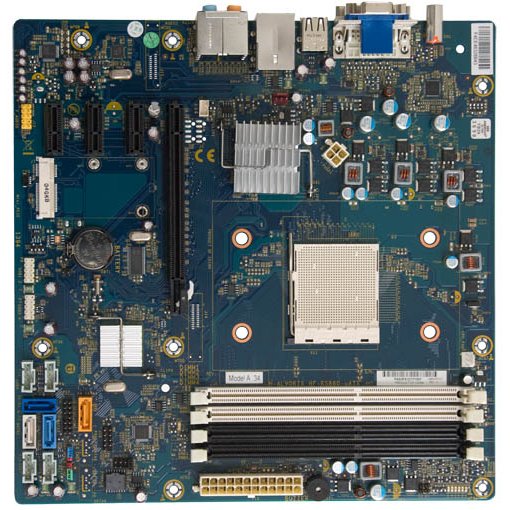
It supports 16GB and no more than 4GB per slot on 64 Bit system.
My Intel has 8 slots up-gradable to 64GB. I don't like AMD's because of this reason. You only have 4 slots and its only up-gradable to 32GB. Intel's are far more up-gradable than AMD's are. My wife was a die hard AMD until I showed her my Intel and she changed her preference pretty quick.
Intel boards in that price point are all dual channel with 2 or 4 slots. Only the high end boards suport quad channel... and even then it's only if the CPU has it (For example: If you go up to Intel's quad channel capable X299 chipset and put an i7-7740X on it, you are stuck with dual channel memory)
If you went up to Xeons and Opterons you would get 6 or 8 channels when running dual CPU setups. (The Dell Precision T 7500 in my signature is running 24GB in a six channel config)
All of AMD's new Threadripper (Ryzen9) chips will have quad channel DDR4 and 64 PCIe lanes. (this is great news for those who run multiple GPUs)
The important takeaway from this is that with AMD bringing out competitive CPUs, This will force Intel to put some more money back into R&D and move the CPU industry forward. (I'm sure that's all Intel can think about right now, as AMD has chopped out 10% of their market with the Ryzen series... so far)