How to Import DAZ Genesis 2 characters into iClone 6
 Reallusion
Posts: 115
Reallusion
Posts: 115
Hello Everyone,
As most of you know, iClone 6 recently launched and Reallusion have already been working on creating new tutorials that will help answer basic questions on the import process. This tutorial covers; applying clothing & facial blend shapes, exporting to iClone, refining material appearances, and basic facial animation.
For this tutorial you will need:
- Genesis 2 .DUF files
- iClone 6 PRO
- 3DXchange 5 (PRO, Pipeline)
[3DXchange 6 will be out this summer, but you can still use 3DXchange 5 to import content into iClone 6. You just can't export it back out for the time being.]
http://www.reallusion.com/reallusiontv/youtubega.aspx?url=//www.youtube.com/embed/D3iS164uTgc

Daz 3D is part of 
Connect
DAZ Productions, Inc.
7533 S Center View Ct #4664
West Jordan, UT 84084
Licensing Agreement | Terms of Service | Privacy Policy | EULA
© 2026 Daz Productions Inc. All Rights Reserved.
Comments
In the tutorial, you will also need the new .DUF face morph files for both male and female Genesis 2 characters.
These files are normally sold as a part of a content pack, but Reallusion would like to give these files out for free to all DAZ users as part of our partnership with DAZ. http://bit.ly/DAZ-iClonefiles
Looks useful .. few questions though..
1. Are there presets for M3/V3 M4/V4
2. Can you export a pose to be used in iclone e.g Rifle held with two hands
3. When is the release date for 3dxchange 6
Hello DecadentUK,
Thank you for your questions.
1. Are there presets for M3/V3 M4/V4 >> Victoria and Michael will work if you have them in Genesis 1 or 2 formats. 3DXchange does not have a specific preset for them, but it does have automatic presets for Genesis 1 & 2
2. Can you export a pose to be used in iclone e.g Rifle held with two hands > If you bring your pose in FBX or BVH then yes. You can import that specific pose/animation, save it and then apply it inside iClone to any character.
3. When is the release date for 3dxchange 6 > 3DXchange 6 is due to launch in the end of May, or earlier. So just 4 more weeks.
Thankyou for your quick response.. I am guessing that 3dxchange is flexible enough to actually create a working M3/V3 M4/V4 preset if required?
Due to the nature of Genesis its weight mapping often distorts many items of clothing from earlier figures e.g armour.. that is the main reason for an individual preset.
Going back to the pose export , as mentioned regarding a rifle pose, could this be used in conjunction with any other motion within iClone e.g. running, walking etc.
Thanks Graeme
Absolutely. Once your pose/motion is in iClone, you are free to combine, blend, and edit it with other animations inside iClone. You are able to use tools like HumanIK, body puppeteering panel, facial lip-sync, etc.
Absolutely. Once your pose/motion is in iClone, you are free to combine, blend, and edit it with other animations inside iClone. You are able to use tools like HumanIK, body puppeteering panel, facial lip-sync, etc.
Will 3DXChange 6 make it easier to move assets between DAZ 3D and iclone? Like clothes, props, hair, poses. Would be nice to have something as simple as the DAZ 3D bridge between DAZ and Iclone.
Right now there is no way to export a BVH with auxiliary effectors and other advanced animation tools back into DAZ Studio. Waiting on 3DXchange 6 for that.
Also is there any way to get HD details of DAZ characters show in Iclone? DAZ characters in HD now display skin details like veins wrinkles etc. but that gets lost once the characters enters iclone. You have some displacement tools announced, would be nice if at least there could be some automatic export of DAZ HD details into Iclone 6 using 3DXchange and iclone displacement power tools.
SimonWM
There are several new things that will come with 3DXchange 6.
For one, it will be easier to import Daz Genesis 1 and Genesis 2 characters, as 3DXchange 6 will have the automatic preset detection for both types of characters. Clothing will still have to be brought with the character, and as others have described before - the hair works best if brought in separately.
One cool thing is that 3DX6 will be silently integrated into the background with iC6, which means that when 3DX6 is running as an application, you will have the freedom to directly drag&drop; certain FBX, OBJ and BVH items directly into iClone 6. This should make the process a lot smoother and faster for default items.
For the HD skin details, you can currently do that with iClone character's NORMAL MAP in the material channels. You can export that Normal map, modify/enhance and then apply to the character again if needed.
As 3DX6's launch date gets closer, I will be posting a Roadmap Post, describing the upcoming features and enhancements. Daz users can always download the trial version first to test it out with their current Daz characters.
I am happy to hear about the new features being added to 3dxchange 6. Thanks for including Genesis 1 in with those presets. I am not fond of Gen2 and will continue using Gen 1 for now. I will be looking for it.
I made the decision to purchase 6 pro and the Indigo plugin in a couple of weeks. I am also excited to hear that the mocap plugin works with 6.03.
All good news Realtimer. Thanks! :)
>>For the HD skin details, you can currently do that with iClone character’s NORMAL MAP in the material channels. You can export that Normal map, modify/enhance and then apply to the character again if needed.>>
This screams for a tutorial, using any DAZ HD Genesis 2 like maybe the Minotaur.
Just one question:
Is there any chance to get daz morphs of props exported to iClone?
I am able to get the animation to 3ds or Maya. But then is out. I can do what I want, 3dx does not "understand" the blendshapes / morphs and recognizes only that there is any animation (it appears in the tab), without animating the prop.
And yes, I know, you can bring morphs over chars into iClone. But there you can only control the morphing manually - and this is cheesy.
I would like to animated over time any prop in Daz and then get the full animated prop over Maya or 3ds into iClone, like every other bone animation of Daz.
Do you know any trick for this goal?
Thanx!!
I find that a naked character comes through the pipeline into iClone fine... but add clothing and it is a FUBAR.
are you merging the skeletons in the FBX export advanced options and are they fit to the figures in DAZ studio?
these are the two most common errors with clothing
Hi, I am new and have followed your tutorial. However, when I am in 3DXchange the clothing and hair do not move with my Genesis2 Female. HELP! I have searched and searched for answers and have found nothing.
Thanks!
Hi,
Having the same issue with morphing clothes. I found a tutorial for exporting bvh to iClone (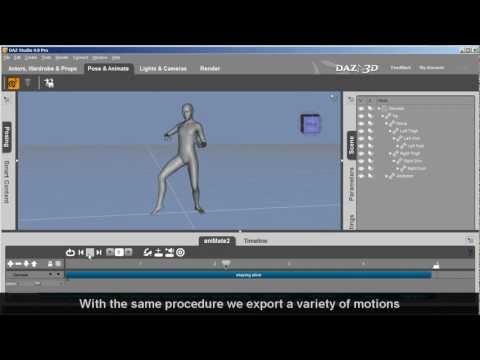 ) and it worked just fine except the morphing animations for the cloak https://www.daz3d.com/wintertide-for-genesis-2-female-s were lost. When used it in iClone it is all stiff and limbs poke through. Should I export the cloak separately and somehow merge it afterwords in 3dxchange?
in attempting to follow these steps to import a character into iclone, I'm running into a problem.. in that fbx files aren't supported in iclone. at least it's not shown on the list of accepted file types.. what can I do to fix this or work around it?