Putting Clothes on Stonemason's Prototype robot
 Griffin Avid
Posts: 3,837
Griffin Avid
Posts: 3,837
Doesn't say what generation it is....Genesis 2, 3, michael 4....Jeremy 28 etc....
Trying to put clothes on the figure.
It fights off everything, His zero position is with the arms slightly curved forward, which I thought would indicate a Genesis 3 build.
Auto-fit says Unsupported Item with no choices.
It's too late on a Saturday night to spend it troubleshooting.
It's like the robot it just larger than normal figures.
Using scale warps the clothing,,,,
This is a good one.

Daz 3D is part of 
Connect
DAZ Productions, Inc.
7533 S Center View Ct #4664
West Jordan, UT 84084
Licensing Agreement | Terms of Service | Privacy Policy | EULA
© 2026 Daz Productions Inc. All Rights Reserved.
Comments
If you are talking about this https://www.daz3d.com/prototype, it's not a figure like G3M. It is a standalone, so it will not handle clothing built and rigged for Genesis 3 Male.
DAMMMMNNNIOIIITTT!!!!
What to do?
Thanks
you could try using the transfer utility to rig original clothing to the specific rigging for it.
Never heard of that technique. I don't see 'transfer' in the utilities menu.
Where is that?
He also doesn't take (Gen 3) poses. How the heck did stone mason expect us to pose this figure? lol
Static or animated?
If static, just pose a figure on top of it, clothe the figure, then hide the figure, but not the clothes.
Hmmm...so then I'd be selecting the figure underneath, pose that and everything else would follow?
I'll try that. And so, I'd parent the Prototype robot to the invisible figure. The clothes get parented to the invisible figure and I do everything to the invisible figure....
The robot, when dressed has lots of poke through, but I actually like it and would leave it...this sounds like an interesting idea...
Why would Stonemason make a figure that can't take poses?
Wish it said that somewhere, but it's funny,, he has the best products -- with the worst descriptions and product info. lol
Because robots and other stuff are often not rigged like human figures.
I mean, cats don't take human poses, either.
As for clothing, I've occasionally wrestled clothing onto robots by using creative scaling and then some sort of dynamic clothing option, like VWD. It's hard, though not impossible.
I tried scaling. The suit started wrapping around whatever I parented it to. It folded up without a parent.
Does it not have any built-in poses? That's usually what I find with original figures that seem like they should pose. There aren't a LOT of them but there's usually something. It lists 4 poses on the product page....
Yeah, all terrible. lol
One I think is running,,,a reset zero a crouch....whatever....
Just disappointed since he's being used as a major character. Picking that bot-body over DzFire's cyborg is going to cost me lots of time...
He looks awesome, but I have to do everything maually.
Putting guns in his hand and getting the poses right is usually a nightmare.
If he was ANY generation, I'd eat that. I'd even get someone's bundle if he was based on some-numbered icon.
But damn. Always something.
Oh shoot, the store might update soon.
Hopefully not....
I do admit it is a pain in the arse posing that thing,the joint limits are set too low so it has limited ranges of motion,oddly enough it's almost too robotic. if it's not working for you don't forget you can return it, maybe look into DzFire's robots as he has some in a similar style.
That was funny! I went to move the elbow and it suddenly stopped and I was like
"There is no way this robot is so robotic!"
No, he's in and a keeper. maybe you could do an update, like a version 2.0 add-on and add some features.
My version of him added a different face- from another robot.
You are AMAZING at places, and this robot is crazy.
Please do more....
I'm about to gush, but anyway- maybe some better descriptions in the liner notes. What's props etc...I know your products are extensive and well worth the value, but if you cruise the forum you'll see some confusion on how your offerings are laid out.
The only other thing I could suggest is standalone props, more of that. Your attention to detail is insane...
Maybe some interior stuff- do insides.
I finally got The Protype after years of having it in the wishlist. It looks great, but sadly, it poses like a potato!
this guy did a nice job re-rigging it...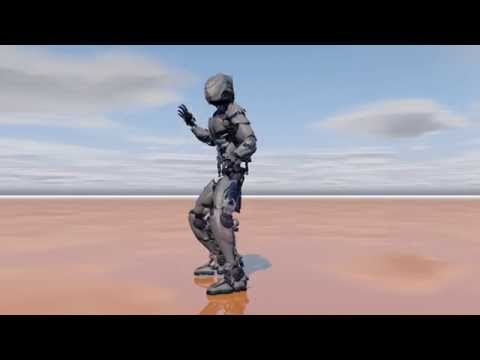
Awesome....soooooo contact that guy and, I dunno- get that RIGGING!
I have no idea what that entails, but a version 2.0 with some better movement and the ability to take poses- that would be great.
You don't have to do much now, as the creator, I'm sure he'd be happy to get you that set up..
Hell give him one of your sets in trade, anything, lol.
I like the "invisible figure" idea.
open robot
open new G3 (or whatever) figure.
match limbs and body on the G3 to the robot in scale and pose.
edit G3 figure rigging to fit to shape
parent robot to G3
make G3 invisible.
Pose G3 and hopefully, robot pose will follow.
I don't own the robot. Or, I would have given this a try. :)
Good luck!
One thing to remember is that you can shut off pose limits. I often do that with a number of things, including the basic Genesis figures (which find it impossible, normally, to do things I can do relatively easily, like put my hands behind my back)
If you don't know, select the move in question, click on the little gear to upper right of the line, and uncheck 'parameter limits'
As an alternative,
this one: https://www.daz3d.com/cyborg-model-4 takes M4 clothing
this one: https://www.daz3d.com/cyborg-version-4 takes V4 clothing
Or this one: https://www.daz3d.com/cyborgs-4-0 for both.
-MJ
I solved it by placing the head on another body, making the original head transparent and bulking/morphing the new body to approximate the size of Prototype. Threw clothes on and voila, robot in clothes. Thanks for the suggestions.