DS viewport controls
 Taoz
Posts: 10,299
Taoz
Posts: 10,299
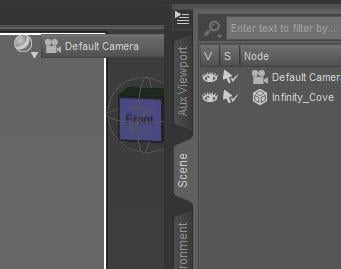
What have they done to the viewport controls in the latest DS? When I have both left and right panel open and with the width I use to use, they're more or less hidden now. Not very smart. Monitor is 1920x1200.
Post edited by Taoz on

Daz 3D is part of 
Connect
DAZ Productions, Inc.
7533 S Center View Ct #4664
West Jordan, UT 84084
Licensing Agreement | Terms of Service | Privacy Policy | EULA
© 2026 Daz Productions Inc. All Rights Reserved.
Comments
They're hidden behind that set of tabs, make that narrower and you'll see 'em.. happens to me too, don't know why they're not moving over like they should, something buggy going on with the UI.
I'm aware that narrowing the tabs will solve the problem, just wonder why they've changed this. If it's a bug you'd think they'd noticed it before releasing it?
Close the Shader Mixer tab along the top row and you should be set. :)
Hm, you're right, that fixes it, thanks. The funny thing is that if you add the Shader Mixer tab back the problem doesn't return, until you restart DS. Does look like a bug of some kind.
OMG I absolutely ADORE you!
Wow, realy.. that's what's doing it? Crazy..