Video card choices: GTX 1080?
 James_H
Posts: 1,097
James_H
Posts: 1,097
in The Commons
This is perhaps a wishlist item, but at least now Daz can deal with it, worth wishing for: there seem to be quite a few 1080s at 8Gb, but are there significant differences between them? Any pointers so that I may gaze with longing appropriately? I have a 970 4Gb at present, so a worthwhile upgrade (until the next release).

Daz 3D is part of 
Connect
DAZ Productions, Inc.
7533 S Center View Ct #4664
West Jordan, UT 84084
Licensing Agreement | Terms of Service | Privacy Policy | EULA
© 2026 Daz Productions Inc. All Rights Reserved.
Comments
I avoided EVGA because at the time, there were reports of them overheating and even erupting in flames. They appear to have fixed the issue:
http://www.theverge.com/circuitbreaker/2016/11/3/13510238/evga-geforce-1080-1070-1060-graphics-card-fire
I use a couple of MSI 1080s. Even packed somewhat close in my average-sized case, they run full bore at a cool 75C. Air cooled. Quiet as a mouse.
Sure, they're not quite as fast as the good ole Titan, but plenty fast enough for fast renders and animations.
Even though both my cards are MSI, one of them was stock with the computer so it's probably older and less expensive. It gets a degree or two hotter and it lacks all the fancy ports like HDMI (only has DVI). The new MSI I just bought has HDMI.
So, in spite of some of the negative perception that the 10 series isn't as fast as they 'should' be, I'm happy with them. They run cool/quiet and get the job done, and 8 gb is decent for most scenes.
I also have a 970 4GB which I fooloshly bought just days before the 10 series was released. I've since emigrated from the UK to NZ and am looking at prices - golly-gosh these cards are expensive outside of the USA. So anyhow, I'm thinking I might add a card but price restricts me to a 1070 ($700 NZD = $500 USD approx) at best. From what I'm reading in various threads here, the 1070 performs quite well compared to the 1080. But maybe that's just my confirmation bias seeing as I can't afford a 1080?
Oh ya. The 1070 sold out crazy fast in my area. They are better bang for the buck for sure (my store had some really good deals going on and they went fast). So if you can find a good deal on one, go for it.
I recommend ZOTAC and they have the fastest GTX 1080 on the market right now.
You want to make sure they fit in your case and that the voltage is within your power suppy's specs (whatever brand you decide to go with).
I had to settle for the ZOTAC GTX Founders Edition.
ZOTAC GTX1080 AMP Extreme
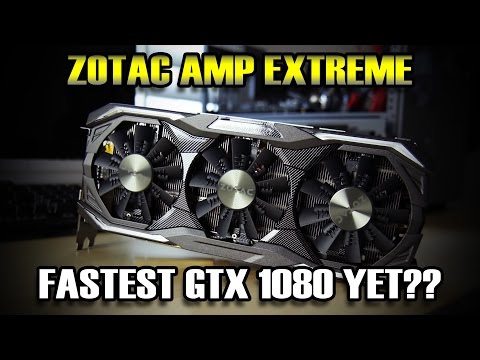
https://www.zotac.com/product/graphics_card/GeForce-GTX-1080/all
I'm never sure whether fast means fast for gaming or fast in general. I have a sneaky suspicion that cards that power through game frames might not necessarily render an Iray scene any faster than the stock configuration. Of course, I don't understand the technology behind the stats so I'm probably guessing wrong.
Well for speed, your 970 isn't bad. It just has 4 GB of memory instead of 8. Perhaps that's enough for the scenes you're building. If Daz consistently reverts to CPU due to out of memory, the 8 GB will help.
As for speed in rendering, there is a scene folks render to compare speed of various cards/configurations. You can read about all kinds of results in this thread:
http://www.daz3d.com/forums/discussion/53771/iray-starter-scene-post-your-benchmarks#latest
Personally, I think any two 1080 cards (regardless of config/vendor) are going to show similar Iray performance (within 10 seconds of each other on that test scene).
The "fastest 1080" simply means it has a faster out of the box clock speed compared to other 1080's. For a hardcore gamer, this might mean a couple extra frames per second. In Iray, I honestly don't believe it would make much of a difference. Maybe it would shave a couple seconds off your render, that's all. That card is over a foot long, lol. I'd have to buy a new case. I think 11" is the max my case can hold, so no triple fan monstrosities for me.
Anyway, if you are primarily just using Iray, there is no reason to go for crazy super clocks, unless the cooling is really nice. Good cooling would be more important than the clock speed itself considering how Iray pushes cards for potentially long periods of time. Go with what fits in your case and has good cooling.
While EVGA may have had a few hiccups, every company has, they are still solid and have excellent customer service. EVGA offers extended warranties, for a 1080, it would be $30 for 5 years, $60 for 10 years. You read that correctly, you can get a TEN year warranty on a graphics card from EVGA. Odds are you will not own it that long! If your card dies, they might just give you a newer model replacement instead of the same card. Plus you can transfer that warranty if you sell it, which raises the resell value of the card for down the road. Nobody else offers an extended warranty like that, and with their reputation for customer service that is why I personally would choose EVGA for my next GPU. I do not know how living outside the US impacts this, though.
I have an MSI Aero 1080 8G and my experiences tally with yours. Mine runs quite happily at full throttle for hours at around 74 to 75c. Mind you, I have a Corsair 450D case so there's plenty of room for airflow.
Cheers,
Alex.
Note that nVidia will be releasing a GTX 1080 Ti and from the leaked specs it seems to be very close to a Titan X (12 GB memory). Hopefully it won't be as expensive as a Titan though, and it's release may drive down prices of regular 1080's somewhat.
Yeah I know, there's always something better on the horizon and all that, but if you're just in the "looking around" stage, this might be something to keep an eye out for.
the bad news it that everybody was expecting this 1080 ti at the vegas CES but nothing, nada.
They're probably waiting for the amd VEGA card wich are anounced/expected before june. I think that nvidia is just waiting for a competition to get his top card out and then adjust the price in order to crush this cometition. They have a lot of room for this: they started the 1080 gtx at the higher price due to the lack of competition. now they can drop the price a bit, after having made a big margin.
They're on about gaming; it will apply to rendering to some extent, but how much would need testing.
I let CyberPower PC choose what 1080 to put in my new computer. It save a couple hundred dollars, and I really had no idea which card or manufacturer to choose. What they installed is an MSI GTX-1080 Armor. Video outputs are "DisplayPort x 3", "HDMI x 1", and "Dual-link DVI-D x 1". The HDMI port is used by the computer somehow. Perhaps because the computer was sold as "VR Ready"... I'm very happy I chose the 1080 instead of the 1070. Even with 8GB of RAM, I find myself having to use lower res images to keep the render on the card. I'm looking forward to adding another 1080 sometime this year.
I went with the ASUS ROG Strix 1080 cards. The big reason I did this is that unlike the other 1080 cards (which have 3 Display Port, 1 HDMI, 1 DVI-D), the ASUS cards have 2 HDMI, 2 Display port, 1 DVI-D. I wanted the additional HDMI for VR support. Most monitors still don't support DisplayPort, only the higher-end ones. SO it was worth the slight extra expense to go with the ASUS Strix....
The Xtreme is still going to be faster than my foun
It will definately render faster than my Founders Edition or the AMP edition.
Would having two nvidia cards be better than one for rendering? Advantages? Disadvantages?
There are pluses and minuses. The pluses are faster renders. The minuses are minimal, like one card having less memory than the other. If a scene doesn't fit in the one with less memory it will only render in the one that has enough memory to hold the scene.
I have two cards, a GTX 960 (4 GB) and a GTX 1080 (8 GB). I only use the GTX 1080 most of the time and keep my GTX 960 free to watch videos, etc, while I wait for the render to finish.
Thanks. Building a new computer and trying to decide on what to put in it.
I was surprised how little performance wise in iray GTX 1070 differs from GTX 1080 - look at the thread
http://www.daz3d.com/forums/discussion/53771/iray-starter-scene-post-your-benchmarks#latest
One can buy almost two GTX 1070 for the price of GTX 1080 and GTX 1070 has also 8GB of VRAM, only slightly slower.
Just wonder, if that is not a better solution for iray rendering if you wish to spend similar amount of money,
but would like to see some benchmark first.
I would also like to see more data comparing these two cards, my next card is highly likely to be a 1070 or a 1080
Big advantage to two, adding a third, well it helps, but performance scales, and they ideally need the same RAM
One card drives your monitor(s); I use three monitors.
The other(s) render.
Disadvantages are costs.
It's a consideration, but buy one 1080, get that small amount (?) extra performance, and have room for another card.
But, with two 1070s you get one for monitors, and one for rendering.
Personally, I'd consider one 1070; see how it performs on its own; also try it as the rendering card with the monitors being driven by on-board graphics (or just maybe by a very cheap card).
Then consider a 1080, or a 1080ti.
I mean using two GTX 1070 for iray rendering and also for monitors at the same time.
At the moment I am running only one GTX 1080 for iray rendering and for two monitors.
I already have a GTX 970, and I have been happy with that, so I would likely get a 1070 to work with it (though naturally for scenes under 4GB VRAM, although I have rarely hit a scene that exceeds that).
My monitor is already driven by the on-board graphics. Since I do not play games, I see little advantage of using the GPU to drive my monitor.
My brother mentioned that using two 1070 cards would give you more cuda cores than one 1080. Don't know if that makes a difference or not.
The 1070 and the 1080 only differ by the number of CUDA cores, and the speed of the memory (and it isn't much of a difference on the latter.) However, the cost difference is a bit higher than you say. Currently, best prices on 1070's is around $400. Best prices on 1080s is around $600. Two 1070 cards will cost you 33% MORE than a single 1080 ($600 vs $800). Two 1070 cards will render faster than a single 1080 in Iray, but will consume more power and take up two slots, and generate more heat (each 1070 dissipates about 150W, each 1080 dissipates about 180W.)
There are trade offs to the cost savings. Two 1080s will cost ~$400 more than two 1070s, but will use only 60W more. Two 1070s will cost $200 more than a single 1080, but will use 120W more, and occupy two slots.
The difference in rendering power is significant. 1070's are rendering on average the benchmark scene around 4m, the 1080s are rendering it around 3m. That's about 25% more rendering speed. (980Ti is in between the two.) All numbers are based on Stock speeds (not stock as in 'comes that way' but as in the base reference clock speed.)
Yes, it will render faster, you have to make sure that your power supply can handle both cards. You need to check the voltage needs of the brand and model you are going to be purchasing.
My GTX 960 and GTX 1080 can render a bit faster together but because the GTX 960 is my primary video card it slows down my video and I hate that, that's why I only use the GTX 1080 for rendering.
Yep, he recommended a 700watt power supply for the card(s) and the computer. Thankfully they are not that expensive.
I have a GTX 970 4GB but am constantly hitting the VRAM limit so am thinking of getting a 1070. The question I have is should I try to sell the 970 or keep both? I am currently using the 970 for Iray and the built-in GPU on the Skylake CPU for my monitor, but that is a hassle because it is a BIOS setting. So I'm thinking of keeping the 970 for the display and adding the 1070 for Iray. I'm not even sure that I have all the connectors coming from my power supply for another GPU although I'm pretty sure I have a strong enough PSU.
One advantage might be that for small scenes - such as an animation with just one figure and very little other content - I could check both cards for quicker rendering of an image series for animation.
I would keep both if you get the GTX 1070. I see no reason not too, it's a plus not a minus.
If they both fit, I would keep both. My mobo only has only two PCIE and they are way too close together to fit two cards :(