Daz Cloud Rendering? Will this ever see the light of day?
 kyoto kid
Posts: 41,960
kyoto kid
Posts: 41,960
...since the stable public release of ver 4.8, I noticed in the Advanced tab under Render Settings, there is an option labelled Cloud (BETA). It includes a sign in and connect button as well as a check box marked Protocol - Secure. This makes it sound (at least to myself) as if Daz is planning to offer an online render service. My question is, when will we see this (if ever)? It has been more than year since 4.8 rolled out which leads me to wonder if there is any development on this front happening at all?
For those of us who don't have nor can afford a state or the art system with the latest and greatest high memory Nvidia GPU, or a render farm of our own, this would be a welcome alternative even at an added cost. As I understand, as with 3D printing, using a third party render service raises issues with the Daz EULA as one would be sending raw meshes in the scene to be rendered. A Daz provided render service would solve that.

Daz 3D is part of 
Connect
DAZ Productions, Inc.
7533 S Center View Ct #4664
West Jordan, UT 84084
Licensing Agreement | Terms of Service | Privacy Policy | EULA
© 2026 Daz Productions Inc. All Rights Reserved.
Comments
I would like this too. The ability to send an image to be rendered elsewhere while I continue to use my PC would be awesome. OF course it depends on the price.
..compared to having to shell out for a whole new system and beefy GPU (like a 1080Ti, Titan-X, or Quadro P series), I would think for final rendering it would be cost effective. Not sure if it would actually be "In House" at Daz or if they are looking to contract out to a major render farm as a client or how the service will be priced. I am unable to find any information about this anywhere.
If one just uses it for late stage proofing and the final full render then I don't see it as a very big expense, particularly if Daz is managing it for their own customers. Now if you use it for running all your test rendering, then yes, you could run up some serious charges (as well as possibly having it take longer as it would be in the wait queue with other submissions).
A couple years ago they announced plans for a 3D printing service and even sent free samples to select community members, but since then I have heard little to nothing about this either.
I can not possibly imagine this being cost effective for anyone
other than people needing thousands animation frames rendered.
...true, to a point, as there is a setting for rendering animation frames as well. Though this being Daz who knows what the final cost would be. Keep in mind they offer a free programme that has two render engines, each which cost a pretty penny on their own. Personally for single frame large scene rendering, I don't see it being all that expensive if Daz offers that option "in house" and I feel it would be "cost effective" vs. having to shell out thousands to build a new system that is best suited for Iray rendering (especially when you are on a low or fixed income).
My current system is adequate enough for setting scenes up and even running basic render tests. It's rendering it in large format and high quality which is where the process bogs down to almost a screeching halt if all you can use is the CPU and your system's physical memory. .
See the current beta thread.
Kyoto Kid, you would still be limited by the size of the memory on the video cards being used at the render farm. For example, Amazon has 4GB Nvidia cards for rendering graphics (they have larger cards for other data processes, not graphics). You would have to manage the size of your textures - or - finally render parts separately and -composite-, which would work for you right now.
...That's Amazon. Daz is more geared towards graphics rather than date processes, so it would make more sense for them to use higher memory cards, possibly even leasing Nvidia VCAs (built on the Quadro M6000 GPU the last model which had 24 GB opf VRAM). So much for GPU memory issues.
Again compositing is something I am terrible at (yes I have attempted it and discovered it does involve digital painting as well which I cannot do as I don't have a steady enough hand). This is why as I have mentioned before, I need to accomplish as much in the render pass as possible. Adjusting size of every individual texture in a large scene becomes and exercise in diminishing returns and it really doesn't work well with photo based ones (such as those Stonemason uses). Again, I am looking to produce works for gallery quality photoprints. I'm talking rendering in the 10,000+ pixel range in which lower resolution textures will stick out.
...so does this mean it is now functional?
Amazon and Microsoft Azure do have Systems with Quadro K80. So you'd be limited to 12GB on GPU which is already not bad. And Iray can still render on CPU, so no compositing needed
Misgenus published new benchmarks for Iray 2016.3 including Cloud Rendering http://www.migenius.com/products/nvidia-iray/iray-benchmarks-2016-3
I find Cloud rendering to be a good option
I can't imagine how it would be cheaper, unless they get insane deals on the hardware.
Where it would be beneficial would be for the occaisional user, or someone who doesn't need to render high quality often enough to cover the expense of buying the hardware themselves. Of course for animation, the bar for entry is higher than doing stills.
Here is one problem I have encountered with cloud rendering for animation. Unless you have a 30 gig plus upload data speed internet connection. there would be no benefit to cloud for rendering for animation. Because the data upload that would have to be sent through the internet to the cloud GPU server average about 10 to 14 gps(gig per second) of data per animated scene which is required for advance frame rendering. & would be much slower than just rendering with a titan 980ti 12 gig card. Now I know renderman does not offer a option to upload the complete animation scene for rendering then redownload it after the rendering is complete. its live rendering which requires a fast IPS .and API access to the software your using. in my case I would be using a Maya cloud option.
I tell you this because I have been researching cloud rendering and I was running into this issue. I have a 60 gig download speed , But my upload is only 10 gigs through my ISP carrier, which in my area is the highest speed I can get which comes in through a fiber optic cable and is set up in a t11 & DSL router the t11 option is for my home server. . the ISP promised me it would be equal to a t11 30 gps upload . But I'm not getting anywhere close to the 30 gigs I would need for cpu 3dl cloud rendering with Pixar tractor. It is also the same for Nvidia cloud rendering which uses gpu server rendering using API, I checked them both and they both Iray and 3LD companies charge you a per core minute usage fee . So at this point I am seriously looking at building a home server render farm if i can keep the cost down. But so far that has been the challenge the cheapest render farm for my needs is starting around $12,000 plus. & that is building it myself and ordering the stuff online. its those darn graphic cards that push the cost up. I have not given up hope yet . there is still a few more options I am looking at ..lol
I think a bit of patience to see what shakes out by 2017 in GPUs and PBR renderers is probably the better move, even if you have lots of money and a mediocre GPU right now.
I think the biggest problem is DAZ Eula. The good way would be to upload a file describing a whole animated scene to the server which would process the entire animation. There is the problem of having a format that can deal with animation. 3Delight can process a whole animation with RIB files which can be exported from DS. I don't know if Iray has a file format that can contain an animation.
The Eula problem wouldn't be one if DAZ is the cloud provider. So DAZ Cloud may be what you're waiting for if it comes out one day
Hi proper compositing in most cases does not involve hand painting anything.
Except in cases of manual wire removal from live actors who used harneses to fly etc.
That would defeat the purpose of saving time and system resources that come from compositing in the first place.
CG/3D compositing is the rendering of certain elements separately with transparent backgrounds
but with matching lighting or even camera motion
(in animation ) and combining the perfectly matching layers into on comp
If you are having to hand paint anything then you are not setting up your renders properly to match each other in the first place( It requires a bit of pre planning)
Again this is something that is a normaly part of CG animation with comping of CG element
( Creatures ,Transformers etc ) onto live shot footage
You make a very good point. But really the bottom line is , Its all about the money.
Pixar Tractor uses rib But it simultaneously does the batch rendering as it is uploads and downloads in PNG format to your drive. so the files are always moving. back and fourth across the internet. between the render server so scene data is really not being stored on the pixar render server. I could download the full renderman to a home server then I will be required to purchase the API license for full renderman version at about $1800 a year.
On the other hand & one point i forgot to mention in my previous post about home gpu render farms is you will need to purchase a license for each external GPU used in your home server. so if you have 3 GPU in your server you will need to purchase them at around $235 bucks a pop depending on the company your buying the license from. Renderman cloud or tractor charges a CPU core minute of $30 per CPU core minute . so if you require a 100 CPU cores to render out a long scene your looking at $3000 per minute for a 100 cores. I use 100 for the simple math. Most likely the average Maya user would only need 20 core core minutes for a 10 second at 240 Keyframe scene for animation running at 24kfps . and NIVDIA cloud going through their recommended cloud service companies charges a little more per core time.
So at this point cloud rendering is not really advantages for the hobby user. But is Ideal for large productions projects . which is why I am looking for a home render farm because I have been approached a few of times in the last year to bid on some commercial media & gaming animation projects . that I feel in my current state of condition of my equipment is in I could not complete the projects in the allotted timeframe required by the projects I want to Bid on. that is why I have been doing all this research. So if I go the home render farm approach then I will only need the required gpu licenses for each external GPU used in my server for a year usages which would be under a $1000 bucks , instead of paying for per core minute on a cloud render farm which could be 10's of $1000 a year. So far what I have been looking to set up is 4 -1080 pascal external GPU on a new xeon 2.8ghz server and installing about 224 gigs of ram. that we will build ourselves and estimates I got from cyberpower for the parts will cost around $13,800 just for the hardware. not including the gpu licenses needed after that. or the cloud software subscription I will need Still in the long run if I go into commercial animation , then using Maya with a home render farm is my best option and I will have still the option of importing my daz studio scenes into Maya for rendering . This is how far i got in my research..This has been in the works for the last 5 months. The small business administration will give me a loan up to $25,000 if I can show them a working business plan.. So now really the debate my husband and I are having is will it be worth it to take a risk & go the commercial route and take the loan or just stay in a hobbyist profile and try to work with what I have now, which is still a pretty stout set up & paid for. So in the end that is what all of us are going to have to ask ourselves if we want to use cloud services.
..the painting needed in my attempts has usually been for shadows from one scene element that fall on another which would be rendered on a different "layer".
I approach a scene as if it were a painting on a canvas (as I used to paint in oils for a good part of my life). This is the way I visualise a scene, not in overlays. To have to change the composition and "blocking" of scene elements to accommodate multi pass layerd rendering without having to paint in shadows or touch up certain parts, would make it quite a bit different from the one I envision.
As I do not use HDRI's (can't see what's going on in OpenGL mode as Daz crashes if I am running in Iray Viewport mode since I have only an old 1 GB card), I am not so concerned about merging the 3D elements with a "real life" surrounding like they do in films.
...I'm willing to wait an see what happens with this. As Daz would be administering it, hopefully it would involve a full upload of the scene and render settings to their server queue so the process itself isn't throttled by bandwidth speed. True, it would be dependent on the method they use for setting fees, whether by CPU/GPU time, file size, or whatever. Daz still caters primarily to hobbyist and enthusiasts instead of professional production studios. If their charges were way out of line, with what the majority of their customer base could afford (again by being included within the Daz programme), it would most likely fail.
To "go it alone" for myself, the price of a 12 GB Titan-XP and system to support it (even a BIY one) is far more than I can afford without a pile of money literally dropping in my lap. As I am not looking to start a full blown commercial studio venture, funding from external sources is out of the question.
Ivy I wish you good fortune on your endeavour and hope the decision you make is the one that works best. I'm mainly doing this to maintain at least one creative outlet (after music was taken away) and maybe making a little spare cash on the side now and then. For me, this needs to be a source of relaxation and accomplishment, not one of frustration.
I believe and this is just an opinion. that If Daz were to offer cloud rendering OPTION ( which I doubt because what is involved and the fees that hobbyist will not be willing to pay ) it would properly be a subscription base plan. You pay a base fee every month then the more you pay into the plan the more render time & options you get. That has been how most of the NVIDIA cloud services companies are selling render time . when I contacted rendercore that was how they were selling render time by the core minute or weekly & monthly subscriptions plans. I think they said the base fee was $2500 or something like that a month for the unlimited data transfer plan. Plus you will need a software like Maya C4D, 3DS or blender that will let you FTP into their farm. at this time daz Studio does not have that FTP option. So I would imagine that if daz would offer cloud rendering it be along same kind of plans these companies are offering.. Its just market standards
As far as if I'm going the commercial route. It has been a debate my husband and i have been kicking around for the last 5 months . I do have a opportunity & contact with a game company in Pa . But the system I will need has me a bit nervous wanting to invest in it. and my internet upload speed is really slow. Plus I will only have 36 months to pay back the SBA loan or refinance it through my bank . and right now my house is almost paid off in another year and I'm not to horny at my age in this investment even though my husband says I would do well. I'm still waiting for Tiger Direct to get back with me & their quote for the parts. theres a growing market for 3d if you want to invest in it. . like I said " Its All About the Money"
I'm sure you know this, Ivy, but I would have a good lawyer (possibly in the entertainment field) look at that contract if you haven't already. I'd hate to see you and your husband invest in all that and lose everything because the company didn't hold up their end of any deal.
Thanks for posting your info and all the digging you've done. I've been curious about the cloud render stuff.
Hey, KK -- If you're rendering in Iray, you can make shadowcatchers (a.k.a. "Matte Objects") out of the elements that would have shadows fall on them if you want to render in layers. I made this simple tutorial image a while back and there's a youtube video that demonstrates how, too. I render layers this way all the time because my video card isn't top-of-the-line and my painting skills are undoubtedly worse than yours!
Note: make sure you remove all image maps and turn off all shader settings from the shadowcatcher's surface except those which make it bumpy or transparent. And be aware that if your shadowcatcher isn't opaque, it won't catch shadows -- Iray knows that invisible things don't allow shadows to fall on them, which is why Iray glass is fully opaque, just refractive.

YouTube video: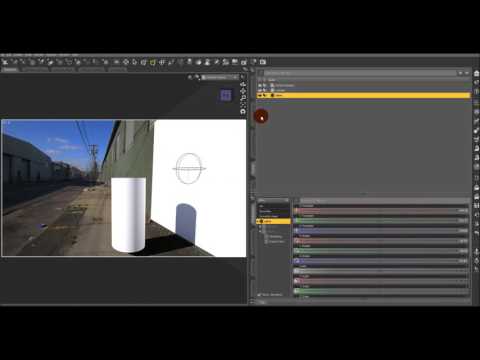
Maybe this will help? It's a little time consuming, but one heck of a lot cheaper than either a new video card or cloud rendering!
Hi Kevin , Yes we do have a couple of lawyers actually we have one that is a Interstate commence attorney that deals with copyright & trust laws , that was one of the first thing hubby got to deal with the SBA , & besides quadratron games We have other media outlets that approach us for sub contractor media productions to help them fill their quota needs. there is a firm in Atlanta Ga called Blue sky they are always looking for people, & K2 productions & WSOC in NC to name a few , we have a pretty good contact list. that is why I have been pounding the research for cloud rendering to see what going to work for us.. I thought that was going to be our best option . but from the way things have been adding up , building a render farm maybe the best way to go. & I think going with the xeon server will allow us to expand as well if we were to be successful. Hubby want to use cloud.Services.But not me.. My big issue. I'm 54 years old and I have a good full time job already. and I am taking a very caution approach to this venture. as my husband is a more balls to the walls kind of guy..and wanted it done like in July. Since he retired from Nursing He been doing media consultant work.. where I am a lonely graphic artist, illustrator. & I rather like the pay as I go route. So that is why nothing has been bought, signed or committed to yet because its me dragging my feet & yes we have some good fights about to too.lol its just hard for me to commit to such a investment when everything in life is starting to be paid off and the kids have finely moved out..lol
...and that's why at the most for myself, will just be a pasttime and one I am beginning to lose enthusiasm for because I cannot financially keep up with the tech curve. The system I built and currently use has become totally outdated particularly where Iray is concerned. All the components are now "legacy" tech. You know the old joke about how much a car depreciates once it's driven off the lot. With computers that is pretty much the case when they are still sitting on the shelves in the stores. This is how fast it the tech world is changing.
Four years ago when I built my system, 12 GB was a a lot of memory and cost a pretty penny (today I could get 64 GB of quad channel DDR4 memory for about the same price). 12 GB was more than sufficient for 3DL at the time particularly when using the AoA advanced lights instead of UE. As all rendering was CPU based (even LuxRender through Reality or Luxus), a GPU was pretty much only needed to run the Displays and Viewport (or if one also used the system for gaming which I do not, hence why a 1 GB card was pretty much all I needed), so having 6, 8 or 10 GB of VRAM (which wasn't even available at the time) wasn't necessary. With the advent of Iray, everything changed as it offered the ability to render in GPU mode which was faster and more efficient than on the CPU. While I could render even a fairly busy a scene in 3DL in say around 30 min (or less), doing so in Iray took hours, and sometimes many hours (though not as "glacial" as Reality/Lux). Yes it looked more "realistic", but at a much higher cost in time and stress on system components. It also meant more "idle time " as my system was pretty much useless for a longer period of time while rendering. Even test renders to check shadows, placement, & such took longer than final 3DL renders.
This is why I am curious as to how Daz is looking to handle rendering as a service to community members. So far, nothing "official" from Daz on what their proposal would involve yet.
You know you can still add advance GPU to your old system with a video card adaptors I use a EXP GDC V7.0 Beast External Independent Video Card Dock for my old laptop it came with a power option for the graphic card too. I have not done it myself but they say you can use the new Pascal tech on older pci systems with a dock, My laptop had a integrated graphic solution, so this was my option for upgrading my laptop so I could build animation sets on it when i was rendering on my desktop. I use a gtx 560 on my laptop So if you look around, an external adaptors for graphic cards Memory chips, and Hard drives are becoming the best option for upgrading older systems especially when on a limited budget
Just an idea
...as my current system, is a full tower an external adapter isn't necessary. It has two PCi2 x 16 slots. However I would need to expand the system's memory to 24 GB to support even an 8 GB 1070 (this is a six slot tri channel board so I need memory in banks of 3 sticks). .It would also require getting an OEM of WIn 7 Pro as I have the Home edition which only supports up to 16 GB. So to start, the total cost of the memory with OS upgrade is around 300$ Add a 1070 and the investment jumps to over 700$ which for me is a huge expense as I am on a fixed income. Using a PCi 3 card in a PCi 2 slot is not an issue, it may take a little longer to loading teh scene into VRAM, but render performance itself would not be impacted. the touch part is the size of the card as it is double width and I would like to use my old one to run the displays.
So basically 720$ or so for a "stopgap". Add another 200$ or so to swap for a 3.33 GHz 6 core 980 Extreme. and that would be about as far as I could push the upgrade.
Are you sure about this math? That seems prohibative even to studios. I've used cloud rendering with V-ray, and a single frame worked out to about a buck at 2k resolution.
...is that 2K (2000pix) render size?
Renderman tractor cost go by the subscription for base core hour for a $120 bucks a year download license or you can get you get 10 base core hours, $30 a core hour or unlimited data core hours for $2500 a month to me it would be much cheaper to just buy the full renderman year use license for a year than use the cloud render farm.. they have all the cost on the rendermans web site i posted under option packages check out rendrrman 21 for non commercial use only
4k Iray rendering is $2200 for unlimited monthly data rendering through render core. or you can pay $.30 a core hour for small projects. with a 10 core hour minimum so depending on the project your rendering, it could run you $1000's by the time your done unless you want it for few still renders not a good option for animation, its will cost you more than a monthly subscription . Rendercore was the company NVIDIA recommenced to us . there is a couple more I have that we compared prices with , but they are all pretty much the same cloud rendering has no advantages for the hobby use in my opinion
I want to correct myself here i ment core hours not minutes. how this adds up
" Pay as you go the core hour dependent cost on how many gpu cores you will require there is a 10 core minimum for every pay as you go core hour package."
that was in the bottom print of this Boucher i have
heres hw they explain the cost