Too hot to render!

edited November 2016 in The Commons

Help! I live in the frozen north. Problem is I am renting an apartment that is on the top floor. Heat rises from the lower floors. Worse yet is that the heat is blasting out of my radiators. It's an old building and heat is included in the rent. The landlord is required by law to maintain a minimum amount of heating during the winter months. I have requested in the past years to lower the heat but to no avail. The tenants in the floors below walk around in shorts. I am dehydrating and thirsty most of the time. The temperature is now 83 Fahrenheit when the windows are closed, but with the windows open, the temperature is 83F. I could see the heat waver as it rises forming a wall shield keeping the cold air out. 


I am afraid of turning on my computers because that will bring the heat up to 90F. When we had a broken heater a couple of weeks ago the heat dropped from 72 or 73F (22 Celsius) to 60 degrees. My computers kept me warm at about 65F. Was going to turn on the render farm but they fixed the heat too well the next day. 


Seriously, I can not turn on my computers or I will cook everything.

Suggestions please.

I was even thinking of taking a vacation in Hell. I hear it's cool there this time of year.

Post edited by Barefoot Upto My Soul on

Comments

  • MattymanxMattymanx Posts: 6,996

    Open all your windows.

    Put a fan on the floor under your window aiming at your computers?

  • FSMCDesignsFSMCDesigns Posts: 12,843

    Sounds like it's time to move.

  • IvyIvy Posts: 7,165

    I think I would try what Matty suggested a fan in the window.

  • 3Diva3Diva Posts: 11,973
    edited November 2016

    Sounds like it's time to move.

    I second that. It's not cheap to move though. If you can afford to move, I would - personally I can't stand being too hot, it's miserable and I can't sleep when I'm hot no mater how tired I am. If you can't afford to move  to a new apartment then perhaps move your computer station near the window with a fan in it and set the tower up as high as you can to get as much of the window's airflow. You could even freeze a couple of wet wash cloths and clip them to the front of the fan and have the fan blow on the frozen cloths. That should blow some cooler air until they thaw. You could even do like a bag of frozen peas instead of frozen towels. 

    Post edited by 3Diva on
  • damn you need to move for your health too!

    know not easy but hell.

  • edited November 2016
    Thank you everyone for responding. Hell hath no fury like my hot apartment.

    My big square window fan died out last winter and so I will have to get another one. The humidifier I had when I moved in, I threw that out when I saw the water from the bath tub was rusted. Not something I want to be breathing. Normally a humidifier would make cold air warmer and warm air cooler by making dry air moist. I forced the balcony door open last night just to watch the thermometer drop to 67F. Spent the night closing the door because it was too windy cold and opening it because it was to stifling hot. My cats must have thought I lost it. I will probably put the air conditioner back in the window since that passes through the heat shield of the Star Ship Overheat Apartment. That AC has also seen better days and I was going to chuck it. Good thing I kept it instead. At least it stops cooling when it reaches a set temperature. Crazy me having to air condition in the winter. The electric bill is going to be ugly trying to keep cool while competing with the landlord's over heating. The wind from the balcony door when open is rough but worse is the sound of the traffic of this busy city street. I try to imagine the sound of the traffic is like the calming ocean waves of Florida where I used to live. Just can't make it connect in my head. I guess I will have to move eventually... always wanted to move to the country. Mister Haney!

    Post edited by Barefoot Upto My Soul on
  • nDelphinDelphi Posts: 1,920

    I live in the Caribbean where 80F to 90F days and nights are normal most of the year, I have no AC, too expensive. My computer hasn't melted. I am sure, as long as you have good airflow, yours will not.

  • srieschsriesch Posts: 4,243

    I don't know how the average radiator is controlled, but (assuming it's water-based) is there some sort of valve you can adjust to reduce the flow to it?

    If it's electric there might be a hidden control knob that adjusts it inside the removeable end panel (I either turned mine down or off in one room years ago, while leaving the other baseboard heaters unaffected and still controlled by the main thermostat.)

    If all rooms are too warm (and it isn't set that way to heat the coldest room to a reasonable temperature, or because you need enough hot water for showers for all tenants), and the central unit can be adjusted, maybe you can convince your landlord to turn it down by doing a bit of math and showing how much it's costing over a many-year period to heat.  I can't imagine your landlord wouldn't want free money, which may be easily obtained by simply turning down a thermosthat or setting somewhere.

  • outrider42outrider42 Posts: 3,679

    What matters are the temps inside your computer. As long as you have good airflow, you'll be fine, even in a warm apartment. Use a monitoring software to see what your PC's temps are. Make sure your PC is clean, and no fans are blocked by dust. You can use the same software to set an aggressive fan curve, so that GPU fans ramp up faster than normal. It might get noisy depending on your machine, but your PC will be happy, and that's all that matters. No need to open windows or do anything weird. If you are really concerned, you could maybe try water cooling, but I don't think you need to.

  • riftwitchriftwitch Posts: 1,439

    I realize a lot of the problem is heat rising from the apartments below you, but if you have but as sriesch mentioned, lowering, or even turning off the water flowing through some or all of your radiators may help a lot. There should a valve at each radiator. 

    I'm surprised you had wanted to use a humidifier; radiant heat doesn't dry the air out like forced air does. If your humidity is around 35% or so, it's optimum for human health and comfort. If you really feel that you need more moisture in your air, you could always filter the rusty water. Also, if you do have to run the air conditioner, it will dehumidify the air, so the air may become too dry. This isn't normally a problem in the summer, when the air is naturally much more humid.

    At any rate, if you can't find any valves outside the radiators, post some pictures of them. I'm working in the HVAC field, so if I can see what you're dealing with, I might be able to offer some other suggestions. 

  • ToborTobor Posts: 2,300
    always wanted to move to the country. Mister Haney!

    I suspect few born after 1970 will get the reference!

    If it were me, I'd see about moving the computer outside the living space, and networking it with a bare bones machine that you have inside. You don't want the remote PC wet or overly cold, but heat will kill a computer very quickly. I've already had to bury one Xeon machine that I used for rendering, and it was because of rendering at 83-85 degrees ambient temperature during summer months.

  • mjc1016mjc1016 Posts: 15,001
    Tobor said:
    always wanted to move to the country. Mister Haney!

    I suspect few born after 1970 will get the reference!

    I suppose not...but reruns and streaming services are great for stuff like that.

  • Help! I live in the frozen north. Problem is I am renting an apartment that is on the top floor. Heat rises from the lower floors. Worse yet is that the heat is blasting out of my radiators. It's an old building and heat is included in the rent. The landlord is required by law to maintain a minimum amount of heating during the winter months. I have requested in the past years to lower the heat but to no avail. The tenants in the floors below walk around in shorts. I am dehydrating and thirsty most of the time. The temperature is now 83 Fahrenheit when the windows are closed, but with the windows open, the temperature is 83F. I could see the heat waver as it rises forming a wall shield keeping the cold air out. 


    I am afraid of turning on my computers because that will bring the heat up to 90F. When we had a broken heater a couple of weeks ago the heat dropped from 72 or 73F (22 Celsius) to 60 degrees. My computers kept me warm at about 65F. Was going to turn on the render farm but they fixed the heat too well the next day. 


    Seriously, I can not turn on my computers or I will cook everything.

    Suggestions please.

    I was even thinking of taking a vacation in Hell. I hear it's cool there this time of year.

    I would cut a bore hole in the top of your case and install a 120mm fan to increase airflow thru your case. If this does not work then it is time for extremes. The next step is water cooling. If you live in a cold enviroment having a bucket outside your window and pumping the water from outside thru rubber hoses into your PC will cool your components down but the pump and new brackets and other parts are expensive. If this is too expensive you could look into getting some Plexiglass or Plywood and boring a hole in a homemade window vent. The Idea is to make something you can install in your window to keep the rain and weather out of your house and allow cool air to get to your PC. You can use thin sheet metal exhaust or you chan use large PVC piping. I would use duct tape on metal piping and pvc glue on plastic piping. The tricky part is condensation, just remember warm air on cold surface equals condensation. So make sure you test the system out so you don't get water on your PC. These are just ideas, please consult a professional when doing anything envolving electricity and construction.

  • caravellecaravelle Posts: 2,654

    If you like the flat and want to stay you, together with your neighbours, could try to make a 'petition' to the landlord. Any normal landlord would gladly agree because he/she could save a lot of his dear money if he/she lowered the heat a bit. Or your lawyer should inform your landlord that he has to pay for any extra expenses you have because of that heat, health problems included.

  • Hi again and thank you all for commenting. Reading has helped me feel less alone.


    The temperature came down a bit to 80F 25C and the humidistat still reads as about 27 percent. It seems a couple of other neighbors were complaining. So I voiced my frustration to the janitor who said he can't do anything about it but will let the landlord know its still too hot. This janitor has been quite incompetent but the rent is low and the landlord is way better than any I have had when I moved to this city 26 years ago. Will see if it drops by 8 degrees or 4 degrees respectively this coming week.

  • MattymanxMattymanx Posts: 6,996

    You would think the landlord would want to save money by not having it up so high


  • edited November 2016
    Did I say 80 degrees? It's back up to 82...

    The city comes down hard on landlords who don't heat to a minimum amount so in order to avoid these rediculous fines, they heat and then some. My mouth is so dry.

    Post edited by Barefoot Upto My Soul on
  • edited November 2016
    Humidity is down to 22 percent now. Heat is holding steady at 80F with the windows open. Door is wide open to the balcony as well so that blast of arctic air is cold but not helping any more.

    I can't reach the landlord at the moment but spoke with the janitor. He tells me there is no shut off with the new valves they put in in my apartment. It only bleeds the steam. They had called back the repairman several times last week and each time the heat still goes back up after lowering it. They think it may be the board on the computer that controls the furnace. It will be some time this coming week before they can change that board.

    I hope my cats will make it though this. I am coughing up dust. This may be my last post. This is General Distress, Star Fleet Enema, signing off.

    Post edited by Barefoot Upto My Soul on
  • Kendall SearsKendall Sears Posts: 2,995
    edited November 2016

    Bleeding off heat in those situations can be a bear.  If your system is close enough to an external window, you have a relatively inexpensive solution.  You can use clothes dryer vent tubing to route cold(er) external air into the case and vent the hot air from inside the case to the outside.  This requires 2 sets of dryer tubing long enough to reach the window (the flexible plastic kind will be fine), a piece of rigid plastic (acrylic sheeting works well but is more expensive than some other plastics), and 2 (maybe 3) pieces of dryer vent connector (metal and plastic are available).  Cut the plastic sheet to the width of your window and about 2.5cm to 4cm taller than the diameter of the dryer vents' tubing connectors.  Cut two holes into the plastic the diameter of the vent, and screw the connectors to the plastic sheet.  This will go into your window to stop excess heat leakage and keep out insects, etc.  If your case has a side vent, connect the incoming tube over the vent however your case will allow (an additional vent connector screwed over the side case vent works well https://www.lowes.com/pd/IMPERIAL-4-in-Plastic-Dryer-Vent-Draft-Blocker/3126471), if not you may need to cut one into the side.  Connect the exhaust tube to the main exhaust port for your computer.  In many cases, you can use a few metal "L" brackets to connect the tubing to the computer exhaust via the screws available already.  Don't worry about "leaks" from the tubes to the computer case, enough air will be drawn/exhausted to serve the purpose.

    All of this should be available for under $30US or so at a hardware store.  If you aren't savvy with plastics, the sheeting can be replaced with a flat piece of plywood.

    EDIT:  You will need to make sure that you don't allow rain to run down the tubes into the computer, so it would be wise to get the dryer vents designed to block rain.  On the incoming side fasten the flap (if one is on the vent) open so that suction is not blocked by it. (something like this -- https://www.lowes.com/pd/IMPERIAL-4-in-Plastic-Preferrered-with-Guard-Dryer-Vent-Cap/3203015)

    EDIT2:  If you decide to go this route, it is up to you to make sure that you insulate the system from contamination and possible damage.  If you live in a particularly dusty or polluted area, then the intake side may not be proper for your situation and you may need to only use the exhaust to the outside.  You may want to investigate a portable A/C system (like one of these: http://www.kmart.com/kenmore-portable-air-conditioner-8-000-btu/p-04283086000P?sid=KDx01192011x000001&gclid=Cj0KEQiAperBBRDfuMf72sr56fIBEiQAPFXszWJucENxkh2QupYYt5o4fuvY6gTlk_l361IpC_tQpjQaAnRR8P8HAQ&gclsrc=aw.ds) which operate on a similar methodology.

    Kendall 

    Post edited by Kendall Sears on
  • Bleeding off heat in those situations can be a bear.  If your system is close enough to an external window, you have a relatively inexpensive solution.  You can use clothes dryer vent tubing to route cold(er) external air into the case and vent the hot air from inside the case to the outside.  This requires 2 sets of dryer tubing long enough to reach the window (the flexible plastic kind will be fine), a piece of rigid plastic (acrylic sheeting works well but is more expensive than some other plastics), and 2 (maybe 3) pieces of dryer vent connector (metal and plastic are available).  Cut the plastic sheet to the width of your window and about 2.5cm to 4cm taller than the diameter of the dryer vents' tubing connectors.  Cut two holes into the plastic the diameter of the vent, and screw the connectors to the plastic sheet.  This will go into your window to stop excess heat leakage and keep out insects, etc.  If your case has a side vent, connect the incoming tube over the vent however your case will allow (an additional vent connector screwed over the side case vent works well), if not you may need to cut one into the side.  Connect the exhaust tube to the main exhaust port for your computer.  In many cases, you can use a few metal "L" brackets to connect the tubing to the computer exhaust via the screws available already.

    All of this should be available for under $30US or so at a hardware store.  If you aren't savvy with plastics, the sheeting can be replaced with a flat piece of plywood.

    Kendall 

    That was the best answer so far. Although all the answers were of interest. The dryer hose can pass through the heat shield that is hot air rising from the radiators. It can connect from the window to the room or to the PCs or MACs. Thus transferring hot and cold air while bypassing the hot air shield. I like this. I am putting that in the window of the door now just to help cool the room without me freezing. My main concern at the moment is to cool the apartment till they fix the overheating. All my computers are shut off this past week to help keep the place from burning up and avoid burning out the computers. I turned off the power bars as well so computers are completely off. No green light glowing inside. I am using my Android phone or iPad for viewing the forum so no risk of heat from these.

    This is Major Lee Exhausted, Space Station Sick as a K9, signing out.

    End Transmission

  • Help! I live in the frozen north. Problem is I am renting an apartment that is on the top floor. Heat rises from the lower floors. Worse yet is that the heat is blasting out of my radiators. It's an old building and heat is included in the rent. The landlord is required by law to maintain a minimum amount of heating during the winter months. I have requested in the past years to lower the heat but to no avail. The tenants in the floors below walk around in shorts. I am dehydrating and thirsty most of the time. The temperature is now 83 Fahrenheit when the windows are closed, but with the windows open, the temperature is 83F. I could see the heat waver as it rises forming a wall shield keeping the cold air out. 


    I am afraid of turning on my computers because that will bring the heat up to 90F. When we had a broken heater a couple of weeks ago the heat dropped from 72 or 73F (22 Celsius) to 60 degrees. My computers kept me warm at about 65F. Was going to turn on the render farm but they fixed the heat too well the next day. 


    Seriously, I can not turn on my computers or I will cook everything.

    Suggestions please.

    I was even thinking of taking a vacation in Hell. I hear it's cool there this time of year.

    I would cut a bore hole in the top of your case and install a 120mm fan to increase airflow thru your case. If this does not work then it is time for extremes. The next step is water cooling. If you live in a cold enviroment having a bucket outside your window and pumping the water from outside thru rubber hoses into your PC will cool your components down but the pump and new brackets and other parts are expensive. If this is too expensive you could look into getting some Plexiglass or Plywood and boring a hole in a homemade window vent. The Idea is to make something you can install in your window to keep the rain and weather out of your house and allow cool air to get to your PC. You can use thin sheet metal exhaust or you chan use large PVC piping. I would use duct tape on metal piping and pvc glue on plastic piping. The tricky part is condensation, just remember warm air on cold surface equals condensation. So make sure you test the system out so you don't get water on your PC. These are just ideas, please consult a professional when doing anything envolving electricity and construction.

    My audio workstation is an Antec tower which has a 120mm fan on top. I will post some photos of this and the radiators for riftwitch and etc.
  • Bleeding off heat in those situations can be a bear.  If your system is close enough to an external window, you have a relatively inexpensive solution.  You can use clothes dryer vent tubing to route cold(er) external air into the case and vent the hot air from inside the case to the outside.  This requires 2 sets of dryer tubing long enough to reach the window (the flexible plastic kind will be fine), a piece of rigid plastic (acrylic sheeting works well but is more expensive than some other plastics), and 2 (maybe 3) pieces of dryer vent connector (metal and plastic are available).  Cut the plastic sheet to the width of your window and about 2.5cm to 4cm taller than the diameter of the dryer vents' tubing connectors.  Cut two holes into the plastic the diameter of the vent, and screw the connectors to the plastic sheet.  This will go into your window to stop excess heat leakage and keep out insects, etc.  If your case has a side vent, connect the incoming tube over the vent however your case will allow (an additional vent connector screwed over the side case vent works well), if not you may need to cut one into the side.  Connect the exhaust tube to the main exhaust port for your computer.  In many cases, you can use a few metal "L" brackets to connect the tubing to the computer exhaust via the screws available already.

    All of this should be available for under $30US or so at a hardware store.  If you aren't savvy with plastics, the sheeting can be replaced with a flat piece of plywood.

    Kendall 


    That was the best answer so far. Although all the answers were of interest. The dryer hose can pass through the heat shield that is hot air rising from the radiators. It can connect from the window to the room or to the PCs or MACs. Thus transferring hot and cold air while bypassing the hot air shield. I like this. I am putting that in the window of the door now just to help cool the room without me freezing. My main concern at the moment is to cool the apartment till they fix the overheating. All my computers are shut off this past week to help keep the place from burning up and avoid burning out the computers. I turned off the power bars as well so computers are completely off. No green light glowing inside. I am using my Android phone or iPad for viewing the forum so no risk of heat from these.


    This is Major Lee Exhausted, Space Station Sick as a K9, signing out.


    End Transmission

    Please see my edits before attempting this.

    Kendall

  • What matters are the temps inside your computer. As long as you have good airflow, you'll be fine, even in a warm apartment. Use a monitoring software to see what your PC's temps are. Make sure your PC is clean, and no fans are blocked by dust. You can use the same software to set an aggressive fan curve, so that GPU fans ramp up faster than normal. It might get noisy depending on your machine, but your PC will be happy, and that's all that matters. No need to open windows or do anything weird. If you are really concerned, you could maybe try water cooling, but I don't think you need to.

    Thank you for responding too. I don't have fans on my GPUs. This hopefully helps keep the noise down of the computers. All are very old computers being socket 478 and 775 if I remember correctly. I refurbished them myself and occasionally check inside to clean out dust. The server which runs with Windows XP doesn't have a software monitor. I am having difficulty finding one that works with this paticular motherboard. I might have to switch to Ubuntu 64 bit 14.04 as the OS due to recently purchasing a 6TB hard drive that XP might not be able to handle. I'll see. Ubuntu might have a monitor for this mobo.
  • mjc1016mjc1016 Posts: 15,001
     

    EDIT2:  If you decide to go this route, it is up to you to make sure that you insulate the system from contamination and possible damage.  If you live in a particularly dusty or polluted area, then the intake side may not be proper for your situation and you may need to only use the exhaust to the outside. 

    An inline filter could help in that situation...

  • outrider42outrider42 Posts: 3,679
    edited November 2016

    What matters are the temps inside your computer. As long as you have good airflow, you'll be fine, even in a warm apartment. Use a monitoring software to see what your PC's temps are. Make sure your PC is clean, and no fans are blocked by dust. You can use the same software to set an aggressive fan curve, so that GPU fans ramp up faster than normal. It might get noisy depending on your machine, but your PC will be happy, and that's all that matters. No need to open windows or do anything weird. If you are really concerned, you could maybe try water cooling, but I don't think you need to.

    Thank you for responding too. I don't have fans on my GPUs. This hopefully helps keep the noise down of the computers. All are very old computers being socket 478 and 775 if I remember correctly. I refurbished them myself and occasionally check inside to clean out dust. The server which runs with Windows XP doesn't have a software monitor. I am having difficulty finding one that works with this paticular motherboard. I might have to switch to Ubuntu 64 bit 14.04 as the OS due to recently purchasing a 6TB hard drive that XP might not be able to handle. I'll see. Ubuntu might have a monitor for this mobo.

    Well, while my PC has been entirely changed out, I still have a case that dates back to 2002 or 2004. So it goes back a decade. I just really like it, modern cases are either super bland or super gaudy, there isn't much of a between. My case has a nice blue paint finish, with a clear side panel. Its not black, and it doesn't look like it came from another planet whose aliens think everything must be "extreme."

    Anyway, being an old case, it had some things I needed to work out to modernize it for better airflow. I used metal cutters to cut out several sections and covered them with mesh metal vents, allowing more air. I added several fans. Some are CPU controlled so they ramp when needed, and some are manual with speed switches. There are 4 80mm manual fans up front (old case, so it fits 80mm fans.) But combined, the 4 effectively make one large 160mm fan, and they move more air than a 160mm would. These babies take in a lot of air. The back has the original pair of 80mm fans, plus a 92mm CPU fan I added that actually sits in the expansion slot area on the back. This serves to eject more air. The psu has its own fan ejecting air out the back, and my gpu is a "blower" style also ejecting air out the back, so the whole back side is all fans except where the cable connections are. I thought about hacking a hole for a fan on the top, but my temps were fine with this, so I kept it this way. My CPU has a giant 120mm fan of its own. All the air moves from front to back.

    So the end result is this case can move a ton of air. Its pretty sexy, too. The case modding didn't cost much, as fans, mesh metal vents, connectors, and fan guards are all very cheap items. The holes I cut out up front are covered by the case itself, which has its own vent, so you have no idea that I cut out those holes. The mesh metal vent covers hide the holes I cut out in the back nicely. So the case doesn't look like its been hacked up. If cranked all the way up, it does hum along. But it works great. I've used temp probes as well as software monitoring while running Daz renders and gaming, and all is well. I run my PC almost 24/7 now, too.
    Post edited by outrider42 on
  •  

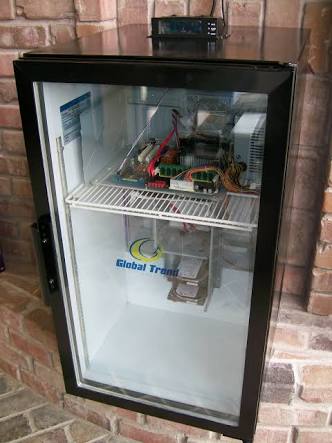
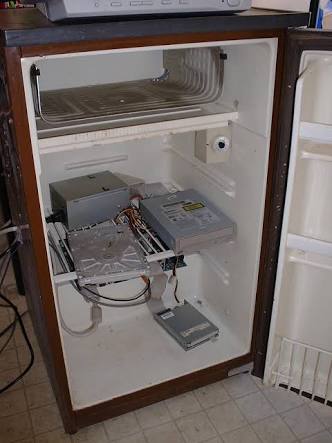
    maybe a bar fridge?


  • Roaring laughing! I want that mini bar fridge as my server tower.... and I want it stocked too ;)
  • wizwiz Posts: 1,100

    I'm disappointed tnat this wasn't a story about a scene "too hot to render".

  • It originally was Wiz but Richard or Chohole wagged their finger. Okay they didn't and it wasn't but perhaps it could be within the confines of DAZ prudery. Maybe post your best image that flies a little too close to the sun without burning up.

  • edited November 2016

    Captain's blog, star date unknown. The temperature dropped to 75F finally due to the rain and humidity is now down to 21 percent. We have run out of Star Fleet rations and have resorted to opening a bag of chocolate chip cookies we have scavenged from the store. 


    It has been five minutes since we've opened the bag of chocolate chip cookies and it is now empty.


    The guy from the plumbing company arrived to fix the furnace just in the nick of time.  Once the heat drops down to 72 Fahrenheit or below the room temperature should be OK for me to do rendering again. The computers themselves run efficiently. Thank you all for your help and for humouring me. 


    Michael

    Post edited by Barefoot Upto My Soul on
Sign In or Register to comment.