Hunt or be Hunted Bundle... Wow!
 BeeMKay
Posts: 7,019
BeeMKay
Posts: 7,019
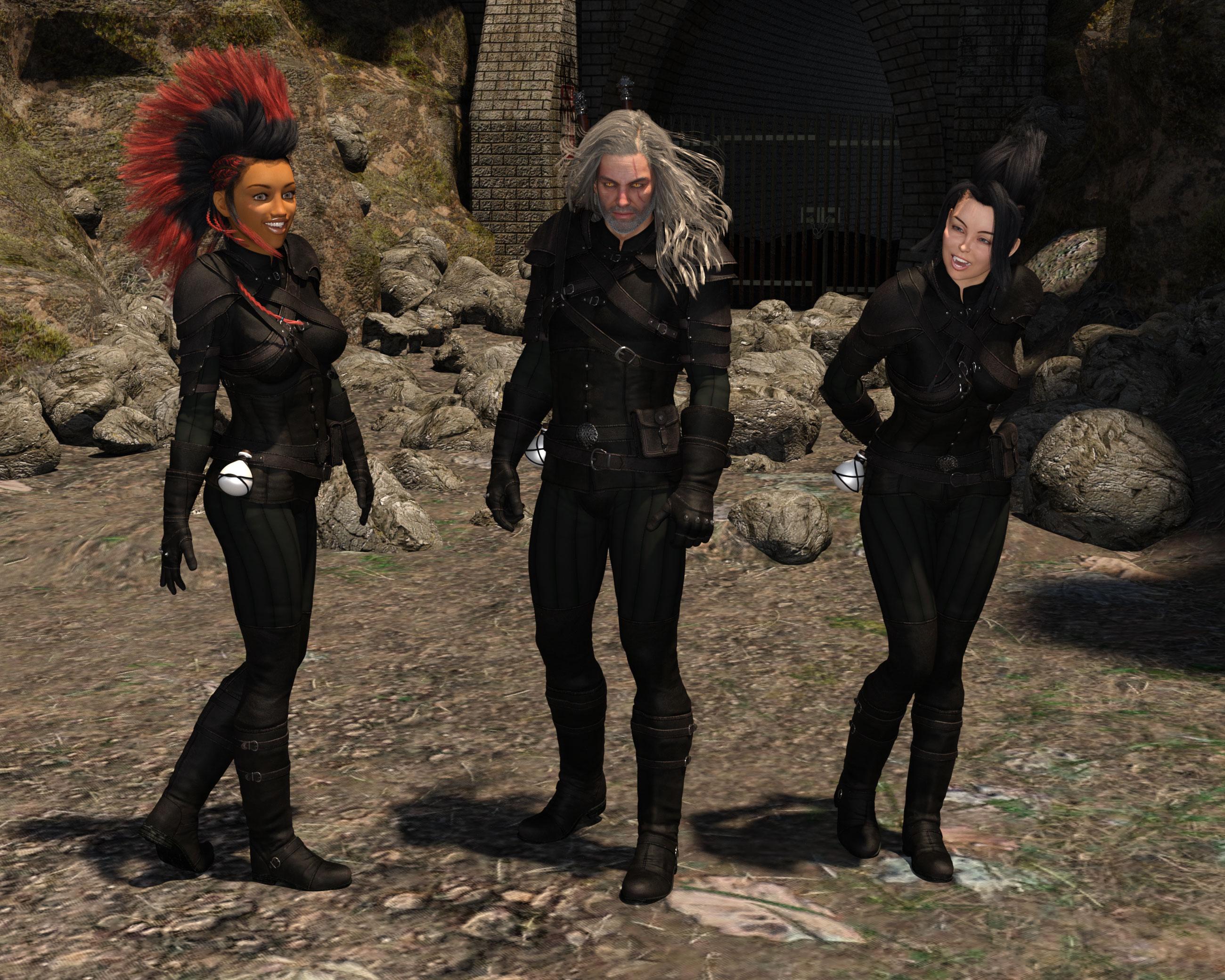
I'm usually rather shying away from G3 stuff, as I am primarily using G2. But in this case, I couldn't resist. The character himself is just great. And the Hunter Gear Outfit is not just looking great on G3F (left side of the image) but, if you fit it to G3F first, and then save that as a wearable preset, can be fit rather nicely to G2F (left side). Of course, there's the belts and straps which curve too tightly around the bosom, but that's what assorted helpers are for. I left them out in this very quick test render, just as G2M.
Nox Hair (not part of the bundle) had to be loaded as a prop and parented to G2F, though, as it losess all the bones otherwise.

Daz 3D is part of 
Connect
DAZ Productions, Inc.
7533 S Center View Ct #4664
West Jordan, UT 84084
Licensing Agreement | Terms of Service | Privacy Policy | EULA
© 2026 Daz Productions Inc. All Rights Reserved.
Comments
Yep, it looks very nice (just completed dl, so I've got to try it yet).....
One thing, as a fan of the witcher games, to me this bundle would be near perfect if the steel sword had a straight crossguard...... ah, well, a minor point....
Geralt!
I bought the outfit. It's simple, yet detailed, and very nicely designed. I think there's a good balance of base garment work and armor. Great for both sci-fi and fantasy in my opinion. I really like how all the accessories 'build it up' so to speak.
No heels, thank athe!
I especially like the outfit and the add-on texture set, not so much the character, but I bought the bundle and add-on texture. I think the outfit is so versatile.
It looks great! Both the outfit and the character; now we only need Triss to make the couple :P
Love the character and love the older guys. Keep em comin'! ;)
Laurie
Here's a closer render of Gwenbleiz in the mountains... this is the scar version, with normal eyes. I'm currently rendering the version without the scars. For some reason, the shape morphs for "scars off" and "eyes back to normal" don't seem to work for me and I have to manually dial them back. Does anyone else have that problem? Using 4.8 here.
As a huge fan of the Witcher games I was very excited and snapped this up quickly. I'd love to see some more characters from the Witcher games most especially Ciri and Triss if the PA is looking for ideas!
It's gorgeous and found its way quickly into my cart! Waiting for downloads to finish so I can start rendering. Many thanks to Kayleyss for this incredible set! I cannot wait to play with it! (I immediately thought "Witcher" as well!)
Except that you can find/craft/buy a huge variety of steel and silver swords in game (at least)
Very true, but most 'dedicated' witcher steel swords (in game) have a straight ot near straight crossguard. IIRC, only the 'ursine' steel sword has that distinctive angled crossguard that most silver swords (in game) have...
You could always use one of these swords...
http://www.porsimo.net/3d/weapons.htm (Medieval Sword Pack 2)
The artist has posted a freebie medalion that seems to be intended to go with this over in Rendo's freebie secton. There may be a link to it in the freebies here as well.
Thanks for the heads up, JOdel!
Here's a render of the character without the scars and with a very different hairdo. I'll probably re-do this with a diferent shirt color, and the left foot pose needs some tweaking....
Fantastic character and clothing. The quality is really high! I squealed when I saw him in the newsletter! <3
I'm playing The Witcher 3 right now (I *will* finish it this time, and the expansions :p) so I'm in total Witcher mode. For anyone that likes the games, I highly recommend the books too. :3
There are books too? Ooh, I'm in trouble. I bought all three games this summer when they were on some crazy sale. Haven't had a chance to play them yet. The previews blew me away.
I picked up the character. I don't have use for fantasy clothing or props, but the character is very good.
The character, yes! More men for the femdom that is Daz. Shox-Design's textures once again bring a luxuriant touch to a basic textured outfit.
comic books and a tv series from 2001 as well. also a posibilty of a movie.
Hi all :)
For the medallion you have the link in this thread:
http://www.daz3d.com/forums/discussion/121401/wolf-medallion-for-genesis-3-male-and-female
About his Steel Sword, you are completely right: In the game the crossguard in generaly straight.
But in the book, they are identical except one thing, the silver sword got runes on the blade.
The Scar and the eyes are Linked to the head morph (same for the body). I will do an update to correct that. Sorry if you encounter issues
as a person who uses other software than DAZ studio one thing has me puzzled,
the way things are parented like the swords, scabards potion bottle etc, they either disappear or parent wrong if FBX exported for iClone or converted using SY's clones to Genesis for Carrara.
Not a big issue except I cannot just unparent and save as props in the case of say the dagger sheath or bag which vanishes from the belt for some reason as in fact one mesh.
My only option was to convert it to a prop and attack it in Carrara's vertex room separating out the missing bits, I have never seen this before and very puzzled why it happens.
I have solved it as said but as many might chose to use clones in autofit for other earlier figures maybe a prop version of the bag, sheath etc would help.
I wasn't aware about that ( I don't use iClone or Carrara) Thanks for the feedback :)
its fine just saying same thing occurs autofitting to Genesis and possibly G2M etc as some might do.
as I said never seen it happen before.
Thank you for looking into this! For some reason, the separat "Remove" icons don't work when using on the pre-loaded character. I haven't tried using them on the character if I used the insert morphs before on a "neutral" G3M.
This is really a beautiful character, and ´versatile clothing set.
Come on Will we all know you're a Hi Heel man !!!!
I have submit the corrections to DAZ, just have to wait until they release the patch.
Yes, if you use a neutral G3M the inj and the remove works without trouble :)
oh update, unparenting props and parenting to the G3M works fine for the FBX export, its just the autofit to earlier figures I still get weird stuff happening, I am thinking maybe its because I fitted it to George first time, on Gwenbliez it worked fine, maybe Georges extreme morphs affected the bag and sheath which vanished and were not AFAIK hidden in him.
I think it could also be because I am using the D|S 4.9 beta.
Love the bundle, but is anyone else gettting a duplicate errors mesage when loading a saved scene using the clothes, from the log it seems to have something to do with the double belt?