Holy Horny Suitsuit! Problem
 ebonartgallery
Posts: 272
ebonartgallery
Posts: 272
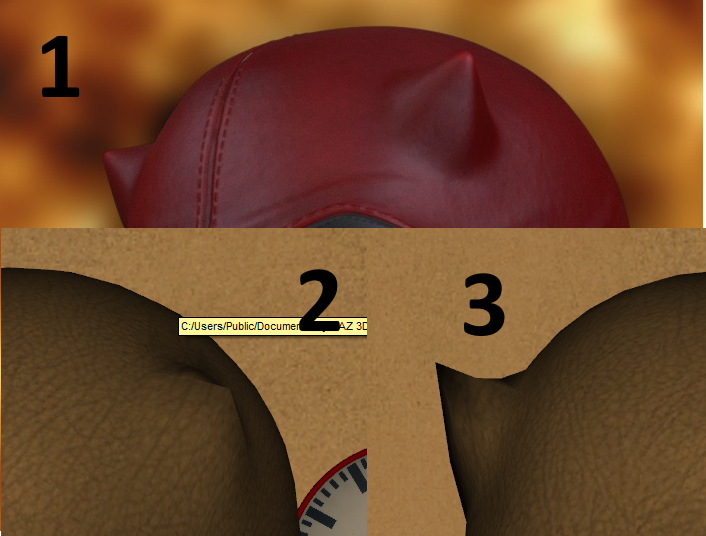
So I tried the devil horn morph for the Guardian cowl. Something is either wrong with the morph or wrong with something I've done, somehow.
In the pic below: (1) is the promo pic for the G3M Guardian suit (2) is what I get with the devil horn morph turned up to 100% Oddly, (3) is what I get before I let go of the mouse button.
Neither look anything like the promo in even the most basic of shapes, in any lighting, etc etc. What gives?
Post edited by ebonartgallery on

Daz 3D is part of 
Connect
DAZ Productions, Inc.
7533 S Center View Ct #4664
West Jordan, UT 84084
Licensing Agreement | Terms of Service | Privacy Policy | EULA
© 2026 Daz Productions Inc. All Rights Reserved.
Comments
Are you sure you rendered it and it's not just the preview window you're showing?
P.S I'm thinking this is a HD morph and you won't see it till you fully render it !
Nope, that's a fully-completed render.
Looks like smoothing. You can try turning it off to see what it does. But before that, I'd check if there's a higher resolution mesh for the suit and try to bump up the SubD maybe.
Yes, this is a smoothing problem. That is why I included the line in the readme that says: " For best effect on cowl morphs, “Smoothing Type” on the body suit should be switched to “Generic” instead of “Base Shape Matching”"
This is also true for the wrinkle morphs
(also..it looks like you do not have the mesh set to High Density)
Rawn
Someday I despair of ever really learning anything about this hobby. Nothing has ever mentioned such things before or why you'd ever need to do them.
I did that, pumped up the subD/SubDRender, and put both smoothing and collision detection to zero - and the horns look amazing.
Thank you!
Glad you got it all working :)
There's a read me?! I have never even looked at a single readme for any DAZ product, wonder what I might be missing, LOL.