
Daz 3D is part of 
Connect
DAZ Productions, Inc.
7533 S Center View Ct #4664
West Jordan, UT 84084
Licensing Agreement | Terms of Service | Privacy Policy | EULA
© 2026 Daz Productions Inc. All Rights Reserved.
Comments
Peach Fuzz saved my peaches from the Japanese Beetles. I am glad I have only two nectarine trees, Japanses Beetles ate them up.
@ Will, to avoid offset from the skin, I sometimes put the hair on a copy of the figure that has a push modifier that shrinks the skin to below the high rez main figure, and make the hair longer than you'd intuitively like. I think all geometry hair figures and generators (as opposed to transmapped ribbon types) should have their roots under the skin or that option, to be honest.
Thanks for that. Glad you like them.
Wow! That looks great! I think the gaps are probably a good thing. The only time you really see peach fuzz is when the light hits it just right, and due to the natural contours of the human body you're not going to see a lot of it at once.
Played around with LAMH a good part of today trying to approximate some of the effects seen here in Jimbow's and Timmins.william's posts. Didn't even come close. I can't get it thin enough, like the hair on the forearms in Gothic imagination, or short enough, like in the examples Timmins.william posted in this thread.
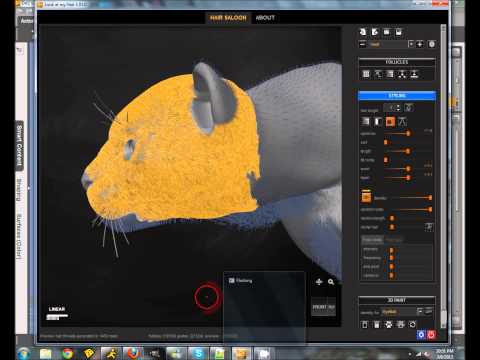
The learning curve on LAMH seems prettys steep, and I can't seem to find any real good tutorials.
This one has been most useful:
But I'm not trying to get a thick, short, dense fur like you might find on a Cheetah. I mean, I've got a use for that too - but I'd like to be able to recreate the effects I am seeing in this thread, too. The Frosted Glass shader doesn't seem to be doing the trick for me.
There's a V4-based product over at Rendo by Exnem (relatively recent product) that might suite your needs, given almost every humaniod mesh has a conversion path from/to V4.
Seems to be geometry-based. Haven't used it but the promos seem to sell it well it well enough :^)
(edit to add,: Further checking of the product info indicates that it's very poser-centric, but a few comments indicate success with DAZ (aiko6?) with some tweaking)
-ms
Iray? 3Delight?
Maybe playing with http://www.sharecg.com/v/36638/favorite/6/Texture/Fuzzy-Wuzzy-Fur-Shader-Daz-Studio ?
or maybe my velvet lining material? http://www.sharecg.com/v/79947/browse/21/DAZ-Studio/Fistys-Eyeglass-Case-Velvet-Lining-DS4.7
For all of us that already bought LAMH, which is useless in IRAY, are they gonna stick us with another big fee for this?
If they can just make it useless with the next "New improved" update, I'm not shelling out more coin on any of this LAMH stuff.
JD
Why is LAMH useless in IRAY? I've rendered in IRAY and things looked fine - but again, I've just started to explore the capabilities and possibilities of LAMH.
It's not useless in Iray at all, it's just a little inconvenient -- you have to convert to Fiberhair, and once converted you can't repose, so you have to either redo it after a pose or only bother when you are ready for the render.
Donovan:
You can change the hair thickness in the LAMH pane, and in the editor you can keep making them shorter (length slider). Finally, if the 'coat' is too thick, change the number of hairs.
Will...
Thanks. After looking at your examples, and sitting looking at the interface scratching my head, I think I'm headed in the right direction. I kind of agree with Diva... the floating quality actually seems realistic to me. It may just be that some postwork in photoshop is needed going about it this way.
Any news about the floating hair problem?