
Daz 3D is part of 
Connect
DAZ Productions, Inc.
7533 S Center View Ct #4664
West Jordan, UT 84084
Licensing Agreement | Terms of Service | Privacy Policy | EULA
© 2026 Daz Productions Inc. All Rights Reserved.
Comments
Hi technically they already have.
Most of the "Standard" BVH Motions
,you find online, are based on Human mocap
Data with very basic bone naming and rotational order
such as this well known free archive
https://sites.google.com/a/cgspeed.com/cgspeed/motion-capture/daz-friendly-release
These motion files will "work" for the most part with
every Zygote/Daz figure from P4 "Dork" & "Posette"
all the way down the Daz "family tree" to Genesis 1-2
Now honestly they are not perfect Click load& play
solutions and do require some knowledge of your chosen apps animation editing tools.
For Example many of them Distort the hands during the animation but the easy solution is to create and re-use your own animated relaxed& natural hand poses to overwrite the Distorted hands in the mocap with one click.
To be fair Gofigure did release quite a bit of "every day motions" for theMil gen4& G1 G2 figures and I likely have them all.
http://www.daz3d.com/catalogsearch/result/?q=animation
I would theorize that this was because of the ease at which one can take "standard" mocap that was so compatible with the Daz "family" mentioned above, and retarget it to a Mike& Vicky 4 or G1-G2 and bake it to an aniblock.
On the matter of G3 the reason you see only a sparse few Sexy strut walks painstakingly hand groked by merchants like "Skamotion", and a few standing gesture motions in the market is obvious.
People have not been able to easily Retask existing archives
of Motion Data to this figure due to the pointlessly exotic(IMHO) rigging scheme.
And telling there average Daz user to go buy$$Iclone Pro$$ or Autodesk$$ Maya or Motionbuilder$$$ is not a solution to animating Genesis 3.
For me the obvious answer is to stay the course with G1-G2.
Could not have said it better myself Wolf.
Its to bad the powers that be at daz didn't seem to listen, or care if it broke compatibility with what they already had as a successful character mesh for animations... and like you said IMHO. I don't think daz really cares about animation support. I have to believe that they are surviving on impulse buying, because a character may look nice,sexy, etc. it does not matter now, that cats out of the bag. I have seen a lot less animation tools , and a lot less people Dev for animation since g3 came out..not to mention Daz also broke compatibility with some really great animation tools, like splash tool, Particle FX.. if that progress its must be the kind that goes backwards...lol I don't know of any other 3d software company that broke compatibility with their own products accept for daz, Maybe good for sales for the average joe that is just renders still art. not so much for users that has been using and want to continue to use daz for to animate. but find it getting harder and harder to do so
Its the new users I really feel sorry for, because unless they have access to older content. They will have a very discouraging experience trying to create animation with g3.
Hi I have had no problems with using a Genesis1- 2 CR2
in Mimic Pro 3
AFAIK Mimic 3 itself is not 64 bit but frankly that is not the main issue for us over here.
The built in Daz mimic plugin has no options to adjust the strength of a phoneme or replace it with a more accurate
phoneme from the phoneme pallet as in Mimic pro.
Also it gets confusing , from a workflow perspective, to jump back & forth between two open copies of DAZ studio(32&64) and I am pretty sure Mimic pro has a lighter RAM Footprint than a second iteration of DS
the attached pic is the G2 female in the mimic pro session manager.
The Video below is an open GL render of the result in Daz Studio .
http://www.daz3d.com/catalogsearch/result/?q=animation
with this link you see its not even possible to search for animations only
you get all that poses stuff too
True you have to sift through the results for aniblocks.
But that fact remains the there are alot of aniblock for the millenieum 4 Figures (and by extension G1, G2) with great variety beyond the typical& repetitive "sexy strut" stuff we see for G3.
This. I agree completely, and hope that Daz will separate off the Animation category from the Poses category, to aid in searches for animations.
At the moment, Daz is not focussing on animation so much since the demand is largely for still frames. However, once the true potential of iRay's animation capabilities are realized, the market will eventually expand. And with it, Animate2, Powerpose, etc.
-P
I so agree with the need for phoneme replacement (hello Dazzie Dev pls there's a growing market here hear hear lol)
Am a bit of phoneme-nazi myself so much so I always rebuild my own viseme set. Same aversion here too about jumping back & forth workflow....
which is why I've been avoiding installing DS 32bit. Oh well now that it's in my workflow - or work-anti-flow lol - I'll have to plan ahead more for RAM-saving too, so less fun and spontaneous!
Thank goodness the syncing is mostly accurate and I actually enjoy GoZ morph making. The use Keymate & Puppeteer to clean up and fix mouth/ tongue fails.
The Mimic pro pic is educational indeed. With a mini graph too, so far ahead of its time!
Just bookmarked your video page, really enjoy watching power users tech tests!
I have not used mimic pro in a couple of years ..I found it cumbersome and did not accomplish what I needed.. so I pretty much hand key frame all my speaking movements now.. the reason i decided to do it by hand was that I could not get any expressions when i used mimic pro. and when i keyframe the movements for my speech sound files I can add expressions to it by hand such as if a girl was laughing or a man was angry ,mimic pro just would not give the right expressions for the lip-synce.. so I went the hand key frame route and found i actually got better results and saved time from having to switch back and fourth from 32 bit back to 64 bit.. It did take a little practice. to learn how to do the right timing. But now i do all of of my speech movements by hand with much better results
I'm going to speculate a bit here. I suspect that DAZ is looking to the future with the rigging in Genesis 3 and not the past, which might be why they don't seem to be concerned about "incompatibility" with bvh based animations. I suspect that fbx is capable of handling the changes in rigging and they hope to see an increased use of that import/export capability rather than bvh. Just my thoughts, nothing more.
Actually FBX is quite capable of handling the changes in the G3 Rigging as long as you:
A) buy a copy of Reallusion Iclone Pro&3D exchange
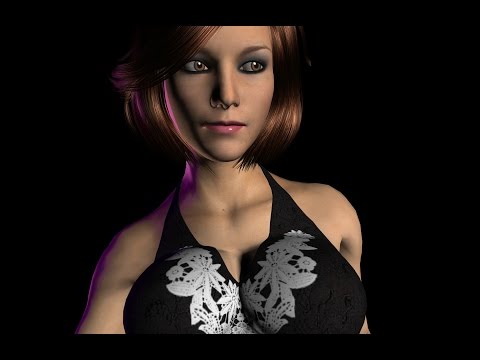
and manually bone map the G3 body& Face rig in that App But be aware that any bone based talking/Facial animation are not exportable from Iclone back to DAZ studio.here is G3 animated in iclone 6 ...Not mine BTW
B) Buy Autodesk Motionbuilder and follow the steps in this
tutorial http://www.flipbookmarket.com/blog/how-import-genesis-2-and-3-motionbuilder
C)Buy Autodesk Maya and carefully follow the steps in this tutorial:
http://toyen-art.deviantart.com/journal/Tutorial-Using-Daz-figures-for-animation-in-Maya-585078140
keeping in mind you must re export from daz and repeat if you decide on a wardrobe change during the animation
but I beleive Maya has the Mental ray engine which is very high quality after you redo all your Daz shaders for it.
Be aware that the Auto desk Apps often offer Student discounts if you are attending college so that May save you some money off the cost of your "cloud Subscription".
P.S
One small point:
once you have followed the motionbuilder tutorial
and animated genesis in motionbuilder you can get the animation back to Daz via custom BVH export from motionbuilder.
Instructions here:
http://www.flipbookmarket.com/blog/how-import-motion-builder-animations-daz-studio
the video does not convince me doing all that for so much money that i not have
you can do all this in daz alone easyly
btw whats up with the music copyrights ?
Yes I actually recognize many of those motions from the
built in library that installed with our seat of Iclone Pro
simply blended together in a nonlinear fashion exactly as one would do in Daz animate2 with Genesis1-2.
The Face expressions leaves me unconvinced that the bone based face rig is any more expressive than morphs
Just iin case people don;t know what BVH file is
"BVH stands for Biovision Hierarchical Data, which was developed by a motion capture company called Biovision. The BVA format (also developed by Biovision) is an older format which was the precursor to BVH. The BVH format is mainly used as a standard representation of movements in the animation of humanoid structures. created for Autodesk ." and was supported by many programs including Daz Studio.up too 2014, until genesis 3 which broke the compatibility for BVH files
Since Genesis 3 came in , BVH files & Older aniblocks do not work because of the changes in the mesh techology, there for to make g3 do what you want during FXB into Autodesk., you must have a whole lot of work around to make it work. .. Whether its worth your time converting or re-riggeing the bvh & aniblocks files for g3 is only the opinions of the artist that is using them.. and in my opinion its not worth the time working with g3 for animations when you have a choice of many other character meshes that will still use them pretty seamlessly
@ wolf
I have found in the auotdesk forums that most users of Maya, and 3DS max don't really use daz figures in their autodesk projects. But if they do, I would dare say its a fair bet that most of them will be staying away from g3 because of the extra work involed to make it work.. The extra face bones and Detail Texture, maps, rigging, etc... are all lost during transfer when you FXB your daz model into Autodesk. That has been the biggest reason why most Autodesk artist dont use daz characters. even when I was playing with g3 with cryengine3 gaming engine i was running to a luandry list of issues.
Though I do want to point out one thing. there is a new poser updater for genesis3 for poser which does work fairly well to bring g3 rigging into poser. Its by Webinar and its free., then you can use poser fusion plugin and just bridge it from poser to auotdesk with out loosing rigging. I would post the link to it the updater.. But its offered on renderosity and I feel the link would be removed by the mods for posting to another 3d store, according to the forum TOS... but you can find the updater there free if your a poser user wanting to use g3
You are quite correct in this opinion.
honestly it amazes me to hear non animators blindly declare
that the new rigging "makes G3 more compatible with other programs"
What "other programs"??
Autodesk users are very similar to us in one respect.
They prefer rigs that are designed to work natively with their animation control systems(Maya HumanIK)
it is simple efficiency & Logic
Its not a matter of snobbishness or elitism as some in the Poser/Daz Community always wish to beleive
I posted those tutorial links just to demonstrate how tedious &labor intensive the task of getting a G3 into an Autodesk application can be..to say nothing of the $$cost$$ of those applications.
On the matter of the New script to get G3 into poser I have followed those threads at rosity since it was released and while im glad the poser users have access to the latest Daz female frankly it is a moot matter to me.
I have poserpro 2014 &Poser's animation tools have not fundamentally Changed since the 1990's and this is not "software bashing" as the SM product manager has publicly posted that state of the animation tools makes him "sad".
Since getting Iclone pro,DS Graphmate& keymate poser has become officially Dead to
me and is not considered part of my Character animation pipeline.