Amazing Skins - strange problem
 Taoz
Posts: 10,293
Taoz
Posts: 10,293
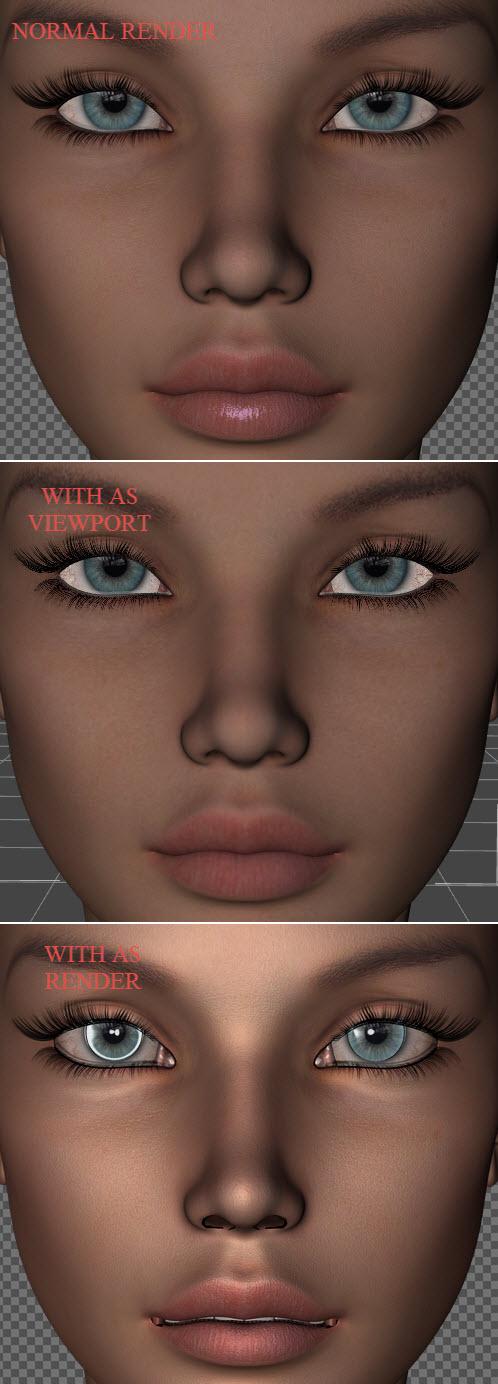
Was just testing a new G2F character and tried to apply Amazing Skins for G2F because the skin looked a bit dull. The result are rather odd though, for what I know it's just shaders but it's almost as if they morph the face. Nose gets smaller, and with some black stuff in the nostrils, and mouth is deformed. There's nothing unusual to see in the Viewport, it's first when I render that it shows up.
I've tried applying AS with the same settings to several other characters, it works fine with all of them, it's only this particular character that is distorted this way. Any idea what can be causing it? My guess is some UV map thing, but I'm not an expert on that stuff.

Daz 3D is part of 
Connect
DAZ Productions, Inc.
7533 S Center View Ct #4664
West Jordan, UT 84084
Licensing Agreement | Terms of Service | Privacy Policy | EULA
© 2026 Daz Productions Inc. All Rights Reserved.
Comments
It could be a displacement map problem. Try removing the displacement maps or fiddle with the settings and see how it looks. :)
It probably is displacement, but not due to maps. With the Age of Armor SUB Surface Shader if the displacement strength is 0/no map but the Minimum and Maximum values are non-zero you will get that effect - the trick it to seelct all surfaces and zero the Minimum and maxumum values under displacement. I do have a script that will do this, though I haven't used it for a while to make sure it is still functional https://www.dropbox.com/s/xnqjh4o8nfk9h23/ZeroDisplacementLimits.zip?dl=0
Well I can confirm that your script still works (DS 4.9) - I can see that all Max/Min values now are 0 and the character looks fine when rendered.
Thanks very much!
Great, thanks for letting me know.