making semi-transparant textures
 gibrril_fa945a6cee
Posts: 550
gibrril_fa945a6cee
Posts: 550
Hi all,
Is there a way of making a texture semi-transparant by default, without using the opacity slider in the surfaces tab (keeping that at 100%)?
Using the opacity slider messes up the render when using toon or cel shading because it also affects the outline, hence the question.
eg, can it be tweaked in photoshop and brought back into Daz Studio? If so, how is it done?
Thanks a lot,
Me
Post edited by gibrril_fa945a6cee on

Daz 3D is part of 
Connect
DAZ Productions, Inc.
7533 S Center View Ct #4664
West Jordan, UT 84084
Licensing Agreement | Terms of Service | Privacy Policy | EULA
© 2026 Daz Productions Inc. All Rights Reserved.
Comments
Which renderer?
Transparency shouldn't really be used to create translucent surfaces.
the toon renderer of Daz studio 4.8 (3delight)
You might look into the geoshell outline shader, which allows you to outline things separately from the opacity of the base object.
Here: http://www.daz3d.com/forums/discussion/10961/manga-style-visual-style-topic-update-may-19th-2013-gso-shader-added-bugfix-commercial/p1
Another option is PWEffect ghost modes, although the outline there isn't perfectly solid.
oops nm. After thinking about it I could be wrong. Double checking and will post again if I'm right
Thanks for the replies!
The thing is, I'm applying the PWToon shaders to everything in the scene, and that comes with an outline. If I pull the opacity of that shader down, the outline also becomes more and more transparant... Not exactly what I wanted, so it got me thinking that maybe I should have the transparancy set in the "base" texture, so that when I apply the shader, the outline itself will stay 100% solid, as well as the effects that the shader provides.
That's not how the transparency works in 3DL. The opacity and final surface color are combined to give you the final 'look' when rendered, so anything that is done with the 'color' is going to end up affected by the final opacity. Yes, you can apply a mid grey map to the Opacity channel...but I'm not sure if there will be any difference than using the slider. Translucent effects aren't something easily doable in pwToon. pwEffect, especially the ghost effects have that built in...
Added:
Yep, did several tests with various shaders and the results are the same wheter doing it with the slider or with a map.
It works quite well if you're applying the transparency to a subsurface Geoshell.
True, but that is a separate shader on the geoshell and you are layering both for the final look. On a single surface you don't have that ability.
You can use more than one geoshell for even more layered effects...
What are you wanting to achieve with the translucency? If people have a better understanding of your goal, they may know a quick way to get there.
I'm currently toon shading in Daz Studio 4.8. I want to be able to have a toon-shaded curtain that is made from a see-through-like material, yet I don't want the outline to be see-through aswell. But using the PwToon and cell-shaders' built in opacity slider, makes the outline fade too... Therefor I thought that the "transparancy-problem" could not be solved by editing the toon- or cellshader.
How would that geoshell approach work?
Thanks a lot,
Me
It SHOULD work perfectly... wrapping up a long render and I'll test it.
If the curtain has a texture map, there is another way. Use the texture map as a template. You would paint a mid-grey covering the majority of the curtain (texture) and then create a thin line a couple of pixels wide in white outlining the texture. Then fill in all the empty areas with black
Save that as curtainTrans and plug it into the Opacity Strength. Leaving the thin white lines will make the edges fully opaque and give some strength to the edges generated by the shader.
Thanks for the replies!
I'll try the method of altering the texture for sure.
But the geoshell approach has me "hooked" aswell... Could you give a short overview on what I need to do to make it work? (which shaders do I need, in what order, etc?)
Thanks a lot,
Me
Here's one of the imported toon shaders I've recently done, with the opacity map technique I mentioned above...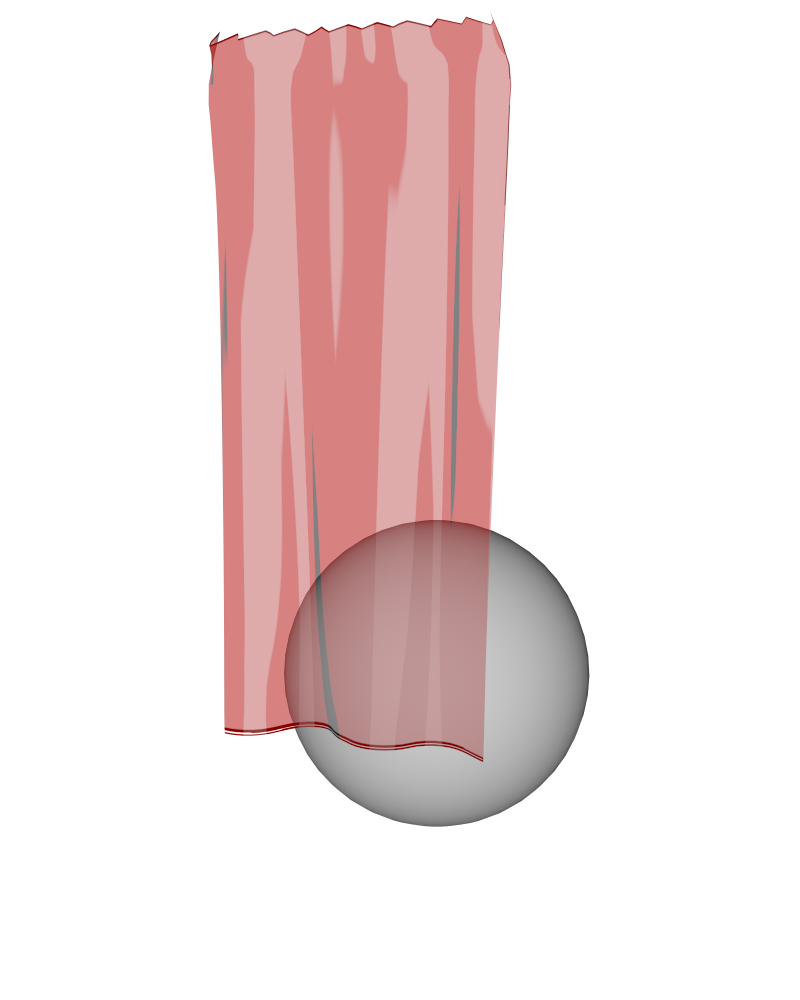
I probably should have made the lines for the edges a little bit wider.
Thanks for the example, but I ran into the same issue that's shown in your render:
at the top, were the fabric creases, there should also be some outlines in the creases. When rendering at 100% opacity, the outline is indeed there, but it disappears using this method...
This is great stuff to get the edges of the curtain absolutely spot on, but any crease that runs down the middle, kind of disappears... Is there any fix for that? (every time the camera or the object moves, the "crease outlines" move too, so to me that seems difficult to solve using "texture-altering" But if you know a way, please let me know.
Thanks a lot,
Me
Download and install: https://dl.dropboxusercontent.com/u/12960659/Daz3DWork/Freebies/TNP_GeoShellOutline_FreebieShader.zip
Select an object. Select Create > New Geoshell
Select your object, open it to see the geoshell parented to it. Select the geoshell. Go into Surfaces, select Geoshell.
Find the shader you installed (you might want to do a search for 'geometry'), double click. Do a test render.
You can adjust line 'thickness' by changing the geoshell offset (basically, how far the geoshell 'floats' off from the main object).
It's not perfect. Like other, similar shaders, surfaces that are angled almost completely away from the camera will end up looking all black. But hey.
Note: apply PWToon (or whatever) to the base object BEFORE putting a geoshell on it. For some reason I've found geoshells confuse some shader conversions.
And, lo! Beware... the... GHOST TABLE! WOOOOOO!
Thanks!
I'll try that as soon as I can!
Thanks a lot,
Me
... Of course, now i'm finding I can't reproduce what I did. Um. Hrm
Going crazy.
What I described? Works perfectly for a table object. Doesn't work at all for a human figure or a sphere, even with the same shaders applied. ... ... I'm so confused.
I've been putzing with this... at this point, I think you're best bet is to do a second pass for outlines. :/
Set all the outlines to white, shut off the lights, and there you go... then image reverse it and plop on top of your regular render.
This one uses the Outline scripted render composited with the staight toon shader...
And this one is just the toon shader with a directional shadow casting light.
Aha! the scripted outline render! How do you do that again? Indeed, if I use one render for the transparancy and then another for the outline (only the outline) and layer the two, that might be it!
How does that script work again?
Thanks a lot,
Me
Ok, what I did for this one:
Figure and duplicate figure. First is PWToon with white outline and the lights off. Second is PWEffect (it doesn't have to be, but the Ghost mode makes nicer transparent figures without showing eyeballs and such)
http://willbear.deviantart.com/art/Outline-test-588130247
For the Outline scripted render...
Go to the Render Settings > renderer dropdown box > Scripted 3Delight...then in the options, under Render Script select Outline.
Render...it will put the passes where you normally/last saved a render, so you may want to render the 'regular' pass first.
Thanks a lot!