Having trouble getting Poser files to New Computer (Resolved!)
 squirt
Posts: 208
squirt
Posts: 208
Hello Daz Gurus!
I recently got a new computer and with you all's help I was able to get all of my Daz files working... But now I've got just one situation left and it's to get my old and new Poser Runtime files to work.
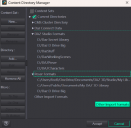
Here's what my Content Directly Manager is looking like which I'm pretty sure is not configured correctly for Poser Runtime Files...
Screenshot 2026-09-08 170139.png
458 x 446 - 61K
Post edited by squirt at

Daz 3D is part of 
Connect
DAZ Productions, Inc.
7533 S Center View Ct #4664
West Jordan, UT 84084
Licensing Agreement | Terms of Service | Privacy Policy | EULA
© 2026 Daz Productions Inc. All Rights Reserved.
Comments
Where is the runtime folder of your older Poser stuff located ? If it's located in D:/DazPoser as shown in your screenshot, you need to configure it under Poser Formats.
Then in Content Library > Poser Formats > DazPoser, you should be able to find your Poser stuff.
I have no clue what you're talking about.
It seems like my Runtime is spread out over several of those folders. This might not be straight forward but I will attempt to move that folder that you highlighted into the Poser part of the DIM.
That seems to have done the job!!!! I think that I've learned that Poser loves Runtime paths and that Daz makes a provision with the "Poser Formats" to make Poser happy!
Thank you once again Crosswind! Daz Gurus WIN AGAIN!!!!!!!