Asset Optimizer (Beta) Sneak Peek [DEVELOPMENT IN PROGRESS]
 umblefugly
Posts: 245
umblefugly
Posts: 245
Asset Optimizer for DAZ Studio — Current Development Features
Asset Optimizer is being developed to make game-ready and real-time assets directly inside DAZ Studio while keeping the original asset safe and editable.
- Optimize both static objects and fully rigged characters.
- Create a single optimized model or a complete custom LOD chain.
- Set different reduction levels for every LOD.
- Control optimization globally, by model component, material, or surface.
- Paint directly on the model to protect important areas such as faces, ears, hands, joints, logos, or small details.
- Painted protection supports a natural falloff: red areas receive the most protection, while blue areas transition gradually into normal optimization.
- Optional X-axis symmetry mirrors painted protection across compatible models.
- Preserves important features such as silhouettes, hard edges, material borders, UV seams, curved surfaces, and open boundaries.
- Includes additional protection and repair for thin, stretched, or sliver-like triangles.
- Handles large and unusually dense meshes, including multi-million-triangle assets.
- Preserves character skeletons, skin weights, posing, fitted followers, eyes, tears, eyelashes, mouth meshes, and similar figure components.
- Export selected character morphs as ordinary FBX blendshapes for editing in applications such as Cinema 4D, Maya, Blender, and Unreal Engine.
- Choose between editable morph exports or baking the character’s current shape directly into the exported model.
- Convert a posed or shaped rigged figure into an ordinary static mesh when rigging is not needed.
- Preserve material assignments, UV layouts, base-color and opacity texture connections.
- Embed available textures in FBX files and create portable, UDIM-safe companion texture files.
- Export single or multi-LOD FBX files with clean, consistent
_LOD0,_LOD1,_LOD2, etc. naming. - Keeps shared skeleton and standard skinning data for broad DCC and engine compatibility.
- Preview and update optimization settings without repeatedly damaging the source.
- Every LOD is generated from the unchanged original geometry rather than from the previous reduced level.
- Source-safe Undo/Redo removes or recreates the complete generated result in one operation.
- Generated LODs can be exported repeatedly without rebuilding them.
- Built-in validation checks geometry, UVs, materials, skinning, morphs, textures, deformation, and exported FBX contents.
- Detailed support logs make failed or unusual assets easier to diagnose.
Still planned: texture baking/atlasing, a polished manual and branding, and a future production-quality remeshing solution.
Currently only being considered for DAZ Studio 2026 Windows Only
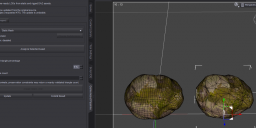
Teaser.PNG
1442 x 609 - 310K
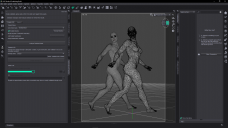
Teaser2.PNG
1920 x 1080 - 362K
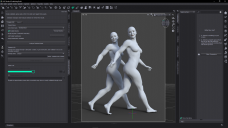
Teaser3.PNG
1920 x 1080 - 517K
Post edited by umblefugly on

Daz 3D is part of 
Connect
DAZ Productions, Inc.
7533 S Center View Ct #4664
West Jordan, UT 84084
Licensing Agreement | Terms of Service | Privacy Policy | EULA
© 2026 Daz Productions Inc. All Rights Reserved.
Comments
This is not related to Atangeo Balancer/Decimator at all, it is a clean new implementation. I am currently working on better polygon flow for critical areas like crotch, face, breasts, armpits etc.
Please use untextured items/views if you need to show nude figures.
My bad.
See first post for updated features
Seems much better than Decimator plugin !
I hope so! Next is multiple LOD chain generation and possible weight painted density maps as another way to control polygon distribution.
This looks very cool. FWIW, I'd probably use the results within DS, let alone in outside game engines. I have and use Decimator, but this looks like a comprehensive step up.
If I can ask, unless there are DS6 SDK features that preclude its design and use in DS 4.24, I'd like to request that you consider releasing a DS4 version as well, as I'm pretty sure my current workflow is going to require DS4 for quite a while (I have *many* DS4 tools and resources that will likely never be DS6 compatible).
Thanks for considering it!
--ms
yes
Decimator topology tends to be rather messy,
I often find it creates holes too
I rarely use it preferring a complicated workflow of Zremeshing in Zbrush then repainting the textures to the new UV in Ultimate Unwrap 3D (which also can decimate as can Zbrush but again the holes!)
then there is the pain of rigging it to the original and not having the morphs
which was the only plus of Decimator
an easier and cleaner in DAZ studio option keeping the original UV mapping, rigging anc morphs would save a lot of kerfuffle
That is exactly the gap this plugin is intended to fill. It creates static or skeletal LODs directly inside DAZ Studio while preserving the original UVs, materials, face groups, rigging, skin weights, selected morphs, and fitted components. It also supports custom LOD chains, per-surface density controls, symmetry preservation, anatomical/curvature protection, and transactional validation—so a broken result is rolled back instead of being left in the scene. It isn’t intended to replace hand-built quad retopology for hero assets, but it should remove most of the remesh, texture-reprojection, rerigging, and morph-rebuilding kerfuffle when producing practical game-ready LODs.
Very interesting product. Hope for the price to be in my range.
Could you please show some example of Genesis 9 hair processed with this product.
Thanks in advance.
You seem to mention this on alot of products, let me ask you this: How much is my time worth? As to your request to see hair on a figure, this is still an alpha, attached clothing and accessories comes later.
Currently working on custom export so multiple LODs only rely on/mapped to a single Genesis 9 rig. The main body there is approx 17000 triangles or ~65% reduction.
Sorry, I have not noticed, that you have it for figures only at the moment. Happy development.
I don't think Artini was devaluing your work
just some of us don't have game developers budgets and just do this as a hobby
There are lots of beautiful sets at FAB for instance, I would love to render for my non monetised YouTube channels nobody watches but when they are hundreds of dollars, that's just not going to happen
I myself wouldn't say anything if it was pricey but I wouldn't buy it either
honestly though, if you are looking for FAB prices, selling at FAB and or Unity etc, would probably get you a better customer range
bear in mind if you do though, your thread here would vanish as DAZ doesn't allow promotion of off site products
Decimator puts a lot of people off for precisely this reason, it is always excluded from sales too
I actually managed to get it in a sale before they enforced that
I didnt say they were hence my question to then. I hear ya though, I am taking a chance here with this, I have my Shatter plugin close to release so we will see how well that does. The nice thing about this current tool is, objects optimized are also immediately useable in DS so great for actual scene optimization. I am already on the fence about removing previous tools I sell here due to what I consider bad sales, but we shall see. Also I too own the original Game Bundle they sold way back when. An important distinction between this tool and others is, you are unlikely to find something similar that is not subscription based ie InstaLOD, Simplygon which have a ton of features, but you never own it. And a small correction, Decimator has been on sale a few times that I have seen, it is even currently on sale.
It is not only for figures, it also works on static meshes/props.
Basic support for optimizing items like clothing and hair is integrated now as well as custom fbx export. Still needs work. See image for results of these items exported via FBX at 50% LOD
Thank you for posting these images.
There are many new and expensive tools here, but this is the DAZ store, and there are always big discounts, so I'm not too worried about the price. The three tools you mentioned earlier look very professional, such as https://www.daz3d.com/ds-2-rizomuv. I checked and the rizomuv (for commercial use) costs 299 euros... that's a very high price(For amateur enthusiasts).
The other DAZ Script Linter looks like a product for PA. The Auto Rigger Pipeline seems to be used for importing Figures from other software, which is something I, as an amateur, would likely use. However, I feel the product page needs more images or videos to demonstrate its functionality, and even how much it improves compared to DAZ's built-in features. The text descriptions contain many terms I, as an amateur, don't understand at all... I suspect the main purpose of these three products is to help PA successfully complete their product?
As you mentioned at the beginning, this product "Turn detailed DAZ assets into game-ready LODs," which seems to be a very professional tool. However, it appears to be an upgraded version that can replace Decimator. In this era where it is difficult to purchase and upgrade computer hardware, I think most hobbyists would be happy to accept any product that can reduce the rendering burden. This will be my first choice to purchase, and I look forward to the product's completion.
If I have misunderstood the product features, please forgive me, as English is not my native language and I am a very amateur.
RizomUV Virtual Spaces Indie is 15$ a month and you can use it commercially. Auto Rigger Pipeline is for rigging your own clothing that you make to the Genesis figure.The Script Linter is for anyone really, but is intended for scripters that wish to remain compliant with DAZ coding standards.Im not a pro, I am a hobbiest as well.
See first post for updated current features
See first post for updated current features
And skeletal/static/painted optimization is done. This concludes the optimization portion of this plugin. Next is polish/speedups where I can.
Image explanation:
Allows you to protect critical areas like fingers/toes etc from being optimized too aggressively, notice the denser areas on the optimized mesh compared to the original (painted map shown for reference)
I will probably port it to DS 4.24 at somepoint but I find it easier to do it one version at a time. :D
As soon as this new plugin I am working on is finished, I will resume the final touches on the Optimizer. The main holdup is supporting all Genesis figures and that is about finished.
Where i can find this tool?
I am using DAZSTUDIO 6.26.2026.28722.
Help please.
This plugin is still in development, so currently it is not available.
Also, Asset Optimizer will be split into 2 seperate plugins with PropTimizer coming first. This decision was made based on the difficulty supporting all Genesis figure versions and the need to get something shipping. PropTimizer will not support figures/rigging or morphs.
Infinitely if it runs in DS6. Still annoyed Decimator hasn't been updated.