BJ 3DConnexion - 3D mouse plugin for Daz Studio 6
 bluejaunte
Posts: 2,271
bluejaunte
Posts: 2,271
Hey all. As you few 3D mousers know, the old plugin is not working and there's no plan to make it work in Daz Studio 6. So here's mine:
DS6: https://drive.google.com/file/d/10xoIGq7tI0B1umiU3tCSOeD9AgP6vKrD/view?usp=drive_link
if you want to use the same one for DS4, that's here (disable the old plugin called 3D Connexion or you'll probably get both of them fighting for the input):
https://drive.google.com/file/d/1JVHnI9iwQeKXkLI3jt0XZ5WNrh63z2Gd/view?usp=drive_link
It should feel close to the old plugin's Orbit Camera setting, where the pivot to rotate around is dynamically determined based on what you are... uh, trying to orbit around. That was pretty involved to even understand what was happening. I added something more though. When you have an item selected in the scene, it will always and instantly orbit around that item. And when you deselect the item, you will still orbit around it until you translate to something else and the auto pivot starts calculating again. I also enhanced the movement curve (IMO) to allow for finer adjustments at very low speeds when you barely move the mouse. That always bothered me with the old plugin when I was zoomed into a face or something and the too high minimum speed was jerking the viewport around too much so I had to resort to Daz Studio viewport controls for fine adjustments.
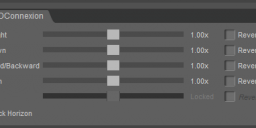
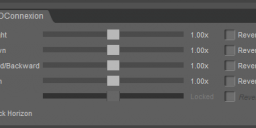
This uses entirely raw mouse input, so nothing you set in the driver will do anyting. To change settings there is a custom pane called BJ Connexion3D under Window > Panes. Here you can set the usual stuff to wire it to your own brain. Adjust axis speeds, reverse axis, and lock or unlock horizon (aka allow tilting/rolling the camera).
I'm giving this away for free. If it's useful and you wanna buy me a coffee (or a new car) I'm not gonna say no. Times are brual for PA's at the moment and I didn't really have the time to develop this.
https://buymeacoffee.com/bluejaunte
Let me know how it feels. Buttons on your 3D mouse are not supported whatsoever at the moment. I never use the 2 buttons on my little space mouse and wouldn't know what to do with them. If you have "feelings" about that, do let me know 

Daz 3D is part of 
Connect
DAZ Productions, Inc.
7533 S Center View Ct #4664
West Jordan, UT 84084
Licensing Agreement | Terms of Service | Privacy Policy | EULA
© 2026 Daz Productions Inc. All Rights Reserved.
Comments
Ah sorry, looks like these links required permission. Should be fixed now.
I've considered buying one of these controllers. They don't work out of the box with Daz? That's surprising.
That's disappointing. I may not be using your plugin but I thank you for making it.
It's amazing to see you giving this away free to the community.
It's even more amazing to see there's a mouse that costs £450!
Looks like that's a kit with a CAD mouse and case and a mat. Definitely don't buy that. But $ 179.00 for a SpaceMouse Compact is still steep... my old regular SpaceMouse was well below 100 at the time I'm pretty sure. But everything is more expensive now so I guess it's not surprising.
Something things are more expensive... and it seems mouses are one of 'em (!): https://3dconnexion.com/uk/product/spacemouse-enterprise/buy/
Haha yeah I mean that thing is total overkill. Check used market:
https://www.ebay.com/itm/206186048618?_skw=3dconnexion&epid=1703375106&itmmeta=01KNWSXZX9C10AX11TTGFGBAW9&hash=item3001a56c6a:g:eC0AAeSw3~5pzxPA&itmprp=enc%3AAQALAAAA8GfYFPkwiKCW4ZNSs2u11xCFFcHJDhveWa8K%2Fn%2B%2BjP0gc6QzUJAT6%2FCW9h%2FZHjAh2RRZrHXzk14%2Fj2Ewl109k55gQUgORM5SIUBRCFGH%2BJEJvIiUbkLjvPAQ%2FN38d4pKiRqgcmSiqkNtJ7d6GT57KbSqHf6xoTwqsRfn3h73CPatAf8PCk4g2DHJYx5YF2NoXnEC0JMxFX5SuxJK8FMQqyA39yrQYixijCMuV7uXn%2BKA1IlkbYMo1jN1nKdkCVXVUznTCaQ5nfb0FFT%2BvcXO%2FWGhv%2BG%2Funo29%2B5srd1B5JC2V5fWqdfshPxO7cz2YwyrDQ%3D%3D%7Ctkp%3ABFBM5v73ma9n
That's the one I have probably. Seems quite indestructable. Needs to be glued to the table with double sided adhesive tape though, it's not heavy enough on its own.
@bluejaunte
I'm a huge fan of your plugins and have a SpaceMouse® Compact. Working without it in DS6 really slowed down some of my workflows. But thanks to your generosity I'm now able to use it in Daz Studio 6.25.2026.9715!
You really made my day with this gift!
Yes it was me
You are most welcome!
Redownload for some minor bugfixes.
Thanks for the update, This will help with my Spacemouse issues.
I had it connected to a desktop along with a Gaomon tablet, The mouse was sometime non responsive or axis were not working correctly. It was a used mouse from eBay and I have since cleaned the internal connectors and confirmed they are reacting as expected. Since Daz dropped support I didnt bother reconnecting the device, but with your plugin it maybe useful again.
I have not tried this DLL yet, but here is the product I use (mostly with Blender).
https://3dconnexion.com/ca/product/spacemouse-compact/
Other forum discussions:
https://www.daz3d.com/forums/discussion/360911/anyone-using-a-3dconnexion-spacemouse
https://www.daz3d.com/forums/discussion/668541/3dconnexion-spacemouse-issues-on-latest-version-dazstudio-4-22
https://www.daz3d.com/forums/discussion/709886/3dconnexion-spacemouse-compact-does-it-work
Redownload for new setting in the config UI "Force Orbit Around Selected Item". On by default, as it was before. Uncheck it if you would rather it never forces orbit around selection, only relying on the auto pivot behavior like the old plugin.
Thanks for the update!
This is so ultra niche I'm not even gonna bother explaining or uploading anything. But let me just mention if ever a very lost soul reads this. I got a translation layer going for getting raw 3d mouse input in Linux to translate to Windows-specific data that my plugin understands when running Daz Studio through Wine/Proton. So if you rarest of unicorns ever need that I could probably hook you up.
Thanks so much !!!!
( I probably should have bought you an extra large coffee ! )
Works great with build ...2026.9715
I think they broke your versioning with the latest beta ...2026.12107
thanks again
Thanks for the coffee. Am I mentioning the version number somewhere? I'm not sure what you mean by that.
The latest error message says the plugin was created for a unsupported version Daz Studio. I just figured that there was a version number in your .dll and the new Daz beta doesn't like it.
In the latest beta ...2026.12107, DS refuses it. And notice there isn't any info about the plugin. I think DS changed it's method of getting dll information
In an earlier beta ..2026.9715, It loads just fine and has all the .dll information.
There was an updated Public beta for DS 6 earlier today, did you install that? IIf so then the SDK will have changed, so the plug-in will (at least) need recompiling.
Right, re-download the DS6 plugin. Should work now.
The new plugin works in the latest beta ...2026.12107
Thank you !
But take note that it does not work in the earlier beta ..2026.9715
People should upgrade to the latest beta so you don't need to maintain different versions. (I put your original .dll back in my beta ..2026.9715 installation)
Thanks Again !
Oh yeah for sure I'm not gonna maintain older versions. Keep a backup if you still need it for some reason. Not every new version is gonna need a recompile, just if the SDK changes I think.
"WORK WHILE YOUR SCENE LOADS UP!"
I dont get it you cant do anything while the scene loads up. So did they just made this shit up?
Do they say that? That is news to me. If that's how it works now I'm gonna have to make some changes. Currently I'm disabling all plugin functionality until the scene is loaded, which was the clean way to do it.
Does this also imply that my plugin works in the general release by the way? Was surprised by this anouncement today.
Edit: yup, works on my end at least. Let me know if issues.
Edit2: not sure how working while loading is supposed to work, I mean I can't do anything with the viewport while a scene is loading. And how would that make sense anyway? We'll see I guess.
Even at the lowest possible settings, it was WAY too sensitive in DS for me. I don't spend a lot of time with DS these days, but it would be nice if my SpaceMouse worked as well in DS as it does in C4D and Houdini.
Thanks for the workaround.
Seems like the Shelf does not work with V6, too. :-(
Not unsurprising, but for me its elementary workflow, so I stay with the old version for now.