(Released) LIE Skin Blends [Commercial]
 Silas3D
Posts: 836
Silas3D
Posts: 836
Hi everyone!
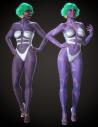
My next product releasing soon is a collection of LIE skin presets for Genesis 8 and 9 figures. It enables you to create fantasy/alien versions of your favourite skins, all within Daz Studio!
Adding color directly to the Base Color and Translucency Color channels often results in a darker, muddier look with lost detail and contrast.
LIE Skin Blends uses the Layered Image Editor and its blend modes to add color layers to skin surfaces whilst maintaining saturation, luminosity, and enhancing detail and contrast.
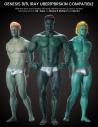
This can also be used as a merchant resource since LIE generates updated temp textures with the new layers, which can then be saved out. Supports both Iray Uber and PBRSkin with unique results across different skins/shaders.
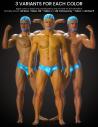
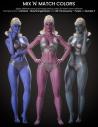
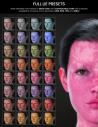
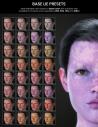
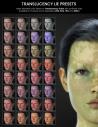
Layer presets include eight colors in four opacities, luminance presets for adjusting lightness or darkness, plus separated base and translucency presets for extra flexibility.
Store link: https://www.daz3d.com/lie-skin-blends
Additional Info
- As an alternative to the luminance presets, if you have Josh Darling and I's 1-Click PBRSkin product (https://www.daz3d.com/1-click-pbrskin), you can use the gamma adjuster script after you've created your skin coloring to tweak the result.
- Default anatomical elements are also supported, but you will need to select the graft as well as the figure in the Scene tab before applying a preset - this is because LIE presets aren't hierarchical.
- Similarly, because Genesis 9's mouth is separate geometry, you will need to select it in the Scene tab if you want the color preset to apply to the tongue, mouth and gums (teeth will be unaffected).
- These presets apply cumulatively, meaning that applying multiple presets one after the other will stack on top of each other, rather than remove the previously applied preset. This enables a high degree of skin customisation as you can apply multiple semi opaque colors or multiple luminace presets.
Thanks for your time :)
Silas3D




Daz 3D is part of 
Connect
DAZ Productions, Inc.
7533 S Center View Ct #4664
West Jordan, UT 84084
Licensing Agreement | Terms of Service | Privacy Policy | EULA
© 2026 Daz Productions Inc. All Rights Reserved.
Comments
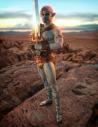
Here's another example - an interpretation of Elphaba, using Angela 9 as a base and some basic morph tweaks.
Also using my Lip Service for Genesis 9 product for the lips
Very nice, I look forward to it.
I plan on getting that tooo, not I likes your color blends and choices better, thanks.
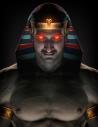
Here's another example :)