Need help with interface. [solved]
 artxtap
Posts: 179
artxtap
Posts: 179
Don’t know when or how, but I somehow changed it so the controls are not scaling in their window panels.
The controls on the right side are NOT ‘all’ showing.
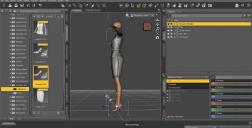
The only way to show them ‘all the way’ is to collapse the left side.

How do I fix it?
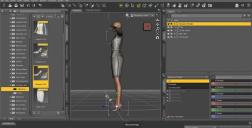
notsee.jpg
179K

see.jpg
153K
Post edited by artxtap on

Daz 3D is part of 
Connect
DAZ Productions, Inc.
7533 S Center View Ct #4664
West Jordan, UT 84084
Licensing Agreement | Terms of Service | Privacy Policy | EULA
© 2026 Daz Productions Inc. All Rights Reserved.
Comments
You probably have a pane with a minimum width larger than the column width docked there, scroll down the list of tabs at the bottom to check - Shader Mixer/Shader Builder are likely culprits.
Thanks, you helped fix it! I didn’t have the ‘Shader Mixer/Shader Builder tabs. BUT the timeline got docked there. So I redocked it to the correct place – and fixed.
It has to be/due to this new laptop I got. It is the WORST or rendering: hp with intel core i5 and intel irisx graphics! I have never seen this, even on old laptops!!!
when you render with daz3d on this thing it takes over everything – including the MOUSE!!!! you get a jerky mouse, mouse that skips over it’s path!
Like I said even on OLD laptop computers I have never seen that.
Hp 15-fd0152wm; only has 2 usb ports, one hdmi port, one usb-c port, no card reader. Stay away from it – that is my review :-)
I thought MS windows was a multitasking os! :-)
You could adjustr the CPU load limit, using the settings at the bottom of the Advanced tab of render Settings Hardware page, to stop it from using all cores - that will make rendering slower but should maske the machine more usable while it is doing.
You fixed it again! Apparently the laptop has 12 cores and under scheduling
; the cpu load limit was set to 12 cores. to get a nice good regular mouse movement the limit has to be 9.
and what does ‘cpu thread affinity’ do?
Thanks again!
The details are given here https://www.daz3d.com/forums/discussion/comment/5534391/#Comment_5534391 (I had forgotten what the Thread Affinity option did).