-
Whimper Whine... M7 taking a long time!
... Michael 4 had the longest delay after Victoria 4's release because we were told they had a heck of a time getting the chest right.
Yeah, the chest for Genesis 2 Male has gotten a lot of flak. May be the wait will be worth it and the Genesis 3 Male will be much better in these critical areas.
You mean he won't be emasculated?
 Whimper Whine... M7 taking a long time!
... Michael 4 had the longest delay after Victoria 4's release because we were told they had a heck of a time getting the chest right.
Yeah, the chest for Genesis 2 Male has gotten a lot of flak. May be the wait will be worth it and the Genesis 3 Male will be much better in these critical areas.
FREEBIE CHALLENGE --- September and The Leaves Are TurningThank you! :D The background is Autumn Thicket - DS Creative - Issue 1 - page 33 (it comes with 3 backgrounds (image files) in the download, all very beautiful).
Yes, it's Iray (used lights that come in Daz already) It's my favorite render, too bad it takes so many hours in my computer... (I urgently need to learn 3Delight) But I heard if a person has that special nividia (?) graphics card it goes very fast! (the problem is that i make it in a laptop, so it uses the processor, and it's not possible to change the graphics card, not to say its probably expensive).
I love DS Creative! They publish in the middle of the month right? I can't wait for the next one! Do you participate in the magazine? You could save them as .pdf and read in your free time (if you have any hehe). I particularly would love to have a physical copy of the magazine in hands... I find it a bit hard to read on pc :|
Oops! I totally missed the fact that you listed the background as the first item on your freebie list - I've got to read this lists better!

I know what you mean about long render times especially with the physical based render engines. I don't know if it is just my machine or if others are running in to the same issue, but when I use the 3Delight engine in Studio 4.8, the shadows and lights don't seem to work the same as they used to before Iray was added. Anyway it would probably be cheaper for you to buy the Reality 4.1 plugin for DAZ (especially since it is on sale this month) than to install new processesor or buy a newcomputer. The new version of Reality has really shortened render times compared to the original version. You can check out their promo video here: https://www.youtube.com/watch?v=aSY-YW1RVj0
That's ok :) Well, I don't know how 3Delight used to work before Iray because when I joined Daz3d my software already came with Iray... Which render do you use more/prefer? I just watched the Reality 4.1 video and I fell in love with it - WHAT is that render?! So perfect! When you buy Reality 4.1, if it gets upgraded to 4.2, for example, do you have to buy again? I would love to buy so many things in here, but I will have to wait my currency go up again (my country is going through hard times lately). Hopefully it will be better by the end of the year (I'm happy to see Daz has lots of promotions!). The time reduction from the renders was incredible! From 2 hours to less than 10 minutes is a huge improvement! I should start making a list of products I want for when they have promotions... (I think I need to have more items before getting a better render...) I think Victoria bundles are a great thing to purchase (I just wouldn't know the difference between them).
I used to use 3Delight exclusively until I purchased Reality a couple of years ago. The folks at Preta3d.com are very good about the upgrades. So far the incremental updates (i.e.Reality 4.0 to 4.1, etc) have all been free. I only recently went from Reality 2 to Reality 4 which was just a lower "upgrade" price. I've actually haven't played much with Iray yet since I'm just more comfortable with Reality but some of the test renders I've tried look promising and many of the Iray renders I've seen posted here are very impressive! I always say, stick to what you are comfortable with and what works for you! Great art is not about the tools but the artist!

I have to say all the Daz bundles are a great deal. Keep them on your wishlist because they frequently go on massive sales, up to 70 to 80%. The only difference between the bundles really is how much is included. The higher priced bundles usually having every thing the other bundles have. For example, usually everything in the "starter bundle" is part of the "complete bundle", and everything in the "complete bundle" is in the "pro bundle". Of course, sometimes you just don't need or want something in a bigger bundle so you can save money for a different bundle later!

Sorry for the late reply... I fell in love with Reality after watching the video... I willl definitely purchase it when I improve my skills... So many beautiful things here... What bundles you would recommend for beginners? From what I have noticed, having Victoria and Michael is very important, even because it increases the range of freebies I can use... (Is it possible to make a Genesis 2 a child without buying Kids bundle?). About Iray, I need to read more about it, there are lots of options there and I only know how to add sunlight/sky option...
Nowadays you don't really need to think about purchasing Reality when you start out as DS comes with Iray built in, which is also an unbiased renderer, like Luxrender. With Iray you don't need to worry about purchasing a plug-in in order to use an unbiased render, you already have the choice of biased or unbiased built in, with either Iray or 3Delight.
FREEBIE CHALLENGE --- September and The Leaves Are TurningThank you! :D The background is Autumn Thicket - DS Creative - Issue 1 - page 33 (it comes with 3 backgrounds (image files) in the download, all very beautiful).
Yes, it's Iray (used lights that come in Daz already) It's my favorite render, too bad it takes so many hours in my computer... (I urgently need to learn 3Delight) But I heard if a person has that special nividia (?) graphics card it goes very fast! (the problem is that i make it in a laptop, so it uses the processor, and it's not possible to change the graphics card, not to say its probably expensive).I love DS Creative! They publish in the middle of the month right? I can't wait for the next one! Do you participate in the magazine? You could save them as .pdf and read in your free time (if you have any hehe). I particularly would love to have a physical copy of the magazine in hands... I find it a bit hard to read on pc :|
Oops! I totally missed the fact that you listed the background as the first item on your freebie list - I've got to read this lists better!
I know what you mean about long render times especially with the physical based render engines. I don't know if it is just my machine or if others are running in to the same issue, but when I use the 3Delight engine in Studio 4.8, the shadows and lights don't seem to work the same as they used to before Iray was added. Anyway it would probably be cheaper for you to buy the Reality 4.1 plugin for DAZ (especially since it is on sale this month) than to install new processesor or buy a newcomputer. The new version of Reality has really shortened render times compared to the original version. You can check out their promo video here: https://www.youtube.com/watch?v=aSY-YW1RVj0
That's ok :) Well, I don't know how 3Delight used to work before Iray because when I joined Daz3d my software already came with Iray... Which render do you use more/prefer? I just watched the Reality 4.1 video and I fell in love with it - WHAT is that render?! So perfect! When you buy Reality 4.1, if it gets upgraded to 4.2, for example, do you have to buy again? I would love to buy so many things in here, but I will have to wait my currency go up again (my country is going through hard times lately). Hopefully it will be better by the end of the year (I'm happy to see Daz has lots of promotions!). The time reduction from the renders was incredible! From 2 hours to less than 10 minutes is a huge improvement! I should start making a list of products I want for when they have promotions... (I think I need to have more items before getting a better render...) I think Victoria bundles are a great thing to purchase (I just wouldn't know the difference between them).
I used to use 3Delight exclusively until I purchased Reality a couple of years ago. The folks at Preta3d.com are very good about the upgrades. So far the incremental updates (i.e.Reality 4.0 to 4.1, etc) have all been free. I only recently went from Reality 2 to Reality 4 which was just a lower "upgrade" price. I've actually haven't played much with Iray yet since I'm just more comfortable with Reality but some of the test renders I've tried look promising and many of the Iray renders I've seen posted here are very impressive! I always say, stick to what you are comfortable with and what works for you! Great art is not about the tools but the artist!
I have to say all the Daz bundles are a great deal. Keep them on your wishlist because they frequently go on massive sales, up to 70 to 80%. The only difference between the bundles really is how much is included. The higher priced bundles usually having every thing the other bundles have. For example, usually everything in the "starter bundle" is part of the "complete bundle", and everything in the "complete bundle" is in the "pro bundle". Of course, sometimes you just don't need or want something in a bigger bundle so you can save money for a different bundle later!
Sorry for the late reply... I fell in love with Reality after watching the video... I willl definitely purchase it when I improve my skills... So many beautiful things here... What bundles you would recommend for beginners? From what I have noticed, having Victoria and Michael is very important, even because it increases the range of freebies I can use... (Is it possible to make a Genesis 2 a child without buying Kids bundle?). About Iray, I need to read more about it, there are lots of options there and I only know how to add sunlight/sky option...
What can I do with this?The only item I am aware of that has additonal restrictions not in the EULA is the Anne Marie Goddad Digital Clone for Victoria 3, which notes the additions on the product page.
NEW! Novica & Invited Guest Contributors Tips & Product Reviews Pt 6DYK October 4th
Wow, almost everything went into my cart- it's Australia day! (I did my student teaching in Sydney, Australia. Love the Aussies, very kind and humorous people.)
Here's some of the featured stores goodies:
DM's Queen Chamber Poses are lounging and standing poses, but here's the thing- some are holding staffs, so if you want some good hand gripping something poses, these are showing 58% before your discounts. (PC member) They go with this set DM's Queen Chamber (on sale too. I have it but haven't rendered it yet.) There is a bundle with both, but it also has other items, so see if the two separately or the bundle would work best for you.
DM's Memorial Poses and Swords has poses for both Genesis 2 and Victoria 4, and poses for the Big Cat. The poses have the sword already parented to the hand, so you can use the poses, or do your own from there without having to get those fingers locked around the sword. It, too, starts at 58% off if you are PC member.
DM's Aithukaya is GORGEOUS, I've already showcased it. There is a small pond/lake as you rotate the scene, simply by moving the camera you can really change up your view.
So basically, if you are a PC member, swoop in to that store as many are 58% off to start with. I've used the Blox N Poses several times recently, and have used all the pose sets.
*********************************
Fairy Nook remembered you Poser users, including Poser lights and materials! What I noticed is the vegetation looked good in the upclose shots, and the ground floor was also quite decent. This set reminds me of something that could double as a child's playset, a toy. You also get three different DAZ Studio light presets, so quite a bit to doodle with!
Deviney's Store is awesome. I have all but 3 (but that was a bundle, a Carrara product, and the second blood one.) I love his water brushes, SereneNight has used tons of his brushes in her renders. A Must Have!
Portals of Power somehow got past me- this has an awesome portals- and special effects for each one. Take a minute and look at the thumbnails! (And yes, also has Poser Materials.)
Aztec Portal
Celtic Portal
Egyptian Portal
Greek PortalAnd how about 40 backgrounds, and you Poser users get wonderful lightsets! (Works in DS, but not all features of the lights.) Take a look at Chaotic Realms!
Show Us Your Bryce Renders! Part 9David, I have noticed this too when using the bridge especially on textures, some work, others not. And I have also noticed when you have added a Daz Studio shader, i.e. furs, velvets, etc. it doesn't show up in Bryce. Could it be the fact that when using shaders in DS itself, one can only see the effect only when rendering in Daz? ...
Correct. DS procedural shaders do not work in Bryce, nor do Bryce procedural shaders work in DS, as each piece of software was designed in a completely different and incompatible manner, originally by completely different companies and development teams. If an object has an image file mapped to it's surface, that can be shared between the two applications. Bryce can also attempt to bake an image onto an object like a terrain when exporting it, although it won't be identical to what you se in Bryce. Basic colors go from DS to Bryce also, although some things don't work for example you might have to mess around with the transparency settings after transferring, maybe other stuff I forget offhand.
...A funny thing also happended at first, with the first render of the ventriloquest doll above. Genesis and the doll on his lap and the one sitting worked perfectly. But when I have added the 3rd doll standing the body part textures were perfect, but the head had no textures thus only grey!! I only got it to work eventually when I have added another extra head of the doll to the scene by itself. Off course this extra head also turned grey! But at the same time when the extra grey head appeared in the scene, the doll standing's head got suddenly back the original textures! I have then deleted the extra grey head from the scene and standing doll kept the textures as should! Luckilly the head didn't turned grey again as before. Is this normal behaviour? I can also remember some years back when I have a few Victoria characters in the same scene who originally all had their own hair styles in DS, suddenly some (not all) of the characters lost their hair completely when importing into Bryce scene. Too many characters and textures together? Could this cause such problems?
Definitely not normal. I don't know what would have caused this offhand. One thing to consider is Bryce's limited memory. If you exceed that, Bad Things(tm) can happen, although I have no idea if this is one of those things or not. If you hare having trouble with the bridge and you suspect this is the cause, a nice quick test is to try restarting Bryce then sending only a single object into an emtpy scene to see if it works when more memory is available (ie, the rest of your scene isn't or wasn't in memory). Think of it like Bryce is a glass, the bridge from DS is pouring water into the glass. If you pour 3/4 of glass of water from the pitcher into the cup, if it's empty it will work fine. If you already have half a glass full and you do this, it won't fit and water will get all over the table and make a mess. You need to know how full your Bryce cup is, and how much you are going to add to it. :-) It could just be a bug somewhere too. And perhaps it could be as simple as accidentally changing a setting... I often mis-mouse something, or apply a material to the wrong item because things are close together or similarly named, and while I no longer recall the details there was some case (maybe when multiple items are grouped?) where you can select a material, make no changes and go back out of the material lab, but that will change one of the materials. maybe it swapped the material between the group and one or more items in the group? can't remember, but I know I've done it to myself a number of times and had to undo if I noticed right away, re-apply a material if it was too late to undo, or revert to an older saved version or something.
For the characters loosing their hair, remember you can parent items (like hair) to a figure, or you can keep them unparented and fit them to a figure, and you can put the hair and the figure in a group, but these various methods of attaching one item to another don't all translate from DS to Bryce. I can't double-check at the moment, but I'm thinking perhaps if you send a figure to Bryce, it also sends any parented items, but not the fit-to items that are unparented, and I think groups and instances simply don't work at all? If that is correct, then perhaps you simply need to parent the hair before sending the figure, or send the hair as a second item later or something.
Confused About Anemone for G2FI think I need to get this and GenX, finally. It occurs to me I have a bunch of Genesis/Genesis 2 morphs I would really like to mix.
(Anyone know if GenX would make it possible to use Bot Genesis for Genesis2, by any chance?)
If you had Gen x, you could make a male morph for Victoria 2.
The problem I see with Bot 2, is the makeup seems a touch feminine and the torso is designed to emphasize breasts. Here is Bot Armor 2 applied to FW Nalin. - the nipple morph, which looked odd.
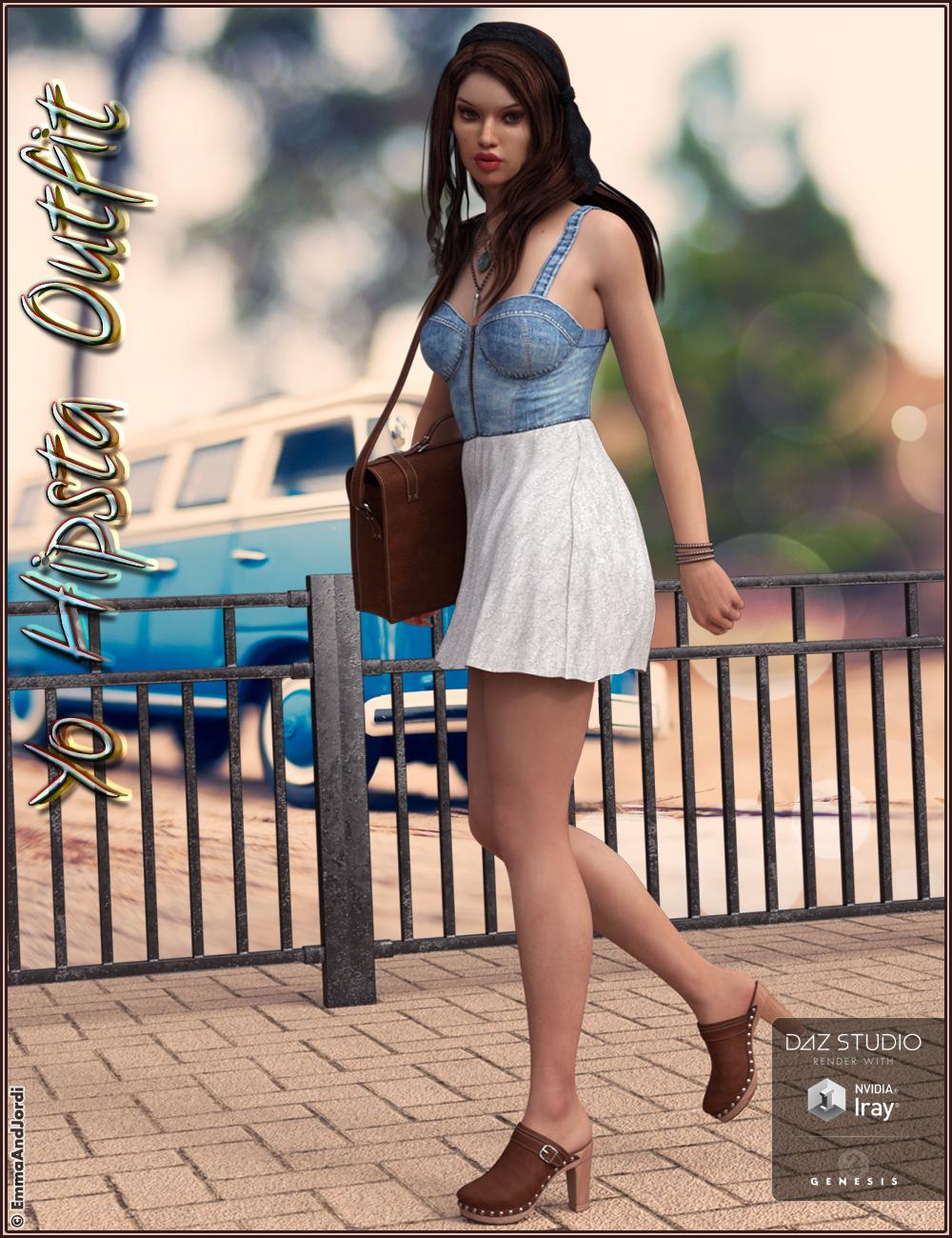
 NEW: EmmaAndJordi's Yo Hipsta Outfit And Accessories For Genesis 3 Females [Commercial]
Hi all! :)
This is our new product: Yo Hipsta Outfit And Accessories For Genesis 3 Female(s). It's a complete set of dress (that can be turned into a top), satchel bag (in 3 shapes: shoulder handbag, hand handbag, and standalone prop), clog shoes, layered necklaces, bracelets, and 10 poses for Genesis 3 Female(s). And lots of material presets for each piece and possibility to customize them. For example you can put one necklace or both, and mix and match the materials for the skirt with the tops as you wish, same for clogs and handbag, and the bracelets straps can be changed of material independently and include mess morphs to make them look different. And you also can customize the card of the satchel bag, to write what you want. A tutorial on how to make it easy is included with the templates :)
It comes with Iray and 3Delight material presets. Conforms to all Genesis 3 Female Body morphs and Bethany 7, Eva 7, Karen 7, Teen Josie 7 and Victoria 7.
You can watch more images and get it here:
http://www.daz3d.com/yo-hipsta-outfit-and-accessories-for-genesis-3-female-s
Hope you like it! :) Post images here please, we love to watch them! :)
PS: The girl in these promos is our EJ Valeria, and the hair is our Sela Hair ;)

 NEW! Novica & Invited Guest Contributors Tips & Product Reviews Pt 6
DYK October 3
Yo Hipsta Outfit and Accessories for Genesis 3 Female(s) is not only an outfit, it has a very nice satchel bag which can be a handbag or for the shoulder, the dress can be turned into a top, there's bracelets and necklaces. And of course, clog shoes too! A lot of material options in this product.
PixieS Poses for Teen Josie 7 I love the pose hanging upside down from the tree! A few unique poses in this one and many can be used for everyday situations. Note the leaning forward from a kneeling position, reaching for the dragon. That one is versatile.
Bank Vault is very unusual. If you ever need a bank scene, this is a must have. Has cash, goldbars, goldcoins, safecases, etc. Iray optimized.
Western Town I already showcased, so you know I recommend this one!
Haiku for Keiko 6 For those wonderful, more natural eyebrows. Compatible with Genesis 2 Females. Also, your chance to grab the young teens at a discount up to 60%.
My top pick: Fantasy Scene Bundle because of Rocks N Drops. SereneNight and I both discovered that gem during the first five threads, and I used the heck out of it. With the bundle, you get poses which you might not need, but you get an additional texture set for Rocks N Drops. Add those two up and see if they are better as two separate purchases if you don't need the poses. Love the backgrounds on these!
I've showcased this more than once, that top detailing with the unique curves is AWESOME! Galaxy for Genesis 2 Females And it looks great with pants- very family friendly and dressy. That store is showing a lot of 58% off BEFORE my discounts.
Heads up, no longer on New Status and one of my favorite Genesis 3 (I've showcased.) Summer (Victoria 7)
TigerLily Bundle Or TigerLily alone, I think she's rather neat. Been a long time since I showcased her, but I remember liking her. She has the right amount of freckles!
Saori Kimono Love those material options. Wow! (Ignore the promo image- what a huge, weird looking bust IMO) I think a tube top can be layered under it to make it a tad more family friendly, if you were going for a portrait or a top use.
So how much trouble am I in?Hundreds? I think I own in the thousands by now (been here since Michael an Victoria 1.0) Be afraid, be very afraid! ...and have a ball ;)
Using Gen 2 skins on Genesis-- Sorry, I'm sure this has been asked and answered before...What UVs does the skin use? For base G2F Uvs you'd need this: http://www.daz3d.com/genesis-2-male-and-female-base-uvs-for-genesis
For V6 UVs you'd need this: http://www.daz3d.com/victoria-6-and-michael-6-uvs-for-genesis
And there's a batch converter to convert the presets if you want to use multiple skins (you'd still need the first products I listed)
Whimper Whine... M7 taking a long time!I agree with the thought that when a new Victoria is released she should have a consort, a new Michael. Daz is missing out on an opportunity to sell them as a bundled couple. I disagree with the inability to get genitalia without buying the pro version of a model; it should at least be offered as a separate purchase--there are a lot of items in a Pro Pack that I don't want, it would be better if I could pick and choose just what I want.
I'm hoping when M7 does arrive that there will be a new version of the Freak. We need a large man with more real world proportions and without excessive exagerraton. I thought the Freak 4 was ideal, he had the body that actual real world power lifters have in spite of some rigging issues in Poser. I think maybe the name Freak should be changed to reflect a larger male figure that doesn't have to be ugly or a monster. Something like Atlas or Zeus or Hercules or Samson. Honestly I haven't been very happy with the last two generations of Michael. I thought Michael 4 was closer to the body type of real world man; M5 and M6 are more similar to M3--slender runway model men.
Do women really want their men to be slender, runway model types? I assume that what Daz thinks woman want in a man comes in a lot when they are designing figures.
I'm Animated, are you? -CONTEST INSIDE! - (ceck the last post, page 8)I don't think that's the case. Some people have shown some items and had them released within a week or two of the preview.
Hey, in the absence of any real news, people start spreading rumors. I was just doing my share. At least I didn't go for my usual "kidnapped by aliens" rumor.
Nahhh! Animated girl is in an eternal date with Michael 7 in a tropical island drinking daikiris in the beach...shhhhh! don't say it to Animated boy and/or Victoria 7.
Now THAT I can believe!
NEW! Novica & Invited Guest Contributors Tips & Product Reviews Pt 6Well, it's time for the site to change over- is the sale done? We'll see. Been a wonderful month, I was fortunate to be in the 64% discount group so I got a lot of neat things. Coming up- you'll see Natasha, Sasha, and Dara. I am rendering Sasha right now- really, really like her. She looks like a typical person, not a model, but attractive.
With Dara, my rendered eyes have the deer-in-the-headlights look, which is probably the pose. I can't remember what I did (sorry, I staged all three gals this morning.) I'll do the links in a little while, but here's Dara and Sasha will be done in about half an hour.
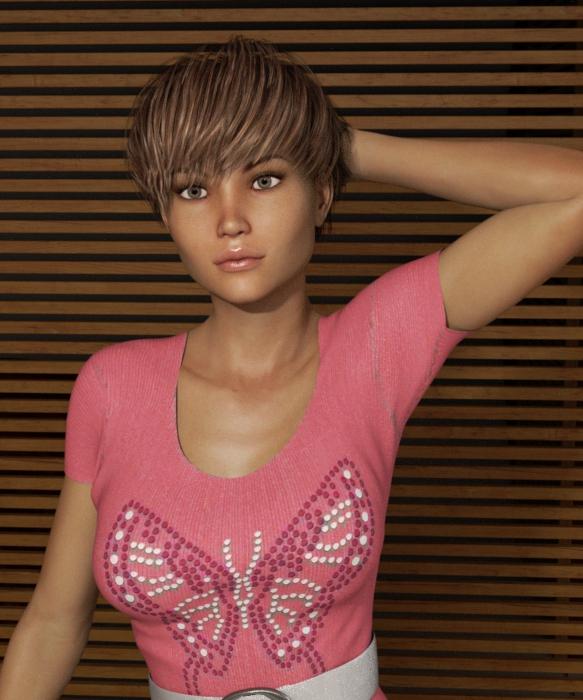
First is Dara with Sela Hair (Genesis 3) . All of these use Abagail Outfit (Genesis 3) and the Textures.
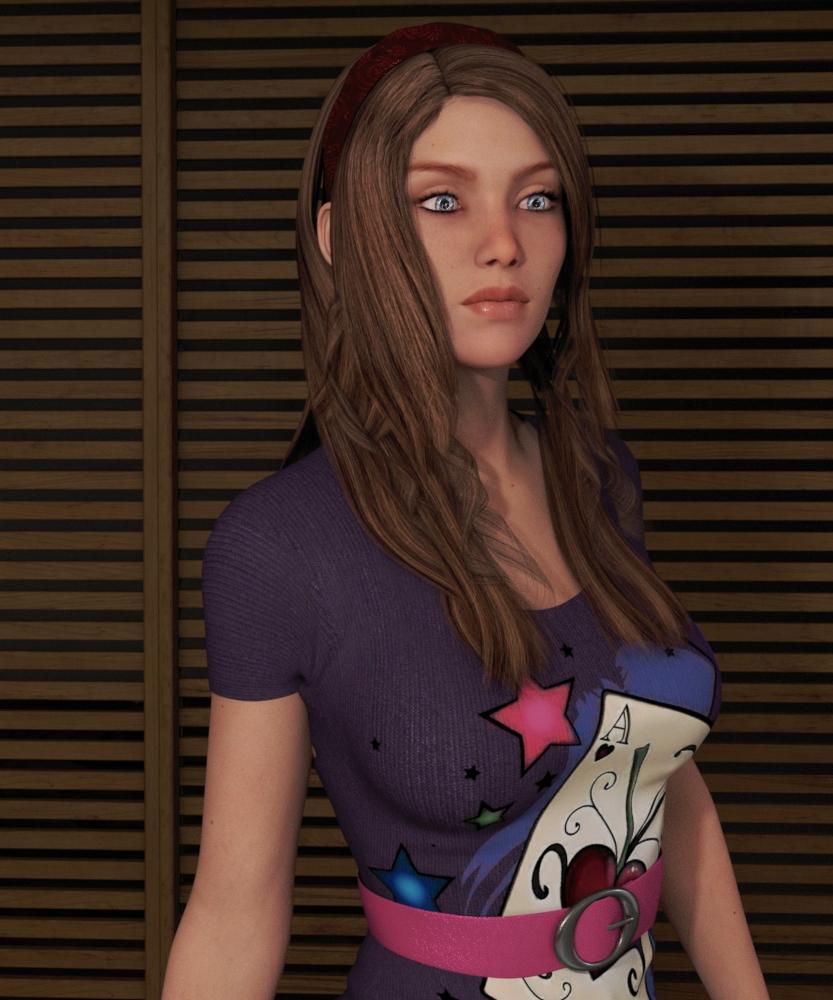
This is Sasha For Victoria 7 with Paisley Hair (Genesis 3) (same outfit, different textures.)
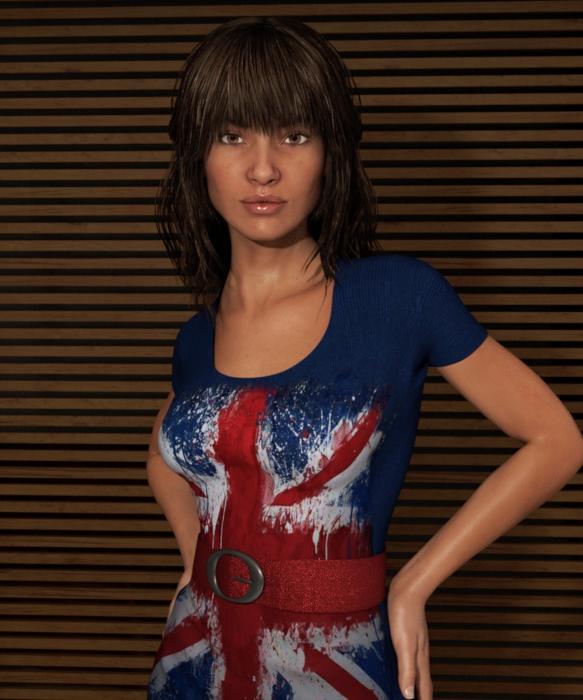
And this is FWSA Natasha (HD, Victoria 7) with Dove Hair. (Genesis 3)
 Wish list for fantasy characters by DAZwith my dragoness I just hid the lower part of my genesis 3 lady and the head of the dragon lined them up then parented her to his neck so I had full movement still on both as well as posing them as one did give her a bit of a hunch back to fill in some gap using zevo/draagonstorm's age morphs but it was a pretty good fit horse though been harder for me. Some hybrids bought that use v4 I've wanted to use g2 instead still had to use v4 but made her invisable then parented g2 to her to work distorts warps like crazy otherwise and you lose movement morphs. the green creature with wings I made from several michael 6's + a victoria 6 with the sucubus wings + reptillian 6 + creature creature + mandibles and claws from another creatureShow Us Your Iray Renders. Part IV
Thanks L'Adair,
I will have to repost after I have made some adjustments to the floors and a few other little things. I haven't had much trouble with lots of emissives, which is why I am very happy with Iray. I have a system that I built to eventually have 4 GTX Titan X cards but I only have one right now. So my upgrade plan is to just buy more cards. I have a power supply and everything ready for 4 cards:
http://pcpartpicker.com/p/TfWMWZ
Maybe the difference is just having an Nvidia GTX card so you don't have to do CPU only. Right now, I get a pretty good full screen preview of scenes that have over 50 lights in about 60 seconds on my 4K monitor. It doesn't seem to slow it down much to add more lights. What slows it down is SSS, Translucency, and a high polygon count that the characters have when HD morphs are on. With these environment only renders, I don't see much of a render time difference between a single HDRI lighting and have 50+ emissive lights in the scene. But if I stick Victoria 7 in there, then the render time doubles.
The renders I posted were set to a maximum time of 8 hours and were originally rendered at 5464 pixels by 4096 pixels. Then I size then down to 50% to help get rid of the grain from the render. The renders looked pretty good and would be considered usable around 15 minutes in but I just let them go overnight just to try to get rid of the grain as much as I can.
For instance, I have attached a work in progress of Planet Lava by Stonemason: https://www.daz3d.com/planet-lava
I have the lighting done. I have the lava emitting light and I feel that I am done with it. I have the skydome emitting light now. I set the windows to be light emitting as well so it looks like lights are on inside of the building. I am calling it a night on it as I have only gotten to the metals on the bridge in this shot. It looks like I will have to fine tune each metal texture and there are a lot of them. The rest of the metal beyond bridge floor in this shot is still just using 3Delight textures.
I stopped this render at 15 minutes in to show that it doesn't seem like more lights really seems to give the Titan X much issue.
Whimper Whine... M7 taking a long time!Get 50% off Micheal 7 if you own Victoria 8 pro pack...*chuckles* Nice.
Whimper Whine... M7 taking a long time!Get 50% off Micheal 7 if you own Victoria 8 pro pack...I'm Animated, are you? -CONTEST INSIDE! - (ceck the last post, page 8)I don't think that's the case. Some people have shown some items and had them released within a week or two of the preview.
Hey, in the absence of any real news, people start spreading rumors. I was just doing my share. At least I didn't go for my usual "kidnapped by aliens" rumor.
Nahhh! Animated girl is in an eternal date with Michael 7 in a tropical island drinking daikiris in the beach...shhhhh! don't say it to Animated boy and/or Victoria 7.
Daz 3D is part of

Connect
DAZ Productions, Inc.
7533 S Center View Ct #4664
West Jordan, UT 84084Licensing Agreement | Terms of Service | Privacy Policy | EULA
© 2026 Daz Productions Inc. All Rights Reserved.