-
Separating JCMs from joint rotationI was wondering if I would be able to separate the JCMs so I could set them to 100% while leaving the figure in a T-pose. I can't seem to find the JCM morph sliders. Maybe something in the property hierarchy? Any help would be great[Released] Turbo Loader for Genesis 8 and 8.1 [Commercial]
FSMCDesigns said:
I was excited about this till I read this part
Products installed manually or with products like Content Wizard do not have morphs recognized by the Daz Studio database. They will be organized as unknown products with a name from their parent directory.
2/3's of my content is from other stores, installed manually and I never use smart content, so I am guessing this won't be of much use for me
As @Mark_e593e0a5 helpfully replied, it will work with anything, with or without metadata. As long as Daz Studio finds the morph to load on a figure, the script can find them too.
Missing morph dials after updatingI had a issue with Daz Central few weeks ago where out of nowhere, it wouldn't detect DAZ even though it was installed and had correct location paths and kept telling me to install it. Since then, I've been running DAZ directly from the folder.
Now that 4.20 was out I decided to update (from 4.16) but I did it through Daz Central by pressing install.
Everything seemed identical except now some of my "pose control" tab dials were missing, I managed to bring some back by redownloading assets manually but there are still some that are missing. Is there something I can do to locate and or bring them all back other than instaling them all over?
What products are used in this pictureDo be aware there are free scripts available to transfer poses from G2 to G8 if you don't want to use G2.Rigging doesn't aline properly with blender morphYea I've done that, though thanks for the suggestion. I've found another oddity, the morph works fine when character 1 is on its own (not in the scene I want). Is it possible any changes to a new gen8 female character will act as an entirely new body for the bones of the morph? If so is it best to make a seperate morph for each character even if it's the same gen8 female? Sorry about the lack of photos will post when I'm back at my laptop.Freebie Challenge March 2022-"Luck of the Draw" - Main ThreadHere's mine, sorry it might be a little deep for a friendly contest, it's just that this is where the theme took me this time...
Poker Face
Just a little piece about depression, something I struggle with quite a bit. She holds a great hand, and tries to put on a happy face, but in reality she's so sad and upset, for no good reason. The colors are supposed to make you think of old tv soap operas, because I thought it would look fitting. And don't worry, I'm fine, just needed to get these emotions rendered out apparently!
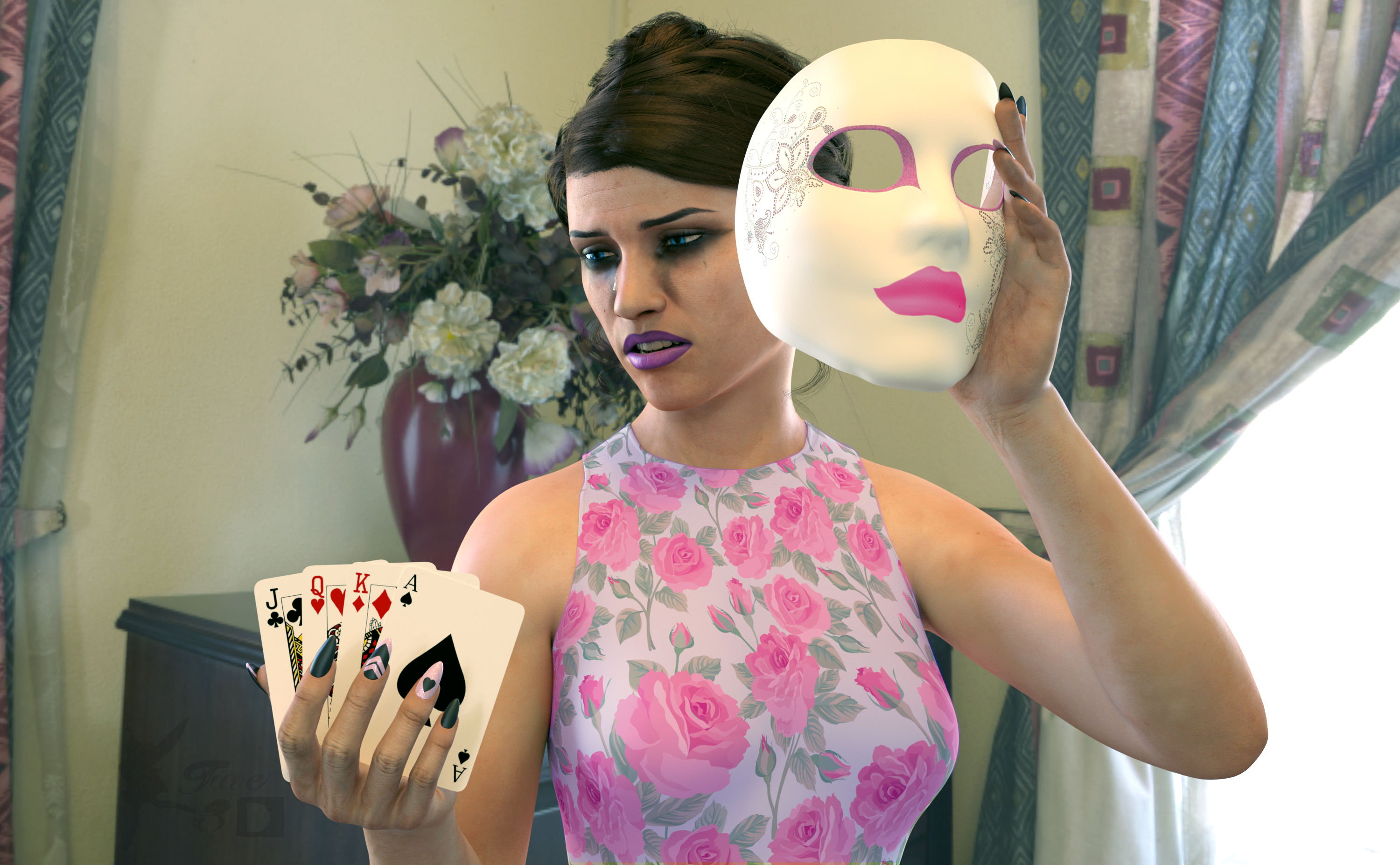
Free:
Chameleon R0se2 (Materials and Body Morphs) - https://www.renderosity.com/freestuff/items/85859/chameleon-rose2-for-genesis-8-female
E. Watson Head Morph (50%) - https://www.deviantart.com/magnus1781/art/E-Watson-899086138
H. Berry Head Morph (40%) - https://www.deviantart.com/magnus1781/art/H-Berry-892028818
Halter dForce Dress Collection G8F - https://www.renderosity.com/freestuff/items/88119/halter-dforce-dress-collection-g8f
Free Tears for Genesis 8 Female - https://www.renderosity.com/freestuff/items/79570/free-tears-for-genesis-8-female
A Thousand Reasons to Cry (Makeup) - https://sharecg.com/v/95817/gallery/21/DAZ-Studio/A-Thousand-Reasons-to-cry
dForce French Twist Hair for Genesis 8 Female(s) - https://www.renderosity.com/mod/freestuff/dforce-french-twist-hair-for-genesis-8-female-s-/81937
Pose (Standing) 94 + Mirror pose - https://www.renderosity.com/rr/mod/freestuff/pose-standing-94-mirror-pose/84264
Flowers and Hearts for Mothers Day Shaders - https://www.renderosity.com/mod/freestuff/flower-amp-heart-shader-set-for-mothers-day/85162
Playing Cards Prop (2nd Down) - https://www.most-digital-creations.com/free_poser_poses_textures_morphs_props_8.htm
HDRI Anniversary Lounge - https://polyhaven.com/a/anniversary_lounge
Paid:
Carnaval Style (Mask) - https://www.daz3d.com/carnaval-style
IBLM Master for Daz Studio (for seeing what the HDRI would look like) - https://www.daz3d.com/ibl-master-for-daz-studio
I tweaked the materials and the pose. Set up and rendered within Daz Studio Iray. Quite a bit of Postwork done in Pixelmator to fix colors and add a smile to the mask, I hope that’s ok! I’ve attached the before post render (the one that says Render) and the finished image file.
Heavy Teeth Distortion G8.1FSMCDesigns said:
with the figure loaded, go to the parameters tab and at the top, above the figure name, click currently used and it will display all morphs being used (if you have show hidden files enabled). if there is a wonky morph, it may show up there. What did you install before the Leprechaun Pot of Gold Bundle?
Jackpot! I can't believe i have forgotten to check there! thank you! there were some weird JCM that had to do with shoulder movements that also moved the teeth...
Rigging doesn't aline properly with blender morphI am also not entilrely following, but it sounds like you need to use Reverse Deformations in the morph loader when importing your morph. Without that whatever shape you're dial spinning in DAZ and then exporting to Blender is getting doubled up if that makes sense. That's got nothing to do with rigging though, which is why I'm not quite following. Maybe a screenshot in smooth shaded mode would help us understand what you mean exactly?
Heavy Teeth Distortion G8.1with the figure loaded, go to the parameters tab and at the top, above the figure name, click currently used and it will display all morphs being used (if you have show hidden files enabled). if there is a wonky morph, it may show up there. What did you install before the Leprechaun Pot of Gold Bundle?
What's up with Daz Studio(4.15), I had tons of characters and Morphs and G8F loaded in 10 seconds...Padone said:
Personally I do a separate content folder for every project, where I install only the assets required. Then to switch to another project I just switch the content folder. This makes things fast and also avoids most conflicts among different assets.
If you're doing an actual 'install' every time, here's a suggestion that might save you a massive amount of time.
Install the "Data" folders for each asset that Genesis(or other figures) may use in separate directories and map them, as needed, in CDM(Content directory manager).
Then, when the project is done, copy the DSX file(ContentDIrectoryManager.dsx) from C:\Users\(username)\AppData\Roaming\DAZ 3D\Studio4, to a backup so you can go back and use the same assets again, if needed. Replacing the new one with a 'default' version to reset it.
This is for the morph data folder only, anything else can get dumped in a general data folder.
Is it possible to convert a Genesis 8.1 figure to Genesis 8? Reallusion doesn't support G8.1Would you please share your transfer utility settings. I'm also interested in transfering morphs but I have not been able to do it.
Thanks in advance,
MarthaOh, I'm sorry I didn't see your question before! It only ocurred to me now to check if anyone had done so! Well, because I wasn't that familiar with utitility transfer myself, I followed a tutorial by one of my favorite Daz3d youtubers. Here's a link:
The part about utility transfer starts at minute 10 or so.
EDIT: So, something else that seems to be relevant is the G8.1F figure has to be stripped of absolutely all kinds of custom elements except the morphs. For example I loaded a G8.1 female, then loaded the morphs, then didn't load anything else including custom skin, hair, eyebrows or any kinds of materials or anythng at all really. I also didn't delete the eyelashes or the tear. I also didn't tick the 'Add smoothing modifier' box despite the tutorial saying so. So far all transfers have gone well. I just discovered, however, that if I load so much as a custom skin material the new figure gets all smushed.
lwaves said:
As you state you can get G8 into iClone, if you just want the basic shape without all the morphs, there is an easy way. Save G8.1 as a shape preset, apply that shape to G8 and then what you'd normally do to get that into iClone. That may not be enough for what you want though but I figured it was worth mentioning. :-)
PerttiA said:
If the character uses G8.1 morphs, those will not transfer with shape preset
lwaves said:
I know, thar's why I said "the basic shape without all the morphs." Although to be fair, I think I messed up a little by reversing the character conversion, as a shape preset works well for G8 to G8.1. So likely not the best way to do things. Saving an object for a morph would be better.:

I would need to research about presets to be able to say if it could work, as I know very little about the topic, however, since I actually only get ready-made figures to use them with other software, not being able to take the morphs would make this method unsuitable for my personal needs. Still, I'l try it our to see if it works, one never knows!
Searching for a model (solved)deepswing said:
MimicMolly said:
From what I've seen in 3DLab's forum posts, they only say they made the character when asked, but never mentioned details if it is a mix or custom sculpted. So it's unlikely that you'll find the model, as she is, for sale. The only thing you can do is try to make your own version of her with other morphs while using the promo images as a reference.
Hi MimicMolly,
Thank you very much, I followed your advice and pretty much built her using the promos as my reference. This is the result so far and I like how she renders now.
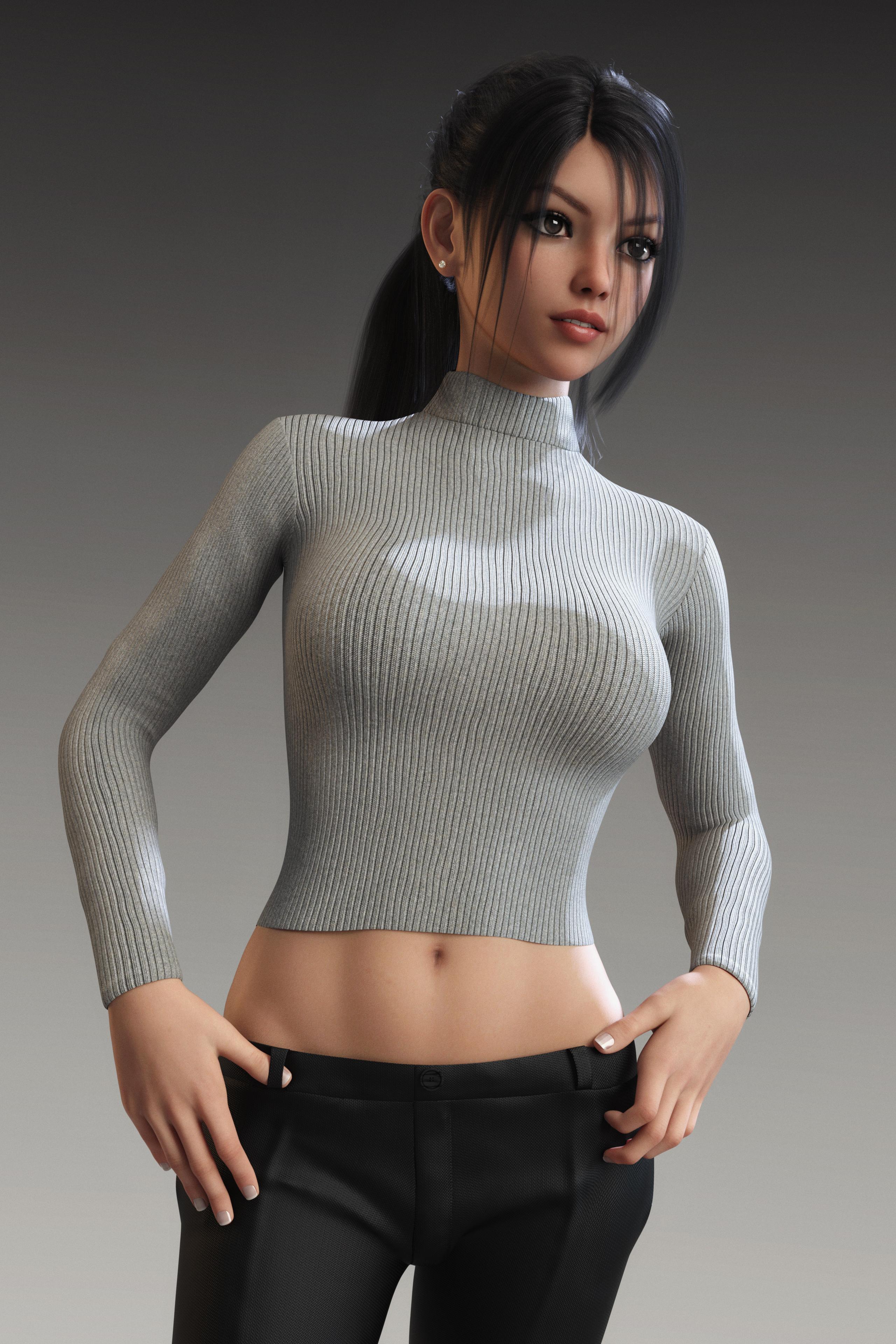
In case someone's interested in her details, let me know and I am happy to pull it together for you.
Thank you for sharing. May I ask what body morph you've used for the render as well? And while you're at it. What about the clothing ;-)
Black marks on the skin of my charactershansolocambo said:
This is caused by objects having similar geometry and being so close to one another that their respective polygons share more or less the same exact space.
It happens for example with (too many...) hair bundles when the scalp is too close from the base head mesh.
If you're using hair and those black marks appear about the front head area you should send the hair to blender or ZBrush and use an inflate modifier to make the scalp a bit bigger. Load that as a morph (easier to do with ZBrush as it can replace the original mesh rather than creating a morph).
It may have a morph to do this, and if not a Push Modifier will do the job in DS (which is what you are using with the Geometry Shell below)
If you're using a Geometry Shell, aka geoshell (for sweat, wet skin, etc.), select it and inflate it slightely : Parameters Tab > Mesh Offset > Offset Distance
Black marks on the skin of my charactersThis is caused by objects having similar geometry and being so close to one another that their respective polygons share more or less the same exact space.
It happens for example with (too many...) hair bundles when the scalp is too close from the base head mesh.
If you're using hair and those black marks appear about the front head area you should send the hair to blender or ZBrush and use an inflate modifier to make the scalp a bit bigger. Load that as a morph (easier to do with ZBrush as it can replace the original mesh rather than creating a morph).
If you're using a Geometry Shell, aka geoshell (for sweat, wet skin, etc.), select it and inflate it slightely : Parameters Tab > Mesh Offset > Offset Distance
Excessive Memory Usage (Logs attached)Greetings all, I just downloaded a host of assets, and suddenly my memory usage is going through the roof. Daz is using 11GB of System RAM on a scene it was only using 2 on last night. Whenever i load a scene with this specific model in it, the log throws this series of errors:
2022-03-18 16:20:47.778 [WARNING] :: ..\..\..\..\..\src\sdksource\fileoutput\dzassetoutfile.cpp(11290): No geometries match the vertex count of morph "PHMEyelashesCurl"
2022-03-18 16:20:47.918 [WARNING] :: ..\..\..\..\..\src\sdksource\fileoutput\dzassetoutfile.cpp(11290): No geometries match the vertex count of morph "PHMEyelashesTopPoint"
2022-03-18 16:20:47.918 [WARNING] :: ..\..\..\..\..\src\sdksource\fileoutput\dzassetoutfile.cpp(11290): No geometries match the vertex count of morph "PHMEyelashesCurl"
2022-03-18 16:20:47.927 [WARNING] :: ..\..\..\..\..\src\sdksource\fileoutput\dzassetoutfile.cpp(11290): No geometries match the vertex count of morph "PHMEyelashesCurl"
2022-03-18 16:20:47.935 [WARNING] :: ..\..\..\..\..\src\sdksource\fileoutput\dzassetoutfile.cpp(11290): No geometries match the vertex count of morph "PHMEyelashesCurl"
2022-03-18 16:20:48.012 [WARNING] :: ..\..\..\..\..\src\sdksource\fileoutput\dzassetoutfile.cpp(11290): No geometries match the vertex count of morph "PHMEyelashesCurl"One of the assets i downloaded today was the Genesis 8 Female Body Morphs (https://www.daz3d.com/genesis-8-female-body-morphs). It's the only thing i can match to the error messages, and it only seems to happen with one character. Any scene that she's in. The rest don't do this. So, would it be a problem with the asset itself? Or could the solution be something as simple as removing/re-applying the eyelashes? or changing them?
Not terribly knowledgable in this stuff, so thought I'd reach out. Thanks :)
Is there anyway to make a symmetrical morph using Hexagon?Saxa -- SD said:
Lol your bugaboo & pose is cute.
So did you get this figured out?
Have made many symm and a-symm-morphs for years now, and must admit, without a video, am somewhat unclear still what this means: "without it squishing in the middle and flipping side to side."
Can guess, but maybe am wrong.IMO, from the image, you can't make a symm-morph for that. [true] Symm only works "properly" for default pose where L&R are same. Or am I misunderstanding your intent?
For that pose, you would be limited to maybe using custom selection sets, morph flipping maybe (depending what u want) and be left with making asymm morphs.Not sure if you have? but MarvDesigner and that particular outfit would symm so fast. Probably total less than 2 minutes once avatar is imported.
Lol, nope.
"without it squishing in the middle...." Hexagon makes the symmetry by reversing the sides 'the painful way.' Flattens it, then expands it reversing everything. Now for modeling .obj files, this is fine. For everything else it may be fine. But for clothing morphs, no. And the why is because the mesh has been physically reversed, when D/S is applying the morph, it too is squishing/flattening the clothing and then reversing everything. End result looks good, but this cannot be animated. For stills, not generally an issue.
Bugga Boo is an extreme character figure obviously. Available for Bugga Boo is a nice set of poses. There is the pose A and then the symmetrical pose B. Why the stores are not flooded with long skirts and big long sleeves is because these are a heck of a lot of work most people would not waste their time with IMHO. I guess I like challenges in life ;-)
No I do not have MarvDesigner. I've been using D/S's dForce for simulations. Then bring that into Hexagon to polish the morph and send it back to D/S to make the morph in the clothing. I understand what it was doing, was hoping there might be a way to make use of the finished A morphs to make more quickly the B morphs. As things stand right now, if this gets released it'll be going out the instructions that if they want the B pose, take a render of the A pose and flip it in an image editor.
There is a good reason why most clothing ends before the arms begin, big gap, then long armbands.
It also doesn't help the clothing morph process if the pose of the figure has its own mesh intersecting. So sims being run for Bugga Boo have to be run from the default for Bugga Boo "A" pose. Then in Hexagon I can assure everybody it is not a 2 minutes job to polish the morph. But she's so cute ...
Is there anyway to make a symmetrical morph using Hexagon?Lol your bugaboo & pose is cute.
So did you get this figured out?
Have made many symm and a-symm-morphs for years now, and must admit, without a video, am somewhat unclear still what this means: "without it squishing in the middle and flipping side to side."
Can guess, but maybe am wrong.IMO, from the image, you can't make a symm-morph for that. Symm only works "properly" for default pose where L&R are same. Or am I misunderstanding your intent?
For that pose, you would be limited to maybe using custom selection sets, morph flipping maybe (depending what u want) and be left with making asymm morphs.Not sure if you have? but MarvDesigner and that particular outfit would symm so fast. Probably total less than 2 minutes once avatar is imported.
Projection Morph Manager (Commercial)Zev0 said:
It is those, but they all randomly populated in DS. The script allows you to arrange them via dial strength, product or list via body part, and also it restores morph linking. EG if figure has morph A which drives morph B, the standard projections have no linking. The script maintains these. Also the grey hidden text is very hard to read.
And that is why the product is called a Manager.
 Rigging doesn't aline properly with blender morphSorry if I wasn't clear. It's just for personal use regarding the practice. I mean I create my own character (call it 1) adjusting sliders and such. Then edited that character a little more before exporting to blender, sculpting it a bit making a character morph (2), importing it back to daz and when I go to align 1's rigging with 2's it goes nuts. YET when I just use a base gen8 female (the same base to make character 1) it works.Rig Humanoide
I'm still not sure what you are wanting to do - the problem with an independent figure is that it will almost certainyl have limited support, and as RawArt and Joe Quick have shown there is a lot that can be done with morphs and rigging adjustments, plus GeoGrafts for extra body parts. The Transfer Utility is really for add-ons - clothes etc. - rather than new figures, since something different enough to merit its own rigging will be too far from the original shape to be effectively rigged by projecting the other figure's rigging.
Daz 3D is part of

Connect
DAZ Productions, Inc.
7533 S Center View Ct #4664
West Jordan, UT 84084Licensing Agreement | Terms of Service | Privacy Policy | EULA
© 2026 Daz Productions Inc. All Rights Reserved.