-
Converting to G1, G2, G3, G8 & G9
FIGURES
Millennium Age
Millennium 3 (Generation 3)
 Better Option: Equal price than Stephanie 3.0 Petite Head Morphs + Stephanie 3.0 Petite Body Morphs, It contain them and contain Std Skins + Wild & Messy Hair + 2cond skins.
Michael 3.0 Base Michael 3.0 Head & Body Morphs Hiro 3.0 (Base) 


David Base (David 3.0) David Body Morphs David Head Morphs 


The FREAK The FREAK: Morphs and Maps 

Millennium Kids- Preschoolers Preschoolers Morphs Millennium Kids - Young Teens 

 Converting to G1, G2, G3, G8 & G9
INTRODUCTION
Figures and Elements Associated
For complete information about DAZ figures AWESOME Scott-Livingston THREAD DAZ 3D Human Figures - A History
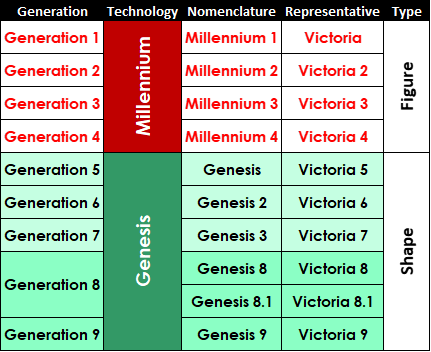
There are eight generations of DAZ figures. The first four were called Millennium. The last four are Genesis System. So, Genesis 1 System contains Generation 5 figures, Genesis 2 System contains Generation 6 figures, and Genesis 3 System contains Generation 7 figures. Since Generation 8 names like Genesis 4 to 7 have been dropped, now Genesis 8 System contains Generation 8 figures. This change in enumeration prevent confusion between Genesis 4 y Generation 4 (The still active Millennium 4 figures).
Each generation of figures is associated to different elements:
- Millennium 1-2 (generation 1-2) and others figures:
- Character Base (Mesh + Rigging)
- Morphs
- UV-map
- Millennium 3 (generation 3):
- Character Base (Unimesh + Shape + rigging + UV-map)
- Morphs
- UV-map
- Millennium 4 (generation 4):
- Character Base (Unimesh + Shape + rigging + UV-map)
- Characters (Shape)
- Morphs
- UV-map
- Genesis 1-2 figures (generation 5-6):
- Base (Unimesh + Shape + rigging + UV-map)
- Characters (Shape + rigging + UV-map)
- Shapes (Morphs)
- UV-map
- Clone (Autofit) + templates
- Genesis 3, 8, 8.1 and 9 figures (generations 7-9):
- Base (Unimesh + Shape + rigging + UDIM-map)
- Characters (Shape + rigging + UDIM-map)
- Shapes (Morphs)
- UDIM-map
- Clone (Autofit) + templates
All figures use: Hair, Clothes, Shoes and Accessories:
For Millennium 1-4 and others figures hair, clothes, shoes and accessories are conformed or parented.
For Genesis 1-3, 8-9 hair, clothes, shoes and accessories are autofited, a few are parented.
All figures can be posed and setting with expressions. Expressions until generation 6 are actually morphs. For generation 7-8 these are poseable.
Mesh:
A polygon mesh is a collection of vertices, edges and faces that defines the shape of a polyhedral object in 3D computer graphics and solid modeling. The faces usually consist of triangles (triangle mesh), quadrilaterals, or other simple convex polygons, since this simplifies rendering, but may also be composed of more general concave polygons, or polygons with holes.
http://en.wikipedia.org/wiki/Polygon_mesh
Unimesh:
It is a unique mesh for every figure towards creating a single master mesh that could be used as a foundation for creating each new figure. This is referred to as the DAZ Unimesh. The Unimesh is a cutting edge geometry mesh with very strategically placed polygons.
This androgynous mesh was created with a focus on attention to detail in the placement and concentration of polygons. The Unimesh is now used as the base for all bipedal Millennium Figures that DAZ creates. Victoria 3.0 was the first to be created from this mesh, and Michael 3.0 was the second.
https://helpdaz.zendesk.com/entries/124483-What-is-the-Unimesh-Shapes/Morphs:
Vertices on the mesh are change from their original position in the space to produce a different aspect. It can be the aspect of an old figure, a new character or features for these.Clones:
These are used to autofit clothes from a different figure to Genesis 1-3. Each clone has several templates for each type of cloth to be converted.Skins:
“Textures” or “Image Maps” to give the model color.UV Set:
(From section 3.5.8 in III - Textures, Surfaces and Materials)
A “UV Set” is a set of 2 dimensional coordinates that correspond to a 3 dimensional point on a model. The UV set determines how a 2 dimensional image will “wrap” around the 3 dimensional model. A good UV set will minimize stretching and compression while placing seams in logical or hidden locations of the model.
Because the Genesis and Genesis 2 figures have incredible morphing capabilities, DAZ Studio allows for multiple UV sets. If an artist creates an extreme morph for Genesis or one of the Genesis 2 figures they can include an additional UV set that will account for any distortions caused by the changes in the morph. Support of multiple UV sets also increases texture compatibility across figures.
The 'UV Set' property on a surface determines which UV set is used for that surface. It is important that the UV set and image maps for a particular surface match. If they don't you are likely to get distortion and seams.
You can change the UV set for a single surface, for multiple surfaces, or (more commonly) for an entire figure. To switch the UV set for your current selection in the Surfaces pane click the UV set selection list and choose a UV set from those that are listed.
For DS it is the mapping from the texture space [0, 1] x [0, 1] to mesh or figure. Each skin is related to a unique UV. Genesis 1-2 supports multiples UVs, with a pair of click in surface tab you can switch UVs. To other figures a new remapped mesh is needed.
UDIM Set:
It’s only for Genesis 3, 8, 8.1 and 9.UDIM UV mapping
UDIM Guide
UDIM Workflow
Multiple UV Tiles (UDIM)
Using Multi-Tile shaders within 3Delight and Renderman
G3M G3F, Q and A. V7 welcome as well
Now Four Tutorials - Stuff for Genesis 3 too
Stuff-for-Genesis-3-pdf-tutorial
Convert
It is the list of desirable conversions. Not all elements can be converted in some cases.
- Millennium 3-4 to Genesis 1.
- Millennium 3-4 to Genesis 2.
- Millennium 3-4 to Genesis 3.
- Genesis 1 to Genesis 2 to Genesis 3 to Genesis 8.
- Genesis 8 to Genesis 3 to Genesis 2 to Genesis 1.
- Genesis 2 Female to Genesis 2 Male, and vice versa.
- Genesis 3 Female to Genesis 3 Male, and vice versa.
- Genesis 8 Female to Genesis 8 Male, and vice versa.
- Others to Genesis 1, 2, 3 & 8.
- Genesis 1, 2, 3 & 8 to Millennium 1-4 & Others.
- For conversion to Genesis 1-3, 8 system, thinking in a figure as an indivisible entity is a common mistake. Think in shape, clone and uv-map to find the suitable product that fit your needs.
- Figures and characters from generation 3-4 are converted to shapes in generation 5-8. Until now, there aren’t generation 1-2 shapes or other figures shapes for Genesis. Sadie, Sam and Mavka shapes are versions of the old figures, so, only generation 3-4 figures have been represented almost exactly in the Genesis Mesh.
- If you want the “contour” from a base character of a previous generation in Genesis 1-3 & 8, you need to buy the respective shape. Example: You want to see Genesis looking like Victoria 4; then, you need get the product containing V4 shape for Genesis.
- If you want autofit clothes, hair and shoes from previous generation to Genesis 1-3, 8 you need the respective clone. Example: You want to use a Victoria 4 cloth to dress Genesis, then you need get the product containing V4 clone for Genesis. Dress, hair and shoes may need extra steps/tools to achieve a good fit or don’t lose morphs.
- If you want to use skins from previous generation in Genesis 1-2 you need the respective UV-map. Example: You want to use Victoria 4 skins in Genesis; then, you need get the product containing V4 UV-map for Genesis.
- If you want to use skins from previous generation in Genesis 3 & 8 you need the respective Cayman's Legacy UV-map or an Texture tranformer. Example: You want to use Victoria 4 skins in Genesis 3; then, you need get the product containing V4 Legacy UV-map for Genesis 3.
- If you want to use morphs from previous generation to Genesis 1-3 you need the respective tool. Example: You want use a Victoria 4 morph in Genesis, then you need get the product/tool to transferring the morph to Genesis.
- If you want use expressions from previous generation to Genesis 1-2 you need the respective tool. Example: You want use Victoria 4 expressions in Genesis, then you need get the product/tool to transferring the expression to Genesis. Due to the fact that generations 1 to 6 use morphs for expression and generation 7 & 8 expressions are based in a poseable head, there isn’t a way to “translate” old expressions to the last generation. Nevertheless, old good expression could be useful for inspiration to build Genesis 3 & 8 expressions from scratch.
- If you want use poses or animations from previous generation to genesis 1-3 & 8 you need the respective tool. Example: You want use Victoria 4 poses in Genesis, then you need get the product/tool to adjust poses to Genesis.
WARNING! You need to be careful about these:
1-Not all products contain shape, clone and UV-map. These can be selling separately by different PA.
2-Some conversions need some extra-steps or extra tools to improve, facilitate or batch the process.
3-Some conversions can be made up with free DS-tools, but some commercial products do dramatically easier this task.Two G2 To G3 Pose Converters?nemesis10 said:
I have heard a rumor that there is more than one fantasy medieval with high heels and bared midriff for Victoria in the store too...
Nah, I don't believe you.
Where is Victoria 4?Victoria 4.2 is Victoria 4, other than the addition of the eyebrow bone and possibly the ExP system - neither of which broke existing content for 4.0/4.1.
October 2015 New User Contest (WIP-THREAD)Wow Ka1, one cool pic after the other.

You are to good for the beginner thread. When i see such cool pics, i have no hope to gain a price.

daybird so sorry about your mishap. So I think you need to decide where your focus is going to be. You have two faces and viewers will be drawen to both of them. I think I would blur Michael more because you have a great expression on Victoria's face. I would also try and see if I could get a glow on the energy beam from the gun. Maybe drop her right arm just a bit to move the focus to the gun in the left hand. Good start. I see you have used the rule of three to set up your subjects.
Looking forward to seeing what you do.
Thx for the tips DollyGirl. There are many things in the pic i'm not happy with. One off them is this damned beam. I try so many things, but this stupid beam won't glow in iray render.

But i look what i can do with that. Hope i have enough time this weekend.
If that beam is a prop you can apply an emissive shader to it to make it glow.
Apply the emissive shader to the beam
On the "Surface" pane scroll down to "Luminance Units" and switch it to "kcd/m^2"
Set "luminance" to 400 (this is where we will start, you might need to make it higher or lower depending on how it looks in the render)
Set "Emission Temperature" to 4800 ( this will make it slightly red)
Set "Emission Color" to the color you want the beam to be.
:) hope this helps
NEW! Novica & Invited Guest Contributors Tips & Product Reviews Pt 6Yes, I do actually- forgot about that one. I dug around and also have the OOT Iray Hair Shader from another site.
Wanted to show my dabbles with testing lights- these are not fully rendered but are almost "done." My intent is to check various settings for the lights based on the characters and also to render some of the characters to see their features. A lot of mine don't look like the promos, which is a good thing- I like both.
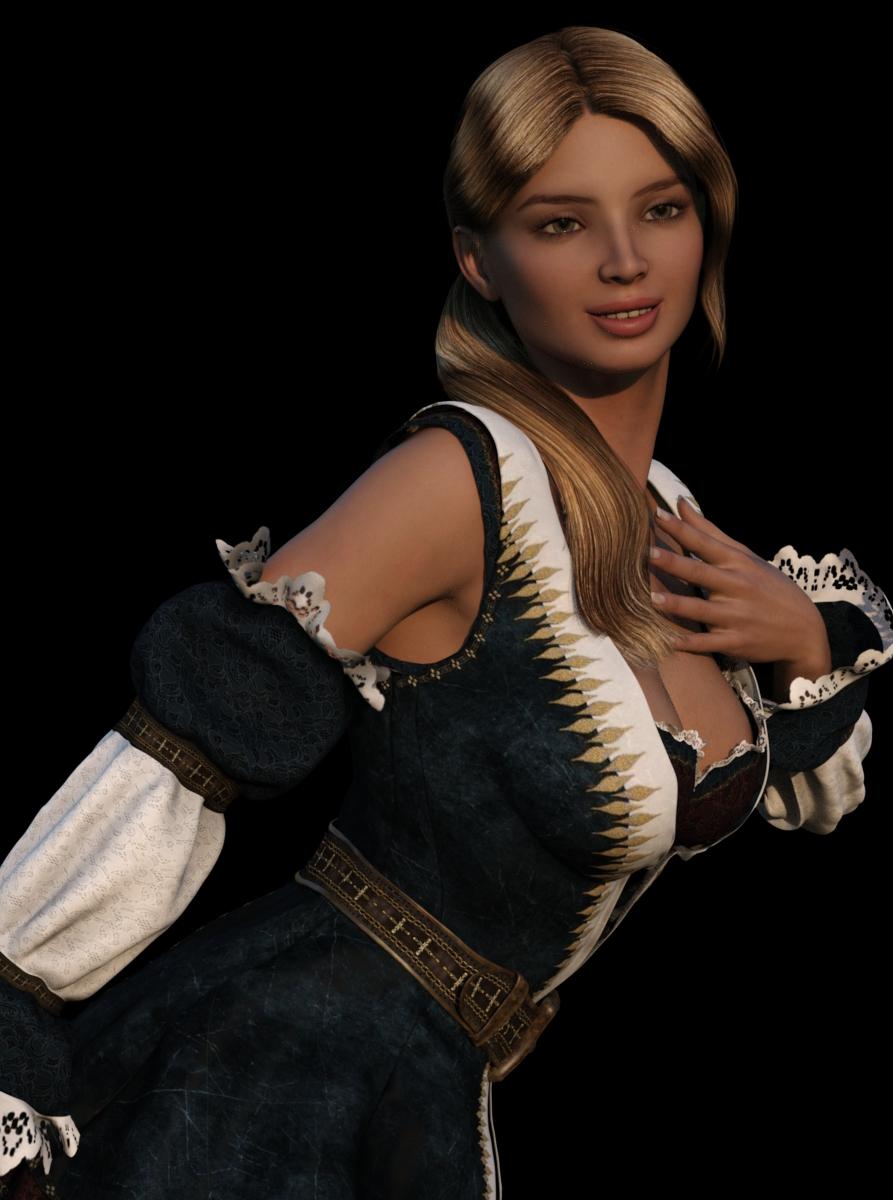
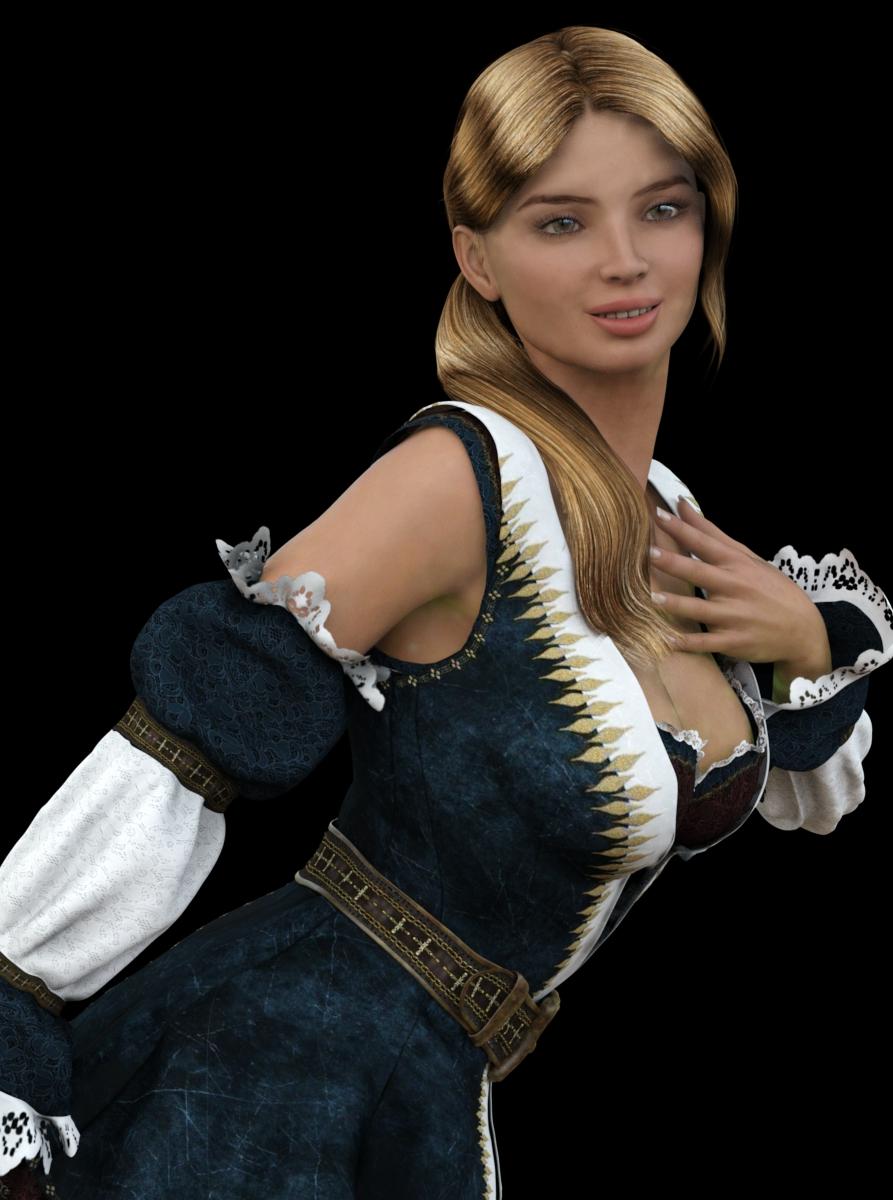
FWSA Tempie (Victoria 6) rendered in wonderful time, even though she's not quite done it moved along nicely. This is with the Dimension Theory's Real World HDR lightset using Desert B.It's one which usually renders a bit darker and you can change it for more of a daylight scene, I left it more towards dusk. It is a desert colored lightset, with the oranges/yellow.
One thing to note is that teeth will also go quite yellow. I reduced the chest, she's quite busty. If you go in the Tone Mapping in studio, my settings (starting from the top) were (Start w Exposure Value) 14.23 / 519.41 / 6.25 / 95 (Film ISO) then drop down to Burn Highlights 0.19 and Crush Blacks 0.40
The second one, I used a Maui with settings 13.37 / 157.36 / 6.70 / 150 (Film ISO) then 0.16 Burn Highlights and 0.40 Crush Blacks. I also went to Environment and turned down the Environment Intensity to 0.95 from 1.00, the dome scale multiplier down to 28.35. (Playing around.)
This Lady Scarlett outfit comes with a flamboyant hat, I got it as a potential Halloween costume to kitbash with other items. A bit too low cut for children's books! (Must've really gotten a good deal, eh?)
For the hair, all I can say is after trying one of EmmaAndJordi's, I know there will always be fantastic morphs that address every section of the hair. Have you ever wanted to lay the middle of a long section over the breast down onto it? No problem. What about only the ends? No problem. Is there hair coming through the shoulder? No problem. Melinda Hair is the hair of choice for use with "problem" outfits with things sticking up in the clothing, or big busted figures.
 Where is Victoria 4?
It sounds to me like you may not have your Runtime mapped as a poser Runtime as well. When you do that you can browse the Runtime under Poser Formats in the Content tab.
Then navigate to Figures/DAZ People/ there you will see Victoria and all the other DAZ 3D figures.
I always map my DAZ Studio Runtimes as Poser Formats because there are many items still in Poser runtime format that will only be browseable when you have the DAZ Studio Runtime also mapped as a Poser runtime. When you browse a DAZ Studio runtime in Poser format you will notice that you can't see .duf stuff. This is normal.
http://docs.daz3d.com/doku.php/public/read_me/index/4783/file_list:
-
/Runtime/libraries/Character/DAZ People/Victoria 4.2.cr2
-
/Runtime/libraries/Character/DAZ People/Victoria 4.2.png
I do have my Poser Runtimes mapped, as shown in the attached screenshot. However, there is still no V4. The Victoria 4 item on the far right between Anatomy and Young Teens 5 only leads to Actual Hair, nothing else. I did a file search in the DAZ 3D\My DAZ 3D library\ for Victoria 4.duf and pretty much only found files related to poses with the following exception: 'Set Victoria 4 UV.duf' (Set Victoria 4 for Genesis) and 'Set Victoria 4 UV.duf' (Set Victoria 4 for Genesis 2 Female). I tried the one for Genesis (on a stock Genesis figure) and it didn't do anything. I also loaded a stock G2F and applied the other one. It added a UV with baked-in underwear. However, there is still no plain Victoria 4 loadable figure anywhere that I've looked.
I guess she did go on an extended vacation and was replaced with V4.2. I tried the V4.2 and that worked for my application, so I guess not all is lost. It's just odd when you look in your DIM and it says straight out that you have a Victoria 4 model installed.
Thanks for the help though!
October 2015 New User Contest (WIP-THREAD)Wow Ka1, one cool pic after the other.
You are to good for the beginner thread. When i see such cool pics, i have no hope to gain a price.
daybird so sorry about your mishap. So I think you need to decide where your focus is going to be. You have two faces and viewers will be drawen to both of them. I think I would blur Michael more because you have a great expression on Victoria's face. I would also try and see if I could get a glow on the energy beam from the gun. Maybe drop her right arm just a bit to move the focus to the gun in the left hand. Good start. I see you have used the rule of three to set up your subjects.
Looking forward to seeing what you do.
Thx for the tips DollyGirl. There are many things in the pic i'm not happy with. One off them is this damned beam. I try so many things, but this stupid beam won't glow in iray render.
But i look what i can do with that. Hope i have enough time this weekend.
What have you used for the beam daybird? Is there a jpg image for it in the surfaces tab?
October 2015 New User Contest (WIP-THREAD)Wow Ka1, one cool pic after the other.
You are to good for the beginner thread. When i see such cool pics, i have no hope to gain a price.
daybird so sorry about your mishap. So I think you need to decide where your focus is going to be. You have two faces and viewers will be drawen to both of them. I think I would blur Michael more because you have a great expression on Victoria's face. I would also try and see if I could get a glow on the energy beam from the gun. Maybe drop her right arm just a bit to move the focus to the gun in the left hand. Good start. I see you have used the rule of three to set up your subjects.
Looking forward to seeing what you do.
Thx for the tips DollyGirl. There are many things in the pic i'm not happy with. One off them is this damned beam. I try so many things, but this stupid beam won't glow in iray render.
But i look what i can do with that. Hope i have enough time this weekend.
Fiddling with Iray skin settings...@Arnold C.
Translucency color 255, 0, 0 comes from other PBR renderengines - they use more layers and colors for subdermis and even more layers all with a tint or texture! ...
When i look on a light penetration chart in human skin/tissues....
it shows about 3/2/1.... red, green, blue... our ear is, well.... how dick? ... it can NOT be just red which shines trough a ear.... direct lights penetrates 3mm human skin... my fingers are about 10mm thick translucent against a poor 20 watt light...
here is such a chart,,, i think my colors are way better then red, 0 0 .Yep, I know, I guess MEC4D got her translucency color recommendation straight from the MarmoSet Toolbag 1 skin shader tutorial.
Just to make clear for everyone, the advice I gave on the "devibranced diffuse texture" matter is how MEC4D explained it using her method to set up a skin shader. That method I dropped months ago for it requires any damn different texture to be modified for any damn different character. Too much effort.
I have a render back from the days when I used MEC4D's method, "Victoria at PixarCampu9E" below. And a newer one, "Magic_Falls_Oktober_2015", using a method mostly similar to what Andy has described here, a skin diffuse texture in the translucency slot with RGB 240, 240, 240 and some measured values put into. A mid Beta state, if you want. Mostly satisfied with the reflections on her body, but not so with the reflections on her face, without a good gloss map it's really hard to define stronger reflection highlights on forehead, nose, chin and cheeks without giving the whole face a uniform reflection strength.
"Dom" and "dick", you're by any chance a "middle-european", maybe even a "Landsmann"? I'd say, cartilaginous tissue and skin included, around 3 - 4 mm dick.

@Arnold C.
the added photo shows how i want my ears in iray :-).... 3R,2G,1B.You can't put your ears in Iray, Andy...


Welcome to the "Skin Shading Disscussion and Confusion Assembly", Virginie.
That's the reason I tend to don't use backscattering either.Where is Victoria 4?... I look in Smart Content and all it lists is V4.2. I have all the V4.2 stuff. I also found where it says V4 for Genesis 2. I checked that out but nothing. I'm totally stumped. I've run into this before. Does Victoria 4 not actually exist?
It sounds to me like you may not have your Runtime mapped as a poser Runtime as well. When you do that you can browse the Runtime under Poser Formats in the Content tab.
Then navigate to Figures/DAZ People/ there you will see Victoria and all the other DAZ 3D figures.
I always map my DAZ Studio Runtimes as Poser Formats because there are many items still in Poser runtime format that will only be browseable when you have the DAZ Studio Runtime also mapped as a Poser runtime. When you browse a DAZ Studio runtime in Poser format you will notice that you can't see .duf stuff. This is normal.
http://docs.daz3d.com/doku.php/public/read_me/index/4783/file_list:
-
/Runtime/libraries/Character/DAZ People/Victoria 4.2.cr2
-
/Runtime/libraries/Character/DAZ People/Victoria 4.2.png
Where do I find the Props / Objects?There is the mesh - and there are the textures/UVmaps.
The mesh of Genesis and it's rigging/bending (Genesis is weightmapped) are very different from Generation4 rigging (classical rigging for Poser, no weightmaps).
The UVmaps for Generation4 - which tell the computer where to put what part of the texture - have been added to the free base Genesis.
For Genesis2Female you have to buy http://www.daz3d.com/victoria-4-for-genesis-2-female to get the texture maps of V4 to apply to Genesis2.
October 2015 New User Contest (WIP-THREAD)Mhh first try with new setting after the crash.
daybird so sorry about your mishap. So I think you need to decide where your focus is going to be. You have two faces and viewers will be drawen to both of them. I think I would blur Michael more because you have a great expression on Victoria's face. I would also try and see if I could get a glow on the energy beam from the gun. Maybe drop her right arm just a bit to move the focus to the gun in the left hand. Good start. I see you have used the rule of three to set up your subjects.
Looking forward to seeing what you do.
Where is Victoria 4?Victoria 4.2 is the current version of V4
Where is Victoria 4?I'm trying to load a prop (a mannequin) that calls for loading a basic Victoria 4. Afterwards you apply a couple poses and mats and viola, you get a headless, armless, legless puppet to use in a store. However, I simply cannot find Victoria 4 anywhere. All I find is a couple UVs, some other maps, a Stephanie 4 character and a few other things. I checked my DIM and it says I have V4. I look in Smart Content and all it lists is V4.2. I have all the V4.2 stuff. I also found where it says V4 for Genesis 2. I checked that out but nothing. I'm totally stumped. I've run into this before. Does Victoria 4 not actually exist?
DAZ and PoserI've been following this thread from beginning to end, and I must confess that I'm having a hard time figuring out what all the hoopla is about.
I've been using both Poser and DAZ Studio since about 2005 -- Poser, since version 6, and Studio since version 1. (Although I skipped version 2, since version 1 sucked so badly, I all but bailed on it completely.) I never really got a 'feel' for DS until version 3 was released, and after 4.x came out, I seriously began to take to it! I did continue to use Poser, right up to my current version, Poser Pro 2012. (For some reason, I have never felt any urge to upgrade to a more recent version.) Until recently, I have generally used both applications interchangeably, and frequently in the same workflow: Poser to design, clothe, and pose my characters; and DAZ Studio to build the actual scenes and renders.
But, as I have watched the divergence of content-compatibility between the two applications, I am finding that my workflow has evolved as well, into a 'one or the other' situation, especially since the original Genesis figure was introduced. (And I have to admit, that 'Victoria 5 Preview' April Fools' Day prank was simply classic!) Then, when Genesis 2 was released (and the DSON Importer for Poser), I brought Poser back into my workflow (and adapted my content libraries accordingly) -- until I finally accepted the fact that the DSON Importer doesn't work for crap! At least, not for me; getting clothed figures to pose without an infuriating level of poke-through was so frustrating, I finally gave up, and went back to the 'one or-the-other' approach.
As a consequence, I haven't used Poser in nearly a year, and even then, it was for the express purpose of using a feature in Poser that DAZ Studio didn't have (simpler (read: 'non-proprietary') dynamic cloth or hair, mainly (nothing works better for producing a crumpled pile of clothing on the floor!), or the multitude of posing cameras). And when I did, it was always with Generation 4 and earlier figures (yes, I still use Michael 3 and Victoria 3 on occasion); for Genesis and everything more recent, it is now DAZ Studio, and DAZ Studio only. The decision of which application to use, therefore, is determined entirely by the figures I intend to use. And there is precious litle 'inter-breeding' between generations. I don't even try to use the DSON Importer anymore; I no longer even bother with keeping the thing up-to-date.
So, when I run across a product that offers a separate Poser version, or a 'Poser Companion file', I download and install them in the appropriate Poser runtime, which are also visible to DS. (I even have a 'DSON Content' runtime, which is dedicated entirely to Genesis 2.) And if there isn't a separate Poser installer, or if it's a product for a newer figure (Genesis 3 Female, specifically), it goes into my DAZ Studio Content folder. I'm equally comfortable using both applications, so the support, or the absence thereof, for one product or the other, is really no skin off my <insert crude reference to body-part of choice here>.
There are already too many things going on in the world around me to get worked up over (or that I probably should, at any rate); this issue is not one of them.
Returning to Daz. Suggestions?I would recommend you play around with G2F, that way you get to learn the flexibility of the Genesis system. You only need to get one product, namely, http://www.daz3d.com/victoria-4-for-genesis-2-female, and you can put all your V4 clothing, and V4 skins on her.
3rd Party content installation issuesIt may be that there is now a nested content directory confusing the issue, or that there are two folders for the older (Victoria 4 etc.) figures and the first found doesn't have the morphs. Is this all as in older (V4, m4 etc.) and newer (the Genesises)?
I work mainly with Genesis and Genesis 2, and genesis3. So how do I reload all my morph files? I have but ton of them and am not sure where to locate the files.
Carrara 8.5 & Genesis 3 - Victoria 7?I had the same problem. Stezza answered in another thread. http://www.daz3d.com/forums/discussion/comment/882238/#Comment_882238
There are pictures there with arrows, but here are the quotes.
diomede64 said:
Personally, when I tried collada, the mesh did not follow the bones, but I have seen other people be successful.If people discover work arounds or other uses, feel free to add to the thread. I am returning the V7 that I purchased. If it gets support, or if I use DS more, I will re-acquire it.
After exporting the posed figure from DAZ Studio in collada format import the collada file into Carrara 8.5
Select the bones of the figure and then either do one of two things..
1. Select the Transform tab then click on the HP->Obj button
or
2. Select a bone in the assembly room window
the figure will then pose to the bones
do this with each of the items ie.. figure.... clothing...hair ect..
you will probably need to also rotate the clothing/hair to match the figure
that's how I do it.. hope it helps :-)
Howdy Folks,
Could someone who has sucesfully exported Victoria 7 as either COLLADA or FBX and got it to work correctly, share thier settings? Everytime I export as COLLADA, the mesh does not follow the bones, and is useless. The FBX export just plain doesn't work for me. Thanks!
Rich S.
Thanks! I'll give it a try. This issue has been seriously hampering my purchases. Almost every Genesis 3 item I want, just goes on my wish list, and I only purchase if it is Genesis 2 or Victoria 4 these days. It is really dissapointing that DAZ did this...
FREEBIE CHALLENGE ----- October, and it's TRICK OR TREAT TIME ---- Main ThreadOk. Here is my entry.
Halloween time
Done with Daz Studio 4.8
Items marked with an asterisk require registration.
Not Counting: Victoria 4 figure
Freebies:
1.) V4 Alta Morphs
2.)* V4 Faith Textures
3.) Black cat for V4 DS Version
4.) More Styles for BlackCat V4 Black choker with silver key texture
5.)* Black Cat Fever Black dress texture
6.)* Footwear for the V4 Windwalker by Jan19
7.)* Riding Rainbow Grey texture
8.)* Haunted House
9.) Halloween Junkies Glutton Boo
10.) Halloween Junkies 2014 Jack
11.) August Hair
12.)* August Hair++
13.)* Realistic for August Hair This was used because of the transmaps needed for the next file
14.) Fantasy for August Hair Violet texture
15.)* Render Profiles for DAZ Studio 4.5 (Rendered on Insane)
16.)* Morphing Witches Hat Last on the page
Another cool one!Dana
Daz 3D is part of

Connect
DAZ Productions, Inc.
7533 S Center View Ct #4664
West Jordan, UT 84084Licensing Agreement | Terms of Service | Privacy Policy | EULA
© 2026 Daz Productions Inc. All Rights Reserved.