-
Running Daz studio on an offline machine
grendel1 said:
namffuak said:
grendel1 said:
I gather this is possible, although I'm having trouble finding the forum post I read where some one outlined how they do it.
I think I basically just need to use a separate machine with DIM installed on it to download the files, then transfer them to the offline machine. Then the DIM on the offline machine will find them once they are in the downloads folder and can install them.
Manually installed content is probably not a problem?
Does daz studio itself ever need to access the internet to run? Are there any gotchas I'm missing here?
I have a few reasons I want to be offline, the most important being I don't want Windows updates breaking the software after I have it setup. Basically I don't really trust Windows.
I've been doing it for years.
I download with DIM to an external USB drive, then move the drive to the off-line system and run DIM in off-line mode to install. Keep the downloads on the USB drive so the online system DIM knows what you have, will notify you about updates, and won't keep trying to download the same products over and over.
Thanks, good info about preventing future unnecessary downloads. This is the kind of workflow I was thinking of as well.
I see there are "offline installers" and "DIM" installers for some content on the shop. I assume a similar workflow for offline or manual install could work as well. Daz Connect sounded like it might be more complicated but from reading daz connect isn't really required, interferes with DIM sometimes and some people feel it's buggy and unreliable.
DIM is incredibly flexible; Central is a stripped down DIM that just doesn't have much flexibility - and Connect doesn't do software, handles plugins badly (if it does them at all - I don't remember) and breaks most scripted products. You could do manual install, but most (all?) plugins need to be installed by DIM or Central - they're not available as stand-alone installers.
I do have a separate install directory for third-party products (sharecg, rendo- and render- and the like) that I do all manual installs to; DIM doesn't need to know about this one). Right now my dim-download directory is using 1.9 TB on my USB drive (16,400 items). You really only need to configure the Downloads tab on the online system DIM; the offline system should have a matching Downloads configuration (with the appropriate drive letter for the archive directories) and the full configuration of the Installation tab.
I've been using this since about two days after DIM came out.
 Running Daz studio on an offline machine
namffuak said:
grendel1 said:
I gather this is possible, although I'm having trouble finding the forum post I read where some one outlined how they do it.
I think I basically just need to use a separate machine with DIM installed on it to download the files, then transfer them to the offline machine. Then the DIM on the offline machine will find them once they are in the downloads folder and can install them.
Manually installed content is probably not a problem?
Does daz studio itself ever need to access the internet to run? Are there any gotchas I'm missing here?
I have a few reasons I want to be offline, the most important being I don't want Windows updates breaking the software after I have it setup. Basically I don't really trust Windows.
I've been doing it for years.
I download with DIM to an external USB drive, then move the drive to the off-line system and run DIM in off-line mode to install. Keep the downloads on the USB drive so the online system DIM knows what you have, will notify you about updates, and won't keep trying to download the same products over and over.
Thanks, good info about preventing future unnecessary downloads. This is the kind of workflow I was thinking of as well.
I see there are "offline installers" and "DIM" installers for some content on the shop. I assume a similar workflow for offline or manual install could work as well. Daz Connect sounded like it might be more complicated but from reading daz connect isn't really required, interferes with DIM sometimes and some people feel it's buggy and unreliable.
Duplicate formula found.....Although duplicate formulas are usually a cofnlict between two products rather than a bug in one it is still worth reporting them, but it probably is worth uninstalling stuff you don't want to have quick access to - whether that is morph packs or chacter sets will be a matter of taste and workflow. You certainly shouldn't need to strip down to the bare essentials for a project to get decent performance.
Could I use certain products to make my own custom character to sell?Depends how they are used and also check if they are actually merchant resources that are made to sell for the figure you are making the product for.
oh about those morph, as long as there is still a need for the morph product, I think it is okay. One moment, hopefully.
Could I use certain products to make my own custom character to sell?As long as what you sold was a preset, which required the user to have the morph pack installed, yes - but you can't use it to make a shape and bake that to a single morph that will work without the original pack.
Running Daz studio on an offline machinegrendel1 said:
I gather this is possible, although I'm having trouble finding the forum post I read where some one outlined how they do it.
I think I basically just need to use a separate machine with DIM installed on it to download the files, then transfer them to the offline machine. Then the DIM on the offline machine will find them once they are in the downloads folder and can install them.
Manually installed content is probably not a problem?
Does daz studio itself ever need to access the internet to run? Are there any gotchas I'm missing here?
I have a few reasons I want to be offline, the most important being I don't want Windows updates breaking the software after I have it setup. Basically I don't really trust Windows.
I've been doing it for years.
I download with DIM to an external USB drive, then move the drive to the off-line system and run DIM in off-line mode to install. Keep the downloads on the USB drive so the online system DIM knows what you have, will notify you about updates, and won't keep trying to download the same products over and over.
Running Daz studio on an offline machineI gather this is possible, although I'm having trouble finding the forum post I read where some one outlined how they do it.
I think I basically just need to use a separate machine with DIM installed on it to download the files, then transfer them to the offline machine. Then the DIM on the offline machine will find them once they are in the downloads folder and can install them.
Manually installed content is probably not a problem?
Does daz studio itself ever need to access the internet to run? Are there any gotchas I'm missing here?
I have a few reasons I want to be offline, the most important being I don't want Windows updates breaking the software after I have it setup. Basically I don't really trust Windows.
Looking for the outfit and hat in this pictureThere are a couple possibilities.
The dress may have a length morph, or the artist used an alpha mask to hide the bottom of the dress.
[Released] Turbo Loader for Genesis 8 and 8.1 [Commercial]second_technician_rimmer_9571136c47 said:
When we talk about "products" being identified, it also covers packs of anatomical morphs too, I guess? Like for example a set of breasts morphs or a set which can alter a whole host of anatomical features, withouth being linked to a specific character?
Yes. If it is a morph that shows up in Parameters/Shaping when you select a G8F/G8M, Turbo Loader can find it.
I need this shirt in dforceI have uploaded it here https://www.daz3d.com/forums/discussion/557911/g8m-jersey
I am just using the basic male transfer, so adjustments to that shall be handled by the auto generated morphs.
I don't have an actual child, by this is what it looks like with a toon child.
Duplicate formula found.....i just got another pop-up related to this - 'one or more files referenced by the loading content is missing'
this is weird because
a) the figure i was loading is the same Face Transfer figure that yesterday loaded ok after uninstalling this Alice
b) the FT figure hasn't been edited for over a year, so it's impossible that i wrote any Alice-related stuff into it
c) it didn't contain anything from any other Alice products i have - it was 50% iSource Caprice body, the rest was just general stuff from e.g. FBM and similar morph packs
d) this Alice, the faulty one, i never loaded it. it got installed, uninstalled, then re-installed and its morph folder immediately deleted BEFORE running DS, but i still haven't actually put any of it into a scene in any way.
why is this thing worming its way into my other content?
Headshop Pro -- does it work?Oh good, the forum's back ... was trying to add a link to the commercial thread: https://www.daz3d.com/forums/discussion/556741/march-19-first-ever-headshoppro-at-daz-commercial
He provides support for his products.
Providing various folders are in certain places, providing the temp folder in D/S settings is to default, his products normally work. As to how easy - depends what results one is expecting I guess. Like all the face modeling plugins, you provide an image and the program does the work to make the figure morph. Keeping in mind a good deal of the 'accuracy' for who does it look like - is done by the image provided in the first place.
If you're on Windows 64bit, you may wish to try Face Transfer which is included in D/S. It presents the front of the face in as decent a fashion as any, and very quickly.
[Released] Turbo Loader for Genesis 8 and 8.1 [Commercial]Saxa -- SD said:
re: Manual Morphs
(1) will still show the exact names of each morph, right? Even if the main root product is listed as Unknown? (screenshot does not have any product expanded to show morph names) Having an abbreviated option for Unknown Product like *U* would be nice. Seeing that big real estate use for tons of morphs would be not so nice for this kid.
You can see the label and the relative paths for the morphs in this promo
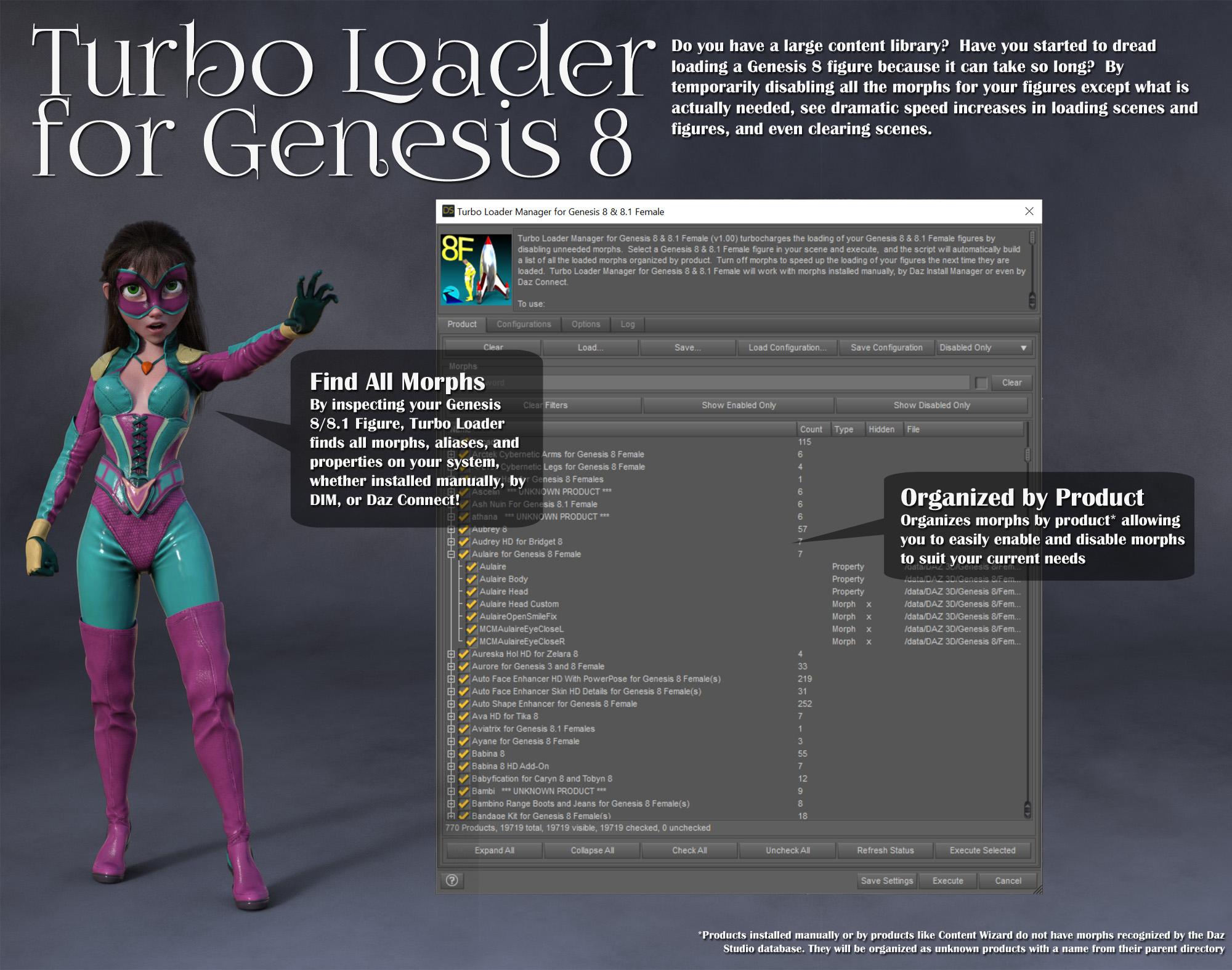
(2) can u confirm, you won't have any deleting function for the morph in this script, now or in future? Mass deletion (or other loss) due to some wierd error going on the background scares me silly. Even with backups. Big system management is real lol. That said, personally, would be OK with a 2nd non-interlinked separate script for deleting morphs should that become a feature.
The morphs have their extensions renamed (from .dsf to .tloff), which is a directory table change and does not affect the morph. That is it. They are never deleted. There is also a button in options to rename all .tloff files in a directory (and its subdirectories) back to .dsf. This is a recovery solution that will work no matter what (except if the file is in use/locked but you can just reboot and then use this solution if that occurs)
Update/edit: thought of this afterwards. Another Option for documenting morph origins would be color coding. Recognized morphs one color and unrecognized another, along with color setting for user customization, as opposed to "Unknown Product" text. Color would just so much easier for this artist-type by alot. Anyway just posting for earlier consideration if things are still open and fits with your plans etc.
I don't believe the listview that the script interface provides has a color option. I can investigate.
EDIT: BTW, the 'Unknown Product' is defined in the constants file for the product and you could change this to *U*
Is there anyway to make a symmetrical morph using Hexagon?Saxa -- SD said:
Aha lol, i think I get what you are after.
my short version to more in depth below:
You could tilt bugaboo (L or R) so fabric drapes further away from figure in that one-sided asymm pose, follow numbered steps below (which you prbly know most or all), and then the resulting morph would fit better when step 4 is done. But then it would require another sim. Oh joy.Also, if memory serves me right you also have to flip Bugaboo pose in DS first for step 3 to work properly. Critcial in fact i think now. This would tie into wierd flips etc. Remember that. (Been a while since i did this).
more in depth (again, most or all u prbly know, but posting here for completeness):
To re-state (to make sure i got this), u are making a-symm morphs for Pose A (asymm) and trying to use those one-sided morphs to make a 2-sided symm-morph for Pose B (symm).The only way to do this with mixed results would be to:
(1) make 2 selection sets: Left vs Right
(2) attenuate via these
(3) And, the side you did not work on, you have to flip it in the morph loader with -x or x (the reverse) (and if memory serves me right FLIP the pose too first before making this 2nd morph in DS or won't work)
note: this works pretty good for body, but guess "unknown or mixed" results for clothing that has to drape without poke-through.
(4) then if you like result in 3, make a new 3rd morph combining again L&R changesBy the way, not sure if I was clear enough, but the MarvDesigner taking 2minutes - that's simm And obj back to DS for new morph.
Seriously may be so worth while to save up batch of clothes and get MD for 1 month?
IMO, Hex remains awesome with it's instant bridge but in this case is a very slow tool for clothes, though it has really some good uses for some MD clothing prep.
Cos lol, clothing designs are all over the place.Anyway, good luck with your advanced Hex adventures
And she is soo cute

Thank you, I think I get you're saying. I had tried some swapping features in D/S and ended up with 2 sides doing the same thing. Maybe some more trials with those features will prove helpful.
I'm getting to the stage of possibly releasing the gown "as is" sometime next week along with the head scarf. Then please, feel free to test it out in MD.
Aerys FingernailsHmmm... I can't seem to duplicate that either loading her as a full preset or by applying her morph and materials to a base 8.1 character. I am still using 4.16.
If you could let me know exactly how you're applying the character and what pose, I'm happy to try again.
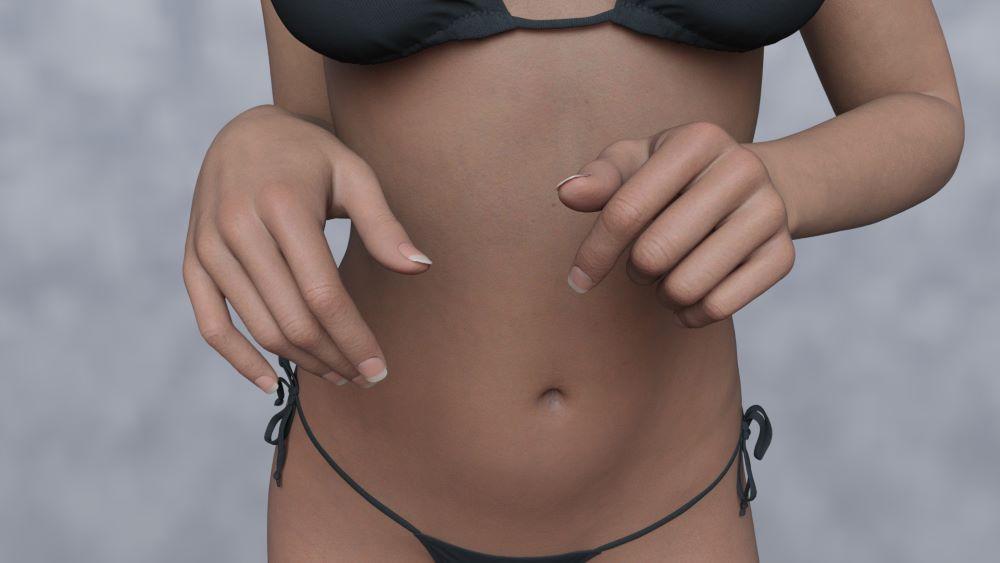 Aerys Fingernails
yeah, it seems to be part of the DD Aerys body morph. When that is zeroed the funky nails go away. When the figure is in A-pose they almost look worse for some reason.
 [Released] Turbo Loader for Genesis 8 and 8.1 [Commercial]
re: Manual Morphs
(1) will still show the exact names of each morph, right? Even if the main root product is listed as Unknown? (screenshot does not have any product expanded to show morph names) Having an abbreviated option for Unknown Product like *U* would be nice. Seeing that big real estate use for tons of morphs would be not so nice for this kid.
(2) can u confirm, you won't have any deleting function for the morph in this script, now or in future? Mass deletion (or other loss) due to some wierd error going on the background scares me silly. Even with backups. Big system management is real lol. That said, personally, would be OK with a 2nd non-interlinked separate script for deleting morphs should that become a feature.
Update/edit: thought of this afterwards. Another Option for documenting morph origins would be color coding. Recognized morphs one color and unrecognized another, along with color setting for user customization, as opposed to "Unknown Product" text. Color would just so much easier for this artist-type by alot. Anyway just posting for earlier consideration if things are still open and fits with your plans etc.
Is there anyway to make a symmetrical morph using Hexagon?Aha lol, i think I get what you are after.
my short version to more in depth below:
You could tilt bugaboo (L or R) so fabric drapes further away from figure in that one-sided asymm pose, follow numbered steps below (which you prbly know most or all), and then the resulting morph would fit better when step 4 is done. But then it would require another sim. Oh joy.Also, if memory serves me right you also have to flip Bugaboo pose in DS first for step 3 to work properly. Critcial in fact i think now. This would tie into wierd flips etc. Remember that. (Been a while since i did this).
more in depth (again, most or all u prbly know, but posting here for completeness):
To re-state (to make sure i got this), u are making a-symm morphs for Pose A (asymm) and trying to use those one-sided morphs to make a 2-sided symm-morph for Pose B (symm).The only way to do this with mixed results would be to:
(1) make 2 selection sets: Left vs Right
(2) attenuate via these
(3) And, the side you did not work on, you have to flip it in the morph loader with -x or x (the reverse) (and if memory serves me right FLIP the pose too first before making this 2nd morph in DS or won't work)
note: this works pretty good for body, but guess "unknown or mixed" results for clothing that has to drape without poke-through.
(4) then if you like result in 3, make a new 3rd morph combining again L&R changesBy the way, not sure if I was clear enough, but the MarvDesigner taking 2minutes - that's simm And obj back to DS for new morph.
Seriously may be so worth while to save up batch of clothes and get MD for 1 month?
IMO, Hex remains awesome with it's instant bridge but in this case is a very slow tool for clothes, though it has really some good uses for some MD clothing prep.
Cos lol, clothing designs are all over the place.Anyway, good luck with your advanced Hex adventures
And she is soo cute
How to tell if certain morphs/dials are used by other dials?I'm going to be cleaning up my morphs to reduce load times and I'd like to know how I can tell if a morph is being dialled in by another dial in the properties tab.
Darwins' Schtuff Pt DeuxThree test renders of a new base facial sculpt; later will be to hammer out the finer details and finalize the head morph sculpt in zbrush. I'm naming this one Jean-Pierre:
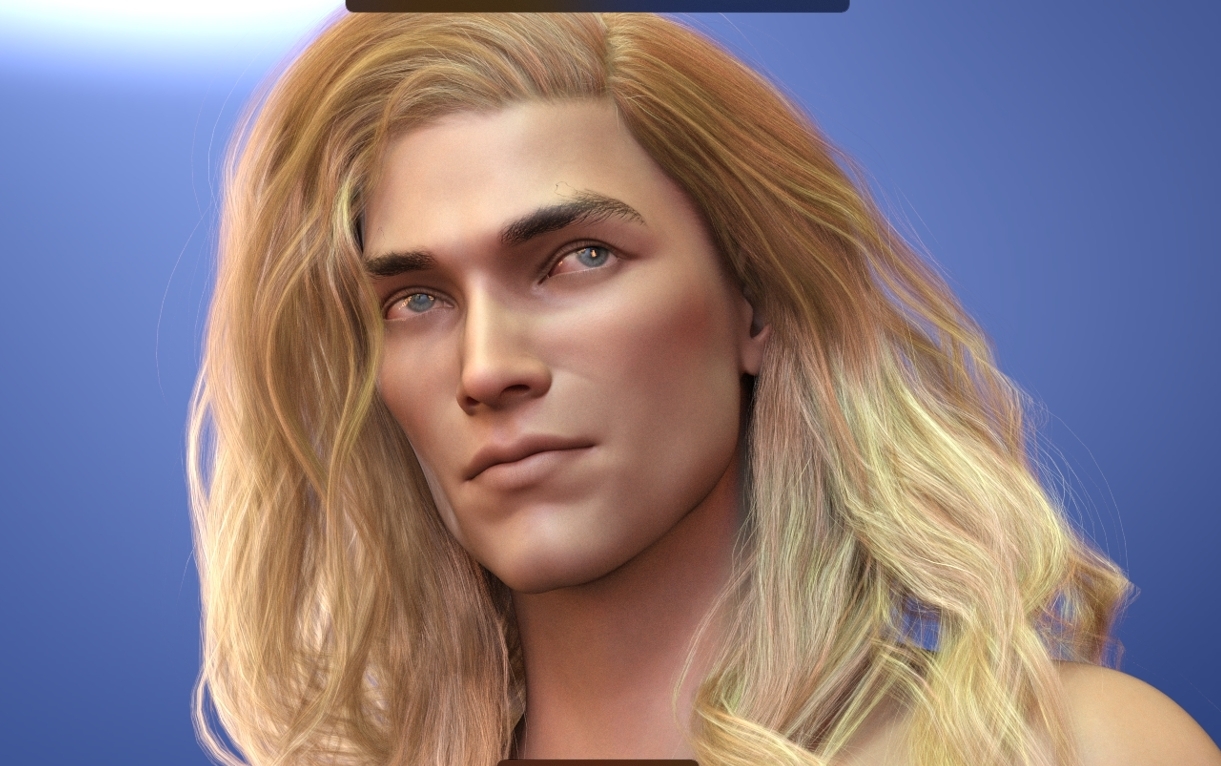
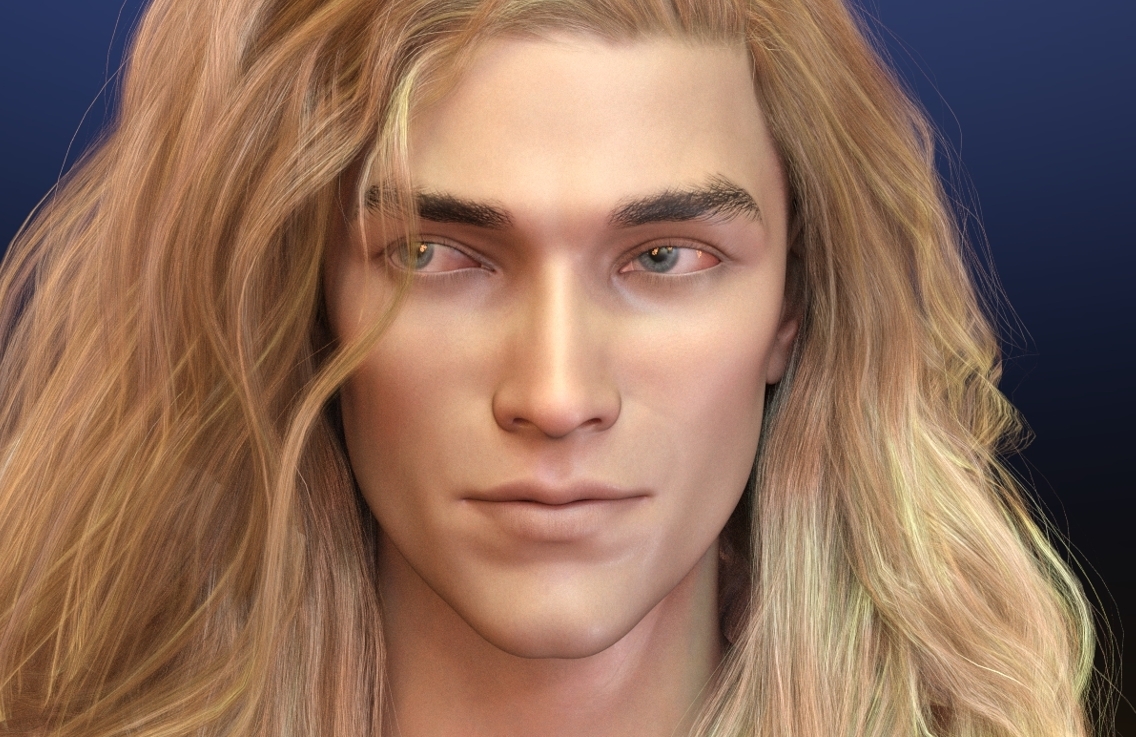
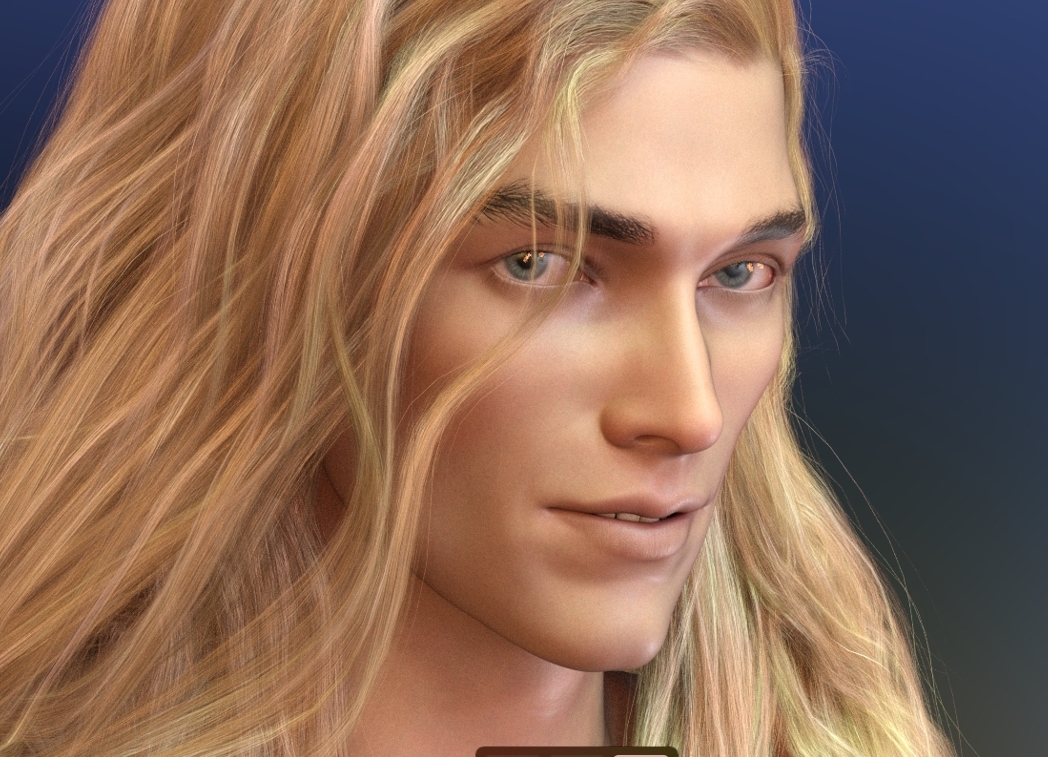
I used three sets of hand-dialed micro-expressions on him to see how well the different emotional expression dials work together on his sculpt. I like. Gonna keep this one. ;)
Daz 3D is part of

Connect
DAZ Productions, Inc.
7533 S Center View Ct #4664
West Jordan, UT 84084Licensing Agreement | Terms of Service | Privacy Policy | EULA
© 2026 Daz Productions Inc. All Rights Reserved.