-
Mars madness?
Diomede said:
.
I wondered if it might be useful for the perennial "clothing and breasts don't mix" issue?
I am not sure. I speculate that would be better addressed if the morph projector can project morphs that are independent of the base figure. (eg., insert gap) But I am just speculating about that. On the other hand, SickleYield and others have created breast fix morphs that Zevo's utility presumably would have access to. So maybe it would address the breast-cling issue.
Zevo has a product thread in the commercial forum. More detail there.
https://www.daz3d.com/forums/discussion/551131/projection-morph-manager-commercial#latest
Thanks for the link.
As an aside, this, for me, is probably the most serious flaw in Daz, although self-intersection of the mesh around the legs and armpits is a close second. I generally fix both with custom morphs, and I would dearly love to make my own products to magically fix them... but they don't sound like beginners projects, especially the latter!
Mars madness?.
I wondered if it might be useful for the perennial "clothing and breasts don't mix" issue?
I am not sure. I speculate that would be better addressed if the morph projector can project morphs that are independent of the base figure. (eg., insert gap) But I am just speculating about that. On the other hand, SickleYield and others have created breast fix morphs that Zevo's utility presumably would have access to. So maybe it would address the breast-cling issue.
Zevo has a product thread in the commercial forum. More detail there.
https://www.daz3d.com/forums/discussion/551131/projection-morph-manager-commercial#latest
Mars madness?Diomede said:
I went Mad today.
The Zevo projection morph manager looks like something I could use often. I wish I had something like that just the other day to fix a leprechaun ear/hair issue. I found more than 10 of the buy 10 for 2.99 items but limited myself to 10. I also bought an older Zevo utility in the featured artist sale. I picked a couple other items in the 'nice to have but don't know when I will use' category that also triggered additional discounts.
So there you go. I went mad. Mad, I tell you.
And @LiveInBeauty, hard to believe no one else has commented on the navel issue. Yowzah!
@LiveInBeauty said Navel madness?
https://gcdn.daz3d.com/p/85050/i/charmingcasualdenimoutfitsetforgenesis8and81females07daz3d.jpg
Attaching screen grab of the Zevo ear fix. For those of us who like whimsical characters, ear hair can be a problem.
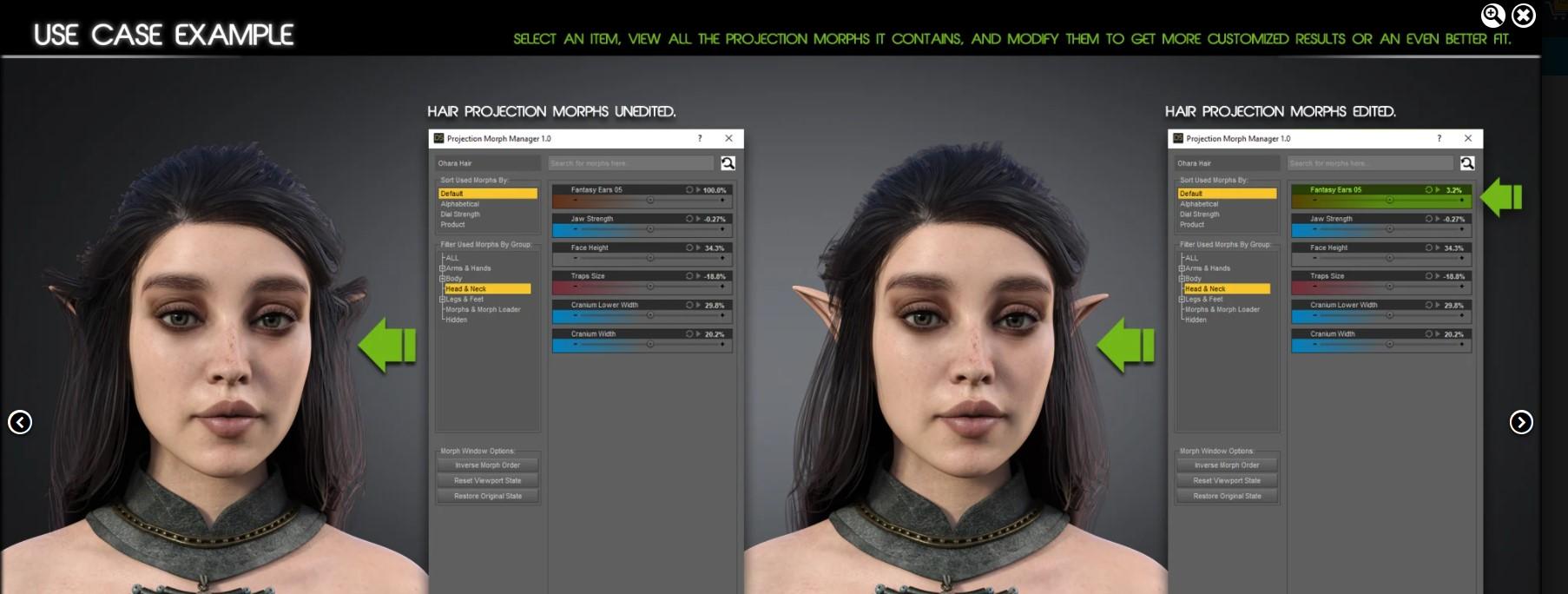
I wondered if it might be useful for the perennial "clothing and breasts don't mix" issue?
Mars madness?I went Mad today.
The Zevo projection morph manager looks like something I could use often. I wish I had something like that just the other day to fix a leprechaun ear/hair issue. I found more than 10 of the buy 10 for 2.99 items but limited myself to 10. I also bought an older Zevo utility in the featured artist sale. I picked a couple other items in the 'nice to have but don't know when I will use' category that also triggered additional discounts.
So there you go. I went mad. Mad, I tell you.
And @LiveInBeauty, hard to believe no one else has commented on the navel issue. Yowzah!
@LiveInBeauty said Navel madness?
https://gcdn.daz3d.com/p/85050/i/charmingcasualdenimoutfitsetforgenesis8and81females07daz3d.jpg
Attaching screen grab of the Zevo ear fix. For those of us who like whimsical characters, ear hair can be a problem.
Where do I find the gorilla morphs (and others) for Gen 8 figures?rnollman said:
What about this screenshot from the video put out by DAZ which demonstrates how, after using Face Transfer to create a figure with a morphed face, you can morph between a gorilla and the face created by Face Transfer?
What about it? None of the other properties that came up with the search string "go" are default or free. All that screenshot proves is that the person who made the video owns the gorilla morph that Richard linked to.
How Long Does It take Daz to release VRam?The structure of the folder tree for morphs is pretty logical, for example the morph for curling the lashes on G8F is located in ...\data\DAZ 3D\Genesis 8\Female\Morphs\DAZ 3D\Head\PHMEyelashesCurl.dsf
What I found, was a product where "PHMEyelashesCurl.dsf" and the two other morphs related to the G8F lashes were packaged into the product and placed into ...\data\DAZ 3D\Genesis 8\Female\Morphs\[CreatorName]\Morphs\ together with the creator's own morphs. When DS opened a scene with G8F, every second time, it had activated the morph from the correct DAZ folder, but other times the wrong one was activated.
Once I removed the morphs from the wrong location, the lashes have started remembering their saved values.I have noticed similar behaviour before, where for example the depth of the face changed on every other render I made, but couldn't track down the cause and malfunctioning morphs, but the lashes were easy as I knew which morphs were having problems.
Where do I find the gorilla morphs (and others) for Gen 8 figures?What about this screenshot from the video put out by DAZ which demonstrates how, after using Face Transfer to create a figure with a morphed face, you can morph between a gorilla and the face created by Face Transfer?
Ivan 7 texture maps missing.Thanks for your suggestions, folks. Looks like them ways to do it would work just fine.
But I'm still pulling my hair out over how long this is going to take to fix, but not so much because there's a lot of sceene files to fix. There's only about 20 of them. The real hair pulling problem is that any bad reference calls during the opening of a sceene file will trigger another problem I've got with some other figures that are often in these sceene files.
Ya. Some other characters use morphs that have duplicte names in the Daz system, and any other bad reference calls during sceene load will trigger Daz to do a search for all morphs from scratch. And when it searches for the morphs from scratch, it always picks the wrong copy of the morphs. I've removed the actual morph files from my installation, but Daz still has their names and invalid paths in the system and will call those invalid paths during the search from scratch. And when the sceene loads, the implicated characters will be missing the good copies of the morphs, and be all distorted. It makes me have to replace and re-pose those characters in my scene. Adds hours to my process.
G8 and G8.1There's something else that seems to be missing from this equation of why use something old instead of upgrading to the latest. The cost of buying new products for the new model. I don't know about any of you, but tossing out thousands of dollars of products every few years, just because a new model is presented, is an awfully big waste of money. On the upside there are PA's who make scripts that will transfer morphs, materials and clothes forwards and backwards, however, that is not a very smooth operation and time is wasted tweaking for hours to correct what didn't work. On top of that is the computer. Each time we get a new model it's harder on our machines, forcing many to get upgrades or even a completely new computer, which is another waste of money, since there's nothing really wrong with the older computer, except the newer products make it harder to work with them.
It would appear that anyone involved with buying the latest and greatest doesn't mind waste, after all, it's only a few thousand computers and all the various parts that are replaced being added to the dump, it's not like that will harm the environment. All that matters is saving a few seconds to do a render, while emptying your bank accounts to buy all new products for the newest models.
And yes I know my response to this topic makes me a pain in the butt, it doens't make me wrong.
No Navel geograft for Genesis 8 FemaleI needed it, so I made it and it works pretty good. G8F's belly button is baked in HD so creating a morph didn't work You'll have to edit the character textures yourself though.
How Long Does It take Daz to release VRam?PerttiA said:
DS releases the VRAM once it's closed, but closing down may take anything from a few seconds to eternity.
Accidentally stumbled on something that may be the cause for never closing...
I was wondering, why the length of the lashes on G8F didn't stick, and found out that some products had included the lash morphs in the their own morph folders...
While tracking those I came across a number of products that had done the same with the G8 base morphs as well...
Removed all those and DS hasn't hanged on closing this whole week.Where are the morph supposed to go? Or can you just delete them. Not sure I completely follow @Perttia !
Where do I find the gorilla morphs (and others) for Gen 8 figures?I think there was a free gorilla morph for the original Genesis, but to my knowledge, none of Daz's figures have ever come with any kind of animal morphs by default.
How Long Does It take Daz to release VRam?DS releases the VRAM once it's closed, but closing down may take anything from a few seconds to eternity.
Accidentally stumbled on something that may be the cause for never closing...
I was wondering, why the length of the lashes on G8F didn't stick, and found out that some products had included the lash morphs in the their own morph folders...
While tracking those I came across a number of products that had done the same with the G8 base morphs as well...
Removed all those and DS hasn't hanged on closing this whole week.G8 and G8.1Half Life said:
Sure, but you dodged my point about why use Genesis 8 Base when using the Genesis 8.1 was the superior choice. We didn't even discuss the issue of supporting the Genesis 8 base directly until it was time to submit to DAZ, because we both didn't even consider that anybody would want to use the Genesis 8 base instead of the Genesis 8.1 base -- it's a counter-intuitive decision. But then again, I dropped 3Delight as soon as Iray came around -- I'm not one to hold onto old technology, so I have a hard time understanding why others would choose to (or more specifically what advantage that choice provides in this instance). We could still update the product (if it seems worthwhile to do so), and would have already if DAZ asked us to during the submission process...
Some of us DAZ customers create our own characters by combining morphs from different generations of figures and alter skin to be exactly the way we want it to look. Then we make renders of these characters and publish them on paper (books, comic books, book covers) or similarly publish them online. Some of us have followings of thousands of readers who expect to see the characters they've been following for 5 years, look the same. Each new generation of figures DAZ creates, and content made for those new figures causes problems with trying to maintain a specific look for a character - in the worst cases - making the old familiar character imposible to transfer to the new figures, and the new clothing unfittable to the old characters. It's not a matter of not wanting to adapt to new technology - I WOULD LOVE ❤️ TO BE ABLE TO TRANSFER MY CUSTOM CHARACTERS TO THE NEW FIGURES, and the new versions of DAZ Studio. But I've tried and tried and a lot of times it just can't be done - UNFORTUNATELY. Poser renders have a specific look, 3Delight has a specific look, iRay has a specific look. If what is important to an artist is to maintain a specific established look with their characters and their renders, then upgrading anything causes a LOT of problems. I dread DAZ bringing out new versions of anything. I DREAD it.
M4 - How to make Morph Injections from Zbrush/etc made morphs?Okay Viper016 As I just happened to be going through some ancient files anyways, I came across a note from way back in 2012. So change the V4 to M4, and update any references as to where options are located in D/S and the process should still work.
................................
From the ancient forums of 2012: original poster was not findable by the poster "Safetyman" or credits would be given.
Safetyman paraphrased it as:
1) Clear the scene, then load V4
2) Inject desired character face/body morph
3) Export as OBJ
4) Clear scene (File > New)
5) Load V4
6) Convert to TriAx Weight Map (under Scene tab > Edit > Rigging)
7) Building|Scripting tab > Morphloader Pro (icon) > select OBJ (created in #3)
8) Dial in Character morph (which was created in prev step)
9) Load Genesis
10) Dial in Genesis corresponding shape (i.e. A3/V3/v4/etc., this is a purchased item)
11) Run Figure Transfer Utility (Scene > Assets > Transfer Utility) - source = V4 (use default), target is Genesis (Clone > matching figure). Show options, under morph targets, check source morphs ... then un-check fit to source figure (you can pretty much uncheck everything else as well)
12) When complete, Dial In the new Imported morph in Genesis (Parameters Tab, Morphloader section)
13) Dial in any other needed morphs to make the character look right
14) File > Save As > Support Asset > DSF Morph File; making sure to check only the new morph and any other required morphs done in #13
15) Reload Genesis and the Morphs should be there. Note that this will give you one dial to make the morph..........................
https://www.daz3d.com/v4-and-m4-shapes-for-genesis
https://www.daz3d.com/gen-4-iconic-shapes-for-genesis
Can't get eyebrows on The GirlThere is an attahment for eyelashes, but not eyebrows. I can see the brow shaders, the brow morphs, and the brow presets that come with The Girl/Face Morph Collection for The Girl but no matter what I click nothing will actually put eyebrows on her...Please help this poor lost newb
Modifying a wearable item - The Templar HelmAnything that saves and reloads geoemtry should work - but bear in mind that there can be only one version of the underlying object in the scene if they ultimately point back to the same asset, so it may be ebst to use File>Save As>Support Assets>Figure/Prop Asset. The main drawback of an asset save is that you break the link to the original, but I would assume at this date there are unlikely to be any updates or morph expansions you would want to carry over.
Where are the missing files?It is not only Face Transfer files that do not work. It seems to be all my saved files. DAZ does not seem to recognize them. I put in a support ticket. Hopefully, they will be able to help.
Released : Wet And Tanned Skins For Genesis 8.1 Bundle (Commercial)Find it here : https://www.daz3d.com/wet-and-tanned-skins-for-genesis-81-bundle
Wet And Tanned Skins For Genesis 8.1 Bundle is finally coming! Based on the same, but improved, principle of the version for Genesis 8, here is as a summary of what you will find:
- The ability to browse wide ranges of skin tones, from super pale to super tanned,
- The ability to adjust the wet looks from dry to super wet,
- Based on a custom made shader relying on the PBRSkin shader,
- Everything is optimized for Genesis 8.1 figures, and remains strongly compatible with all Genesis 8 figures (developed to support both UV sets and original shaders).
- All the tans (+skin tones) and wet look effects can be made three ways, depending on what you prefer : via partial or total presets, via a simple global control interface, or via the surfaces editor
- Two wet layers and several wet maps are included, you can control amount and various other aspect of wet look to adjust it to your lights if necessary (maps and maps strengths, roughness, exponent, grazing and normal factors)
- Tans and skin tones sub-tools include lightness, saturation and hue controls associated with tan boosters and translucency weights tools. They also include many full presets.
- Many tan lines patterns are provided, and once they are applied, you can adjust the tan lines saturation, lightness and hue.
- Tan lines can be applied directly (for Genesis 8 and 8.1), or combined as overlays to build more complex tan lines patterns (Genesis 8.1 only).
- Genitalia support (shader transfer and maps apply) is included
Three different products exist : the males version, the females version, and a Michael 8.1 specific product which also includes exclusive volume boosters for the tan of male figures. They come standalone, or as a bundle. Feel free to use this post or PM for feedback or questions.
Where are the missing files?Why do you think re-installation would help? It will not, as the problem is not in how DS works.
What do you do when you have used the Face transfer, how do you save what you have done?
It looks like you are not saving assets but presets that are still connected to the temporary files that are not even supposed to stay in place for long.
Daz 3D is part of

Connect
DAZ Productions, Inc.
7533 S Center View Ct #4664
West Jordan, UT 84084Licensing Agreement | Terms of Service | Privacy Policy | EULA
© 2026 Daz Productions Inc. All Rights Reserved.