-
Diffeomorphic DAZ Importer version 1.6.0 released
speaker-60 said:
Is there a way to use both daztoblender bridge and Diffeomorphic, Id like to import with daztoblender bridge and get the rig/model to be recogniced by Diffeomorphic
As i want to use its rig features ect
My reason is i find that corrective morphs that auto blend with bone drivers seem to work better with importing daztoblender bridge
Iv tried several times with Diffeomorphic and they just often dont work, were as they always work when improting with bridge so for the sake of it wroking for me now id like to know how to get Diffeomorphic to recognise the rig and model from bridge for use with the riging features and the morphing features of Diffeomorphic
Basicly what it is about your imported rig and mesh vs the bridge one that grays out options in Diffeomorphic
A lot of characters in Daz have their own corrective morphs, keep that in mind. That's probably why you think that they don't always work because as far as I know the JCMs morph category under morphs just imports the base mesh correctives. You can import the custom ones as custom morphs.
Looking for tutorials, resources, tips and tricks for sculpting custom morphs (G8F)Cheers all for the replies so far, you guys and gals are awesome.
So yes as most of you have mentioned, sculpting the morph itself in another 3d program (in my case I will be using blender for sculpting) is obviously 1 piece of the puzzle for making something usable in daz. At this point I'll be happy just being able to sculpt that base shape and being comfortable doing that, then once I have mastered that process, progressing onto making it play nice in daz studio by learning how to properly set up things like corrective morphs and other adjustments, developing a workflow for making morphs for clothing and other appendable items when the smoothing modifier is insufficient to produce an elegant result, etc. At this point I have established a workflow for exporting g8f (at base res) into blender and then back again via morphloader pro. I've sculpted a couple draft morphs messing around with the proportions of the body, but hadn't thought about hd detail yet. Perhaps there might be something in blender I can do combined with the subD modifier in daz studio to mimic or get close to hd detail once I get the base shape setup. Thanks again for all the input so far. I will checkout all the videos and other linked resources during the week. I think I might also see if i can find anything related to sculpting human anatomy in general. Perhaps over the weekend I can practice what I've learned over the week and draft something decent.How do I fix clothes pop in?juvesatriani said:
lou618_2b45855fe7 said:
 So I just imported a scene into Blender from Daz Studio, but clothes are still popping in through the models, not fitting as intended. How do I fix this in Blender? is there a demorph type of tool in Blender? How do I select the bones of the clothes?
You can fix them using SCULPT tool . As long you`re not bring back those model into DAZ studio again , you can literally use any sculpt tools to fix it .
Here the simple walkthorugh ,
- Open plus sign like outliner just like you find or select conformed/parented object in DAZ scene tab
- Find and select the clothes object ( make sure you`re still in OBJECT mode not EDIT - SCULPT or POSE etc )
- With object selected change OBJECT MODE into SCULPT mode , the left area will changes with bunches of SCULPT Tools
- Choose GRAB sculpt tool , then try use it in area you want to fix
- Play with RADIUS - STRENGTH _ FALL OFF setting for more precise with your need
- Back to Object Mode if you`re done .
Optional : save it as new custom shape key ( Custom morph if in DAZ ) . Find tutorial in youtube for create new Shape key
I would add a new shape key in Blender first before start sculpting. I use mostly the grab and elastic deform brush while working on the base mesh.
Small tip: If you can't rename a shape key or a vertex group name, just switch off any subdiv modifier in viewport. Then renaming works again :)
[Released] Turbo Loader for Genesis 8 and 8.1 [Commercial]Rod Wise Driggo said:
How does TL handle shared morphs or files? Two samples:
1)
I started from scratch and add characters and morphs one by one. Now some figures caused multiple other figures to appear as well as they i.e. share a nail morph from P3D. Now what if I disable a character which uses this morph? And could I do away with the other characters (I might not even have) because they crowd the list?You can uncheck the unnecessary characters, though keep the shared morph. When TL is told to disable a morph, it searches for the morph, disables it, and then searches again (repeating this until it can no longer be found). So if the morph is in a lot of character directories, it will be turned off in ALL those directories. Similarly for enabling a morph, it searches for the disabled morph, enables it, and then searches again. So TL is very robust that way.
What is an issue is if you check the morph in one product and then in product later in the list, you uncheck it. The product later in the list will turn off the morph for all earlier products. For this reason, it is really recommended that you only do a Disable operation or an Enable operation. Don't mix both. I always uncheck all and execute. If I need products turned on, I use an Enable configuration (created in TLM or by Scene Configuration) or I select that product in TLM and click "Execute Selected"
2)
What if that situation appears with 3rd party stuff? Because then the database might not be aware that a morph is shared by some figures.Finally I wonder what makes morphs appear under "unknown". It is clear for 3rd party stuff but I also get that sometimes for stuff installed via DIM.
It doesn't make any difference with 3rd party stuff. TL uses DS (and its content manager directories) to find morphs. If DS could find them, TL can find them.
[Released] Turbo Loader for Genesis 8 and 8.1 [Commercial]How does TL handle shared morphs or files? Two samples:
1)
I started from scratch and add characters and morphs one by one. Now some figures caused multiple other figures to appear as well as they i.e. share a nail morph from P3D. Now what if I disable a character which uses this morph? And could I do away with the other characters (I might not even have) because they crowd the list?2)
What if that situation appears with 3rd party stuff? Because then the database might not be aware that a morph is shared by some figures.Finally I wonder what makes morphs appear under "unknown". It is clear for 3rd party stuff but I also get that sometimes for stuff installed via DIM.
Looking for tutorials, resources, tips and tricks for sculpting custom morphs (G8F)One thing I almost forgot: Sickleyield has 2 morph packs for Genesis 2 which might inspire:
Black eyes after Face TransferI think FaceTransfer is super fun. You get models with more of a personality as a result. Just love it. Have made several successful projects using FaceTransfer. But yesterday something went terribly wrong. One of my Face Transfer projects resulted in the model having black eyes. Just as she would've starred in the TV-series Supernatural portraying a demon.
Now, I've checked the forum for soultions, but nothing of the answers and solution really fits to this problem. I've tried to add eyes from other PA's but to no avail. Tried to loead another Genesis 8 Female, resulting in the same black eyes for her. Also tried with Outrider42's soluttion Eye Moisture Pushout in DAZ Studio 4.20. It wasn't even visible in Parameters->Actors->Head->Face. At least not in 4.20.The model I tried to imitate is the supermodel Anne Vyalitsyna. I came pretty close except for the black demon eyes. OK, tried to load a standard Genesis 8 Female to see if the results would be the same. And YES it did result in the same eyes.
What's going on here???
Export-import Issue Daz-Blender.Hi everybody,
I'm a newbie, I know, sorry for that... I try to morph this saddle (first image). Imade this modification on Blender (second image) I think (but of course not) I do every steps like I had to do... but I got this result (see 3th image).
Someone could help me?
ThanksBend morphs for arm pose with zbrush?thoi said:
Hi everyone! I am trying to make this particular pose look as natural as possible but having som issues with the arms intersecting in a unnatural way.
I have tried sending to zBrush to create my own morph, but it does not let me work on the arms independtly only the whole mesh. Does anyone know how I could mask one arm only? Or is there any bend morphs out there that would work well for this purpose?
Thank you!
In ZBrush you can isolate the arm by setting polygroups using the "Auto Groups With UV" option, and then use the polygroups to pick the part of the mesh to work on or mask (CTRL+Shift+Left mouse click).
The story of Gnosha CurosineiGnosha steps forward with his rapier, studying the blue skinned Kobold for weaknesses, and makes a solid attack and hits the blue skinned Kobold in the kidney and he is also no longer posing a threat. They quickly leave the scene to avoid being detected by any guards that heard the shouting from the Kobolds. When they are at a safe distance, Gnosha spends about a quarter of an hour bandaging his shoulder. The damage was less dangerous than it first looked, just a deep scratch as the bolt was stuck in his leather armor, but the point just hit the flesh.
Gnosha and Aered decide to take a chance to go back, and Gnosha makes a note in his book about the Kobolds, apparently heading towards Luckfall. When they look around where the recent skirmish occurred, Gnosha sees a large trunk, probably carried by the two red skinned Kobolds, and dropped before they joined into the fight. They open it and it looks like it mostly contains junk, like a rusty sword, a rusty ax, some old daggers, a rusty shoulder piece of armor and about a squarefoot of a rusted chainmail. Gnosha realizes that this is probably a tribute to the bandit king, stolen and gathered by the Kobolds.
Aered picks up the trunk and they ride back to where they think they are at a safe distance from Luckfall, and take a closer look at the content in the trunk. After removing the obvious junk, there are some valuable things in the truck. Ghosha counts to twenty three pieces of gold and ten pieces of silver, and four gems which he estimates to be worth about forty pieces of gold together, money that would come handy.
At the bottom of the trunk, there are three stones the size of eggs, two are rough stones with a one flat surface, with a rune on. The third stone is a flat smooth stone, like a river bed stone, that starts to jump around and tries to escape from the truck. Gnosha has to catch it and put it back again and close the trunk. He tries to figure out what the stones with runes could be, but he comes out blank, he really has no idea what they are. The jumping stone was even more confusing.
Aered asks Ghosha if he can have a look at the stones, and he makes a little prayer and then closes his eyes and touches the stones. He opens his eyes and says: - “These are Rune stones, created by a powerful magician. Their purpose is to transfer their magical power to a weapon, but I do not know how that is done, and I do not know what the magical powers are, yet. And for the jumping stone, I’m not sure but that could be a cursed magical stone of some sort.”
Gnosha thought, a stone that jumps, maybe cursed, this can be a quite useful distraction when you need to sneak past guards, I need to lock it into a small purse and keep it handy. They decide to continue circling Luckfall to get to the other side of it and maybe see a little more. One thing is certain, the one calling himself the Bandit King, has set up some kind of base in Luckfall.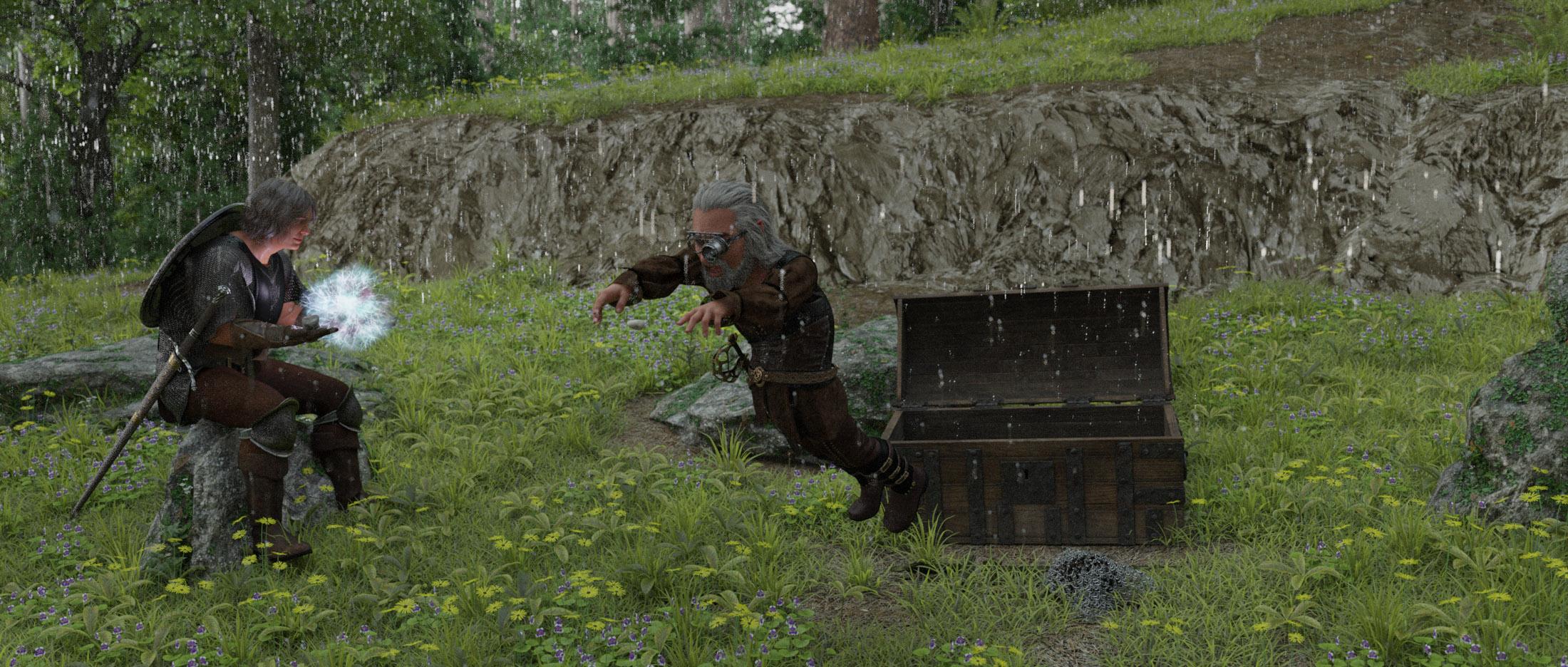 Looking for tutorials, resources, tips and tricks for sculpting custom morphs (G8F)I also tell you that to obtain a high level model you should create a Hd morph because usually the genesis base mesh is low poly. The tecnology to create a Hd morph is reserved only for PA.Looking for tutorials, resources, tips and tricks for sculpting custom morphs (G8F)
Another detail to be aware of, if you're working completely from scratch well you know you have 'all' the extra work to do as well.
IF just using morphs from packages intended for your own use, those normally [should I would hope] have that extra work done. However if/when using morphs from "merchant resource" packages, that extra work is not necessarily done as the PA is expecting one to incorporate the MR morph in with their own morph and so once again, one is back to doing all the extra work entailed for the morphs.
Using 4.20 UI settings revert back to default every time I restart DAZThis hasn't been a problem on the previous version but I also happen to transfer my DAZ library and update the game to 4.20 same time to a new drive, so I'd like to make sure if this is my fault or the new version's.
Render settings, viewport sizes, my asset content library's previous pathing, and my selections for the bookmark plugin that I use, just about everything they all go back to default when I restart DAZ.
This is very time consuming and annoying!
I'd like to ask if anyone else is having this problem?
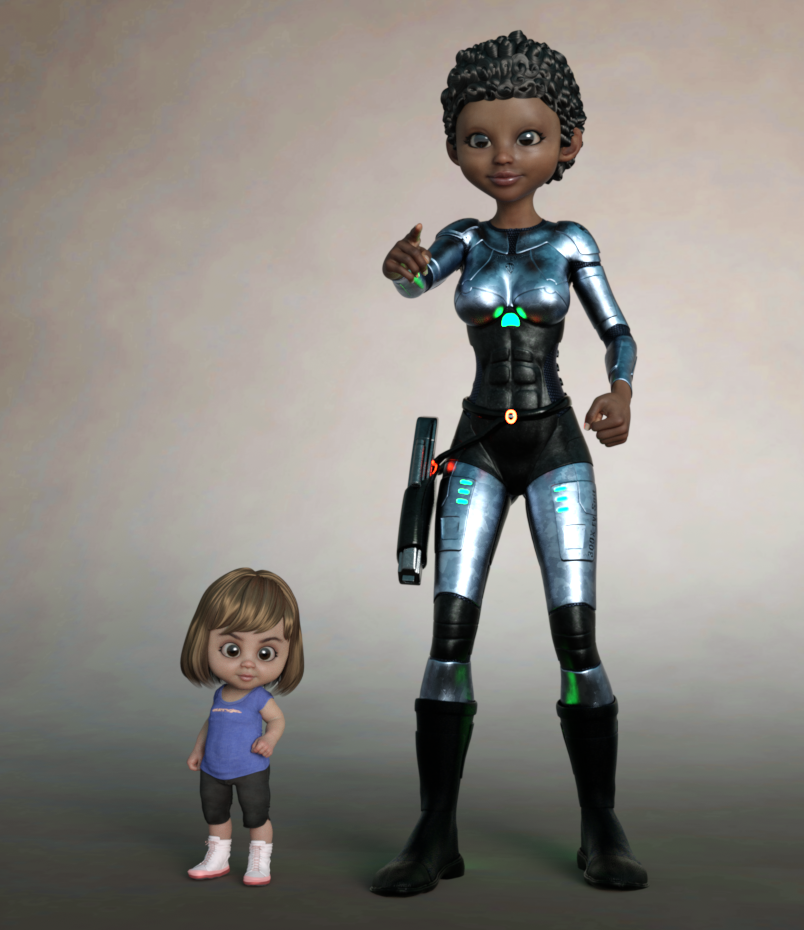
Quick Questions about Toon BundleThere's no separate head morph, so it's limited how much you can mix and match. Those normal hairs I've tried didn't work very well. Otherwise what I've tried so far has worked fine. Here's 1 year and a 20 year old with human skin textures (think I forgot to add eyebrows on the big one).
 Issues with "adjust rigging to shape"
ERC Freeze is used to link sub-properties such as joint adjustments to a controller. It is a one-shot command, you can't include ERC Freeze with soemthing. You can (and should) include ERC links, however created, with morphs etc. to ensure that they correctly make adjustments such as joint placements or JCM morphs to improve bends when the morph is applied.
DSF Toolbox DSF to OBJ conversion— is it supposed to be able to generate an OBJ .mtl file?Hi.
I recently purchased and downloaded the DSF Toolbox standalone app to convert DSF files to OBJ for use in other programs. It does a great job on converting the DSF files to OBJ geometry files, but it doesn't seem to generate OBJ .mtl files which would be additionally helpful to apply the DSF model textures onto the converneted OBJ files. Does anyone know if the DSF Toolbox is supposed to be able to create OBJ .mtl files or do I need to create those manually after it converts the DSF file to OBJ? It seems that DSF Toolbox would create an OBJ .mtl file since the program asks if you want materials and groups, but doesn't seem to give an option to identify where the equivalent DSF metal and texture files are (it only asks for where the DSF geometry file, DSF morph and DSF UV files are.
I appreciate anyone's help who has used this process. The DSF Toolbox instruction manual doesn't make it clear whether the program creates OBJ .mtl files, and I can't find an address to write the creator.
Thank you.
Umbra Outfit for Genesis 8 & 8.1 Females [Commercial]Hi, sorry for bumping this discussion thread but I face similar problems described above about G8F teeth and tongue distortion.
In G8.1F I have the dials for both G8F and G8.1F (e.g. Umbra Sleeve L Micro Pressure HD G8F and Umbra Sleeve L Micro Pressure HD) shown in pic 1.
After dialing only 2 G8F dials the distortion is very visible which affects the teeth, gum and tongue, as shown in pic 2.
If I use the same amount of Umbra G8.1F dials there's just a slight distortion which is shown in pic 3. The reason why I mention slight distortion is that if I dial all Umbra related micropressure morphs (for G8.1F), as displayed in pic 4, the distortion is now visible.
Some may ask why am I using the dials for G8F on G8.1F is because the same exact thing has happened to G8F when I use those dials for G8F, which are the ones that produced most distortions. See pic 5 for G8F and 4 Umbra Outfit dials applied.
@Herschel Hoffmeyer (I don't know how to @ someone with space...) The geometry editing technique did not work because somehow the dials from Umbra Outfit aren't highlighting the gums, teeth and tongue as their affected morph vertices, therefore the software assumed nothing is needed to be cleared but it's apparent some residues are present in those dials...from what I can observe, it seems like it's affecting the teeth and tongue at higher resolution instead of base resolution. There maybe perhaps some residues are residing in the HD morph files.
Hope this helps on diagnosing the issue!
Freebie Challenge April 2022-"New Beginnings" - Main ThreadModernWizard said:
Inspired by the Angel of Death Victorious [photo and basic info in the summary here https://commons.wikimedia.org/wiki/File:Angel_of_Death_Victorious.jpg ], one of my favorite pieces of funerary sculpture, this render arises from recent losses in my life.
It's all freebies this time!
G3F for base figure
Head morph (Ghavandyn) from 9 Custom Head Morphs for G3F -- no other morph packs needed! by ModernWiz https://www.renderosity.com/freestuff/items/75672/9-custom-head-morphs-for-g3f-no-other-morph-packs-needed
dforce big circle skirt for G8F by perlk https://www.renderosity.com/freestuff/items/91378/dforce-big-skirt-circle-for-g8f
Shirt from Ghastly's Basic Set - Genesis 1 by GhastlyH https://www.renderosity.com/freestuff/items/75030/ghasltys-basic-set-genesis-1
Angel Wings By Erlik and Virus https://sharecg.com/v/32304/view/11/Poser/Angel-Wings-By-Erlik-and-Virus
Hair from Cargo Genie for STAR! (DAZ) by adairia https://www.sharecg.com/v/81243/
Seth Scythe by rmxxabes https://www.renderosity.com/freestuff/items/52745/seth-scythe
CS Diorama by Codeman https://www.sharecg.com/v/9561/browse/11/Poser/CS-Diorama
Saxon3d Morphing Fae Leaf by Saxon3d https://www.renderosity.com/freestuff/items/71523/saxon3d-morphing-fae-leaf
...And some postwork, as shown via original and final versions attached.
This is SUPER cool, I love it! (Also, I love how my skirt looks in stone!)
Issues with "adjust rigging to shape"Spacious said:
and ERC Freeze done before saving as a morph asset.
Am curious why ERC freeze is reco'd for each morph.
Am guessing this is for sharing your morphs with others so they don't have to adjust rig? And usually those are always full character morphs that you parent stuff to.
Importantly, even DazOriginal figures will pose different.
Topsy vs Josephine vs Khesmit all have different feet heights for one test pose, despite each having ERC freezes.One popular PA included an ERC freeze in their morph and it caused my figure to move it's head when activating their morph.
I removed the ERC froze bones in the morph leaving only the deltas and now my figure's head no longer moves but morph does what it's supposed to.So if there is a good reason for extra work to ERC freeze each morph would like to hear this for own evaluation. Thanks.
FYI. And i have saved tons of morph assets with slider on. Made no diff for me.
[Released] Turbo Loader for Genesis 8 and 8.1 [Commercial]Imago said:
smaker1 said:
If you bought plenty of G8 characters and now time to load G8 in DS4 take a very very long time. This tool disable/enable morphs to have a shorter loading time. For myself I had more or less 12 mn to load one G8F before disabling morphs and now it take 1mn 30. It could be better but I kept a group of morphs I use very often to tune the characters .
With Turboloader you don't need to uninstall/reinstall products or manage multiple libraries
If you need a specific character who's morphs are disabled : you use Turbo loader to enable the morph (and under morphs automatically) before using it. A game changer at least for myself :-).
If you don't have any problem with G8 loading time you don't need this product . 12 mn was not acceptable for me on my old config and I don't talk about scenes with 2 or 3 G8 :-) !
There are also plenty of other options explained in the description. Hope a non tech guy give you a better understanding of this tool
So I don't need it, my G8 chars loads in about four seconds with 2000+ morphs and aliases installed.

Anyway, great work with the product, the more tools DAZ Studio gets, the better.
Thanks for the explanation!
Yup, not for you! Until your library gets much larger.
Daz 3D is part of

Connect
DAZ Productions, Inc.
7533 S Center View Ct #4664
West Jordan, UT 84084Licensing Agreement | Terms of Service | Privacy Policy | EULA
© 2026 Daz Productions Inc. All Rights Reserved.